Congressional Appropriations Analyzer
congress-approp is a Rust CLI tool and library that downloads U.S. federal appropriations bills from Congress.gov, extracts every spending provision into structured JSON using Claude, and verifies each dollar amount against the source text. The included dataset covers 32 enacted bills across FY2019–FY2026 with 34,568 provisions and $21.5 trillion in budget authority.
Dollar amounts are verified by deterministic string matching against the enrolled bill text — no LLM in the verification loop. 99.995% of extracted dollar amounts are confirmed present in the source (18,583 of 18,584). Every provision carries a source_span with exact byte offsets into the enrolled bill for independent verification.
Jump straight to working examples: Recipes & Demos — track any federal account across fiscal years, compare subcommittees with inflation adjustment, load the data in Python, and more. No API keys needed.
What’s Included
This book ships with 32 enacted appropriations bills across 4 congresses (116th–119th), covering FY2019 through FY2026. All twelve appropriations subcommittees are represented for FY2020–FY2024 and FY2026. You don’t need any API keys to explore them — just install the tool and start querying.
116th Congress (FY2019–FY2021) — 11 bills
| Bill | Classification | Provisions | Budget Auth |
|---|---|---|---|
| H.R. 1865 | Omnibus (FY2020, 8 subcommittees) | 3,338 | $1,710B |
| H.R. 1158 | Minibus (FY2020, Defense + CJS + FinServ + Homeland) | 1,519 | $887B |
| H.R. 133 | Omnibus (FY2021, all 12 subcommittees) | 6,739 | $3,378B |
| H.R. 2157 | Supplemental (FY2019, disaster relief) | 116 | $19B |
| H.R. 3401 | Supplemental (FY2019, humanitarian) | 55 | $5B |
| H.R. 6074 | Supplemental (FY2020, COVID preparedness) | 55 | $8B |
| + 5 CRs | Continuing resolutions | 351 | $31B |
117th Congress (FY2021–FY2023) — 7 bills
| Bill | Classification | Provisions | Budget Auth |
|---|---|---|---|
| H.R. 2471 | Omnibus (FY2022) | 5,063 | $3,031B |
| H.R. 2617 | Omnibus (FY2023) | 5,910 | $3,379B |
| H.R. 3237 | Supplemental (FY2021, Capitol security) | 47 | $2B |
| H.R. 7691 | Supplemental (FY2022, Ukraine) | 67 | $40B |
| H.R. 6833 | CR + Ukraine supplemental | 240 | $46B |
| + 2 CRs | Continuing resolutions | 37 | $0 |
118th Congress (FY2024/FY2025) — 10 bills
| Bill | Classification | Provisions | Budget Auth |
|---|---|---|---|
| H.R. 4366 | Omnibus (MilCon-VA, Ag, CJS, E&W, Interior, THUD) | 2,323 | $921B |
| H.R. 2882 | Omnibus (Defense, FinServ, Homeland, Labor-HHS, LegBranch, State) | 2,608 | $2,451B |
| H.R. 815 | Supplemental (Ukraine/Israel/Taiwan) | 306 | $95B |
| H.R. 9468 | Supplemental (VA) | 7 | $3B |
| H.R. 5860 | Continuing Resolution + 13 anomalies | 136 | $16B |
| S. 870 | Authorization (Fire Admin) | 51 | $0 |
| + 4 CRs | Continuing resolutions | 233 | $0 |
119th Congress (FY2025/FY2026) — 4 bills
| Bill | Classification | Provisions | Budget Auth |
|---|---|---|---|
| H.R. 7148 | Omnibus (Defense + Labor-HHS + THUD + FinServ + State) | 2,774 | $2,841B |
| H.R. 5371 | Minibus (CR + Ag + LegBranch + MilCon-VA) | 1,051 | $681B |
| H.R. 6938 | Minibus (CJS + Energy-Water + Interior) | 1,028 | $196B |
| H.R. 1968 | Full-Year CR with Appropriations (FY2025) | 514 | $1,786B |
Totals: 32 bills, 34,568 provisions, $21.5 trillion in budget authority, 1,051 accounts tracked by Treasury Account Symbol across FY2019–FY2026.
What Can You Do?
“How did THUD funding change from FY2024 to FY2026?”
congress-approp enrich --dir data                    # Generate metadata (once, no API key)
congress-approp compare --base-fy 2024 --current-fy 2026 --subcommittee thud --dir data
82 accounts matched across fiscal years — Tenant-Based Rental Assistance up $6.1B (+18.7%), Transit Formula Grants reclassified at $14.6B, Capital Investment Grants down $505M.
“What’s the FY2026 MilCon-VA budget, and how much is advance?”
congress-approp summary --dir data --fy 2026 --subcommittee milcon-va --show-advance
┌───────────┬────────────────┬────────────┬─────────────────┬─────────────────┬─────────────────┬─────────────────┬─────────────────┐
│ Bill      ┆ Classification ┆ Provisions ┆     Current ($) ┆     Advance ($) ┆    Total BA ($) ┆ Rescissions ($) ┆      Net BA ($) │
╞═══════════╪════════════════╪════════════╪═════════════════╪═════════════════╪═════════════════╪═════════════════╪═════════════════╡
│ H.R. 5371 ┆ Minibus        ┆        257 ┆ 101,742,083,450 ┆ 393,689,946,000 ┆ 495,432,029,450 ┆  16,499,000,000 ┆ 478,933,029,450 │
└───────────┴────────────────┴────────────┴─────────────────┴─────────────────┴─────────────────┴─────────────────┴─────────────────┘
79.5% of MilCon-VA is advance appropriations for the next fiscal year — without --show-advance, you’d overstate current-year VA spending by $394 billion.
“Trace VA Compensation and Pensions across all fiscal years”
congress-approp relate 118-hr9468:0 --dir data --fy-timeline
Shows every matching provision across FY2024–FY2026 with current/advance/supplemental split, plus deterministic hashes you can save as persistent links for future comparisons.
“Find everything about FEMA disaster relief”
congress-approp search --dir data --semantic "FEMA disaster relief funding" --top 5
Finds FEMA provisions across 5 different bills by meaning, not just keywords — even when the bill text says “Federal Emergency Management Agency—Disaster Relief Fund” instead of “FEMA.”
Key Concepts
enrichgenerates bill metadata offline (no API keys) — enabling fiscal year filtering, subcommittee scoping, and advance appropriation detection.--fy 2026filters any command to bills covering that fiscal year.--subcommittee thudscopes to a specific appropriations jurisdiction, resolving division letters automatically (Division D in one bill, Division F in another — both map to THUD).--show-advanceseparates current-year spending from advance appropriations (money enacted now but available in a future fiscal year). Critical for year-over-year comparisons.relatetraces one provision across all bills with a fiscal year timeline.link suggest/link acceptpersist cross-bill relationships socompare --use-linkscan handle renames automatically.
Navigating This Book
This book is organized so you can jump to whatever fits your needs:
- Recipes & Demos — Worked examples for account tracking, fiscal year comparisons, inflation adjustment, Python/pandas integration, and data export. Interactive visualizations included.
- Getting Started — Install the tool and run your first query in under five minutes. Covers installation and first commands.
- Getting to Know the Tool — Background reading on what this tool does, who it’s for, and a primer on how federal appropriations work if you’re new to the domain.
- Tutorials — Step-by-step walkthroughs for common tasks: finding spending on a topic, comparing bills, tracking programs, exporting data, and more.
- How-To Guides — Task-oriented recipes for specific operations like downloading bills, extracting provisions, and generating embeddings.
- Explanation — Deep dives into how the extraction pipeline, verification, semantic search, provision types, and budget authority calculation work under the hood.
- Reference — Lookup material: CLI commands, JSON field definitions, provision types, environment variables, data directory layout, and the glossary.
- For Contributors — Architecture overview, code map, and guides for adding new provision types, commands, and tests.
Version
This documentation covers congress-approp v6.0.0.
- GitHub: https://github.com/cgorski/congress-appropriations
- crates.io: https://crates.io/crates/congress-appropriations
What This Tool Does
The Problem
Every year, Congress passes appropriations bills authorizing roughly $1.7 trillion in discretionary spending — the money that funds federal agencies, military operations, scientific research, infrastructure, veterans’ benefits, and thousands of other programs. These bills run to approximately 1,500 pages annually, published as XML on Congress.gov.
The text is public, but it’s practically unsearchable at the provision level. If you want to know how much Congress appropriated for a specific program, you have three options:
- Read the bill yourself. The FY2024 omnibus alone is over 1,800 pages of dense legislative text with nested cross-references, “of which” sub-allocations, and provisions scattered across twelve divisions.
- Read CBO cost estimates or committee reports. These are expert summaries, but they aggregate — you get totals by title or account, not individual provisions. They also don’t cover every bill type the same way.
- Search Congress.gov full text. You can find keywords, but you can’t filter by provision type, sort by dollar amount, or compare the same program across bills.
None of these let you ask structured questions like “show me every rescission over $10 million” or “which programs got a different amount in the continuing resolution than in the omnibus” or “find all provisions related to opioid treatment, including ones that don’t use the word ‘opioid.’”
What This Tool Does
congress-approp turns appropriations bill text into structured, queryable, verified data:
- Downloads enrolled bill XML from Congress.gov via its official API — the authoritative, machine-readable source
- Extracts every spending provision into structured JSON using Claude, capturing account names, dollar amounts, agencies, availability periods, provision types, section references, and more
- Verifies every dollar amount against the source text using deterministic string matching — no LLM in the verification loop
- Generates semantic embeddings for meaning-based search, enabling search by meaning rather than exact keywords
- Provides CLI query tools to search, compare, summarize, and audit provisions across any number of extracted bills
The Trust Model
LLM extraction is not infallible. This tool is designed around a simple principle: the LLM extracts once; deterministic code verifies everything.
The verification pipeline runs after extraction and checks every claim the LLM made against the source bill text. No language model is involved in verification — it’s pure string matching with tiered fallback (exact → normalized → spaceless). The result across the included dataset:
| Metric | Result |
|---|---|
| Dollar amounts not found in source | 1 out of 18,584 (99.995%) |
| Source traceability | 100% — every provision has byte-level source spans |
| Raw text byte-identical to source | 94.6% |
| CR substitution pairs verified | 100% |
| Sub-allocations correctly excluded from budget authority | ✓ |
Every extracted dollar amount can be traced back to an exact byte position in the enrolled bill text. The audit command shows this verification breakdown for any set of bills. If a number can’t be verified, it’s flagged — not silently accepted. For the full breakdown, see Accuracy Metrics.
The ~5% of provisions where raw_text isn’t a byte-identical substring are cases where the LLM truncated a very long provision or normalized whitespace. The verify-text command repairs these deterministically — and the dollar amounts in those provisions are still independently verified.
What’s Included
The tool ships with 32 enacted appropriations bills across 4 congresses (116th–119th), covering FY2019 through FY2026. Every major bill type is represented — omnibus, minibus, continuing resolutions, supplementals, and authorizations. See the Recipes & Demos page for the full bill inventory, or run congress-approp summary --dir data to see them all.
Each bill directory includes the source XML, extracted provisions (extraction.json), verification report, extraction metadata, TAS mapping, bill metadata, and pre-computed embeddings. No API keys are required to query this data.
Five Things You Can Do Right Now
All of these work immediately with the included example data — no API keys needed.
1. See budget totals for all included bills:
congress-approp summary --dir data
Shows each bill’s provision count, gross budget authority, rescissions, and net budget authority in a formatted table.
2. Search all appropriations provisions:
congress-approp search --dir data --type appropriation
Lists every appropriation-type provision across all bills with account name, amount, division, and agency.
3. Find FEMA funding:
congress-approp search --dir data --keyword "Federal Emergency Management"
Searches provision text for any mention of FEMA across all bills.
4. See what the continuing resolution changed:
congress-approp search --dir data/118-hr5860 --type cr_substitution
Shows the 13 “anomalies” — programs where the CR set a different funding level instead of continuing at the prior-year rate.
5. Audit verification status:
congress-approp audit --dir data
Displays a detailed verification breakdown for each bill: how many dollar amounts were verified, how many raw text excerpts matched the source, and the completeness coverage metric.
Who This Is For
congress-approp is built for anyone who needs to work with the details of federal appropriations bills — not just the headline numbers, but the individual provisions. This chapter describes five audiences and how each can get the most out of the tool.
Journalists & Policy Researchers
What you’d use this for:
- Fact-checking spending claims. A press release says “Congress cut Program X by 15%.” You can pull up every provision mentioning that program, compare the dollar amounts to the prior year’s bill, and confirm or refute the claim against the enrolled bill text — not a summary or a committee report, but the law itself.
- Comparing spending across fiscal years. “How did THUD funding change from FY2024 to FY2026?” Use
compare --base-fy 2024 --current-fy 2026 --subcommittee thudand get a per-account comparison: Tenant-Based Rental Assistance up $6.1B (+18.7%), Capital Investment Grants down $505M. No need to know which bills or divisions to look at — the tool resolves that automatically. - Finding provisions by topic. You’re writing a story about opioid treatment funding. Semantic search finds relevant provisions even when the bill text says “Substance Use Treatment and Prevention” instead of “opioid.” Combine with
--fy 2026 --subcommittee labor-hhsto scope results to a specific year and jurisdiction. - Separating advance from current-year spending. 79.5% of MilCon-VA budget authority is advance appropriations for the next fiscal year. Without
--show-advance, a reporter comparing year-over-year VA spending would be off by hundreds of billions of dollars. The tool flags this automatically. - Tracing a program across all bills. Use
relate 118-hr9468:0 --fy-timelineto see VA Compensation and Pensions across FY2024–FY2026, with current/advance/supplemental split per year and links to every matching provision.
Start here: Getting Started → Find Spending on a Topic → Compare Two Bills → Enrich Bills with Metadata
API keys needed: None for querying pre-extracted example data (including FY filtering, subcommittee scoping, advance splits, and relate). OPENAI_API_KEY if you want semantic (meaning-based) search. CONGRESS_API_KEY + ANTHROPIC_API_KEY if you want to download and extract additional bills yourself.
Congressional Staffers & Analysts
What you’d use this for:
- Tracking program funding across bills. Use
relateto trace a specific account — say, VA Compensation and Pensions — across all 14 bills with a fiscal year timeline showing the current-year, advance, and supplemental split. Save the matches as persistent links withlink acceptso you can reuse them in future comparisons. - Subcommittee-level analysis. “What’s the FY2026 Defense budget?” Use
summary --fy 2026 --subcommittee defenseand get $836B in budget authority from H.R. 7148 Division A. The tool maps division letters to canonical jurisdictions automatically — Division A means Defense in H.R. 7148 but CJS in H.R. 6938. - Identifying CR anomalies. Continuing resolutions fund the government at prior-year rates except for specific anomalies. The tool extracts every
cr_substitutionas structured data so you can see exactly which programs got different treatment:congress-approp search --dir data/118-hr5860 --type cr_substitution. - Enriched bill classifications. The tool distinguishes omnibus (5+ subcommittees), minibus (2–4), full-year CR with appropriations (like H.R. 1968 with $1.786T in appropriations alongside a CR mechanism), and supplementals — not just the raw LLM classification.
- Exporting for briefings and spreadsheets. Every query command supports
--format csvoutput. Pipe it to a file and open it in Excel:congress-approp compare --base-fy 2024 --current-fy 2026 --subcommittee thud --dir data --format csv > thud_compare.csv.
Start here: Getting Started → Compare Two Bills → Enrich Bills with Metadata → Track a Program Across Bills
API keys needed: None for querying pre-extracted data (including FY filtering, subcommittee scoping, advance splits, relate, and link management). Most staffers won’t need to run extractions themselves — the included example data covers 13 enacted bills across FY2024–FY2026.
Data Scientists & Developers
What you’d use this for:
- Building dashboards and visualizations. The
--format jsonand--format jsonloutput modes give you machine-readable provision data ready for ingestion into dashboards, notebooks, or databases. Every provision includes structured fields for amount, agency, account, division, section, provision type, and more. - Integrating into data pipelines.
congress-appropis both a CLI tool and a Rust library (congress_appropriations). You can call it from scripts via the CLI or embed it directly in Rust projects via the library API. The JSON schema is stable within major versions. - Extending with new provision types or analysis. The extraction schema supports 11 provision types today. If you need to capture something new — say, a specific category of earmark or a new kind of spending limitation — the Adding a New Provision Type guide walks you through it.
Start here: Getting Started → Export Data for Spreadsheets and Scripts → Use the Library API from Rust → Architecture Overview
API keys needed: Depends on your workflow. None for querying existing extractions. OPENAI_API_KEY for generating embeddings (semantic search). CONGRESS_API_KEY + ANTHROPIC_API_KEY for downloading and extracting new bills.
Auditors & Oversight Staff
What you’d use this for:
- Validating extracted numbers. The
auditcommand gives you a per-bill breakdown of verification status: how many dollar amounts were found in the source text, how many raw text excerpts matched byte-for-byte, and a completeness metric showing what percentage of dollar strings in the source were accounted for. Across the included dataset, 99.995% of dollar amounts are verified against the source text. See Accuracy Metrics for the full breakdown. - Assessing extraction completeness. The verification report flags any dollar amount that appears in the source XML but isn’t captured by an extracted provision. A completeness percentage below 100% doesn’t necessarily indicate a missed provision — many dollar strings in bill text are statutory cross-references, loan guarantee ceilings, or old amounts being struck by amendments — but it gives you a starting point for investigation.
- Tracing numbers to source. Every verified dollar amount includes a character position in the source text. Every provision includes
raw_textthat can be matched against the bill XML. You can independently confirm any number the tool reports by opening the source file and checking the indicated position.
Start here: Getting Started → Verify Extraction Accuracy → LLM Reliability and Guardrails
API keys needed: None. All verification and audit operations work entirely offline against already-extracted data.
Contributors
What you’d use this for:
- Adding features. The tool is open source under MIT/Apache-2.0. Whether you want to add a new CLI subcommand, support a new bill format, or improve the extraction prompt, the contributor guides walk you through the codebase and conventions.
- Fixing bugs. The Testing Strategy chapter explains how the test suite is structured — including golden-file tests against the example bills — so you can reproduce issues and verify fixes.
- Understanding the architecture. The Architecture Overview and Code Map chapters explain how the pipeline stages connect, where each module lives, and how data flows from XML download through LLM extraction and verification to query output.
Start here: Architecture Overview → Code Map → Testing Strategy → Style Guide and Conventions
API keys needed: CONGRESS_API_KEY + ANTHROPIC_API_KEY if you’re working on download or extraction features. OPENAI_API_KEY if you’re working on embedding or semantic search features. None if you’re working on query, verification, or CLI features — the example data is sufficient.
How Federal Appropriations Work
This chapter covers the essentials of federal appropriations — fiscal years, bill types, provision structure, and key terminology. Readers already familiar with the appropriations process can skip to the tutorials.
The Federal Budget in 60 Seconds
The U.S. federal government spends roughly $6.7 trillion per year. That breaks down into three major categories:
| Category | Share | What It Covers |
|---|---|---|
| Mandatory spending | ~63% | Social Security, Medicare, Medicaid, SNAP, and other programs where spending is determined by eligibility rules set in permanent law — not annual votes |
| Discretionary spending | ~26% | Everything Congress votes on each year through appropriations bills: defense, veterans’ health care, scientific research, federal law enforcement, national parks, foreign aid, and thousands of other programs |
| Net interest | ~11% | Interest payments on the national debt |
This tool covers the 26% — discretionary spending — plus certain mandatory spending lines that appear as appropriation provisions in the bill text (for example, SNAP funding appears as a line item in the Agriculture appropriations division even though it’s technically mandatory spending). That’s why the budget authority total for H.R. 4366 is ~$846 billion, not the ~$1.7 trillion figure you’ll sometimes see for total discretionary spending (which includes all twelve bills plus defense), and certainly not the ~$6.7 trillion total federal budget.
The Fiscal Year
The federal fiscal year runs from October 1 through September 30. It’s named for the calendar year in which it ends, not the one in which it begins. So:
- FY2024 = October 1, 2023 – September 30, 2024
- FY2025 = October 1, 2024 – September 30, 2025
Bills are labeled by the fiscal year they fund, not the calendar year they were enacted in. The Consolidated Appropriations Act, 2024 (H.R. 4366) was signed into law on March 23, 2024 — nearly six months into the fiscal year it was supposed to fund from the start.
The Twelve Appropriations Bills
Each year, Congress is supposed to pass twelve individual appropriations bills, one for each subcommittee of the House and Senate Appropriations Committees:
- Agriculture, Rural Development, FDA
- Commerce, Justice, Science (CJS)
- Defense
- Energy and Water Development
- Financial Services and General Government
- Homeland Security
- Interior, Environment
- Labor, Health and Human Services, Education (Labor-HHS)
- Legislative Branch
- Military Construction, Veterans Affairs (MilCon-VA)
- State, Foreign Operations
- Transportation, Housing and Urban Development (THUD)
In practice, Congress rarely passes all twelve on time. Instead, it bundles them:
- An omnibus packages all (or nearly all) twelve bills into a single piece of legislation.
- A minibus bundles a few of the twelve together.
- Individual bills are occasionally passed on their own, but this has become increasingly rare.
When none of the twelve are done by October 1, Congress passes a continuing resolution to keep the government funded temporarily while it finishes negotiations.
Bill Types
The included dataset covers 32 enacted appropriations bills spanning all major bill types. Here’s what each one is, with the real example from this tool:
Regular / Omnibus
A regular appropriations bill provides new funding for one of the twelve subcommittee jurisdictions for the coming fiscal year. An omnibus combines multiple regular bills into one legislative vehicle, organized into lettered divisions (Division A, Division B, etc.). H.R. 4366, the Consolidated Appropriations Act, 2024, is an omnibus covering MilCon-VA, Agriculture, CJS, Energy-Water, Interior, THUD, and other matters across multiple divisions. It contains 2,364 provisions and authorizes $846 billion in budget authority.
Continuing Resolution
A continuing resolution (CR) provides temporary funding — usually at the prior fiscal year’s rate — for agencies whose regular appropriations bills haven’t been enacted yet. Most provisions in a CR simply say “continue at last year’s level,” but specific programs may get different treatment through anomalies (formally called CR substitutions). H.R. 5860, the Continuing Appropriations Act, 2024, contains 130 provisions including 13 CR substitutions — programs where Congress set a specific dollar amount rather than defaulting to the prior-year rate. It also includes mandatory spending extensions and other legislative riders.
Supplemental
A supplemental appropriation provides additional funding outside the regular annual cycle, typically in response to emergencies — natural disasters, military operations, public health crises, or (in this case) an unexpected funding shortfall. H.R. 9468, the Veterans Benefits Continuity and Accountability Supplemental Appropriations Act, 2024, contains 7 provisions providing $2.9 billion for VA Compensation and Pensions and Readjustment Benefits, plus reporting requirements and an Inspector General review.
Rescissions
A rescission bill cancels previously enacted budget authority. Rescissions also appear as individual provisions within larger bills — H.R. 4366 includes $24.7 billion in rescissions alongside its new appropriations.
Anatomy of a Provision
To see how bill text becomes structured data, let’s walk through a real example from H.R. 9468. Here’s what Congress wrote:
For an additional amount for ’‘Compensation and Pensions’’, $2,285,513,000, to remain available until expended.
And here is the structured JSON that congress-approp extracted from that sentence:
{
  "provision_type": "appropriation",
  "agency": "Department of Veterans Affairs",
  "account_name": "Compensation and Pensions",
  "amount": {
    "value": { "kind": "specific", "dollars": 2285513000 },
    "semantics": "new_budget_authority",
    "text_as_written": "$2,285,513,000"
  },
  "detail_level": "top_level",
  "availability": "to remain available until expended",
  "fiscal_year": 2024,
  "raw_text": "For an additional amount for ''Compensation and Pensions'', $2,285,513,000, to remain available until expended.",
  "confidence": 0.99
}
Here’s what each piece means:
account_name: Pulled from the double-quoted name in the bill text (the''Compensation and Pensions''delimiters are a legislative drafting convention).amount: The dollar value is parsed to an integer (2285513000), the original text is preserved ("$2,285,513,000"), and the meaning is classified — this isnew_budget_authority, meaning Congress is granting new spending authority, not referencing an existing amount.detail_level: This is atop_levelappropriation — the full amount for the account, not a sub-allocation (“of which $X for Y”).availability: Captured from the bill text. “To remain available until expended” means this is no-year money — the agency can spend it over multiple fiscal years, unlike annual funds that expire at the end of the fiscal year.raw_text: The original bill text, verified against the source XML.- Verification: The string
$2,285,513,000was found at character position 431 in the source XML. Theraw_textis a byte-identical substring of the source starting at position 371.
Key Concepts
Budget Authority vs. Outlays
Budget authority (BA) is what Congress authorizes — the legal permission for agencies to enter into obligations (sign contracts, award grants, hire staff). Outlays are what the Treasury actually disburses. The two differ because agencies often obligate funds in one year but spend them over several years (especially for construction, procurement, and multi-year grants).
This tool reports budget authority, because that’s what the bill text specifies. When you see “$846B” for H.R. 4366, that’s the sum of new_budget_authority provisions at the top_level and line_item detail levels — what Congress authorized, not what agencies will spend this year.
Sub-Allocations Are Not Additional Money
Many provisions include “of which” clauses: “For the Office of Science, $8,220,000,000, of which $300,000,000 shall be for fusion energy research.” The $300 million is a sub-allocation — a directive about how to spend part of the $8.2 billion, not money on top of it. The tool captures sub-allocations at detail_level: "sub_allocation" and correctly excludes them from budget authority totals to avoid double-counting.
Advance Appropriations
Sometimes Congress enacts budget authority in this year’s bill but makes it available starting in the next fiscal year. These advance appropriations are included in the bill’s budget authority total (because the bill does enact them) but are noted in the provision’s notes field.
Congress Numbers
Each Congress spans two calendar years. The 118th Congress served from January 2023 through January 2025; the 119th Congress runs from January 2025 through January 2027. Bills are identified by their Congress — H.R. 4366 of the 118th Congress is an entirely different bill from H.R. 4366 of any other Congress. All three example bills in this tool are from the 118th Congress.
Essential Glossary
These five terms come up throughout the book. A comprehensive glossary is available in the Glossary reference chapter.
| Term | Definition |
|---|---|
| Budget authority | The legal authority Congress grants to federal agencies to enter into financial obligations. This is the dollar figure in an appropriation provision — what Congress authorizes, as distinct from what agencies ultimately spend (outlays). |
| Provision | A single identifiable directive in an appropriations bill: an appropriation, a rescission, a spending limitation, a transfer authority, a CR anomaly, a policy rider, or any other discrete instruction. This is the fundamental unit of data in congress-approp. |
| Enrolled | The final text of a bill as passed by both the House and Senate and presented to the President for signature. This is the version congress-approp downloads — the authoritative text that becomes law. |
| Rescission | A provision that cancels previously enacted budget authority. A rescission of $500 million reduces the net budget authority by that amount. In the summary table, rescissions appear in their own column and are subtracted to produce the Net BA figure. |
| Continuing resolution (CR) | Temporary legislation that funds the government at the prior year’s rate for agencies whose regular appropriations bills have not been enacted. Specific exceptions, called anomalies (or CR substitutions), set different funding levels for particular programs. |
Installation
You will need: A computer running macOS or Linux, and an internet connection.
You will learn: How to install
congress-appropand verify it’s working.
Install Rust
congress-approp is written in Rust and requires Rust 1.93 or later. If you don’t have Rust installed, the easiest way is via rustup:
curl --proto '=https' --tlsv1.2 -sSf https://sh.rustup.rs | sh
If you already have Rust, make sure it’s up to date:
rustup update
Verify your version:
rustc --version
# Should show 1.93.0 or later
Install from Source (Recommended)
Cloning the repository gives you the full dataset — 32 enacted appropriations bills (FY2019–FY2026) with pre-computed embeddings, ready to query with no API keys.
git clone https://github.com/cgorski/congress-appropriations.git
cd congress-appropriations
cargo install --path .
This compiles the project and places the congress-approp binary on your PATH. The first build takes a few minutes; subsequent builds are much faster.
Install from crates.io
If you just want the binary without cloning the full repository:
cargo install congress-appropriations
Note: The crates.io package does not include the
data/directory or pre-computed embedding vectors because they exceed the crates.io upload limit. If you install via crates.io, clone the repository separately to get the dataset, or download and extract your own bills.
Verify the Installation
Run the summary command against the included data:
congress-approp summary --dir data
You should see a table listing all 32 bills with their provision counts, budget authority, and rescissions. The last line confirms data integrity:
0 dollar amounts unverified across all bills. Run `congress-approp audit` for detailed verification.
If you see 32 bills and 34,568 total provisions across FY2019–FY2026, everything is working. You’re ready to start querying.
Tip: If you’re running from the cloned repo directory,
datais a relative path that points to the included dataset. If you installed viacargo installand are running from a different directory, provide the full path to thedata/directory inside your clone.
API Keys (Optional)
No API keys are needed to query the pre-extracted dataset. Keys are only required if you want to download new bills, extract provisions from them, or use semantic search:
| Environment Variable | Required For | How to Get It |
|---|---|---|
CONGRESS_API_KEY | Downloading bill XML (download command) | Free — sign up at api.congress.gov |
ANTHROPIC_API_KEY | Extracting provisions (extract command) | Sign up at console.anthropic.com |
OPENAI_API_KEY | Generating embeddings (embed command) and semantic search (search --semantic) | Sign up at platform.openai.com |
Set them in your shell when needed:
export CONGRESS_API_KEY="your-key-here"
export ANTHROPIC_API_KEY="your-key-here"
export OPENAI_API_KEY="your-key-here"
See Environment Variables and API Keys for details.
Rebuilding After Source Changes
If you modify the source code (or pull updates), rebuild and reinstall with:
cargo install --path .
For development iteration without reinstalling:
cargo build --release
./target/release/congress-approp summary --dir data
Next Steps
Next: Your First Query.
Your First Query
You will need:
congress-appropinstalled (Installation), access to thedata/directory from the cloned repository.You will learn: How to explore the included FY2024 appropriations data using five core commands — no API keys required.
This chapter walks through five core commands using the included dataset. Every command shown here produces output you can verify against the data files.
Step 1: See What Bills You Have
Start with the summary command to get an overview:
congress-approp summary --dir data
┌───────────┬───────────────────────┬────────────┬─────────────────┬─────────────────┬─────────────────┐
│ Bill      ┆ Classification        ┆ Provisions ┆ Budget Auth ($) ┆ Rescissions ($) ┆      Net BA ($) │
╞═══════════╪═══════════════════════╪════════════╪═════════════════╪═════════════════╪═════════════════╡
│ H.R. 4366 ┆ Omnibus               ┆       2364 ┆ 846,137,099,554 ┆  24,659,349,709 ┆ 821,477,749,845 │
│ H.R. 5860 ┆ Continuing Resolution ┆        130 ┆  16,000,000,000 ┆               0 ┆  16,000,000,000 │
│ H.R. 9468 ┆ Supplemental          ┆          7 ┆   2,882,482,000 ┆               0 ┆   2,882,482,000 │
│ TOTAL     ┆                       ┆       2501 ┆ 865,019,581,554 ┆  24,659,349,709 ┆ 840,360,231,845 │
└───────────┴───────────────────────┴────────────┴─────────────────┴─────────────────┴─────────────────┘

0 dollar amounts unverified across all bills. Run `congress-approp audit` for detailed verification.
Here’s what each column means:
| Column | Meaning |
|---|---|
| Bill | The bill identifier (e.g., H.R. 4366) |
| Classification | What kind of appropriations bill: Omnibus, Continuing Resolution, or Supplemental |
| Provisions | Total number of provisions extracted from the bill |
| Budget Auth ($) | Sum of all provisions with new_budget_authority semantics — what Congress authorized agencies to spend. Computed from the actual provisions, not from any LLM-generated summary |
| Rescissions ($) | Sum of all rescission provisions — money Congress is taking back from prior appropriations |
| Net BA ($) | Budget Authority minus Rescissions — the net new spending authority |
The footer line — “0 dollar amounts unverified” — tells you that every extracted dollar amount was confirmed to exist in the source bill text. This is the headline trust metric.
Step 2: Search for Provisions
The search command finds provisions matching your criteria. Let’s start broad — all appropriation-type provisions across all bills:
congress-approp search --dir data --type appropriation
This returns a table with hundreds of rows. Let’s narrow it down. Find all provisions mentioning FEMA:
congress-approp search --dir data --keyword "Federal Emergency Management"
┌───┬───────────┬───────────────┬───────────────────────────────────────────────┬────────────────┬──────────┬─────┐
│ $ ┆ Bill      ┆ Type          ┆ Description / Account                         ┆     Amount ($) ┆ Section  ┆ Div │
╞═══╪═══════════╪═══════════════╪═══════════════════════════════════════════════╪════════════════╪══════════╪═════╡
│   ┆ H.R. 5860 ┆ other         ┆ Allows FEMA Disaster Relief Fund to be appor… ┆              — ┆ SEC. 128 ┆ A   │
│ ✓ ┆ H.R. 5860 ┆ appropriation ┆ Federal Emergency Management Agency—Disast…   ┆ 16,000,000,000 ┆ SEC. 129 ┆ A   │
│ ✓ ┆ H.R. 5860 ┆ appropriation ┆ Office of the Inspector General—Operations…   ┆      2,000,000 ┆ SEC. 129 ┆ A   │
└───┴───────────┴───────────────┴───────────────────────────────────────────────┴────────────────┴──────────┴─────┘
3 provisions found

$ = Amount status: ✓ found (unique), ≈ found (multiple matches), ✗ not found
Understanding the $ column — the verification status for each provision’s dollar amount:
| Symbol | Meaning |
|---|---|
| ✓ | Dollar amount string found at exactly one position in the source text — highest confidence |
| ≈ | Dollar amount found at multiple positions (common for round numbers like $5,000,000) — amount is correct but can’t be pinned to a unique location |
| ✗ | Dollar amount not found in the source text — needs manual review |
| (blank) | Provision doesn’t carry a dollar amount (riders, directives) |
Now try searching by account name. This matches against the structured account_name field rather than searching the full text:
congress-approp search --dir data --account "Child Nutrition"
┌───┬───────────┬───────────────┬─────────────────────────────────────────────┬────────────────┬─────────┬─────┐
│ $ ┆ Bill      ┆ Type          ┆ Description / Account                       ┆     Amount ($) ┆ Section ┆ Div │
╞═══╪═══════════╪═══════════════╪═════════════════════════════════════════════╪════════════════╪═════════╪═════╡
│ ✓ ┆ H.R. 4366 ┆ appropriation ┆ Child Nutrition Programs                    ┆ 33,266,226,000 ┆         ┆ B   │
│ ✓ ┆ H.R. 4366 ┆ appropriation ┆ Child Nutrition Programs                    ┆     18,004,000 ┆         ┆ B   │
│ ...                                                                                                          │
└───┴───────────┴───────────────┴─────────────────────────────────────────────┴────────────────┴─────────┴─────┘
The top result — $33.27 billion for Child Nutrition Programs — is the top-level appropriation. The smaller amounts below it are sub-allocations and reference amounts within the same account.
You can combine filters. For example, find all appropriations over $1 billion in Division A (MilCon-VA):
congress-approp search --dir data/118-hr4366 --type appropriation --division A --min-dollars 1000000000
Step 3: Look at the VA Supplemental
The smallest bill, H.R. 9468, is a good place to see the full picture. It has only 7 provisions:
congress-approp search --dir data/118-hr9468
┌───┬───────────┬───────────────┬───────────────────────────────────────────────┬───────────────┬──────────┬─────┐
│ $ ┆ Bill      ┆ Type          ┆ Description / Account                         ┆    Amount ($) ┆ Section  ┆ Div │
╞═══╪═══════════╪═══════════════╪═══════════════════════════════════════════════╪═══════════════╪══════════╪═════╡
│ ✓ ┆ H.R. 9468 ┆ appropriation ┆ Compensation and Pensions                     ┆ 2,285,513,000 ┆          ┆     │
│ ✓ ┆ H.R. 9468 ┆ appropriation ┆ Readjustment Benefits                         ┆   596,969,000 ┆          ┆     │
│   ┆ H.R. 9468 ┆ rider         ┆ Establishes that each amount appropriated o…  ┆             — ┆ SEC. 101 ┆     │
│   ┆ H.R. 9468 ┆ rider         ┆ Unless otherwise provided, the additional a…  ┆             — ┆ SEC. 102 ┆     │
│   ┆ H.R. 9468 ┆ directive     ┆ Requires the Secretary of Veterans Affairs …  ┆             — ┆ SEC. 103 ┆     │
│   ┆ H.R. 9468 ┆ directive     ┆ Requires the Secretary of Veterans Affairs …  ┆             — ┆ SEC. 103 ┆     │
│   ┆ H.R. 9468 ┆ directive     ┆ Requires the Inspector General of the Depar…  ┆             — ┆ SEC. 104 ┆     │
└───┴───────────┴───────────────┴───────────────────────────────────────────────┴───────────────┴──────────┴─────┘
7 provisions found
This is the complete bill: two appropriations ($2.3B for Comp & Pensions, $597M for Readjustment Benefits), two policy riders (SEC. 101 and 102 establishing that these amounts are additional to regular appropriations), and three directives requiring the VA Secretary and Inspector General to submit reports about the funding shortfall that necessitated this supplemental.
Notice how the two appropriations have ✓ in the dollar column, while the riders and directives show no symbol — they don’t carry dollar amounts, so there’s nothing to verify.
Step 4: See What the CR Changed
Continuing resolutions normally fund agencies at prior-year rates, but specific programs can get different treatment through “anomalies” — formally called CR substitutions. These are provisions that say “substitute $X for $Y,” setting a new level instead of continuing the old one.
congress-approp search --dir data/118-hr5860 --type cr_substitution
┌───┬───────────┬──────────────────────────────────────────┬───────────────┬───────────────┬──────────────┬──────────┬─────┐
│ $ ┆ Bill      ┆ Account                                  ┆       New ($) ┆       Old ($) ┆    Delta ($) ┆ Section  ┆ Div │
╞═══╪═══════════╪══════════════════════════════════════════╪═══════════════╪═══════════════╪══════════════╪══════════╪═════╡
│ ✓ ┆ H.R. 5860 ┆ Rural Housing Service—Rural Community…   ┆    25,300,000 ┆    75,300,000 ┆  -50,000,000 ┆ SEC. 101 ┆ A   │
│ ✓ ┆ H.R. 5860 ┆ Rural Utilities Service—Rural Water a…   ┆    60,000,000 ┆   325,000,000 ┆ -265,000,000 ┆ SEC. 101 ┆ A   │
│ ✓ ┆ H.R. 5860 ┆                                          ┆   122,572,000 ┆   705,768,000 ┆ -583,196,000 ┆ SEC. 101 ┆ A   │
│ ✓ ┆ H.R. 5860 ┆ National Science Foundation—STEM Educ…   ┆    92,000,000 ┆   217,000,000 ┆ -125,000,000 ┆ SEC. 101 ┆ A   │
│ ✓ ┆ H.R. 5860 ┆ National Oceanic and Atmospheric Admini… ┆    42,000,000 ┆    62,000,000 ┆  -20,000,000 ┆ SEC. 101 ┆ A   │
│ ✓ ┆ H.R. 5860 ┆ National Science Foundation—Research …   ┆   608,162,000 ┆   818,162,000 ┆ -210,000,000 ┆ SEC. 101 ┆ A   │
│ ✓ ┆ H.R. 5860 ┆ Department of State—Administration of…   ┆    87,054,000 ┆   147,054,000 ┆  -60,000,000 ┆ SEC. 101 ┆ A   │
│ ✓ ┆ H.R. 5860 ┆ Bilateral Economic Assistance—Funds A…   ┆   637,902,000 ┆   937,902,000 ┆ -300,000,000 ┆ SEC. 101 ┆ A   │
│ ✓ ┆ H.R. 5860 ┆ Bilateral Economic Assistance—Departm…   ┆   915,048,000 ┆ 1,535,048,000 ┆ -620,000,000 ┆ SEC. 101 ┆ A   │
│ ✓ ┆ H.R. 5860 ┆ International Security Assistance—Dep…   ┆    74,996,000 ┆   374,996,000 ┆ -300,000,000 ┆ SEC. 101 ┆ A   │
│ ✓ ┆ H.R. 5860 ┆ Office of Personnel Management—Salari…   ┆   219,076,000 ┆   190,784,000 ┆  +28,292,000 ┆ SEC. 126 ┆ A   │
│ ✓ ┆ H.R. 5860 ┆ Department of Transportation—Federal …   ┆   617,000,000 ┆   570,000,000 ┆  +47,000,000 ┆ SEC. 137 ┆ A   │
│ ✓ ┆ H.R. 5860 ┆ Department of Transportation—Federal …   ┆ 2,174,200,000 ┆ 2,221,200,000 ┆  -47,000,000 ┆ SEC. 137 ┆ A   │
└───┴───────────┴──────────────────────────────────────────┴───────────────┴───────────────┴──────────────┴──────────┴─────┘
13 provisions found
Notice how the table automatically changes shape for CR substitutions — it shows New, Old, and Delta columns instead of a single Amount. This tells you exactly which programs Congress funded above or below the prior-year rate:
- Most programs were cut: Migration and Refugee Assistance lost $620 million (-40.4%), NSF Research lost $210 million (-25.7%)
- Two programs increased: OPM Salaries and Expenses gained $28 million (+14.8%) and FAA Facilities and Equipment gained $47 million (+8.2%)
- Every dollar amount has ✓ — both the new and old amounts were verified in the source text
Step 5: Check Data Quality
The audit command shows how well the extraction held up against the source text:
congress-approp audit --dir data
┌───────────┬────────────┬──────────┬──────────┬───────┬───────┬──────────┬───────────┬──────────┬──────────┐
│ Bill      ┆ Provisions ┆ Verified ┆ NotFound ┆ Ambig ┆ Exact ┆ NormText ┆ Spaceless ┆ TextMiss ┆ Coverage │
╞═══════════╪════════════╪══════════╪══════════╪═══════╪═══════╪══════════╪═══════════╪══════════╪══════════╡
│ H.R. 4366 ┆       2364 ┆      762 ┆        0 ┆   723 ┆  2285 ┆       59 ┆         0 ┆       20 ┆    94.2% │
│ H.R. 5860 ┆        130 ┆       33 ┆        0 ┆     2 ┆   102 ┆       12 ┆         0 ┆       16 ┆    61.1% │
│ H.R. 9468 ┆          7 ┆        2 ┆        0 ┆     0 ┆     5 ┆        0 ┆         0 ┆        2 ┆   100.0% │
│ TOTAL     ┆       2501 ┆      797 ┆        0 ┆   725 ┆  2392 ┆       71 ┆         0 ┆       38 ┆          │
└───────────┴────────────┴──────────┴──────────┴───────┴───────┴──────────┴───────────┴──────────┴──────────┘
The key number: NotFound = 0 for every bill. Every dollar amount the tool extracted actually exists in the source bill text. Here’s a quick guide to the other columns:
| Column | What It Means | Good Value |
|---|---|---|
| Verified | Dollar amount found at exactly one position in source | Higher is better |
| NotFound | Dollar amounts NOT found in source | Should be 0 |
| Ambig | Dollar amount found at multiple positions (e.g., “$5,000,000” appears 50 times) | Not a problem — amount is correct |
| Exact | raw_text excerpt is byte-identical to source | Higher is better |
| NormText | raw_text matches after whitespace/quote normalization | Minor formatting difference |
| TextMiss | raw_text not found at any matching tier | Review manually |
| Coverage | Percentage of dollar strings in source text matched to a provision | 100% is ideal, <100% is often fine |
For a deeper dive into what these numbers mean, see Verify Extraction Accuracy and What Coverage Means.
Step 6: Export to JSON
Every command supports --format json for machine-readable output. This is useful for piping to jq, loading into Python, or just seeing the full data:
congress-approp search --dir data/118-hr9468 --type appropriation --format json
[
  {
    "account_name": "Compensation and Pensions",
    "agency": "Department of Veterans Affairs",
    "amount_status": "found",
    "bill": "H.R. 9468",
    "description": "Compensation and Pensions",
    "division": "",
    "dollars": 2285513000,
    "match_tier": "exact",
    "old_dollars": null,
    "provision_index": 0,
    "provision_type": "appropriation",
    "quality": "strong",
    "raw_text": "For an additional amount for ''Compensation and Pensions'', $2,285,513,000, to remain available until expended.",
    "section": "",
    "semantics": "new_budget_authority"
  },
  {
    "account_name": "Readjustment Benefits",
    "agency": "Department of Veterans Affairs",
    "amount_status": "found",
    "bill": "H.R. 9468",
    "description": "Readjustment Benefits",
    "division": "",
    "dollars": 596969000,
    "match_tier": "exact",
    "old_dollars": null,
    "provision_index": 1,
    "provision_type": "appropriation",
    "quality": "strong",
    "raw_text": "For an additional amount for ''Readjustment Benefits'', $596,969,000, to remain available until expended.",
    "section": "",
    "semantics": "new_budget_authority"
  }
]
The JSON output includes every field for each provision — more detail than the table can show. Key fields to know:
dollars: The dollar amount as an integer (no formatting)semantics: What the amount means —new_budget_authoritycounts toward budget totalsraw_text: The verbatim excerpt from the bill textmatch_tier: How closelyraw_textmatched the source —exactmeans byte-identicalquality: Overall quality assessment —strong,moderate, orweakprovision_index: Position in the bill’s provision list (useful for--similarsearches)
Other output formats are also available: --format csv for spreadsheets, --format jsonl for streaming one-object-per-line output. See Output Formats for details.
Enrich for Fiscal Year and Subcommittee Filtering
The example data includes pre-enriched metadata, but if you extract your own bills, run enrich to enable fiscal year and subcommittee filtering:
congress-approp enrich --dir data # No API key needed — runs offline
Once enriched, you can scope any command to a specific fiscal year and subcommittee:
# FY2026 THUD subcommittee only
congress-approp summary --dir data --fy 2026 --subcommittee thud

# See advance vs current-year spending
congress-approp summary --dir data --fy 2026 --subcommittee milcon-va --show-advance

# Compare THUD across fiscal years
congress-approp compare --base-fy 2024 --current-fy 2026 --subcommittee thud --dir data

# Trace one provision across all bills
congress-approp relate 118-hr9468:0 --dir data --fy-timeline
See Enrich Bills with Metadata for the full guide.
What’s Next
Related chapters:
- Want to filter by fiscal year or subcommittee? → Enrich Bills with Metadata
- Want to find specific spending? → Find How Much Congress Spent on a Topic
- Want to compare bills across fiscal years? → Compare Two Bills
- Want to track a program across all bills? → Track a Program Across Bills
- Want to export data to Excel or Python? → Export Data for Spreadsheets and Scripts
- Want to understand the output better? → Understanding the Output (next chapter)
- Want to extract your own bills? → Extract Your Own Bill
- Want to search by meaning instead of keywords? → Use Semantic Search
Understanding the Output
You will need:
congress-appropinstalled, access to thedata/directory.You will learn: How to read every table the tool produces — what each column means, what the symbols indicate, and how to interpret the numbers.
Before diving into tutorials and specific tasks, let’s build a solid understanding of the output formats you’ll encounter. Every command in congress-approp uses consistent conventions, but the tables adapt their shape depending on what you’re looking at.
The Summary Table
The summary command gives you the bird’s-eye view:
congress-approp summary --dir data
┌───────────┬───────────────────────┬────────────┬─────────────────┬─────────────────┬─────────────────┐
│ Bill      ┆ Classification        ┆ Provisions ┆ Budget Auth ($) ┆ Rescissions ($) ┆      Net BA ($) │
╞═══════════╪═══════════════════════╪════════════╪═════════════════╪═════════════════╪═════════════════╡
│ H.R. 4366 ┆ Omnibus               ┆       2364 ┆ 846,137,099,554 ┆  24,659,349,709 ┆ 821,477,749,845 │
│ H.R. 5860 ┆ Continuing Resolution ┆        130 ┆  16,000,000,000 ┆               0 ┆  16,000,000,000 │
│ H.R. 9468 ┆ Supplemental          ┆          7 ┆   2,882,482,000 ┆               0 ┆   2,882,482,000 │
│ TOTAL     ┆                       ┆       2501 ┆ 865,019,581,554 ┆  24,659,349,709 ┆ 840,360,231,845 │
└───────────┴───────────────────────┴────────────┴─────────────────┴─────────────────┴─────────────────┘

0 dollar amounts unverified across all bills. Run `congress-approp audit` for detailed verification.
Column-by-column
| Column | What It Shows |
|---|---|
| Bill | The bill identifier as printed in the legislation (e.g., “H.R. 4366”). The TOTAL row sums across all loaded bills. |
| Classification | The type of appropriations bill: Omnibus, Continuing Resolution, Supplemental, Regular, Minibus, or Rescissions. |
| Provisions | The total count of extracted provisions of all types — appropriations, rescissions, riders, directives, and everything else. |
| Budget Auth ($) | The sum of all provisions where the amount semantics is new_budget_authority and the detail level is top_level or line_item. Sub-allocations and proviso amounts are excluded to prevent double-counting. This number is computed from individual provisions, never from an LLM-generated summary. |
| Rescissions ($) | The absolute value sum of all provisions of type rescission with rescission semantics. This is money Congress is canceling from prior appropriations. |
| Net BA ($) | Budget Authority minus Rescissions. This is the net new spending authority enacted by the bill. For most reporting purposes, Net BA is the number you want. |
The footer
The line below the table — “0 dollar amounts unverified across all bills” — is a quick trust check. It counts provisions across all loaded bills where the dollar amount string was not found in the source bill text. Zero means every extracted number was confirmed against the source. If this number is ever greater than zero, the audit command will show you exactly which provisions need review.
By-agency view
Add --by-agency to see budget authority broken down by parent department:
congress-approp summary --dir data --by-agency
This appends a second table showing every agency, its total budget authority, rescissions, and provision count, sorted by budget authority descending. For example, Department of Veterans Affairs shows ~$343B (which includes mandatory programs like Compensation and Pensions that appear as appropriation lines in the bill text).
The Search Table
The search command produces tables that adapt their columns based on what you’re searching for. This is one of the most important things to understand about the output.
Standard search table
For most searches, you see this layout:
congress-approp search --dir data/118-hr9468
┌───┬───────────┬───────────────┬───────────────────────────────────────────────┬───────────────┬──────────┬─────┐
│ $ ┆ Bill      ┆ Type          ┆ Description / Account                         ┆    Amount ($) ┆ Section  ┆ Div │
╞═══╪═══════════╪═══════════════╪═══════════════════════════════════════════════╪═══════════════╪══════════╪═════╡
│ ✓ ┆ H.R. 9468 ┆ appropriation ┆ Compensation and Pensions                     ┆ 2,285,513,000 ┆          ┆     │
│ ✓ ┆ H.R. 9468 ┆ appropriation ┆ Readjustment Benefits                         ┆   596,969,000 ┆          ┆     │
│   ┆ H.R. 9468 ┆ rider         ┆ Establishes that each amount appropriated o…  ┆             — ┆ SEC. 101 ┆     │
│   ┆ H.R. 9468 ┆ rider         ┆ Unless otherwise provided, the additional a…  ┆             — ┆ SEC. 102 ┆     │
│   ┆ H.R. 9468 ┆ directive     ┆ Requires the Secretary of Veterans Affairs …  ┆             — ┆ SEC. 103 ┆     │
│   ┆ H.R. 9468 ┆ directive     ┆ Requires the Secretary of Veterans Affairs …  ┆             — ┆ SEC. 103 ┆     │
│   ┆ H.R. 9468 ┆ directive     ┆ Requires the Inspector General of the Depar…  ┆             — ┆ SEC. 104 ┆     │
└───┴───────────┴───────────────┴───────────────────────────────────────────────┴───────────────┴──────────┴─────┘
7 provisions found
| Column | What It Shows |
|---|---|
| $ | Verification status of the dollar amount (see symbols table below) |
| Bill | Which bill this provision comes from |
| Type | The provision type: appropriation, rescission, rider, directive, limitation, transfer_authority, cr_substitution, mandatory_spending_extension, directed_spending, continuing_resolution_baseline, or other |
| Description / Account | The account name for appropriations and rescissions, or a description for other provision types. Long text is truncated with … |
| Amount ($) | The dollar amount. Shows — for provisions without a dollar value (riders, directives). |
| Section | The section reference from the bill text (e.g., “SEC. 101”). Empty if the provision appears under a heading without a section number. |
| Div | The division letter for omnibus bills (e.g., “A” for MilCon-VA in H.R. 4366). Empty for bills without divisions. |
The $ column — verification symbols
The leftmost column tells you the verification status of each provision’s dollar amount:
| Symbol | Meaning | Should You Worry? |
|---|---|---|
| ✓ | The exact dollar string (e.g., $2,285,513,000) was found at one unique position in the source bill text. | No — this is the best result. |
| ≈ | The dollar string was found at multiple positions in the source text. The amount is correct, but it can’t be pinned to a single location. | No — very common for round numbers like $5,000,000 which may appear 50 times in an omnibus. |
| ✗ | The dollar string was not found in the source text. | Yes — this provision needs manual review. Across the included dataset, this occurs only once in 18,584 dollar amounts (99.995%). |
| (blank) | The provision doesn’t carry a dollar amount (riders, directives, some policy provisions). | No — nothing to verify. |
CR substitution table
When you search for cr_substitution type provisions, the table automatically changes shape to show the old and new amounts:
congress-approp search --dir data/118-hr5860 --type cr_substitution
┌───┬───────────┬──────────────────────────────────────────┬───────────────┬───────────────┬──────────────┬──────────┬─────┐
│ $ ┆ Bill      ┆ Account                                  ┆       New ($) ┆       Old ($) ┆    Delta ($) ┆ Section  ┆ Div │
╞═══╪═══════════╪══════════════════════════════════════════╪═══════════════╪═══════════════╪══════════════╪══════════╪═════╡
│ ✓ ┆ H.R. 5860 ┆ Rural Housing Service—Rural Community…   ┆    25,300,000 ┆    75,300,000 ┆  -50,000,000 ┆ SEC. 101 ┆ A   │
│ ...                                                                                                                      │
│ ✓ ┆ H.R. 5860 ┆ Office of Personnel Management—Salari…   ┆   219,076,000 ┆   190,784,000 ┆  +28,292,000 ┆ SEC. 126 ┆ A   │
└───┴───────────┴──────────────────────────────────────────┴───────────────┴───────────────┴──────────────┴──────────┴─────┘
13 provisions found
Instead of a single Amount column, you get:
| Column | Meaning |
|---|---|
| New ($) | The new dollar amount the CR substitutes in |
| Old ($) | The old dollar amount being replaced |
| Delta ($) | New minus Old. Negative means a cut, positive means an increase |
Semantic search table
When you use --semantic or --similar, a Sim (similarity) column appears at the left:
┌──────┬───────────┬───────────────┬───────────────────────────────────────┬────────────────┬─────┐
│ Sim  ┆ Bill      ┆ Type          ┆ Description / Account                 ┆     Amount ($) ┆ Div │
╞══════╪═══════════╪═══════════════╪═══════════════════════════════════════╪════════════════╪═════╡
│ 0.51 ┆ H.R. 4366 ┆ appropriation ┆ Child Nutrition Programs              ┆ 33,266,226,000 ┆ B   │
│ 0.46 ┆ H.R. 4366 ┆ appropriation ┆ Child Nutrition Programs              ┆     10,000,000 ┆ B   │
└──────┴───────────┴───────────────┴───────────────────────────────────────┴────────────────┴─────┘
The Sim score is the cosine similarity between your query and the provision’s embedding vector, ranging from 0 to 1:
| Score Range | Interpretation |
|---|---|
| > 0.80 | Almost certainly the same program (when comparing across bills) |
| 0.60 – 0.80 | Related topic, same policy area |
| 0.45 – 0.60 | Loosely related |
| < 0.45 | Probably not meaningfully related |
Results are sorted by similarity descending and limited to --top N (default 20).
The Audit Table
The audit command provides the most detailed quality view:
congress-approp audit --dir data
┌───────────┬────────────┬──────────┬──────────┬───────┬───────┬──────────┬───────────┬──────────┬──────────┐
│ Bill      ┆ Provisions ┆ Verified ┆ NotFound ┆ Ambig ┆ Exact ┆ NormText ┆ Spaceless ┆ TextMiss ┆ Coverage │
╞═══════════╪════════════╪══════════╪══════════╪═══════╪═══════╪══════════╪═══════════╪══════════╪══════════╡
│ H.R. 4366 ┆       2364 ┆      762 ┆        0 ┆   723 ┆  2285 ┆       59 ┆         0 ┆       20 ┆    94.2% │
│ H.R. 5860 ┆        130 ┆       33 ┆        0 ┆     2 ┆   102 ┆       12 ┆         0 ┆       16 ┆    61.1% │
│ H.R. 9468 ┆          7 ┆        2 ┆        0 ┆     0 ┆     5 ┆        0 ┆         0 ┆        2 ┆   100.0% │
│ TOTAL     ┆       2501 ┆      797 ┆        0 ┆   725 ┆  2392 ┆       71 ┆         0 ┆       38 ┆          │
└───────────┴────────────┴──────────┴──────────┴───────┴───────┴──────────┴───────────┴──────────┴──────────┘
The audit table has two groups of columns: amount verification (left side) and text verification (right side).
Amount verification columns
These check whether the dollar amount string (e.g., "$2,285,513,000") exists in the source bill text:
| Column | What It Counts | Ideal Value |
|---|---|---|
| Verified | Provisions whose dollar string was found at exactly one position in the source | Higher is better |
| NotFound | Provisions whose dollar string was not found anywhere in the source text | Must be 0 — any value above 0 means you should investigate |
| Ambig | Provisions whose dollar string was found at multiple positions (ambiguous location but correct amount) | Not a problem — common for round numbers |
The sum of Verified + Ambig equals the total number of provisions that have dollar amounts. NotFound should always be zero. Across the included example data, it is.
Text verification columns
These check whether the raw_text excerpt (the first ~150 characters of the bill language for each provision) is a substring of the source text:
| Column | Match Method | What It Means |
|---|---|---|
| Exact | Byte-identical substring match | The raw text was copied verbatim from the source — best case. 95.5% of provisions across the 13-bill dataset. |
| NormText | Matches after normalizing whitespace, curly quotes (" → "), and em-dashes (— → -) | Minor formatting differences from XML-to-text conversion. Content is correct. |
| Spaceless | Matches only after removing all spaces | Catches word-joining artifacts. Zero occurrences in the example data. |
| TextMiss | Not found at any matching tier | The raw text may be paraphrased or truncated. In the example data, all 38 TextMiss cases are non-dollar provisions (statutory amendments) where the LLM slightly reformatted section references. |
Coverage column
Coverage is the percentage of all dollar-sign patterns found in the source bill text that were matched to an extracted provision. This measures completeness, not accuracy.
- 100% (H.R. 9468): Every dollar amount in the source was captured — perfect.
- 94.2% (H.R. 4366): Most dollar amounts were captured. The remaining 5.8% are typically statutory cross-references, loan guarantee ceilings, or old amounts being struck by amendments — dollar figures that appear in the text but aren’t independent provisions.
- 61.1% (H.R. 5860): Lower coverage is expected for continuing resolutions because most of the bill text consists of references to prior-year appropriations acts, which contain many dollar amounts that are contextual references, not new provisions.
Coverage below 100% does not mean the extracted numbers are wrong. It means the bill text contains dollar strings that aren’t captured as provisions. See What Coverage Means (and Doesn’t) for a detailed explanation.
Quick decision guide
After running audit, here’s how to interpret the results:
| Situation | Interpretation | Action |
|---|---|---|
| NotFound = 0, Coverage ≥ 90% | Excellent — all extracted amounts verified, high completeness | Use with confidence |
| NotFound = 0, Coverage 60–90% | Good — all extracted amounts verified, some dollar strings in source uncaptured | Fine for most purposes; check unaccounted amounts if completeness matters |
| NotFound = 0, Coverage < 60% | Amounts are correct but extraction may be incomplete | Consider re-extracting; review with audit --verbose |
| NotFound > 0 | Some amounts need review | Run audit --verbose to see which provisions failed; verify manually against the source XML |
The Compare Table
The compare command shows account-level differences between two sets of bills:
congress-approp compare --base data/118-hr4366 --current data/118-hr9468
┌─────────────────────────────────────┬──────────────────────┬─────────────────┬───────────────┬──────────────────┬─────────┬──────────────┐
│ Account                             ┆ Agency               ┆        Base ($) ┆   Current ($) ┆        Delta ($) ┆     Δ % ┆ Status       │
╞═════════════════════════════════════╪══════════════════════╪═════════════════╪═══════════════╪══════════════════╪═════════╪══════════════╡
│ Compensation and Pensions           ┆ Department of Veter… ┆ 197,382,903,000 ┆ 2,285,513,000 ┆ -195,097,390,000 ┆  -98.8% ┆ changed      │
│ Readjustment Benefits               ┆ Department of Veter… ┆  13,774,657,000 ┆   596,969,000 ┆  -13,177,688,000 ┆  -95.7% ┆ changed      │
│ ...                                                                                                                                       │
│ Supplemental Nutrition Assistance … ┆ Department of Agric… ┆ 122,382,521,000 ┆             0 ┆ -122,382,521,000 ┆ -100.0% ┆ only in base │
└─────────────────────────────────────┴──────────────────────┴─────────────────┴───────────────┴──────────────────┴─────────┴──────────────┘
| Column | Meaning |
|---|---|
| Account | The account name, matched between bills |
| Agency | The parent agency or department |
| Base ($) | Total budget authority for this account in the --base bills |
| Current ($) | Total budget authority in the --current bills |
| Delta ($) | Current minus Base |
| Δ % | Percentage change |
| Status | changed (in both, different amounts), unchanged (in both, same amount), only in base (not in current), or only in current (not in base) |
Results are sorted by the absolute value of Delta, largest changes first.
Interpreting cross-type comparisons: When comparing an omnibus to a supplemental (as above), most accounts will show “only in base” because the supplemental only touches a few accounts. The tool warns you about this: “Comparing Omnibus to Supplemental. Accounts in one but not the other may be expected.” The compare command is most informative when comparing bills of the same type — for example, an FY2023 omnibus to an FY2024 omnibus.
Output Formats
Every query command supports four output formats via --format:
Table (default)
congress-approp search --dir data/118-hr9468 --format table
Human-readable formatted table. Best for interactive use and quick exploration. Column widths adapt to content. Long text is truncated.
JSON
congress-approp search --dir data/118-hr9468 --format json
A JSON array of objects. Includes every field for each matching provision — more data than the table shows. Best for programmatic consumption, piping to jq, or loading into scripts.
JSONL (JSON Lines)
congress-approp search --dir data/118-hr9468 --format jsonl
One JSON object per line, no enclosing array. Best for streaming processing, piping to while read, or working with very large result sets. Each line is independently parseable.
CSV
congress-approp search --dir data/118-hr9468 --format csv > provisions.csv
Comma-separated values suitable for importing into Excel, Google Sheets, R, or pandas. Includes a header row. Dollar amounts are plain integers (not formatted with commas).
Tip: When exporting to CSV for Excel, make sure to import the file with UTF-8 encoding. Some bill text contains em-dashes (—) and other Unicode characters that may display incorrectly with the default Windows encoding.
For a detailed guide with examples and recipes for each format, see Output Formats.
Provision Types at a Glance
You’ll encounter these provision types throughout the tool. Use --list-types for a quick reference:
congress-approp search --dir data --list-types
Available provision types:
  appropriation                    Budget authority grant
  rescission                       Cancellation of prior budget authority
  cr_substitution                  CR anomaly (substituting $X for $Y)
  transfer_authority               Permission to move funds between accounts
  limitation                       Cap or prohibition on spending
  directed_spending                Earmark / community project funding
  mandatory_spending_extension     Amendment to authorizing statute
  directive                        Reporting requirement or instruction
  rider                            Policy provision (no direct spending)
  continuing_resolution_baseline   Core CR funding mechanism
  other                            Unclassified provisions
The distribution varies by bill type. In the FY2024 omnibus (H.R. 4366), the breakdown is:
| Type | Count | What These Are |
|---|---|---|
appropriation | 1,216 | Grant of budget authority — the core spending provisions |
limitation | 456 | Caps and prohibitions (“not more than”, “none of the funds”) |
rider | 285 | Policy provisions that don’t directly spend or limit money |
directive | 120 | Reporting requirements and instructions to agencies |
other | 84 | Provisions that don’t fit neatly into the standard types |
rescission | 78 | Cancellations of previously appropriated funds |
transfer_authority | 77 | Permission to move funds between accounts |
mandatory_spending_extension | 40 | Amendments to authorizing statutes |
directed_spending | 8 | Earmarks and community project funding |
The continuing resolution (H.R. 5860) has a very different profile: 49 riders, 44 mandatory spending extensions, 13 CR substitutions, and only 5 standalone appropriations. This reflects the CR’s structure — it mostly continues prior-year funding rather than setting new levels.
For detailed documentation of each provision type including all fields and real examples, see Provision Types.
Enriched Output
When you run congress-approp enrich --dir data (no API key needed), the tool generates bill metadata that enhances the output:
- Enriched classifications — the summary table shows “Full-Year CR with Appropriations” instead of “Continuing Resolution” for hybrid bills like H.R. 1968, and “Minibus” instead of “Omnibus” for bills covering only 2–4 subcommittees.
- Advance appropriation split — use
--show-advanceonsummaryto separate current-year spending from advance appropriations (money enacted now but available in a future fiscal year). This is critical for VA accounts where 79.5% of MilCon-VA budget authority is advance. - Fiscal year and subcommittee filtering — use
--fy 2026and--subcommittee thudto scope any command to a specific year and jurisdiction, automatically resolving division letters across bills.
See Enrich Bills with Metadata for the full guide.
Next Steps
Related chapters:
- Enrich Bills with Metadata — enable FY filtering, subcommittee scoping, and advance splits
- Find How Much Congress Spent on a Topic — your first real research task
- Compare Two Bills — see what changed between bills
- Track a Program Across Bills — trace one account across fiscal years
- Filter and Search Provisions — all the search flags in one place
Recipes & Demos
Worked examples using the included 32-bill dataset (data/). All commands run locally against the pre-extracted data with no API keys unless noted. Semantic search requires OPENAI_API_KEY.
The book/cookbook/cookbook.py script reproduces all CSVs, charts, and JSON shown on this page. See Run All Demos Yourself at the bottom.
Dataset Overview
| 116th Congress (2019–2021) | 11 bills — FY2019, FY2020, FY2021 |
| 117th Congress (2021–2023) | 7 bills — FY2021, FY2022, FY2023 |
| 118th Congress (2023–2025) | 10 bills — FY2024, FY2025 |
| 119th Congress (2025–2027) | 4 bills — FY2025, FY2026 |
| Total | 32 bills, 34,568 provisions, $21.5 trillion in budget authority |
| Accounts tracked | 1,051 unique Federal Account Symbols across 937 cross-bill links |
| Source traceability | 100% — every provision has exact byte positions in the enrolled bill |
| Dollar verification | 99.995% — 18,583 of 18,584 dollar amounts confirmed in source text |
Subcommittee coverage by fiscal year
The --subcommittee filter requires bills with separate divisions per jurisdiction. FY2025 was funded through H.R. 1968, a full-year continuing resolution that wraps all 12 subcommittees into a single division — so --subcommittee cannot break it apart. Use trace or search --fy 2025 to access FY2025 data by account.
| Fiscal Year | Subcommittee filter | Notes |
|---|---|---|
| FY2019 | Partial | Only supplemental and disaster relief bills |
| FY2020–FY2024 | ✅ Full | Traditional omnibus/minibus bills with per-subcommittee divisions |
| FY2025 | ❌ Not available | Funded via full-year CR (H.R. 1968) — all jurisdictions in one division |
| FY2026 | ✅ Full | Three bills cover all 12 subcommittees |
Quick Reference
# Track any federal account across all fiscal years (by FAS code or name search)
congress-approp trace "child nutrition" --dir data

# Budget totals for FY2026
congress-approp summary --dir data --fy 2026

# Find FEMA provisions across all bills covering FY2026
congress-approp search --dir data --keyword "Federal Emergency Management" --fy 2026

# Compare THUD funding FY2024 → FY2026 with inflation adjustment
congress-approp compare --base-fy 2024 --current-fy 2026 --subcommittee thud --dir data --use-authorities --real

# Verification quality across all 32 bills
congress-approp audit --dir data
Searching and Tracking Accounts
Keyword search
The --keyword flag searches the raw_text field — the verbatim bill language stored with each provision. It is case-insensitive. Combine with --type to filter by provision type, --fy by fiscal year, --agency by department, or --min-dollars / --max-dollars for dollar ranges. All filters are ANDed.
congress-approp search --dir data --keyword "veterans" --type appropriation
┌───┬───────────┬───────────────┬───────────────────────────────────────────────┬─────────────────┬─────────┬─────┐
│ $ ┆ Bill      ┆ Type          ┆ Description / Account                         ┆      Amount ($) ┆ Section ┆ Div │
╞═══╪═══════════╪═══════════════╪═══════════════════════════════════════════════╪═════════════════╪═════════╪═════╡
│ ✓ ┆ H.R. 133  ┆ appropriation ┆ Compensation and Pensions                     ┆   6,110,251,552 ┆         ┆ J   │
│ ✓ ┆ H.R. 133  ┆ appropriation ┆ Readjustment Benefits                         ┆  14,946,618,000 ┆         ┆ J   │
│ ✓ ┆ H.R. 133  ┆ appropriation ┆ General Operating Expenses, Veterans Benefit… ┆   3,180,000,000 ┆         ┆ J   │
│ ...                                                                                                              │
Column reference:
| Column | Meaning |
|---|---|
| $ | Dollar amount verification status. ✓ = dollar string found at one unique position in the enrolled bill text. ≈ = found at multiple positions (common for round numbers) — correct but location ambiguous. ✗ = not found in source — needs review. Blank = provision has no dollar amount. |
| Bill | The enacted legislation this provision comes from |
| Type | Provision classification: appropriation (grant of budget authority), rescission (cancellation of prior funds), transfer_authority (permission to move funds), rider (policy provision, no spending), directive (reporting requirement), limitation (spending cap), cr_substitution (CR anomaly replacing one dollar amount with another), and others |
| Description / Account | Account name (for appropriations, rescissions) or description text (for riders, directives). This is the name as written in the bill text, between '' delimiters. |
| Amount ($) | Budget authority in dollars. — = provision carries no dollar value. |
| Section | Section reference in the bill (e.g., SEC. 1701). Empty if no numbered section. |
| Div | Division letter for omnibus/minibus bills. Division letters are bill-internal — Division A means different things in different bills. |
Tracking an account across fiscal years
The trace command follows a single federal account across every bill in the dataset using its Federal Account Symbol (FAS code) — a government-assigned identifier that persists through name changes and reorganizations.
Finding the FAS code by name:
congress-approp trace "child nutrition" --dir data
If the name matches multiple accounts, the tool lists them with their FAS codes. Use the code for the specific account:
congress-approp trace 012-3539 --dir data
TAS 012-3539: Child Nutrition Programs, Food and Nutrition Service, Agriculture
  Agency: Department of Agriculture

┌──────┬──────────────────────┬───────────┬──────────────────────────┐
│ FY   ┆ Budget Authority ($) ┆ Bill(s)   ┆ Account Name(s)          │
╞══════╪══════════════════════╪═══════════╪══════════════════════════╡
│ 2020 ┆       23,615,098,000 ┆ H.R. 1865 ┆ Child Nutrition Programs │
│ 2021 ┆       25,118,440,000 ┆ H.R. 133  ┆ Child Nutrition Programs │
│ 2022 ┆       26,883,922,000 ┆ H.R. 2471 ┆ Child Nutrition Programs │
│ 2023 ┆       28,545,432,000 ┆ H.R. 2617 ┆ Child Nutrition Programs │
│ 2024 ┆       33,266,226,000 ┆ H.R. 4366 ┆ Child Nutrition Programs │
│ 2026 ┆       37,841,674,000 ┆ H.R. 5371 ┆ Child Nutrition Programs │
└──────┴──────────────────────┴───────────┴──────────────────────────┘

  6 fiscal years, 6 bills, 175,270,792,000 total
| Column | Meaning |
|---|---|
| FY | Federal fiscal year (Oct 1 – Sep 30). FY2024 = Oct 2023 – Sep 2024. |
| Budget Authority ($) | What Congress authorized the agency to obligate. This is budget authority, not outlays. |
| Bill(s) | Enacted legislation providing the funding. (CR) = continuing resolution; (supplemental) = emergency funding. |
| Account Name(s) | Account name as written in each bill. May vary across congresses — the FAS code is the stable identifier. |
FY2025 is absent here because H.R. 1968 (the full-year CR) continued FY2024 rates without a separate line item for this account.
Accounts with name changes demonstrate why FAS codes are necessary for cross-bill tracking:
congress-approp trace 070-0400 --dir data
TAS 070-0400: Operations and Support, United States Secret Service, Homeland Security
  Agency: Department of Homeland Security

┌──────┬──────────────────────┬────────────────┬─────────────────────────────────────────────┐
│ FY   ┆ Budget Authority ($) ┆ Bill(s)        ┆ Account Name(s)                             │
╞══════╪══════════════════════╪════════════════╪═════════════════════════════════════════════╡
│ 2020 ┆        2,336,401,000 ┆ H.R. 1158      ┆ United States Secret Service—Operations an… │
│ 2021 ┆        2,373,109,000 ┆ H.R. 133       ┆ United States Secret Service—Operations an… │
│ 2022 ┆        2,554,729,000 ┆ H.R. 2471      ┆ Operations and Support                      │
│ 2023 ┆        2,734,267,000 ┆ H.R. 2617      ┆ Operations and Support                      │
│ 2024 ┆        3,007,982,000 ┆ H.R. 2882      ┆ Operations and Support                      │
│ 2025 ┆          231,000,000 ┆ H.R. 9747 (CR) ┆ United States Secret Service—Operations an… │
└──────┴──────────────────────┴────────────────┴─────────────────────────────────────────────┘

  Name variants across bills:
    "Operations and Support" (117-hr2471, 117-hr2617, 118-hr2882) [prefix]
    "United States Secret Service—Operations and Sup…" (116-hr1158, 116-hr133, 118-hr9747) [canonical]

  6 fiscal years, 6 bills, 13,237,488,000 total
The account was renamed between the 116th and 117th Congress — the “United States Secret Service—” prefix was dropped. FAS code 070-0400 unifies both names. The FY2025 row shows $231M from H.R. 9747 (a CR supplement), not the full-year level.
Semantic search
When the official program name is unknown, semantic search matches provisions by meaning rather than keywords. Requires OPENAI_API_KEY (one API call per query, ~100ms).
export OPENAI_API_KEY="your-key"
congress-approp search --dir data --semantic "school lunch programs for kids" --top 3
┌──────┬───────────────────┬───────────────┬──────────────────────────┬────────────────┐
│ Sim  ┆ Bill              ┆ Type          ┆ Description / Account    ┆     Amount ($) │
╞══════╪═══════════════════╪═══════════════╪══════════════════════════╪════════════════╡
│ 0.52 ┆ H.R. 1865 (116th) ┆ appropriation ┆ Child Nutrition Programs ┆ 23,615,098,000 │
│ 0.51 ┆ H.R. 4366 (118th) ┆ appropriation ┆ Child Nutrition Programs ┆ 33,266,226,000 │
│ 0.51 ┆ H.R. 2471 (117th) ┆ appropriation ┆ Child Nutrition Programs ┆ 26,883,922,000 │
└──────┴───────────────────┴───────────────┴──────────────────────────┴────────────────┘
“school lunch programs for kids” shares no keywords with “Child Nutrition Programs”, but semantic search matches them by meaning. The Sim column is cosine similarity between the query and provision embeddings:
| Sim Score | Interpretation |
|---|---|
| > 0.80 | Almost certainly the same program (when comparing provisions across bills) |
| 0.60–0.80 | Related topic, same policy area |
| 0.45–0.60 | Loosely related |
| < 0.45 | Unlikely to be meaningfully related |
Scores reflect the full provision text (account name + agency + raw bill language), not just the account name, which is why good matches are often in the 0.45–0.55 range rather than near 1.0.
Additional examples (tested against the dataset):
| Query | Top Result | Sim |
|---|---|---|
| opioid crisis drug treatment | Substance Abuse Treatment | 0.48 |
| space exploration | Exploration (NASA) | 0.57 |
| military pay raises for soldiers | Military Personnel, Army | 0.53 |
| fighting wildfires | Wildland Fire Management | 0.53 |
| veterans mental health | VA mental health counseling directives | 0.53 |
Comparing Across Fiscal Years
Year-over-year comparison with inflation adjustment
congress-approp compare --base-fy 2024 --current-fy 2026 --subcommittee thud \
    --dir data --use-authorities --real
| Flag | Purpose |
|---|---|
--base-fy 2024 | Use all bills covering FY2024 as the baseline |
--current-fy 2026 | Use all bills covering FY2026 as the comparison |
--subcommittee thud | Scope to Transportation, Housing and Urban Development. The tool resolves which division in each bill corresponds to THUD. |
--use-authorities | Match accounts using Treasury Account Symbols instead of name strings. Handles renames and agency reorganizations. |
--real | Add inflation-adjusted columns using bundled CPI-U data. |
20 orphan(s) rescued via TAS authority matching
Comparing: H.R. 4366 (118th)  →  H.R. 7148 (119th)

┌─────────────────────────────────────┬──────────────────────┬────────────────┬────────────────┬─────────────────┬─────────┬───────────┬───┬──────────┐
│ Account                             ┆ Agency               ┆       Base ($) ┆    Current ($) ┆       Delta ($) ┆     Δ % ┆ Real Δ %* ┆   ┆ Status   │
╞═════════════════════════════════════╪══════════════════════╪════════════════╪════════════════╪═════════════════╪═════════╪═══════════╪═══╪══════════╡
│ Tenant-Based Rental Assistance      ┆ Department of Housi… ┆ 32,386,831,000 ┆ 38,438,557,000 ┆  +6,051,726,000 ┆  +18.7% ┆    +13.8% ┆ ▲ ┆ changed  │
│ Federal-Aid Highways                ┆ Federal Highway Adm… ┆ 60,834,782,888 ┆ 63,396,105,821 ┆  +2,561,322,933 ┆   +4.2% ┆     -0.1% ┆ ▼ ┆ changed  │
│ Operations                          ┆ Federal Aviation Ad… ┆ 12,729,627,000 ┆ 13,710,000,000 ┆    +980,373,000 ┆   +7.7% ┆     +3.2% ┆ ▲ ┆ changed  │
│ Facilities and Equipment            ┆ Federal Aviation Ad… ┆  3,191,250,000 ┆  4,000,000,000 ┆    +808,750,000 ┆  +25.3% ┆    +20.1% ┆ ▲ ┆ changed  │
│ Capital Investment Grants           ┆ Federal Transit Adm… ┆  2,205,000,000 ┆  1,700,000,000 ┆    -505,000,000 ┆  -22.9% ┆    -26.1% ┆ ▼ ┆ changed  │
│ Public Housing Fund                 ┆ Department of Housi… ┆  8,810,784,000 ┆  8,319,393,000 ┆    -491,391,000 ┆   -5.6% ┆     -9.5% ┆ ▼ ┆ changed  │
│ ...                                 ┆                      ┆                ┆                ┆                 ┆         ┆           ┆   ┆          │
Column reference:
| Column | Meaning |
|---|---|
| Account | Appropriations account name, matched between the two fiscal years |
| Agency | Parent department or agency |
| Base ($) | Total budget authority for this account in FY2024 |
| Current ($) | Total budget authority in FY2026 |
| Delta ($) | Current minus Base |
| Δ % | Nominal percentage change (not inflation-adjusted) |
| Real Δ %* | Inflation-adjusted percentage change using CPI-U data. Asterisk indicates this is computed from a price index, not a number verified against bill text. |
| ▲ / ▼ / — | ▲ = real increase (beat inflation), ▼ = real cut or inflation erosion, — = unchanged |
| Status | changed = in both FYs, different amounts. unchanged = same amount. only in base = not in FY2026. only in current = new in FY2026. matched (TAS …) (normalized) = matched via Treasury Account Symbol because the name differed. |
The Federal-Aid Highways row illustrates why inflation adjustment matters: nominal +4.2%, but real -0.1%. The nominal increase does not keep pace with inflation.
The --real flag works on any compare command — any subcommittee, any fiscal year pair. No API key needed.
The “20 orphan(s) rescued via TAS authority matching” message indicates 20 accounts that would have appeared unmatched (different names between FY2024 and FY2026) were paired using their FAS codes.
Subcommittee budget authority across fiscal years
Individual subcommittee totals can be retrieved per fiscal year using summary --fy Y --subcommittee S. The book/cookbook/cookbook.py script runs all combinations; the resulting table:
| Subcommittee | FY2020 | FY2021 | FY2022 | FY2023 | FY2024 | FY2026 | Change |
|---|---|---|---|---|---|---|---|
| Defense | $693B | $695B | $723B | $791B | $819B | $836B | +21% |
| Labor-HHS | $1,089B | $1,167B | $1,305B | $1,408B | $1,435B | $1,729B | +59% |
| THUD | $97B | $87B | $112B | $162B | $184B | $183B | +88% |
| MilCon-VA | $256B | $272B | $316B | $332B | $360B | $495B | +94% |
| Homeland Security | $73B | $75B | $81B | $85B | $88B | — | +20% |
| Agriculture | $120B | $205B | $197B | $212B | $187B | $177B | +48% |
| CJS | $84B | $81B | $84B | $89B | $88B | $88B | +5% |
| Energy & Water | $50B | $53B | $57B | $61B | $63B | $69B | +38% |
| Interior | $37B | $37B | $39B | $45B | $40B | $40B | +7% |
| State-Foreign Ops | $56B | $62B | $59B | $61B | $62B | $53B | -6% |
| Financial Services | $37B | $38B | $39B | $41B | $40B | $41B | +11% |
| Legislative Branch | $5B | $5B | $6B | $7B | $7B | $7B | +43% |
FY2025 is omitted for individual subcommittees because it was funded through a full-year CR with all jurisdictions under one division — see the coverage note above.
All values are budget authority. These include mandatory spending programs that appear as appropriation lines (e.g., SNAP under Agriculture, Medicaid under Labor-HHS). The MilCon-VA figure ($495B for FY2026) includes $394B in advance appropriations — see the next section.
Advance vs. current-year appropriations
congress-approp summary --dir data --fy 2026 --subcommittee milcon-va --show-advance
┌───────────────────┬──────┬────────────────┬────────────┬─────────────────┬─────────────────┬─────────────────┬─────────────────┬─────────────────┐
│ Bill              ┆ FYs  ┆ Classification ┆ Provisions ┆     Current ($) ┆     Advance ($) ┆    Total BA ($) ┆ Rescissions ($) ┆      Net BA ($) │
╞═══════════════════╪══════╪════════════════╪════════════╪═════════════════╪═════════════════╪═════════════════╪═════════════════╪═════════════════╡
│ H.R. 5371 (119th) ┆ 2026 ┆ Minibus        ┆        263 ┆ 101,839,976,450 ┆ 393,592,053,000 ┆ 495,432,029,450 ┆  16,499,000,000 ┆ 478,933,029,450 │
│ TOTAL             ┆      ┆                ┆        263 ┆ 101,839,976,450 ┆ 393,592,053,000 ┆ 495,432,029,450 ┆  16,499,000,000 ┆ 478,933,029,450 │
└───────────────────┴──────┴────────────────┴────────────┴─────────────────┴─────────────────┴─────────────────┴─────────────────┴─────────────────┘
| Column | Meaning |
|---|---|
| Current ($) | Budget authority available in the current fiscal year (FY2026) |
| Advance ($) | Budget authority enacted in this bill but available starting in a future fiscal year (FY2027+). Common for VA medical accounts. |
| Total BA ($) | Current + Advance. This is the number shown without --show-advance. |
| Rescissions ($) | Cancellations of previously enacted budget authority (absolute value) |
| Net BA ($) | Total BA minus Rescissions |
79.4% of FY2026 MilCon-VA budget authority ($394B of $495B) is advance appropriations for FY2027. Only $102B is current-year spending. Without --show-advance, the total combines both, which can distort year-over-year comparisons by hundreds of billions of dollars.
The classification uses bill_meta.json generated by enrich (run once, no API key). The algorithm compares each provision’s availability dates against the bill’s fiscal year.
CR substitutions — what the continuing resolution changed
Continuing resolutions fund the government at prior-year rates, except for specific anomalies (CR substitutions) where Congress sets a different level.
congress-approp search --dir data/118-hr5860 --type cr_substitution
┌───┬───────────┬──────────────────────────────────────────┬───────────────┬───────────────┬──────────────┬──────────┬─────┐
│ $ ┆ Bill      ┆ Account                                  ┆       New ($) ┆       Old ($) ┆    Delta ($) ┆ Section  ┆ Div │
╞═══╪═══════════╪══════════════════════════════════════════╪═══════════════╪═══════════════╪══════════════╪══════════╪═════╡
│ ✓ ┆ H.R. 5860 ┆ Rural Housing Service—Rural Community…   ┆    25,300,000 ┆    75,300,000 ┆  -50,000,000 ┆ SEC. 101 ┆ A   │
│ ✓ ┆ H.R. 5860 ┆ Rural Utilities Service—Rural Water a…   ┆    60,000,000 ┆   325,000,000 ┆ -265,000,000 ┆ SEC. 101 ┆ A   │
│ ✓ ┆ H.R. 5860 ┆ National Science Foundation—STEM Educ…   ┆    92,000,000 ┆   217,000,000 ┆ -125,000,000 ┆ SEC. 101 ┆ A   │
│ ✓ ┆ H.R. 5860 ┆ National Science Foundation—Research …   ┆   608,162,000 ┆   818,162,000 ┆ -210,000,000 ┆ SEC. 101 ┆ A   │
│ ✓ ┆ H.R. 5860 ┆ Office of Personnel Management—Salari…   ┆   219,076,000 ┆   190,784,000 ┆  +28,292,000 ┆ SEC. 126 ┆ A   │
│ ✓ ┆ H.R. 5860 ┆ Department of Transportation—Federal …   ┆   617,000,000 ┆   570,000,000 ┆  +47,000,000 ┆ SEC. 137 ┆ A   │
│ ...                                                                                                                      │
└───┴───────────┴──────────────────────────────────────────┴───────────────┴───────────────┴──────────────┴──────────┴─────┘
13 provisions found
The cr_substitution table shows New (the CR level), Old (the prior-year rate being replaced), and Delta (the difference). Negative delta = funding cut below the prior-year rate. The full dataset contains 123 CR substitutions across all bills.
To see all CR substitutions: congress-approp search --dir data --type cr_substitution
Working with the Data Programmatically
Loading extraction.json in Python
Each bill’s provisions are in data/{bill_dir}/extraction.json:
import json
from collections import Counter

ext = json.load(open('data/119-hr7148/extraction.json'))
provisions = ext['provisions']

# Count by type
type_counts = Counter(p['provision_type'] for p in provisions)
for ptype, count in type_counts.most_common():
    print(f"  {ptype}: {count}")
  appropriation: 1201
  limitation: 553
  rider: 325
  directive: 285
  transfer_authority: 107
  rescission: 98
  mandatory_spending_extension: 82
  other: 63
  directed_spending: 59
  continuing_resolution_baseline: 1
Field access patterns:
p = provisions[0]
p['provision_type']       # → 'appropriation'
p['account_name']         # → 'Military Personnel, Army'
p['agency']               # → 'Department of Defense'

# Dollar amount (defensive — some fields can be null)
amt = p.get('amount') or {}
value = (amt.get('value') or {}).get('dollars', 0) or 0
# → 54538366000

amt['semantics']          # → 'new_budget_authority'
#   'new_budget_authority' — counts toward budget totals
#   'rescission'           — cancellation of prior funds
#   'transfer_ceiling'     — max transfer amount (not new spending)
#   'limitation'           — spending cap
#   'reference_amount'     — sub-allocation or contextual (not counted)
#   'mandatory_spending'   — mandatory program in the appropriation text

p['detail_level']         # → 'top_level'
#   'top_level'       — main account appropriation (counts toward totals)
#   'line_item'       — numbered item within a section (counts)
#   'sub_allocation'  — "of which" breakdown (does NOT count)
#   'proviso_amount'  — amount in a "Provided, That" clause (does NOT count)

p['raw_text'][:80]        # → verbatim bill language
p['confidence']           # → 0.97 (LLM self-assessed; not calibrated above 0.90)
p['section']              # → '' (empty if no section number)
p['division']             # → 'A'

# Source span — exact byte position in the enrolled bill
span = p.get('source_span') or {}
span['start']             # → UTF-8 byte offset in the source text file
span['end']               # → exclusive end byte
span['file']              # → 'BILLS-119hr7148enr.txt'
span['verified']          # → True (source_bytes[start:end] == raw_text)
Filtering to top-level budget authority provisions (the ones counted in totals):
for p in provisions:
    if p.get('provision_type') != 'appropriation':
        continue
    amt = p.get('amount') or {}
    if amt.get('semantics') != 'new_budget_authority':
        continue
    dl = p.get('detail_level', '')
    if dl in ('sub_allocation', 'proviso_amount'):
        continue
    dollars = (amt.get('value') or {}).get('dollars', 0) or 0
    print(f"{p['account_name'][:50]:50s}  ${dollars:>15,}")
Building a pandas DataFrame from authorities.json
data/authorities.json contains the cross-bill account registry — 1,051 accounts with provisions, name variants, and rename events. To flatten it into a DataFrame:
import json
import pandas as pd

auth = json.load(open('data/authorities.json'))

rows = []
for a in auth['authorities']:
    for prov in a.get('provisions', []):
        for fy in prov.get('fiscal_years', []):
            rows.append({
                'fas_code': a['fas_code'],
                'agency_code': a['agency_code'],
                'agency': a['agency_name'],
                'title': a['fas_title'],
                'fiscal_year': fy,
                'dollars': prov.get('dollars', 0) or 0,
                'bill': prov['bill_identifier'],
                'bill_dir': prov['bill_dir'],
                'confidence': prov['confidence'],
                'method': prov['method'],
            })

df = pd.DataFrame(rows)
Key fields:
| Column | Meaning |
|---|---|
fas_code | Federal Account Symbol — primary key. Format: {agency_code}-{main_account} (e.g., 070-0400). Assigned by Treasury, stable across renames. |
agency_code | CGAC agency code. 021 = Army, 017 = Navy, 057 = Air Force, 097 = DOD-wide, 070 = DHS, 075 = HHS, 036 = VA. |
confidence | TAS resolution confidence. verified = deterministic match. high = LLM-resolved, confirmed in FAST Book. inferred = LLM-resolved, not directly confirmed. |
method | Resolution method. direct_match, suffix_match, agency_disambiguated = deterministic. llm_resolved = Claude Opus. |
Common operations:
# Budget authority by fiscal year
df.groupby('fiscal_year')['dollars'].sum().sort_index()

# Top 10 agencies
df.groupby('agency')['dollars'].sum().sort_values(ascending=False).head(10)

# Pivot: one row per account, one column per FY
df.pivot_table(values='dollars', index=['fas_code', 'title'],
               columns='fiscal_year', aggfunc='sum', fill_value=0)

# Export
df.to_csv('budget_timeline.csv', index=False)
CLI CSV export and analysis
Export provisions from the CLI, then load in Python or a spreadsheet:
congress-approp search --dir data --type appropriation --fy 2026 --format csv > fy2026_approps.csv
import pandas as pd

df = pd.read_csv('fy2026_approps.csv')
CSV field reference:
| Field | Meaning |
|---|---|
bill | Bill identifier with congress (e.g., H.R. 7148 (119th)) |
congress | Congress number (116–119) |
provision_type | One of the 11 provision types |
account_name | Account name from the bill text |
agency | Department or agency |
dollars | Dollar amount as plain integer |
old_dollars | For cr_substitution only: the replaced amount |
semantics | What the amount means (see field guide above) |
detail_level | top_level, line_item, sub_allocation, or proviso_amount |
amount_status | found (unique), found_multiple, not_found, or empty |
quality | strong, moderate, or weak |
match_tier | exact, normalized, or no_match |
raw_text | Verbatim bill language (~150 chars) |
provision_index | Zero-based position in the bill’s provisions array |
Do not sum the
dollarscolumn directly. Filter tosemantics == 'new_budget_authority'and excludedetail_levelin('sub_allocation', 'proviso_amount')to avoid double-counting. Or usecongress-approp summarywhich handles this automatically.
ba = df[(df['semantics'] == 'new_budget_authority') &
        (~df['detail_level'].isin(['sub_allocation', 'proviso_amount']))]
print(f"FY2026 BA provisions: {len(ba)}")
print(f"Total: ${ba['dollars'].sum():,.0f}")
Other export formats: --format json (array), --format jsonl (one object per line for streaming), --format csv.
jq one-liners:
# Top 5 rescissions by dollar amount
congress-approp search --dir data --type rescission --format json | \
  jq 'sort_by(-.dollars) | .[0:5] | .[] | {bill, account_name, dollars}'

# Count provisions by type for FY2026
congress-approp search --dir data --fy 2026 --format json | \
  jq 'group_by(.provision_type) | map({type: .[0].provision_type, count: length}) | sort_by(-.count)'
Source span verification
Every provision carries a source_span with exact byte offsets into the enrolled bill text. To independently verify a provision:
import json

ext = json.load(open('data/118-hr9468/extraction.json'))
p = ext['provisions'][0]
span = p['source_span']

source_bytes = open(f"data/118-hr9468/{span['file']}", 'rb').read()
actual = source_bytes[span['start']:span['end']].decode('utf-8')

assert actual == p['raw_text']  # True
Account:  Compensation and Pensions
Dollars:  $2,285,513,000
Span:     bytes 371..482 in BILLS-118hr9468enr.txt
Match:    True
start and end are UTF-8 byte offsets. In Python, use open(path, 'rb').read()[start:end].decode('utf-8') — not character-based indexing.
| Field | Meaning |
|---|---|
start | Start byte offset (inclusive) |
end | End byte offset (exclusive) — standard Python slice semantics |
file | Source filename (e.g., BILLS-118hr9468enr.txt) |
verified | true if source_bytes[start:end] is byte-identical to raw_text |
match_tier | exact, repaired_prefix, repaired_substring, or repaired_normalized |
To verify all provisions across multiple bills:
import json, os

for bill_dir in ['118-hr9468', '119-hr7148', '119-hr5371']:
    ext = json.load(open(f'data/{bill_dir}/extraction.json'))
    for i, p in enumerate(ext['provisions']):
        span = p.get('source_span') or {}
        if not span.get('file'):
            continue
        source = open(f'data/{bill_dir}/{span["file"]}', 'rb').read()
        actual = source[span['start']:span['end']].decode('utf-8')
        assert actual == p['raw_text'], f'{bill_dir} provision {i}: MISMATCH'
    print(f'{bill_dir}: {len(ext["provisions"])} provisions verified')
Visualizations
Generated by book/cookbook/cookbook.py. The images below are included in the repository; run the script to regenerate from the current data.
FY2026 Interactive Treemap
FY2026 budget authority ($5.6 trillion across 1,076 accounts) organized by jurisdiction → agency → account. The file is a self-contained HTML page — open it in your browser.
Hierarchy: jurisdiction (subcommittee) → agency (department) → account. Click to zoom. Color intensity encodes dollar amount.
Defense vs. Non-Defense Spending Trend
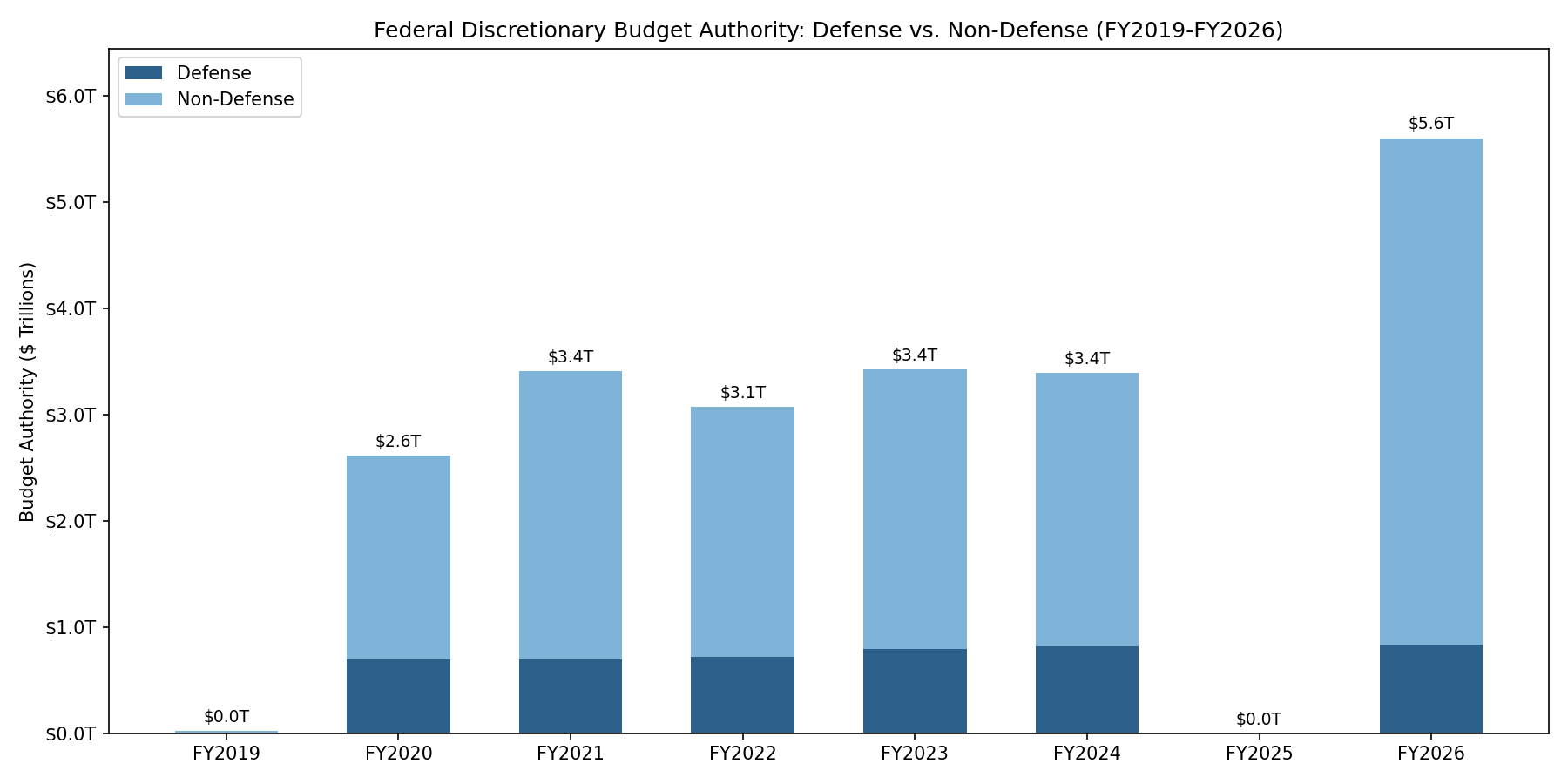
Dark blue = Defense. Light blue = all other subcommittees. Defense grew from $693B to $836B (+21%) over this period. Non-defense growth is primarily driven by mandatory spending programs (Medicaid, SNAP, VA Compensation) that appear as appropriation lines in the bill text. See Why the Numbers Might Not Match Headlines.
Top 6 Federal Accounts by Budget Authority
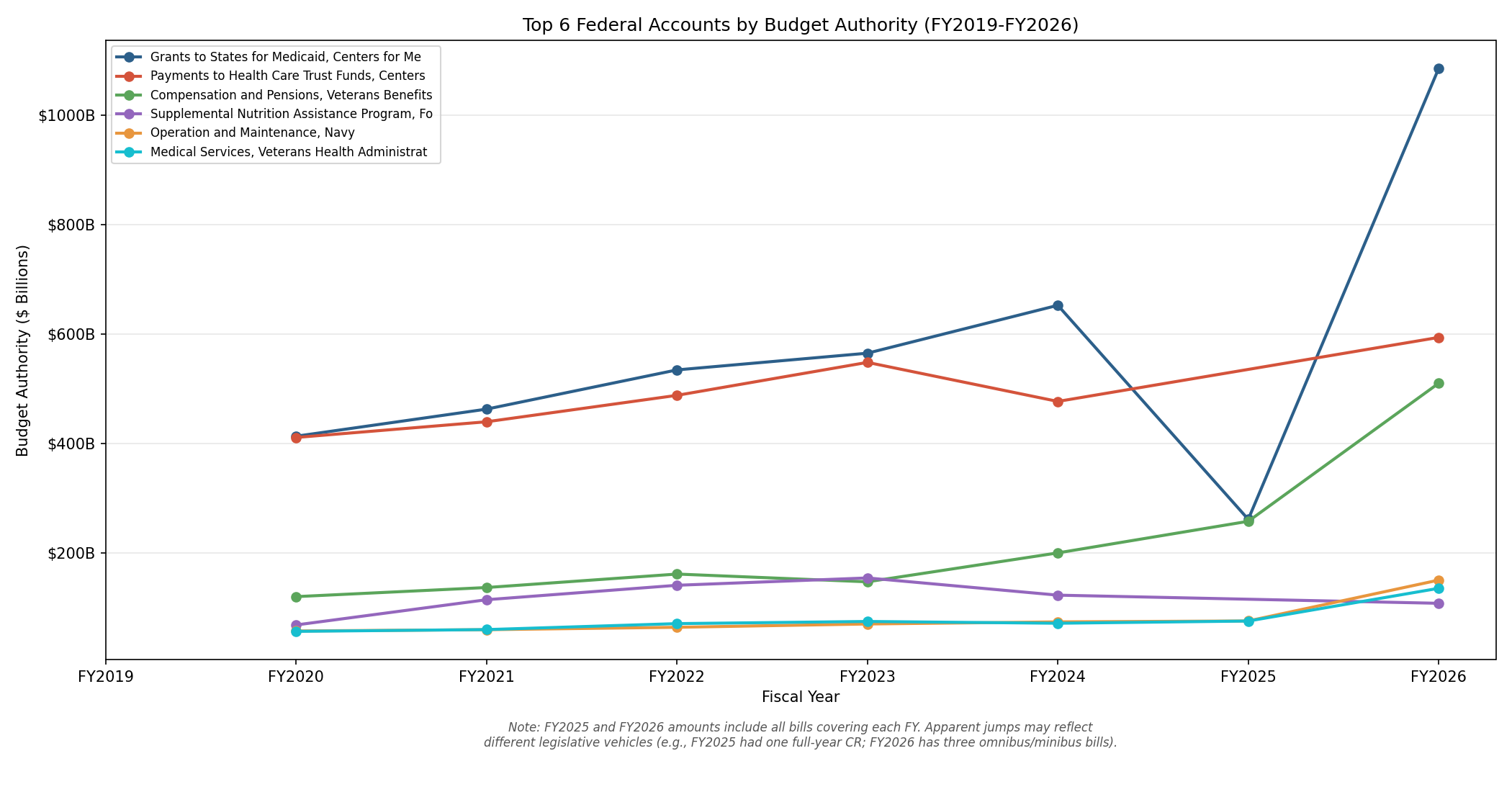
Each line is one Treasury Account Symbol (FAS code). The top accounts are dominated by mandatory programs that appear as appropriation line items: Medicaid, Health Care Trust Funds, and VA Compensation & Pensions.
Note on FY2025→FY2026 jumps: Some accounts show sharp increases between FY2025 and FY2026 (e.g., Medicaid $261B → $1,086B). This is because FY2025 was covered by a single full-year CR while FY2026 has multiple omnibus/minibus bills — the amounts are correct per bill, but the visual jump reflects different legislative coverage.
Verification Quality Heatmap
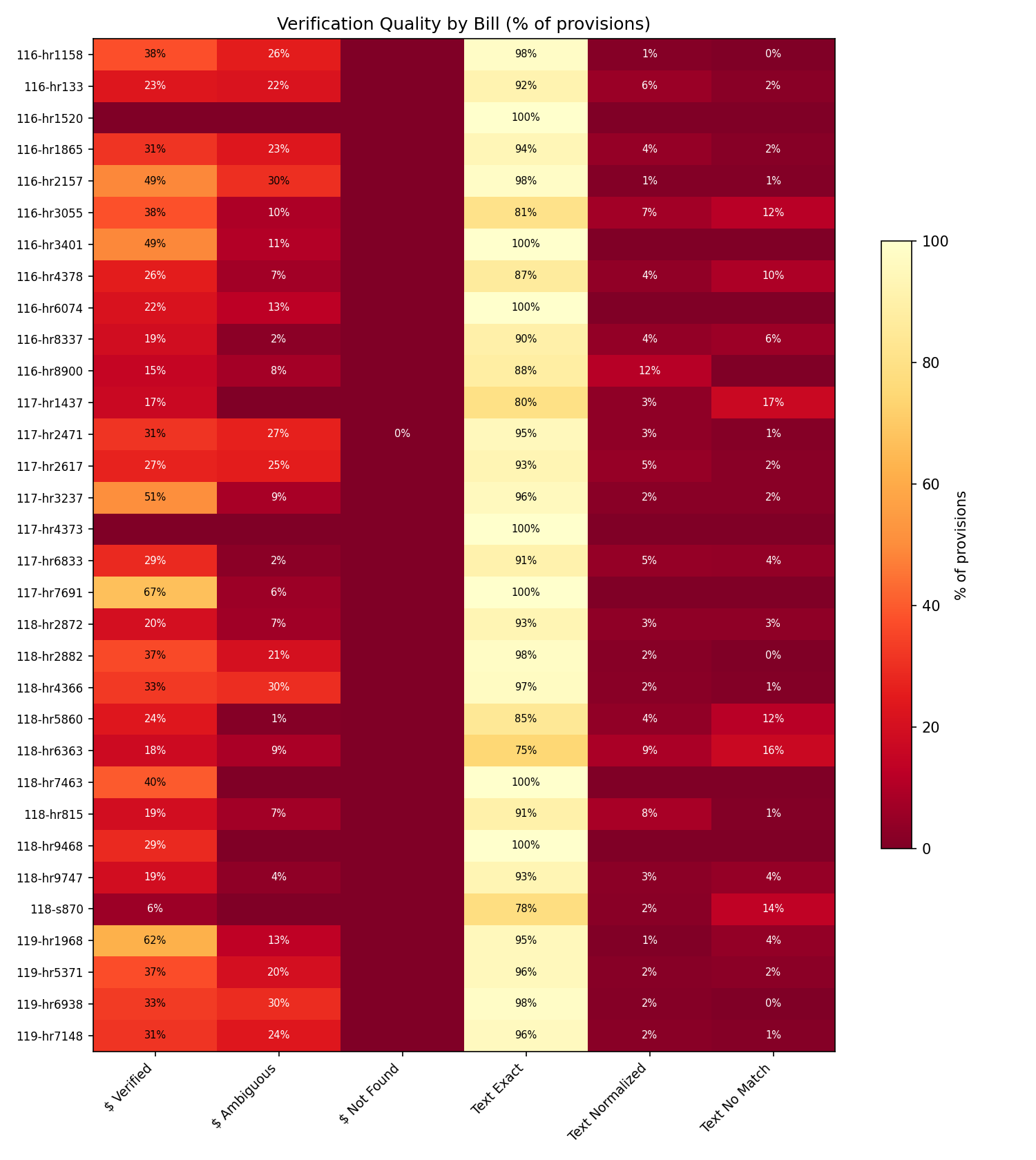
Each row is a bill; each column is a verification metric. Color intensity shows the percentage of provisions meeting that criterion.
| Column | What it measures | Dataset result |
|---|---|---|
| $ Verified | Dollar string at unique position in source | 10,468 (56.3% of provisions with amounts) |
| $ Ambiguous | Dollar string at multiple positions — correct but location uncertain | 8,115 |
| $ Not Found | Dollar string not in source | 1 (0.005%) |
| Text Exact | raw_text byte-identical to source | 32,691 (94.6%) |
| Text Normalized | Matches after whitespace/quote normalization | 1,287 (3.7%) |
| Text No Match | Not found at any tier | 585 (1.7%) |
Bills with low $ Verified percentages (e.g., CRs) are expected — most CR provisions do not carry dollar amounts.
Run All Demos Yourself
book/cookbook/cookbook.py runs 24 demos including everything above plus TAS resolution quality per bill, account rename events, directed spending analysis, advance appropriation breakdown, and more.
Setup
source .venv/bin/activate
pip install -r book/cookbook/requirements.txt
Run
python book/cookbook/cookbook.py
For semantic search demos (optional):
export OPENAI_API_KEY="your-key"
python book/cookbook/cookbook.py
Output
All files go to tmp/demo_output/:
| File | Description |
|---|---|
fy2026_treemap.html | Interactive budget treemap |
defense_vs_nondefense.png | Stacked bar chart |
spending_trends_top6.png | Line chart — top 6 accounts |
verification_heatmap.png | Verification quality heatmap |
authorities_flat.csv | Full dataset as flat CSV — every provision-FY pair |
biggest_changes_2024_2026.csv | Account-level changes FY2024 → FY2026 |
cr_substitutions.csv | Every CR substitution across all bills |
rename_events.csv | Account rename events with fiscal year boundaries |
subcommittee_scorecard.csv | 12 subcommittees × 7 fiscal years |
fy2026_by_agency.csv | FY2026 budget authority by agency |
semantic_search_demos.json | Semantic query results |
dataset_summary.json | Summary statistics |
Find How Much Congress Spent on a Topic
You will need:
congress-appropinstalled, access to thedata/directory. For semantic search:OPENAI_API_KEY.You will learn: Three ways to find spending provisions — by account name, by keyword, and by semantic meaning — and when to use each one.
This tutorial demonstrates three methods for finding spending provisions — by account name, by keyword, and by semantic meaning — and when each is appropriate.
Start with the Agency Rollup
If your question is about an entire department, the fastest answer is the by-agency summary:
congress-approp summary --dir data --by-agency
This prints the standard bill summary table, followed by a second table breaking down budget authority by parent department. Here’s the top of that second table:
┌─────────────────────────────────────────────────────┬─────────────────┬─────────────────┬────────────┐
│ Department                                           ┆ Budget Auth ($) ┆ Rescissions ($) ┆ Provisions │
╞═════════════════════════════════════════════════════╪═════════════════╪═════════════════╪════════════╡
│ Department of Veterans Affairs                       ┆ 343,238,707,982 ┆   9,799,155,560 ┆         51 │
│ Department of Agriculture                            ┆ 187,748,124,000 ┆     351,891,000 ┆        266 │
│ Department of Housing and Urban Development          ┆  75,743,762,466 ┆      85,000,000 ┆        116 │
│ Department of Energy                                 ┆  50,776,281,000 ┆               0 ┆         62 │
│ Department of Justice                                ┆  37,960,158,000 ┆   1,158,272,000 ┆        186 │
│ ...                                                                                                    │
└─────────────────────────────────────────────────────┴─────────────────┴─────────────────┴────────────┘
So the answer to “how much did the VA get?” is approximately $343 billion in budget authority across all bills in the dataset, with $9.8 billion in rescissions.
Important caveat: This total includes mandatory spending programs that appear as appropriation lines in the bill text. VA’s Compensation and Pensions account alone is $197 billion — that’s a mandatory entitlement, not discretionary spending, even though it appears in the appropriations bill. See Why the Numbers Might Not Match Headlines for more on this distinction.
Search by Account Name
When you know the program’s official name (or part of it), --account is the most precise filter. It matches against the structured account_name field:
congress-approp search --dir data --account "Child Nutrition"
┌───┬───────────┬───────────────┬─────────────────────────────────────────────┬────────────────┬─────────┬─────┐
│ $ ┆ Bill      ┆ Type          ┆ Description / Account                       ┆     Amount ($) ┆ Section ┆ Div │
╞═══╪═══════════╪═══════════════╪═════════════════════════════════════════════╪════════════════╪═════════╪═════╡
│ ✓ ┆ H.R. 4366 ┆ appropriation ┆ Child Nutrition Programs                    ┆ 33,266,226,000 ┆         ┆ B   │
│ ✓ ┆ H.R. 4366 ┆ appropriation ┆ Child Nutrition Programs                    ┆     18,004,000 ┆         ┆ B   │
│ ✓ ┆ H.R. 4366 ┆ appropriation ┆ Child Nutrition Programs                    ┆     21,005,000 ┆         ┆ B   │
│ ✓ ┆ H.R. 4366 ┆ appropriation ┆ Child Nutrition Programs                    ┆      5,000,000 ┆         ┆ B   │
│ ≈ ┆ H.R. 4366 ┆ limitation    ┆ Child Nutrition Programs                    ┆        500,000 ┆         ┆ B   │
│ ≈ ┆ H.R. 4366 ┆ appropriation ┆ Child Nutrition Programs                    ┆     10,000,000 ┆         ┆ B   │
│ ≈ ┆ H.R. 4366 ┆ appropriation ┆ Child Nutrition Programs                    ┆      1,000,000 ┆         ┆ B   │
│ ✓ ┆ H.R. 4366 ┆ appropriation ┆ McGovern-Dole International Food for Educ…  ┆    240,000,000 ┆         ┆ B   │
│ ≈ ┆ H.R. 4366 ┆ limitation    ┆ McGovern-Dole International Food for Educ…  ┆     24,000,000 ┆         ┆ B   │
└───┴───────────┴───────────────┴─────────────────────────────────────────────┴────────────────┴─────────┴─────┘
The top result — $33,266,226,000 — is the top-level appropriation for Child Nutrition Programs. The smaller amounts below it are sub-allocations (“of which $18,004,000 shall be for…”) and proviso amounts that break down how the top-level figure is to be spent. These sub-allocations have reference_amount semantics and are not counted again in the budget authority total — no double-counting.
The McGovern-Dole account also matches because it has “Child Nutrition” in its full name.
When to use --account vs. --keyword
--accountmatches against the structuredaccount_namefield extracted by the LLM — the official name of the appropriations account.--keywordsearches the fullraw_textfield — the actual bill language.
Sometimes the account name doesn’t contain the term you’re looking for, but the bill text does. Other times, the bill text doesn’t mention a term that is in the account name. Use both when you want to be thorough.
Search by Keyword in Bill Text
The --keyword flag searches the raw_text field — the excerpt of actual bill language stored with each provision. This finds provisions where the term appears anywhere in the source text, regardless of account name:
congress-approp search --dir data --keyword "Federal Emergency Management"
┌───┬───────────┬───────────────┬───────────────────────────────────────────────┬────────────────┬──────────┬─────┐
│ $ ┆ Bill      ┆ Type          ┆ Description / Account                         ┆     Amount ($) ┆ Section  ┆ Div │
╞═══╪═══════════╪═══════════════╪═══════════════════════════════════════════════╪════════════════╪══════════╪═════╡
│   ┆ H.R. 5860 ┆ other         ┆ Allows FEMA Disaster Relief Fund to be appor… ┆              — ┆ SEC. 128 ┆ A   │
│ ✓ ┆ H.R. 5860 ┆ appropriation ┆ Federal Emergency Management Agency—Disast…   ┆ 16,000,000,000 ┆ SEC. 129 ┆ A   │
│ ✓ ┆ H.R. 5860 ┆ appropriation ┆ Office of the Inspector General—Operations…   ┆      2,000,000 ┆ SEC. 129 ┆ A   │
└───┴───────────┴───────────────┴───────────────────────────────────────────────┴────────────────┴──────────┴─────┘
3 provisions found
This found three provisions: the $16B FEMA Disaster Relief Fund appropriation, a $2M Inspector General appropriation, and a non-dollar provision about how the fund can be apportioned. All three are in the continuing resolution (H.R. 5860), not the omnibus — because FEMA’s regular funding falls under the Homeland Security appropriations bill, which isn’t one of the divisions included in this particular omnibus.
Useful keywords for exploring
Here are some keywords that surface interesting provisions in the example data:
| Keyword | What It Finds |
|---|---|
"notwithstanding" | Provisions that override other legal requirements — often important policy exceptions |
"is hereby rescinded" | Rescission provisions (also findable with --type rescission) |
"shall submit a report" | Reporting requirements and directives |
"not to exceed" | Caps and limitations on spending |
"transfer" | Fund transfer authorities |
"Veterans Affairs" | All VA-related provisions across all bills |
Combining filters
All search filters are combined with AND logic. Every provision in the result must match every filter you specify:
# Appropriations over $1 billion in Division A (MilCon-VA)
congress-approp search --dir data --type appropriation --division A --min-dollars 1000000000

# Rescissions from the Department of Justice
congress-approp search --dir data --type rescission --agency "Justice"

# Directives in the VA supplemental
congress-approp search --dir data/118-hr9468 --type directive
Search by Meaning (Semantic Search)
Keyword search has a fundamental limitation: it only finds provisions that use the exact words you search for. If you search for “school lunch” but the bill says “Child Nutrition Programs,” keyword search returns nothing.
Semantic search solves this. It uses embedding vectors to understand the meaning of your query and rank provisions by conceptual similarity — even when the words don’t overlap at all.
Prerequisites: Semantic search requires OPENAI_API_KEY (to embed your query text at search time) and pre-computed embeddings for the bills you’re searching. The included example data has pre-computed embeddings, so you just need the API key.
export OPENAI_API_KEY="your-key-here"
congress-approp search --dir data --semantic "school lunch programs for kids" --top 5
┌──────┬───────────┬───────────────┬─────────────────────────────────────────────┬────────────────┬─────┐
│ Sim  ┆ Bill      ┆ Type          ┆ Description / Account                       ┆     Amount ($) ┆ Div │
╞══════╪═══════════╪═══════════════╪═════════════════════════════════════════════╪════════════════╪═════╡
│ 0.51 ┆ H.R. 4366 ┆ appropriation ┆ Child Nutrition Programs                    ┆ 33,266,226,000 ┆ B   │
│ 0.46 ┆ H.R. 4366 ┆ appropriation ┆ Child Nutrition Programs                    ┆     10,000,000 ┆ B   │
│ 0.45 ┆ H.R. 4366 ┆ rider         ┆ Pilot project grant recipients shall be r…  ┆              — ┆ B   │
│ 0.45 ┆ H.R. 4366 ┆ appropriation ┆ Child Nutrition Programs                    ┆     18,004,000 ┆ B   │
│ 0.44 ┆ H.R. 4366 ┆ appropriation ┆ Child Nutrition Programs                    ┆      5,000,000 ┆ B   │
└──────┴───────────┴───────────────┴─────────────────────────────────────────────┴────────────────┴─────┘
5 provisions found
The query “school lunch programs for kids” shares no keywords with “Child Nutrition Programs”, but semantic search matches them by meaning. The similarity score of 0.51 reflects the conceptual relationship between the query and the provision text.
More semantic search examples
Try these queries against the example data to get a feel for how semantic search finds provisions that keyword search would miss:
# "Fixing roads and bridges" → finds Highway Infrastructure Programs, Federal-Aid Highways
congress-approp search --dir data --semantic "money for fixing roads and bridges" --top 5

# "Space exploration" → finds NASA Exploration, Space Operations, Space Technology
congress-approp search --dir data --semantic "space exploration" --top 5

# "Clean energy" → finds Energy Efficiency and Renewable Energy, Nuclear Energy
congress-approp search --dir data --semantic "clean energy research" --top 5
Combining semantic search with filters
You can narrow semantic results with hard filters. For example, find only appropriation-type provisions about clean energy with at least $100 million:
congress-approp search --dir data --semantic "clean energy" --type appropriation --min-dollars 100000000 --top 10
The filters are applied first (hard constraints that must match), then the remaining provisions are ranked by semantic similarity.
When semantic search doesn’t help
Semantic search is not always the right tool:
- Exact account name lookup: If you know the account name, use
--account. It’s faster, deterministic, and doesn’t require an API key. - No conceptual match: If nothing in the dataset relates to your query, similarity scores will be low (below 0.40). Low scores are an honest answer — the tool isn’t hallucinating relevance.
- Provision type distinction: Embeddings don’t strongly encode whether something is a rider vs. an appropriation. If you need only appropriations, add
--type appropriationas a hard filter.
Get the Full Details in JSON
Once you’ve found interesting provisions in the table view, switch to JSON to see every field:
congress-approp search --dir data --account "Child Nutrition" --type appropriation --format json
This returns the full structured data for each matching provision, including fields the table truncates: raw_text (the full excerpt), semantics, detail_level, agency, division, notes, cross_references, and more.
For example, the top-level Child Nutrition Programs appropriation includes:
{
  "account_name": "Child Nutrition Programs",
  "agency": "Department of Agriculture",
  "bill": "H.R. 4366",
  "dollars": 33266226000,
  "semantics": "new_budget_authority",
  "detail_level": "top_level",
  "division": "B",
  "provision_type": "appropriation",
  "quality": "strong",
  "amount_status": "found",
  "match_tier": "exact",
  "raw_text": "For necessary expenses of the Food and Nutrition Service..."
}
Key fields to check:
semantics:new_budget_authoritymeans this counts toward the budget authority total.reference_amountmeans it’s a sub-allocation or contextual amount.detail_level:top_levelis the main account appropriation.sub_allocationis an “of which” breakdown.line_itemis a numbered item within a section.quality:strongmeans the dollar amount was verified and the raw text matched the source.moderateorweakmeans something didn’t check out as well.
Cross-Check Against the Source
For any provision you plan to cite, you can verify it directly against the bill XML. The raw_text field contains the excerpt, and the text_as_written dollar string can be searched in the source file:
# Find the dollar string in the source XML
grep '33,266,226,000' data/118-hr4366/BILLS-118hr4366enr.xml
If the string is found (which it will be — the audit confirms this), you know the extraction is accurate. For a full verification procedure, see Verify Extraction Accuracy.
Export for Further Analysis
Once you’ve identified the provisions you care about, export them for further work:
# CSV for Excel or Google Sheets
congress-approp search --dir data --account "Child Nutrition" --format csv > child_nutrition.csv

# JSON for Python, R, or jq
congress-approp search --dir data --agency "Veterans" --type appropriation --format json > va_appropriations.json
See Export Data for Spreadsheets and Scripts for detailed recipes.
Summary: Which Search Method to Use
| Method | Flag | Best For | Limitations |
|---|---|---|---|
| Account name | --account | Known program names | Only matches the account_name field |
| Keyword | --keyword | Terms that appear in bill text | Only finds exact word matches |
| Agency | --agency | Department-level filtering | Case-insensitive substring match |
| Semantic | --semantic | Finding provisions by meaning | Requires embeddings + OPENAI_API_KEY |
| Provision type | --type | Filtering by category | Relies on LLM classification accuracy |
| Division | --division | Scoping to a part of an omnibus bill | Only applicable to multi-division bills |
| Dollar range | --min-dollars / --max-dollars | Finding large or small provisions | Only filters on absolute value |
For the most thorough search, try multiple approaches. Start with --account or --keyword for precision, then use --semantic to catch provisions you might have missed with different terminology.
Next Steps
- Compare Two Bills — see what changed between a CR and an omnibus
- Track a Program Across Bills — follow a specific account across bills using
--similar - Use Semantic Search — deeper dive into embedding-based search
Compare Two Bills
You will need:
congress-appropinstalled, access to thedata/directory.You will learn: How to use the
comparecommand to see which accounts gained, lost, or changed funding between two sets of bills.
One of the most common questions in appropriations analysis is: “What changed?” Maybe you’re comparing a continuing resolution to the full-year omnibus to see which programs got different treatment. Maybe you’re comparing this year’s omnibus to last year’s. Or maybe a supplemental added emergency funding on top of the base bill and you want to see exactly where the money went.
The compare command answers these questions by matching accounts across two sets of bills and computing the dollar difference.
Your First Comparison
Let’s compare the FY2024 omnibus (H.R. 4366) to the VA supplemental (H.R. 9468) to see which accounts got additional emergency funding:
congress-approp compare --base data/118-hr4366 --current data/118-hr9468
The tool first prints a warning:
⚠  Comparing Omnibus to Supplemental. Accounts in one but not the other may be expected
    — this does not necessarily indicate policy changes.
This is important context. A supplemental only touches a handful of accounts, so most accounts from the omnibus will show up as “only in base.” That’s expected — the supplemental didn’t eliminate those programs.
The comparison table follows, sorted by largest absolute change first:
┌─────────────────────────────────────┬──────────────────────┬─────────────────┬───────────────┬──────────────────┬─────────┬──────────────┐
│ Account                             ┆ Agency               ┆        Base ($) ┆   Current ($) ┆        Delta ($) ┆     Δ % ┆ Status       │
╞═════════════════════════════════════╪══════════════════════╪═════════════════╪═══════════════╪══════════════════╪═════════╪══════════════╡
│ Compensation and Pensions           ┆ Department of Veter… ┆ 197,382,903,000 ┆ 2,285,513,000 ┆ -195,097,390,000 ┆  -98.8% ┆ changed      │
│ Supplemental Nutrition Assistance … ┆ Department of Agric… ┆ 122,382,521,000 ┆             0 ┆ -122,382,521,000 ┆ -100.0% ┆ only in base │
│ Medical Services                    ┆ Department of Veter… ┆  71,000,000,000 ┆             0 ┆  -71,000,000,000 ┆ -100.0% ┆ only in base │
│ Child Nutrition Programs            ┆ Department of Agric… ┆  33,266,226,000 ┆             0 ┆  -33,266,226,000 ┆ -100.0% ┆ only in base │
│ ...                                                                                                                                       │
│ Readjustment Benefits               ┆ Department of Veter… ┆  13,774,657,000 ┆   596,969,000 ┆  -13,177,688,000 ┆  -95.7% ┆ changed      │
│ ...                                                                                                                                       │
└─────────────────────────────────────┴──────────────────────┴─────────────────┴───────────────┴──────────────────┴─────────┴──────────────┘
Understanding the Columns
| Column | Meaning |
|---|---|
| Account | The appropriations account name, matched between the two bill sets |
| Agency | The parent department or agency |
| Base ($) | Total budget authority for this account in the --base bills |
| Current ($) | Total budget authority for this account in the --current bills |
| Delta ($) | Current minus Base |
| Δ % | Percentage change from base to current |
| Status | How the account appears across the two sets (see below) |
Status values
| Status | Meaning |
|---|---|
changed | Account exists in both base and current with different dollar amounts |
unchanged | Account exists in both with the same amount (rare in practice) |
only in base | Account exists in the base bills but not in the current bills |
only in current | Account exists in the current bills but not in the base bills |
Interpreting Cross-Type Comparisons
The comparison above — omnibus vs. supplemental — is instructive but requires careful interpretation:
Why “Compensation and Pensions” shows -98.8%: The omnibus has $197B for Comp & Pensions (which includes mandatory spending). The supplemental has $2.3B. The compare command shows the raw dollar values in each set — it doesn’t add them together. The supplemental is additional funding on top of the omnibus, but the compare table shows the amounts within each set, not cumulative totals.
Why most accounts show “only in base”: The supplemental only funds two accounts (Comp & Pensions and Readjustment Benefits). Every other account in the omnibus has zero representation in the supplemental. This doesn’t mean those programs lost funding — it means the supplemental didn’t touch them.
The classification warning: The tool detects when you’re comparing different bill types (Omnibus vs. Supplemental, CR vs. Regular, etc.) and prints a warning. These cross-type comparisons can be misleading if you interpret “only in base” as “program eliminated.”
A More Natural Comparison: Filtering by Agency
To focus on just the accounts that matter, use --agency to narrow the comparison:
congress-approp compare --base data/118-hr4366 --current data/118-hr9468 --agency "Veterans"
This filters both sides to only show accounts from the Department of Veterans Affairs, making the comparison much easier to read. You’ll see the two “changed” accounts (Comp & Pensions and Readjustment Benefits) plus the VA accounts that are “only in base.”
When Compare Shines: Same-Type Comparisons
The compare command is most useful when comparing bills of the same type:
- FY2023 omnibus → FY2024 omnibus: See which programs gained or lost funding year over year
- House version → Senate version: Track differences during the conference process
- FY2024 omnibus → FY2025 omnibus: Year-over-year trend analysis
To do this, extract both bills into separate directories, then:
# Example: comparing two fiscal years (requires extracting both bills first)
congress-approp compare --base data/117/hr/2471 --current data/118/hr/4366
Accounts are matched by (agency, account_name) with automatic normalization. Results are sorted by the absolute value of the delta, so the biggest changes appear first.
Handling Account Name Mismatches
The compare command matches accounts by exact normalized name. If Congress renames an account between fiscal years — say, “Cybersecurity and Infrastructure Security Agency” becomes “CISA Operations and Support” — the compare command will show the old name as “only in base” and the new name as “only in current” rather than matching them.
For accounts with different names that represent the same program, use the --similar flag on search to find the semantic match:
congress-approp search --dir data --similar 118-hr9468:0 --top 5
This uses embedding vectors to match by meaning rather than account name. See Track a Program Across Bills for details.
The compare --use-links flag uses persistent cross-bill relationships (created via link accept) to inform the matching, handling renames automatically. See Track a Program Across Bills for the full link workflow.
Export Comparisons
Like all query commands, compare supports multiple output formats:
# CSV for Excel analysis
congress-approp compare --base data/118-hr4366 --current data/118-hr9468 --format csv > comparison.csv

# JSON for programmatic processing
congress-approp compare --base data/118-hr4366 --current data/118-hr9468 --format json
The JSON output includes every field for each account delta:
[
  {
    "account_name": "Compensation and Pensions",
    "agency": "Department of Veterans Affairs",
    "base_dollars": 197382903000,
    "current_dollars": 2285513000,
    "delta": -195097390000,
    "delta_pct": -98.84,
    "status": "changed"
  }
]
This is useful for building year-over-year tracking dashboards or automated change reports.
Practical Examples
Which programs got the biggest increases?
congress-approp compare --base data/fy2023 --current data/fy2024 --format json | \
  jq '[.[] | select(.delta > 0)] | sort_by(-.delta) | .[:10]'
Which programs were eliminated?
congress-approp compare --base data/fy2023 --current data/fy2024 --format json | \
  jq '[.[] | select(.status == "only in base")] | sort_by(-.base_dollars)'
What’s new this year?
congress-approp compare --base data/fy2023 --current data/fy2024 --format json | \
  jq '[.[] | select(.status == "only in current")] | sort_by(-.current_dollars)'
Summary
The compare command is your tool for answering “what changed?” at the account level:
- Use
--baseand--currentto point at any two directories containing extracted bills - Results are sorted by the absolute value of the change — biggest impacts first
- The
--agencyfilter helps focus on specific departments - Pay attention to the classification warning when comparing different bill types
- Export to CSV or JSON for further analysis
- For accounts that change names between bills, use
--similarsemantic matching
Next Steps
- Track a Program Across Bills — use embedding-based matching when account names differ
- Export Data for Spreadsheets and Scripts — advanced export recipes
- Why the Numbers Might Not Match Headlines — understand why budget authority figures may differ from public reports
Track a Program Across Bills
You will need:
congress-appropinstalled, access to thedata/directory. Optionally:OPENAI_API_KEYfor semantic search.You will learn: How to follow a specific program’s funding across multiple bills using
--similar, and how to interpret cross-bill matching results.
A single program — say, VA Compensation and Pensions — can appear in multiple bills within the same fiscal year: the full-year omnibus, a continuing resolution, and an emergency supplemental. Tracking it across all three tells you the complete funding story. But account names aren’t always consistent between bills, and keyword search only works when you know the exact terminology each bill uses.
The --similar flag solves this by using pre-computed embedding vectors to find provisions that mean the same thing, even when the words differ.
The Scenario
H.R. 9468 (the VA Supplemental) appropriated $2,285,513,000 for “Compensation and Pensions.” You want to find every related provision in the omnibus (H.R. 4366) and the continuing resolution (H.R. 5860).
Step 1: Identify the Source Provision
First, find the provision you want to track. You can use any search command to locate it:
congress-approp search --dir data/118-hr9468 --type appropriation
┌───┬───────────┬───────────────┬─────────────────────────────┬───────────────┬─────────┬─────┐
│ $ ┆ Bill      ┆ Type          ┆ Description / Account       ┆    Amount ($) ┆ Section ┆ Div │
╞═══╪═══════════╪═══════════════╪═════════════════════════════╪═══════════════╪═════════╪═════╡
│ ✓ ┆ H.R. 9468 ┆ appropriation ┆ Compensation and Pensions   ┆ 2,285,513,000 ┆         ┆     │
│ ✓ ┆ H.R. 9468 ┆ appropriation ┆ Readjustment Benefits       ┆   596,969,000 ┆         ┆     │
└───┴───────────┴───────────────┴─────────────────────────────┴───────────────┴─────────┴─────┘
2 provisions found
Compensation and Pensions is the first provision listed. To use --similar, you need the bill directory name and provision index. The directory is hr9468 (the directory name inside data/), and the index is 0 (first provision, zero-indexed).
You can also see the index in JSON output:
congress-approp search --dir data/118-hr9468 --type appropriation --format json
Look for the "provision_index": 0 field in the first result.
Step 2: Find Similar Provisions Across All Bills
Now use --similar to find the closest matches across every loaded bill:
congress-approp search --dir data --similar 118-hr9468:0 --top 10
┌──────┬───────────┬───────────────┬────────────────────────────────┬─────────────────┬─────┐
│ Sim  ┆ Bill      ┆ Type          ┆ Description / Account          ┆      Amount ($) ┆ Div │
╞══════╪═══════════╪═══════════════╪════════════════════════════════╪═════════════════╪═════╡
│ 0.86 ┆ H.R. 4366 ┆ appropriation ┆ Compensation and Pensions      ┆ 182,310,515,000 ┆ A   │
│ 0.78 ┆ H.R. 4366 ┆ appropriation ┆ Compensation and Pensions      ┆  15,072,388,000 ┆ A   │
│ 0.73 ┆ H.R. 4366 ┆ limitation    ┆ Compensation and Pensions      ┆      22,109,000 ┆ A   │
│ 0.70 ┆ H.R. 9468 ┆ appropriation ┆ Readjustment Benefits          ┆     596,969,000 ┆     │
│ 0.68 ┆ H.R. 4366 ┆ rescission    ┆ Medical Support and Compliance ┆   1,550,000,000 ┆ A   │
│ ...                                                                                         │
└──────┴───────────┴───────────────┴────────────────────────────────┴─────────────────┴─────┘
This is the complete picture of Comp & Pensions across the dataset:
- 0.86 similarity — The omnibus’s main Comp & Pensions appropriation: $182.3 billion. This is the regular-year funding for the same account that the supplemental topped up by $2.3 billion.
- 0.78 similarity — The omnibus’s advance appropriation for Comp & Pensions: $15.1 billion. This is money enacted in FY2024 but available for FY2025.
- 0.73 similarity — A $22 million limitation on the Comp & Pensions account.
- 0.70 similarity — Readjustment Benefits from the same supplemental. This is a different VA account, but conceptually close because it’s also VA mandatory benefits.
- 0.68 similarity — A rescission of Medical Support and Compliance funds. Related VA account, lower similarity because it’s a different type of action (rescission vs. appropriation).
Why no CR matches?
The continuing resolution (H.R. 5860) doesn’t have a specific Comp & Pensions provision because CRs fund at the prior-year rate by default. Only the 13 programs with anomalies (CR substitutions) appear as explicit provisions. VA Comp & Pensions wasn’t one of them — it was simply continued at its prior-year level.
Step 3: How –similar Works Under the Hood
The --similar flag does not make any API calls. Here’s what happens:
- It looks up the embedding vector for
118-hr9468:0from the pre-computedvectors.binfile - It loads the embedding vectors for every provision in every bill under
--dir - It computes the cosine similarity between the source vector and every other vector
- It ranks by similarity descending and returns the top N results
Because everything is pre-computed and stored locally, this operation takes less than a millisecond for 2,500 provisions. The only prerequisite is that embeddings have been generated (via congress-approp embed) for all the bills you want to search.
Step 4: Interpret Similarity Scores
The similarity score tells you how closely related two provisions are in “meaning space”:
| Score | Interpretation | Example |
|---|---|---|
| > 0.80 | Almost certainly the same program | VA Supp “Comp & Pensions” ↔ Omnibus “Comp & Pensions” (0.86) |
| 0.60 – 0.80 | Related topic, same policy area | “Comp & Pensions” ↔ “Medical Support and Compliance” (0.68) |
| 0.45 – 0.60 | Loosely related | VA provisions ↔ non-VA provisions with similar structure |
| < 0.45 | Probably not meaningfully related | VA provisions ↔ transportation or energy provisions |
For cross-bill tracking, focus on matches above 0.75 — these are very likely the same account in a different bill.
Step 5: Track the Second Account
Repeat for Readjustment Benefits (provision index 1 in the supplemental):
congress-approp search --dir data --similar 118-hr9468:1 --top 5
┌──────┬───────────┬───────────────┬────────────────────────────────┬─────────────────┬─────┐
│ Sim  ┆ Bill      ┆ Type          ┆ Description / Account          ┆      Amount ($) ┆ Div │
╞══════╪═══════════╪═══════════════╪════════════════════════════════╪═════════════════╪═════╡
│ 0.88 ┆ H.R. 4366 ┆ appropriation ┆ Readjustment Benefits          ┆  13,399,805,000 ┆ A   │
│ 0.76 ┆ H.R. 9468 ┆ appropriation ┆ Compensation and Pensions      ┆   2,285,513,000 ┆     │
│ ...                                                                                         │
└──────┴───────────┴───────────────┴────────────────────────────────┴─────────────────┴─────┘
Top match at 0.88: the omnibus Readjustment Benefits account at $13.4 billion. The supplemental added $597 million on top of that.
When Account Names Differ Between Bills
The example data happens to use the same account names across bills, but this isn’t always the case. Continuing resolutions often use hierarchical names like:
- CR:
"Rural Housing Service—Rural Community Facilities Program Account" - Omnibus:
"Rural Community Facilities Program Account"
Keyword matching would miss this, but --similar handles it because the embeddings capture the meaning of the provision, not just the words.
To demonstrate, let’s find the omnibus counterparts of the CR substitutions that have different naming conventions:
# First, find a CR substitution provision index
congress-approp search --dir data/118-hr5860 --type cr_substitution --format json
# Note: the first CR substitution (Rural Housing) is at some index — check provision_index

# Then find similar provisions in the omnibus
congress-approp search --dir data --similar hr5860:<INDEX> --top 3
Even though “Rural Housing Service—Rural Community Facilities Program Account” and “Rural Community Facilities Program Account” are different strings, the embedding similarity will be in the 0.75–0.80 range — high enough to confidently identify them as the same program.
Building a Funding Timeline
Once you can match accounts across bills, you can assemble a complete funding picture. For VA Comp & Pensions in FY2024:
| Source | Amount | Type |
|---|---|---|
| H.R. 4366 (Omnibus) | $182,310,515,000 | Regular appropriation |
| H.R. 4366 (Omnibus) | $15,072,388,000 | Advance appropriation (FY2025) |
| H.R. 9468 (Supplemental) | $2,285,513,000 | Emergency supplemental |
| H.R. 5860 (CR) | (prior-year rate) | No explicit provision — funded by CR baseline |
With multiple fiscal years extracted, you could extend this to a multi-year timeline. The --similar command makes cross-year matching possible even when account names evolve.
Deep-Dive with Relate
The relate command provides a focused view of one provision across all bills, with a fiscal year timeline showing advance/current/supplemental splits:
# Trace VA Compensation and Pensions across all fiscal years
congress-approp relate 118-hr9468:0 --dir data --fy-timeline
Each match includes a deterministic 8-character hash that you can use to persist the relationship.
Persistent Links
You can save cross-bill relationships using the link system, so they persist across sessions and can be used by compare --use-links:
# Discover link candidates from embeddings
congress-approp link suggest --dir data --scope cross --limit 20

# Accept specific matches by hash (from relate or link suggest output)
congress-approp link accept --dir data a3f7b2c4 e5d1c8a9

# Or batch-accept all verified + high-confidence candidates
congress-approp link accept --dir data --auto

# Use accepted links in compare to handle renames
congress-approp compare --base-fy 2024 --current-fy 2026 --subcommittee thud --dir data --use-links

# View and manage saved links
congress-approp link list --dir data
congress-approp link remove --dir data a3f7b2c4
Links are stored at <dir>/links/links.json and are indexed by deterministic hashes — the same provision pair always produces the same hash, so you can script the workflow reliably. See Enrich Bills with Metadata and the CLI Reference for details.
This will enable automatic cross-year matching even when account names change, with human review for ambiguous cases.
Tips for Cross-Bill Tracking
-
Start from the smaller bill. If you’re tracking between a supplemental (7 provisions) and an omnibus (2,364 provisions), start from the supplemental and search into the omnibus. It’s easier to review 5–10 matches than 2,364.
-
Use
--top 3to reduce noise. You rarely need more than the top 3 matches. The best match is almost always the right one. -
Combine with
--typefor precision. If you’re matching appropriations, add--type appropriationto exclude riders, directives, and other provision types from the results:congress-approp search --dir data --similar 118-hr9468:0 --type appropriation --top 5 -
Check both directions. If provision A in bill X matches provision B in bill Y at 0.85, provision B in bill Y should also match provision A in bill X at a similar score. If it doesn’t, something is off.
-
Low max similarity means the program is unique. If your source provision’s best match in another bill is below 0.55, the program may genuinely not exist in that bill. This is useful for identifying new programs or eliminated ones.
Summary
| Task | Command |
|---|---|
| Find the omnibus version of a supplemental provision | search --dir data --similar 118-hr9468:0 --top 3 |
| Find related provisions across all bills | search --dir data --similar 118-hr4366:42 --top 10 |
| Restrict matches to appropriations only | search --dir data --similar 118-hr9468:0 --type appropriation --top 5 |
| Find provisions in a specific bill | search --dir data/118-hr4366 --similar 118-hr9468:0 --top 5 |
Next Steps
- Use Semantic Search — search by meaning using text queries instead of provision references
- Compare Two Bills — account-level comparison using name matching
- How Semantic Search Works — understand the embedding and cosine similarity mechanics
Extract Your Own Bill
You will need:
congress-appropinstalled,CONGRESS_API_KEY(free),ANTHROPIC_API_KEY. Optionally:OPENAI_API_KEYfor embeddings.You will learn: How to go from zero to queryable data — downloading a bill from Congress.gov, extracting provisions with Claude, verifying the results, and optionally generating embeddings for semantic search.
The included example data covers three FY2024 bills, but there are dozens of enacted appropriations bills across recent congresses. This tutorial walks you through the full pipeline for extracting any bill you want.
Step 1: Get Your API Keys
You need two keys to run the full pipeline. A third is optional for semantic search.
| Key | Purpose | Cost | Sign Up |
|---|---|---|---|
CONGRESS_API_KEY | Download bill XML from Congress.gov | Free | api.congress.gov/sign-up |
ANTHROPIC_API_KEY | Extract provisions using Claude | Pay-per-use | console.anthropic.com |
OPENAI_API_KEY | Generate embeddings for semantic search (optional) | Pay-per-use | platform.openai.com |
Set them in your shell:
export CONGRESS_API_KEY="your-congress-key"
export ANTHROPIC_API_KEY="your-anthropic-key"
# Optional:
export OPENAI_API_KEY="your-openai-key"
Step 2: Test Connectivity
Verify that your API keys work before spending time on a full extraction:
congress-approp api test
This checks both the Congress.gov and Anthropic APIs. You should see confirmation that both are reachable and your keys are valid.
Step 3: Discover Available Bills
Use the api bill list command to see what appropriations bills exist for a given congress:
# List all appropriations bills for the 118th Congress (2023-2024)
congress-approp api bill list --congress 118

# List only enacted appropriations bills
congress-approp api bill list --congress 118 --enacted-only
The --enacted-only flag filters to bills that were signed into law — these are the ones that actually became binding spending authority. You’ll see a list with bill type, number, title, and status.
Congress numbers
Each Congress spans two years:
| Congress | Years | Example |
|---|---|---|
| 117th | 2021–2022 | FY2022 and FY2023 bills |
| 118th | 2023–2024 | FY2024 and FY2025 bills |
| 119th | 2025–2026 | FY2026 bills |
Bill type codes
When downloading a specific bill, you need the bill type code:
| Code | Meaning | Example |
|---|---|---|
hr | House bill | H.R. 4366 |
s | Senate bill | S. 1234 |
hjres | House joint resolution | H.J.Res. 100 |
sjres | Senate joint resolution | S.J.Res. 50 |
Most enacted appropriations bills originate in the House (hr), since the Constitution requires revenue and spending bills to originate there.
Step 4: Download the Bill
Download a single bill
If you know the specific bill you want:
congress-approp download --congress 118 --type hr --number 9468 --output-dir data
This fetches the enrolled (final, signed into law) XML from Congress.gov and saves it to data/118/hr/9468/BILLS-118hr9468enr.xml.
Download all enacted bills for a congress
To get everything at once:
congress-approp download --congress 118 --enacted-only --output-dir data
This scans for all enacted appropriations bills in the 118th Congress and downloads their enrolled XML. It may take a minute or two depending on how many bills there are.
Preview without downloading
Use --dry-run to see what would be downloaded without actually fetching anything:
congress-approp download --congress 118 --enacted-only --output-dir data --dry-run
Step 5: Preview the Extraction (Dry Run)
Before making any LLM API calls, preview what the extraction will look like:
congress-approp extract --dir data/118/hr/9468 --dry-run
The dry run shows you:
- Chunk count: How many chunks the bill will be split into. Small bills (like the VA supplemental) are a single chunk. The FY2024 omnibus splits into 75 chunks.
- Estimated input tokens: How many tokens will be sent to the LLM. This helps you estimate cost before committing.
Here’s what to expect for different bill sizes:
| Bill Type | Typical XML Size | Chunks | Estimated Input Tokens |
|---|---|---|---|
| Supplemental (small) | ~10 KB | 1 | ~1,200 |
| Continuing Resolution | ~130 KB | 5 | ~25,000 |
| Omnibus (large) | ~1.8 MB | 75 | ~315,000 |
Step 6: Run the Extraction
Now run the actual extraction:
congress-approp extract --dir data/118/hr/9468
For the small VA supplemental, this completes in under a minute. Here’s what happens:
- Parse: The XML is parsed to extract clean text and identify chunk boundaries
- Extract: Each chunk is sent to Claude with a detailed system prompt defining every provision type
- Merge: Provisions from all chunks are combined into a single list
- Compute: Budget authority totals are computed from the individual provisions (never trusting the LLM’s arithmetic)
- Verify: Every dollar amount and text excerpt is checked against the source XML
- Write: All artifacts are saved to disk
Controlling parallelism
For large bills with many chunks, you can control how many LLM calls run simultaneously:
# Default: 5 concurrent calls
congress-approp extract --dir data/118/hr/4366

# Faster but uses more API quota
congress-approp extract --dir data/118/hr/4366 --parallel 8

# Conservative — one at a time
congress-approp extract --dir data/118/hr/4366 --parallel 1
Higher parallelism is faster but may hit API rate limits. The default of 5 is a good balance.
Using a different model
By default, extraction uses claude-opus-4-6. You can override this:
# Via flag
congress-approp extract --dir data/118/hr/9468 --model claude-sonnet-4-20250514

# Via environment variable
export APPROP_MODEL="claude-sonnet-4-20250514"
congress-approp extract --dir data/118/hr/9468
Caution: The system prompt and expected output format are tuned for Claude Opus. Other models may produce lower-quality extractions with more classification errors or missing provisions. Always check the
auditoutput after extracting with a non-default model.
Progress display
For multi-chunk bills, a progress dashboard shows real-time status:
5/42, 187 provs [4m 23s] 842 tok/s | 📝A-IIb ~8K 180/s | 🤔B-I ~3K | 📝B-III ~1K 95/s
This tells you: 5 of 42 chunks complete, 187 provisions extracted so far, running for 4 minutes 23 seconds, with three chunks currently being processed.
Step 7: Check the Output Files
After extraction, your bill directory contains several new files:
data/118/hr/9468/
├── BILLS-118hr9468enr.xml     ← Source XML (downloaded in Step 4)
├── extraction.json            ← All provisions with amounts, accounts, sections
├── verification.json          ← Deterministic checks against source text
├── metadata.json              ← Model name, prompt version, timestamps, source hash
├── tokens.json                ← LLM token usage (input, output, cache hits)
└── chunks/                    ← Per-chunk LLM artifacts (thinking traces, raw responses)
| File | What It Contains |
|---|---|
extraction.json | The main output: every extracted provision with structured fields. This is the file all query commands read. |
verification.json | Deterministic verification: dollar amount checks, raw text matching, completeness analysis. No LLM involved. |
metadata.json | Provenance: which model was used, prompt version, extraction timestamp, SHA-256 of the source XML. |
tokens.json | Token usage: input tokens, output tokens, cache read/create tokens, total API calls. |
chunks/ | Per-chunk artifacts: the model’s thinking content, raw response, parsed JSON, and conversion report for each chunk. These are local provenance records, gitignored by default. |
Step 8: Verify the Extraction
Run the audit command to check quality:
congress-approp audit --dir data/118/hr/9468
┌───────────┬────────────┬──────────┬──────────┬───────┬───────┬──────────┬───────────┬──────────┬──────────┐
│ Bill      ┆ Provisions ┆ Verified ┆ NotFound ┆ Ambig ┆ Exact ┆ NormText ┆ Spaceless ┆ TextMiss ┆ Coverage │
╞═══════════╪════════════╪══════════╪══════════╪═══════╪═══════╪══════════╪═══════════╪══════════╪══════════╡
│ H.R. 9468 ┆          7 ┆        2 ┆        0 ┆     0 ┆     5 ┆        0 ┆         0 ┆        2 ┆   100.0% │
└───────────┴────────────┴──────────┴──────────┴───────┴───────┴──────────┴───────────┴──────────┴──────────┘
What to check:
- NotFound should be 0. If any dollar amounts weren’t found in the source text, investigate with
audit --verbose. - Exact should be high. This means the raw text excerpts are byte-identical to the source — the LLM copied the text faithfully.
- Coverage ideally ≥ 90%. Coverage below 100% isn’t necessarily a problem — see What Coverage Means.
If NotFound > 0, run the verbose audit to see which provisions failed:
congress-approp audit --dir data/118/hr/9468 --verbose
This lists each problematic provision with its dollar string, allowing you to manually check against the source XML.
Step 9: Query Your Data
All the same commands you used with the example data now work on your extracted bill:
# Summary
congress-approp summary --dir data/118/hr/9468

# Search for specific provisions
congress-approp search --dir data/118/hr/9468 --type appropriation

# Compare with the examples
congress-approp compare --base data/118-hr4366 --current data/118/hr/9468
You can also point --dir at a parent directory to load multiple bills at once:
# Load everything under data/
congress-approp summary --dir data

# Search across all extracted bills
congress-approp search --dir data --keyword "Veterans Affairs"
The loader walks recursively from whatever --dir you specify, finding every extraction.json file.
Step 10 (Optional): Generate Embeddings
If you want semantic search and --similar matching for your newly extracted bill, generate embeddings:
export OPENAI_API_KEY="your-key"
congress-approp embed --dir data/118/hr/9468
This sends each provision’s text to OpenAI’s text-embedding-3-large model and saves the vectors locally. For a small bill (7 provisions), this takes a few seconds. For the omnibus (2,364 provisions), about 30 seconds.
Preview token usage
congress-approp embed --dir data/118/hr/9468 --dry-run
Shows how many provisions would be embedded and estimated token count without making any API calls.
After embedding
Now semantic search works on your bill:
congress-approp search --dir data --semantic "school lunch programs" --top 5
congress-approp search --dir data --similar 118-hr9468:0 --top 5
The embed command writes two files:
embeddings.json— Metadata: model name, dimensions, provision count, SHA-256 of the extraction it was built fromvectors.bin— Binary float32 vectors (count × dimensions × 4 bytes)
See Generate Embeddings for detailed options.
Re-Extracting a Bill
If you want to re-extract a bill — perhaps with a newer model or after a schema update — simply run extract again. It will overwrite the existing extraction.json and verification.json.
After re-extracting, the embeddings become stale. The tool detects this via the hash chain and warns you:
⚠ H.R. 9468: embeddings are stale (extraction.json has changed)
Run embed again to regenerate them.
If you only need to re-verify without re-extracting (for example, after a schema upgrade), use the upgrade command instead:
congress-approp upgrade --dir data/118/hr/9468
This re-deserializes the existing extraction through the current code’s schema, re-runs verification, and updates the files — no LLM calls needed. See Upgrade Extraction Data for details.
Estimating Costs
The tokens.json file records exact token usage after extraction. Here are typical numbers from the example bills:
| Bill | Type | Chunks | Input Tokens | Output Tokens |
|---|---|---|---|---|
| H.R. 9468 | Supplemental (9 KB XML) | 1 | ~1,200 | ~1,500 |
| H.R. 5860 | CR (131 KB XML) | 5 | ~25,000 | ~15,000 |
| H.R. 4366 | Omnibus (1.8 MB XML) | 75 | ~315,000 | ~200,000 |
Embedding costs are much lower — approximately $0.01 per bill for text-embedding-3-large.
Use extract --dry-run and embed --dry-run to preview token counts before committing to API calls.
Quick Reference: Full Pipeline
Here’s the complete sequence for extracting a bill from scratch:
# 1. Set API keys
export CONGRESS_API_KEY="..."
export ANTHROPIC_API_KEY="..."
export OPENAI_API_KEY="..."  # optional, for embeddings

# 2. Find the bill
congress-approp api bill list --congress 118 --enacted-only

# 3. Download
congress-approp download --congress 118 --type hr --number 4366 --output-dir data

# 4. Preview extraction
congress-approp extract --dir data/118/hr/4366 --dry-run

# 5. Extract
congress-approp extract --dir data/118/hr/4366 --parallel 6

# 6. Verify
congress-approp audit --dir data/118/hr/4366

# 7. Generate embeddings (optional)
congress-approp embed --dir data/118/hr/4366

# 8. Query
congress-approp summary --dir data
congress-approp search --dir data --type appropriation
Troubleshooting
“No XML files found”
Make sure you downloaded the bill first (congress-approp download). The extract command looks for BILLS-*.xml files in the specified directory.
“Rate limited” errors during extraction
Reduce parallelism: extract --parallel 2. Anthropic’s API has per-minute token limits that can be exceeded with high concurrency on large bills.
Low coverage after extraction
Run audit --verbose to see which dollar amounts in the source text weren’t captured. Common causes:
- Statutory cross-references: Dollar amounts from other laws cited in the bill text — correctly excluded
- Struck amounts: “Striking ‘$50,000’ and inserting ‘$75,000’” — the old amount shouldn’t be extracted
- Loan guarantee ceilings: Not budget authority — correctly excluded
If legitimate provisions are missing, consider re-extracting with a higher-capability model.
Stale embeddings warning
After re-extracting, the hash chain detects that extraction.json has changed but embeddings.json still references the old version. Run congress-approp embed --dir <path> to regenerate.
Next Steps
- Verify Extraction Accuracy — detailed guide for auditing results
- Generate Embeddings — embedding options and configuration
- Filter and Search Provisions — all search flags for querying your new data
Export Data for Spreadsheets and Scripts
You will need:
congress-appropinstalled, access to thedata/directory.You will learn: How to get appropriations data into Excel, Google Sheets, Python, R, and shell pipelines using the four output formats: CSV, JSON, JSONL, and table.
The congress-approp CLI is great for interactive exploration, but most analysis workflows eventually need the data in another tool — a spreadsheet for a briefing, a pandas DataFrame for statistical analysis, or a jq pipeline for automation. Every query command supports four output formats via the --format flag, and this tutorial shows you how to use each one effectively.
CSV for Spreadsheets
CSV is the most portable format for getting data into Excel, Google Sheets, LibreOffice Calc, or any other spreadsheet application.
Basic export
congress-approp search --dir data --type appropriation --format csv > appropriations.csv
This writes a file with a header row and one row per matching provision. Here’s what the first few lines look like:
bill,provision_type,account_name,description,agency,dollars,old_dollars,semantics,detail_level,section,division,raw_text,amount_status,match_tier,quality,provision_index
H.R. 9468,appropriation,Compensation and Pensions,Compensation and Pensions,Department of Veterans Affairs,2285513000,,new_budget_authority,,,,For an additional amount for ''Compensation and Pensions''...,found,exact,strong,0
H.R. 9468,appropriation,Readjustment Benefits,Readjustment Benefits,Department of Veterans Affairs,596969000,,new_budget_authority,,,,For an additional amount for ''Readjustment Benefits''...,found,exact,strong,1
Columns in CSV output
The CSV includes the same fields as the JSON output, flattened into columns:
| Column | Description |
|---|---|
bill | Bill identifier (e.g., “H.R. 4366”) |
provision_type | Type: appropriation, rescission, rider, etc. |
account_name | The appropriations account name |
description | Description of the provision |
agency | Parent department or agency |
dollars | Dollar amount as a plain integer (no commas or $) |
old_dollars | For CR substitutions: the old amount being replaced |
semantics | What the amount means: new_budget_authority, rescission, reference_amount, etc. |
section | Section reference (e.g., “SEC. 101”) |
division | Division letter for omnibus bills (e.g., “A”) |
amount_status | Verification result: found, found_multiple, not_found |
quality | Overall quality: strong, moderate, weak, n/a |
raw_text | Excerpt of the actual bill language |
provision_index | Position in the bill’s provision array (zero-indexed) |
match_tier | How raw_text matched the source: exact, normalized, spaceless, no_match |
fiscal_year | Fiscal year the provision is for (appropriations only) |
detail_level | Structural granularity: top_level, line_item, sub_allocation, proviso_amount |
confidence | LLM confidence score (0.00–1.00) |
⚠️ Don’t sum the
dollarscolumn directly. The export includes sub-allocations and reference amounts that would double-count money already in a parent line item. Without filtering, a naive sum can overcount budget authority by 2x or more.To compute correct budget authority totals:
- Filter to
semantics == new_budget_authority- Exclude
detail_level == sub_allocationanddetail_level == proviso_amountOr use
congress-approp summarywhich does this correctly and automatically.
Computing totals correctly
In Excel or Google Sheets:
- Open the CSV
- Add a filter on the
semanticscolumn → select onlynew_budget_authority - Add a filter on the
detail_levelcolumn → deselectsub_allocationandproviso_amount - Sum the filtered
dollarscolumn
With jq (command line):
congress-approp search --dir data --type appropriation --format jsonl \
  | jq -s '[.[] | select(.semantics == "new_budget_authority" and .detail_level != "sub_allocation" and .detail_level != "proviso_amount") | .dollars] | add'
With Python:
import csv
with open("provisions.csv") as f:
    rows = list(csv.DictReader(f))
ba = sum(int(r["dollars"]) for r in rows
         if r["dollars"]
         and r["semantics"] == "new_budget_authority"
         and r["detail_level"] not in ("sub_allocation", "proviso_amount"))
print(f"Budget Authority: ${ba:,}")
Tip: When you export to CSV/JSON/JSONL, the tool prints a summary to stderr showing how many provisions have each semantics type and the budget authority total. Watch for this — it tells you immediately whether filtering is needed.
Opening in Excel
- Open Excel
- File → Open → navigate to your
.csvfile - If Excel doesn’t auto-detect columns, use Data → From Text/CSV and select UTF-8 encoding
- The
dollarscolumn will be numeric — you can format it as currency or with comma separators
Gotchas to watch for:
- Large numbers: Excel may display very large dollar amounts in scientific notation (e.g.,
8.46E+11). Format the column as Number with 0 decimal places. - Leading zeros: Not an issue here since bill numbers don’t have leading zeros, but be aware that CSV import can strip them in other contexts.
- UTF-8 characters: Bill text contains em-dashes (—), curly quotes, and other Unicode characters. Make sure your import specifies UTF-8 encoding. On Windows, this sometimes requires the “From Text/CSV” import wizard rather than a simple File → Open.
- Commas in text: The
raw_textanddescriptionfields may contain commas. The CSV output properly quotes these fields, but some older CSV parsers may not handle quoted fields correctly.
Opening in Google Sheets
- Go to Google Sheets → File → Import → Upload
- Select your
.csvfile - Import location: “Replace current sheet” or “Insert new sheet”
- Separator type: Comma (should auto-detect)
- Google Sheets handles UTF-8 natively — no encoding issues
Useful CSV exports
# All appropriations across all example bills
congress-approp search --dir data --type appropriation --format csv > all_appropriations.csv

# Just the VA accounts
congress-approp search --dir data --agency "Veterans" --format csv > va_provisions.csv

# Rescissions over $100 million
congress-approp search --dir data --type rescission --min-dollars 100000000 --format csv > big_rescissions.csv

# CR substitutions with old and new amounts
congress-approp search --dir data --type cr_substitution --format csv > cr_anomalies.csv

# Everything in Division A (MilCon-VA)
congress-approp search --dir data/118-hr4366 --division A --format csv > milcon_va.csv

# Summary table as CSV
congress-approp summary --dir data --format csv > bill_summary.csv
JSON for Programmatic Use
JSON output includes every field for each matching provision as an array of objects. It’s the richest output format and the best choice for Python, JavaScript, R, or any other programming language.
Basic export
congress-approp search --dir data/118-hr9468 --type appropriation --format json
[
  {
    "account_name": "Compensation and Pensions",
    "agency": "Department of Veterans Affairs",
    "amount_status": "found",
    "bill": "H.R. 9468",
    "description": "Compensation and Pensions",
    "division": "",
    "dollars": 2285513000,
    "match_tier": "exact",
    "old_dollars": null,
    "provision_index": 0,
    "provision_type": "appropriation",
    "quality": "strong",
    "raw_text": "For an additional amount for ''Compensation and Pensions'', $2,285,513,000, to remain available until expended.",
    "section": "",
    "semantics": "new_budget_authority"
  },
  {
    "account_name": "Readjustment Benefits",
    "agency": "Department of Veterans Affairs",
    "amount_status": "found",
    "bill": "H.R. 9468",
    "description": "Readjustment Benefits",
    "division": "",
    "dollars": 596969000,
    "match_tier": "exact",
    "old_dollars": null,
    "provision_index": 1,
    "provision_type": "appropriation",
    "quality": "strong",
    "raw_text": "For an additional amount for ''Readjustment Benefits'', $596,969,000, to remain available until expended.",
    "section": "",
    "semantics": "new_budget_authority"
  }
]
Five jq One-Liners Every Analyst Needs
If you have jq installed (a lightweight JSON processor), you can do filtering and aggregation directly from the command line:
1. Total budget authority across all appropriations:
congress-approp search --dir data --type appropriation --format json | \
  jq '[.[] | select(.semantics == "new_budget_authority") | .dollars] | add'
862137099554
2. Top 10 accounts by dollar amount:
congress-approp search --dir data --type appropriation --format json | \
  jq '[.[] | select(.dollars != null)] | sort_by(-.dollars) | .[:10] | .[] | "\(.dollars)\t\(.account_name)"'
3. Group by agency and sum budget authority:
congress-approp search --dir data --type appropriation --format json | \
  jq 'group_by(.agency) | map({
    agency: .[0].agency,
    total: [.[] | .dollars // 0] | add,
    count: length
  }) | sort_by(-.total) | .[:10]'
4. Find all provisions in Division A over $1 billion:
congress-approp search --dir data --format json | \
  jq '[.[] | select(.division == "A" and (.dollars // 0) > 1000000000)]'
5. Extract just account names (unique, sorted):
congress-approp search --dir data --type appropriation --format json | \
  jq '[.[].account_name] | unique | sort | .[]'
Loading JSON in Python
import json

# Method 1: From a file
with open("appropriations.json") as f:
    provisions = json.load(f)

# Method 2: From subprocess
import subprocess
result = subprocess.run(
    ["congress-approp", "search", "--dir", "data",
     "--type", "appropriation", "--format", "json"],
    capture_output=True, text=True
)
provisions = json.loads(result.stdout)

# Work with the data
for p in provisions:
    if p["dollars"] and p["dollars"] > 1_000_000_000:
        print(f"{p['account_name']}: ${p['dollars']:,.0f}")
Loading JSON in pandas
import pandas as pd
import json

# Load search output
df = pd.read_json("appropriations.json")

# Basic analysis
print(f"Total provisions: {len(df)}")
print(f"Total BA: ${df[df['semantics'] == 'new_budget_authority']['dollars'].sum():,.0f}")
print(f"\nBy agency:")
print(df.groupby("agency")["dollars"].sum().sort_values(ascending=False).head(10))
Loading JSON in R
library(jsonlite)

provisions <- fromJSON("appropriations.json")

# Filter to appropriations with budget authority
ba <- provisions[provisions$semantics == "new_budget_authority" & !is.na(provisions$dollars), ]

# Top 10 by dollars
head(ba[order(-ba$dollars), c("account_name", "agency", "dollars")], 10)
JSONL for Streaming
JSONL (JSON Lines) outputs one JSON object per line, with no enclosing array brackets. This is ideal for:
- Streaming processing (each line is independently parseable)
- Piping to
while readloops in shell scripts - Processing very large result sets without loading everything into memory
- Tools like
xargsandparallel
Basic usage
congress-approp search --dir data --type appropriation --format jsonl
Each line is a complete JSON object:
{"account_name":"Compensation and Pensions","agency":"Department of Veterans Affairs","amount_status":"found","bill":"H.R. 9468","description":"Compensation and Pensions","division":"","dollars":2285513000,...}
{"account_name":"Readjustment Benefits","agency":"Department of Veterans Affairs","amount_status":"found","bill":"H.R. 9468","description":"Readjustment Benefits","division":"","dollars":596969000,...}
...
Shell processing examples
# Count provisions per bill
congress-approp search --dir data --format jsonl | \
  jq -r '.bill' | sort | uniq -c | sort -rn

# Extract account names line by line
congress-approp search --dir data --type appropriation --format jsonl | \
  while IFS= read -r line; do
    echo "$line" | jq -r '.account_name'
  done

# Filter and reformat in one pipeline
congress-approp search --dir data --type rescission --format jsonl | \
  jq -r 'select(.dollars > 1000000000) | "\(.bill)\t$\(.dollars)\t\(.account_name)"'
When to use JSONL vs. JSON
| Format | Use When |
|---|---|
| JSON | Loading the full result set into memory (Python, R, JavaScript). Result is a single parseable array. |
| JSONL | Streaming line-by-line processing, very large result sets, piping to jq/xargs/parallel. Each line is independent. |
Working with extraction.json Directly
Sometimes the CLI search output doesn’t give you exactly what you need. The raw extraction.json file contains the complete data with nested structures that the CLI flattens.
Structure
{
  "schema_version": "1.0",
  "bill": {
    "identifier": "H.R. 9468",
    "classification": "supplemental",
    "short_title": "Veterans Benefits Continuity and Accountability Supplemental Appropriations Act, 2024",
    "fiscal_years": [2024],
    "divisions": [],
    "public_law": null
  },
  "provisions": [
    {
      "provision_type": "appropriation",
      "account_name": "Compensation and Pensions",
      "agency": "Department of Veterans Affairs",
      "amount": {
        "value": { "kind": "specific", "dollars": 2285513000 },
        "semantics": "new_budget_authority",
        "text_as_written": "$2,285,513,000"
      },
      "detail_level": "top_level",
      "availability": "to remain available until expended",
      "fiscal_year": 2024,
      "confidence": 0.99,
      "raw_text": "For an additional amount for ''Compensation and Pensions'', $2,285,513,000, to remain available until expended.",
      "notes": ["Supplemental appropriation under Veterans Benefits Administration heading", "No-year funding"],
      "cross_references": [],
      "section": "",
      "division": null,
      "title": null,
      "provisos": [],
      "earmarks": [],
      "parent_account": null,
      "program": null
    }
  ],
  "summary": { ... },
  "chunk_map": []
}
Key differences from CLI JSON output:
- Nested
amountobject withvalue,semantics, andtext_as_writtensub-fields notesarray — explanatory annotations the LLM addedcross_referencesarray — references to other laws and sectionsprovisosarray — “Provided, That” conditionsearmarksarray — community project funding itemsconfidencefloat — LLM self-assessed confidence (0.0–1.0)availabilitystring — fund availability period
Flattening nested data in Python
import json
import pandas as pd

with open("data/118-hr9468/extraction.json") as f:
    data = json.load(f)

# Flatten provisions with nested amounts
rows = []
for p in data["provisions"]:
    row = {
        "provision_type": p["provision_type"],
        "account_name": p.get("account_name", ""),
        "agency": p.get("agency", ""),
        "section": p.get("section", ""),
        "division": p.get("division", ""),
        "confidence": p.get("confidence", 0),
        "raw_text": p.get("raw_text", ""),
        "notes": "; ".join(p.get("notes", [])),
    }

    # Flatten the amount
    amt = p.get("amount")
    if amt:
        val = amt.get("value", {})
        row["dollars"] = val.get("dollars") if val.get("kind") == "specific" else None
        row["semantics"] = amt.get("semantics", "")
        row["text_as_written"] = amt.get("text_as_written", "")

    rows.append(row)

df = pd.DataFrame(rows)
print(df[["provision_type", "account_name", "dollars", "semantics"]].to_string())
Finding provisions with specific notes
The notes field contains useful annotations that the CLI doesn’t display:
import json

with open("data/118-hr4366/extraction.json") as f:
    data = json.load(f)

# Find all provisions noted as advance appropriations
for i, p in enumerate(data["provisions"]):
    notes = p.get("notes", [])
    for note in notes:
        if "advance" in note.lower():
            acct = p.get("account_name", "unknown")
            amt = p.get("amount", {}).get("value", {}).get("dollars", "N/A")
            print(f"[{i}] {acct}: ${amt:,} — {note}")
Summary: Choosing the Right Format
| Format | Flag | Best For | Preserves Nested Data? |
|---|---|---|---|
| Table | --format table (default) | Interactive exploration, quick lookups | No — truncates long fields |
| CSV | --format csv | Excel, Google Sheets, R, simple tabular analysis | No — flattened columns |
| JSON | --format json | Python, JavaScript, jq, programmatic processing | Partially — CLI flattens some fields |
| JSONL | --format jsonl | Streaming, piping, line-by-line processing | Partially — same as JSON per line |
| extraction.json (direct) | Read the file directly | Full nested data, notes, cross-references, provisos | Yes — complete data |
For most analysis tasks, start with --format json or --format csv. Only read extraction.json directly when you need nested fields like notes, cross_references, or provisos that the CLI output flattens away.
Next Steps
- Filter and Search Provisions — all search flags for narrowing results before export
- extraction.json Fields — complete field reference for the raw JSON
- Output Formats — format reference with full column lists
Use Semantic Search
You will need:
congress-appropinstalled, access to thedata/directory,OPENAI_API_KEYenvironment variable set.You will learn: How to find provisions by meaning instead of keywords, how to interpret similarity scores, how to use
--similarfor cross-bill matching, and when semantic search is (and isn’t) the right tool.
Keyword search finds provisions that contain the exact words you type. Semantic search finds provisions that mean what you’re looking for — even when the words are completely different. This is the difference between searching for “school lunch” (zero results in appropriations language) and finding “$33 billion for Child Nutrition Programs” (the actual provision that funds school lunches).
This tutorial walks through setup, real queries against the example data, and practical techniques for getting the best results.
Prerequisites
Semantic search requires two things:
- Pre-computed embeddings for the bills you want to search. The included example data already has these — you don’t need to generate them.
OPENAI_API_KEYset in your environment. This is needed at query time to embed your search text (a single API call, ~100ms, costs fractions of a cent).
export OPENAI_API_KEY="your-key-here"
If you’re working with your own extracted bills that don’t have embeddings yet, generate them first:
congress-approp embed --dir your-data-directory
See Generate Embeddings for details.
Your First Semantic Search
The following example searches for a concept using everyday language that shares no keywords with the matching provision:
congress-approp search --dir data --semantic "school lunch programs for kids" --top 5
┌──────┬───────────┬───────────────┬─────────────────────────────────────────────┬────────────────┬─────┐
│ Sim  ┆ Bill      ┆ Type          ┆ Description / Account                       ┆     Amount ($) ┆ Div │
╞══════╪═══════════╪═══════════════╪═════════════════════════════════════════════╪════════════════╪═════╡
│ 0.51 ┆ H.R. 4366 ┆ appropriation ┆ Child Nutrition Programs                    ┆ 33,266,226,000 ┆ B   │
│ 0.46 ┆ H.R. 4366 ┆ appropriation ┆ Child Nutrition Programs                    ┆     10,000,000 ┆ B   │
│ 0.45 ┆ H.R. 4366 ┆ rider         ┆ Pilot project grant recipients shall be r…  ┆              — ┆ B   │
│ 0.45 ┆ H.R. 4366 ┆ appropriation ┆ Child Nutrition Programs                    ┆     18,004,000 ┆ B   │
│ 0.44 ┆ H.R. 4366 ┆ appropriation ┆ Child Nutrition Programs                    ┆      5,000,000 ┆ B   │
└──────┴───────────┴───────────────┴─────────────────────────────────────────────┴────────────────┴─────┘
5 provisions found
Not a single word in “school lunch programs for kids” appears in “Child Nutrition Programs” — and yet it’s the top result at 0.51 similarity. The embedding model understands that school lunches and child nutrition are the same concept.
Compare this to a keyword search for the same phrase:
congress-approp search --dir data --keyword "school lunch"
0 provisions found
Zero results. Keyword search can only find provisions containing the literal words “school lunch,” which no provision in any of these bills does.
Understanding the Sim Column
When you use --semantic or --similar, the table gains a Sim column showing the cosine similarity between your query and each provision’s embedding vector. Scores range from 0 to 1:
| Score Range | What It Means | Example |
|---|---|---|
| > 0.80 | Nearly identical meaning — almost certainly the same program in a different bill | VA Supp “Comp & Pensions” ↔ Omnibus “Comp & Pensions” |
| 0.60 – 0.80 | Related topic, same policy area | “Clean energy” ↔ “Energy Efficiency and Renewable Energy” |
| 0.45 – 0.60 | Conceptually connected but not a direct match | “School lunch” ↔ “Child Nutrition Programs” (0.51) |
| 0.30 – 0.45 | Weak connection; may be coincidental | “Cryptocurrency regulation” ↔ “Regulation and Technology” |
| < 0.30 | No meaningful relationship | Random topic ↔ unrelated provision |
Key insight: A score of 0.51 for “school lunch” → “Child Nutrition Programs” is strong for a conceptual translation query. Scores above 0.80 typically occur only when comparing the same program in different bills.
More Queries to Try
These examples demonstrate different types of semantic matching. Try each one against the example data:
Layperson → Bureaucratic Translation
The most common use case — you know what you want in plain English, but the bill uses formal government terminology:
# Plain language → official program names
congress-approp search --dir data --semantic "money for fixing roads and bridges" --top 5
# → Highway Infrastructure Programs, Federal-Aid Highways, National Infrastructure Investments

congress-approp search --dir data --semantic "space exploration and rockets" --top 5
# → Exploration (NASA), Space Operations, Space Technology

congress-approp search --dir data --semantic "fighting wildfires" --top 5
# → Wildland Fire Management, Wildfire Suppression Operations Reserve Fund

congress-approp search --dir data --semantic "help for homeless veterans" --top 5
# → Homeless Assistance Grants, various VA provisions
Topic Discovery
When you’re exploring a policy area without knowing specific program names:
# What's in the bill about clean energy?
congress-approp search --dir data --semantic "clean energy research" --top 10

# What about drug enforcement?
congress-approp search --dir data --semantic "drug enforcement and narcotics control" --top 10

# Nuclear weapons and defense?
congress-approp search --dir data --semantic "nuclear weapons maintenance and modernization" --top 10
News Story → Provisions
Paste a phrase from a news article to find the relevant provisions:
# From a headline about the opioid crisis
congress-approp search --dir data --semantic "opioid crisis drug treatment" --top 5

# From a story about border security
congress-approp search --dir data --semantic "border wall construction and immigration enforcement" --top 5

# From a story about scientific research funding
congress-approp search --dir data --semantic "federal funding for scientific research grants" --top 10
Combining Semantic Search with Filters
Semantic search provides the ranking (which provisions are most relevant to your query). Hard filters provide constraints (which provisions are even eligible to appear). When combined, the filters apply first, then semantic ranking orders the remaining results.
Filter by provision type
If you only want appropriation-type provisions (not riders, directives, or limitations):
congress-approp search --dir data --semantic "clean energy" --type appropriation --top 5
This is useful because semantic search doesn’t distinguish provision types — a rider about clean energy policy scores as high as an appropriation for clean energy funding. Adding --type appropriation ensures you only see provisions with dollar amounts.
Filter by dollar range
Find large provisions about a topic:
congress-approp search --dir data --semantic "scientific research" --type appropriation --min-dollars 1000000000 --top 5
This returns only appropriations of $1 billion or more that are semantically related to scientific research.
Filter by division
Focus on a specific part of the omnibus:
# Only Division A (MilCon-VA)
congress-approp search --dir data --semantic "veterans health care" --division A --top 5

# Only Division B (Agriculture)
congress-approp search --dir data --semantic "farm subsidies" --division B --top 5
Combine multiple filters
congress-approp search --dir data \
  --semantic "renewable energy and climate" \
  --type appropriation \
  --min-dollars 100000000 \
  --division D \
  --top 10
This finds the top 10 appropriations of $100M+ in Division D (Energy and Water) related to renewable energy and climate.
Finding Similar Provisions with –similar
While --semantic embeds a text query and searches for matching provisions, --similar takes an existing provision and finds the most similar provisions across all loaded bills. This is the cross-bill matching tool.
Basic usage
The syntax is --similar <bill_directory>:<provision_index>:
congress-approp search --dir data --similar 118-hr9468:0 --top 5
┌──────┬───────────┬───────────────┬────────────────────────────────┬─────────────────┬─────┐
│ Sim  ┆ Bill      ┆ Type          ┆ Description / Account          ┆      Amount ($) ┆ Div │
╞══════╪═══════════╪═══════════════╪════════════════════════════════╪═════════════════╪═════╡
│ 0.86 ┆ H.R. 4366 ┆ appropriation ┆ Compensation and Pensions      ┆ 182,310,515,000 ┆ A   │
│ 0.78 ┆ H.R. 4366 ┆ appropriation ┆ Compensation and Pensions      ┆  15,072,388,000 ┆ A   │
│ 0.73 ┆ H.R. 4366 ┆ limitation    ┆ Compensation and Pensions      ┆      22,109,000 ┆ A   │
│ 0.70 ┆ H.R. 9468 ┆ appropriation ┆ Readjustment Benefits          ┆     596,969,000 ┆     │
│ 0.68 ┆ H.R. 4366 ┆ rescission    ┆ Medical Support and Compliance ┆   1,550,000,000 ┆ A   │
└──────┴───────────┴───────────────┴────────────────────────────────┴─────────────────┴─────┘
5 provisions found
Here 118-hr9468:0 means “provision index 0 in the hr9468 directory” — that’s the VA Supplemental’s Compensation and Pensions appropriation. The top match in the omnibus is the same account at 0.86 similarity.
Key difference from –semantic
| Feature | --semantic | --similar |
|---|---|---|
| Input | A text query you type | An existing provision by directory:index |
| API call? | Yes — embeds your query text via OpenAI (~100ms) | No — uses pre-computed vectors from vectors.bin |
| Use case | Find provisions matching a concept | Match the same program across bills |
| Requires OPENAI_API_KEY? | Yes | No |
Because --similar doesn’t make any API calls, it’s instant and free. It looks up the source provision’s pre-computed vector and computes cosine similarity against every other provision’s vector locally.
Finding the provision index
To use --similar, you need the provision index. There are several ways to find it:
Method 1: Use --format json and look for the provision_index field:
congress-approp search --dir data/118-hr9468 --type appropriation --format json | \
  jq '.[] | "\(.provision_index): \(.account_name) $\(.dollars)"'
"0: Compensation and Pensions $2285513000"
"1: Readjustment Benefits $596969000"
Method 2: In the table output, count rows from the top (zero-indexed). The first row is index 0, the second is index 1, and so on within each bill.
Method 3: For a specific account, search for it and note the provision_index in the JSON output.
Cross-bill matching with different naming conventions
CRs and omnibus bills often use different naming conventions for the same account. Embeddings handle this because they capture meaning, not just words:
- CR:
"Rural Housing Service—Rural Community Facilities Program Account" - Omnibus:
"Rural Community Facilities Program Account"
Despite the different names, --similar will match these at approximately 0.78 similarity — well above the threshold for confident matching.
When Semantic Search Doesn’t Work
Semantic search has limitations. Here are situations where other approaches work better:
Exact account name lookups
If you know the precise account name, --account is faster, deterministic, and doesn’t require an API key:
# Better than semantic search for exact lookups
congress-approp search --dir data --account "Child Nutrition Programs"
No conceptual match in the dataset
If you search for a topic that genuinely isn’t in the bills, similarity scores will be low — and that’s the correct answer:
congress-approp search --dir data --semantic "cryptocurrency regulation bitcoin blockchain" --top 3
┌──────┬───────────┬───────────────┬───────────────────────────────┬─────────────┬─────┐
│ Sim  ┆ Bill      ┆ Type          ┆ Description / Account         ┆  Amount ($) ┆ Div │
╞══════╪═══════════╪═══════════════╪═══════════════════════════════╪═════════════╪═════╡
│ 0.30 ┆ H.R. 4366 ┆ appropriation ┆ Regulation and Technology     ┆  62,400,000 ┆ E   │
│ 0.29 ┆ H.R. 4366 ┆ appropriation ┆ Regulation and Technology     ┆      40,000 ┆ E   │
│ 0.29 ┆ H.R. 4366 ┆ appropriation ┆ Regulation and Technology     ┆ 116,186,000 ┆ E   │
└──────┴───────────┴───────────────┴───────────────────────────────┴─────────────┴─────┘
3 provisions found
Scores of 0.29–0.30 are well below any meaningful threshold. The tool correctly surfaces the closest things it has (NRC “Regulation and Technology” — the word “regulation” provides a weak signal) but the low scores tell you: nothing in this dataset is actually about cryptocurrency.
Treat scores below 0.40 as “no meaningful match.”
Distinguishing provision types by embedding
Embeddings capture what the provision is about, not what type of action it is. A rider that prohibits funding for abortions and an appropriation for reproductive health services may score highly similar because they’re about the same topic — even though they represent opposite policy actions.
If provision type matters, always combine semantic search with --type:
# Find appropriations about reproductive health, not policy riders
congress-approp search --dir data --semantic "reproductive health" --type appropriation --top 5
Query instability
Different phrasings of the same question can produce somewhat different results. In experiments, five different phrasings of a FEMA-related query shared only one common provision in their top-5 results. This is a known property of embedding models.
Mitigation: If the topic matters, try 2–3 different phrasings and take the union of results. A future --multi-query feature will automate this.
Cost and Performance
Semantic search is fast and inexpensive:
| Operation | Time | Cost |
|---|---|---|
| Embed your query text (one API call) | ~100ms | ~$0.0001 |
| Cosine similarity over 2,500 provisions | <0.1ms | Free (local) |
| Load embedding vectors from disk | ~2ms | Free (local) |
| Total per search | ~100ms | ~$0.0001 |
Embedding generation (one-time per bill):
| Bill | Provisions | Time | Approximate Cost |
|---|---|---|---|
| H.R. 9468 (supplemental) | 7 | ~2 seconds | < $0.01 |
| H.R. 5860 (CR) | 130 | ~5 seconds | < $0.01 |
| H.R. 4366 (omnibus) | 2,364 | ~30 seconds | < $0.01 |
The embedding model is text-embedding-3-large with 3,072 dimensions. Vectors are stored as binary float32 files that load in milliseconds.
How It Works Under the Hood
For a detailed technical explanation, see How Semantic Search Works. In brief:
-
At embed time: Each provision’s meaningful text (account name + agency + bill text) is sent to OpenAI’s embedding model, which returns a 3,072-dimensional vector. These vectors are stored in
vectors.bin. -
At query time (–semantic): Your search text is sent to the same model (one API call). The returned vector is compared to every stored provision vector using cosine similarity (the dot product of normalized vectors). Results are ranked by similarity.
-
At query time (–similar): The source provision’s vector is looked up from the stored
vectors.bin. No API call needed — everything is local. -
The math: Cosine similarity measures the angle between two vectors in 3,072-dimensional space. Vectors pointing in the same direction (similar meaning) have high cosine similarity; vectors pointing in different directions (different meanings) have low similarity.
Tips for Effective Semantic Search
-
Be descriptive, not terse. “Federal funding for scientific research at universities” works better than just “science.” Longer queries give the embedding model more context.
-
Use domain language when you know it. “SNAP benefits supplemental nutrition” will rank higher than “food stamps for poor people” because the embedding model has seen more formal language in its training data.
-
Combine with hard filters. Semantic search ranks; filters constrain. Use them together:
congress-approp search --dir data --semantic "your query" --type appropriation --min-dollars 1000000 --top 10 -
Try both
--semanticand--similar. If you find one good provision via semantic search, switch to--similarwith that provision’s index to find related provisions across other bills without additional API calls. -
Trust low scores. If the best match is below 0.40, the topic likely isn’t in the dataset. Don’t force an interpretation.
-
Check results with keyword search. After semantic search finds a promising account, verify with
--accountor--keywordto make sure you’re seeing the complete picture:# Semantic search found "Child Nutrition Programs" — now get everything for that account congress-approp search --dir data --account "Child Nutrition"
Quick Reference
| Task | Command |
|---|---|
| Search by meaning | search --semantic "your query" --top 10 |
| Search by meaning, only appropriations | search --semantic "your query" --type appropriation --top 10 |
| Search by meaning, large provisions only | search --semantic "your query" --min-dollars 1000000000 --top 10 |
| Find similar provisions across bills | search --similar 118-hr9468:0 --top 5 |
| Find similar appropriations only | search --similar 118-hr9468:0 --type appropriation --top 5 |
Next Steps
- How Semantic Search Works — the full technical explanation of embeddings, cosine similarity, and vector storage
- Track a Program Across Bills — using
--similarfor cross-bill matching - Generate Embeddings — creating embeddings for your own extracted bills
Download Bills from Congress.gov
You will need:
congress-appropinstalled,CONGRESS_API_KEYenvironment variable set.You will learn: How to discover available appropriations bills, download their enrolled XML, and set up a data directory for extraction.
This guide covers every option for downloading bill XML from Congress.gov. If you just want the quick path, skip to Quick Reference at the end.
Set Up Your API Key
The Congress.gov API requires a free API key. Sign up at api.congress.gov/sign-up — approval is usually instant.
Set the key in your environment:
export CONGRESS_API_KEY="your-key-here"
You can verify connectivity with:
congress-approp api test
Discover Available Bills
Before downloading, you’ll usually want to see what’s available. The api bill list command queries Congress.gov for appropriations bills:
List all appropriations bills for a congress
congress-approp api bill list --congress 118
This returns every bill in the 118th Congress (2023–2024) that Congress.gov classifies as an appropriations bill — introduced, passed, vetoed, or enacted.
List only enacted bills
Most of the time you only want bills that became law:
congress-approp api bill list --congress 118 --enacted-only
The --enacted-only flag filters to bills signed by the President (or with a veto override). These are the authoritative spending laws.
Congress numbers
Each Congress spans two years. Here are the recent ones:
| Congress | Years | Fiscal Years Typically Covered |
|---|---|---|
| 116th | 2019–2020 | FY2020, FY2021 |
| 117th | 2021–2022 | FY2022, FY2023 |
| 118th | 2023–2024 | FY2024, FY2025 |
| 119th | 2025–2026 | FY2026, FY2027 |
Note that fiscal years don’t align perfectly with congresses — a bill enacted in the 118th Congress might fund FY2024 (which started October 1, 2023) or FY2025.
Get metadata for a specific bill
If you know which bill you want, you can inspect its metadata before downloading:
congress-approp api bill get --congress 118 --type hr --number 4366
Check available text versions
Bills have multiple text versions (introduced, engrossed, enrolled, etc.). To see what’s available:
congress-approp api bill text --congress 118 --type hr --number 4366
This lists every text version with its format (XML, PDF, HTML) and download URL. For extraction, you want the enrolled (enr) version — the final text signed into law.
Bill Type Codes
When specifying a bill, you need the type code:
| Code | Meaning | Example |
|---|---|---|
hr | House bill | H.R. 4366 |
s | Senate bill | S. 1234 |
hjres | House joint resolution | H.J.Res. 100 |
sjres | Senate joint resolution | S.J.Res. 50 |
Most enacted appropriations bills originate in the House (hr), since the Constitution requires spending bills to originate there. Joint resolutions (hjres, sjres) are sometimes used for continuing resolutions.
Download a Single Bill
To download one specific bill’s enrolled XML:
congress-approp download --congress 118 --type hr --number 9468 --output-dir data
This creates the directory structure and saves the XML:
data/
└── 118/
    └── hr/
        └── 9468/
            └── BILLS-118hr9468enr.xml
The file name follows the Government Publishing Office convention: BILLS-{congress}{type}{number}enr.xml.
Only the enrolled version is downloaded
By default, the tool downloads only the enrolled version (the final text signed into law). This is the version you need for extraction and analysis — one XML file per bill, no clutter.
If you need other text versions (for example, to compare the House-passed version to the final enrolled version), you can request specific versions or all versions:
# Download only the introduced version
congress-approp download --congress 118 --type hr --number 4366 --output-dir data --version ih

# Download all available text versions (introduced, engrossed, enrolled, etc.)
congress-approp download --congress 118 --type hr --number 4366 --output-dir data --all-versions
Available version codes for --version:
| Code | Version | Description |
|---|---|---|
enr | Enrolled | Final version, signed into law (downloaded by default) |
ih | Introduced in House | As originally introduced |
is | Introduced in Senate | As originally introduced |
eh | Engrossed in House | As passed by the House |
es | Engrossed in Senate | As passed by the Senate |
Tip: For extraction and analysis, always use the enrolled version (the default). Non-enrolled versions may have different XML structures that the parser doesn’t support. The
--all-versionsflag is for advanced workflows like tracking how a bill changed during the legislative process.
Download multiple formats
You can download both XML (for extraction) and PDF (for reading) at once:
congress-approp download --congress 118 --type hr --number 4366 --output-dir data --format xml,pdf
Download All Enacted Bills for a Congress
To batch-download every enacted appropriations bill:
congress-approp download --congress 118 --enacted-only --output-dir data
This scans Congress.gov for all enacted appropriations bills in the specified congress, then downloads the enrolled XML for each one. The process may take a minute or two depending on how many bills exist and the API’s response time.
Each bill gets its own directory:
data/
└── 118/
    └── hr/
        ├── 4366/
        │   └── BILLS-118hr4366enr.xml
        ├── 5860/
        │   └── BILLS-118hr5860enr.xml
        └── 9468/
            └── BILLS-118hr9468enr.xml
Preview Without Downloading
Use --dry-run to see what would be downloaded without actually fetching anything:
congress-approp download --congress 118 --enacted-only --output-dir data --dry-run
This queries the API and lists each bill that would be downloaded, along with the file size and output path. Useful for estimating how much data you’re about to pull down.
Choosing an Output Directory
The --output-dir flag controls where bills are saved. The default is ./data. You can use any directory structure you like:
# Default location
congress-approp download --congress 118 --type hr --number 4366

# Custom location
congress-approp download --congress 118 --type hr --number 4366 --output-dir ~/appropriations-data

# Organized by fiscal year (your choice of structure)
congress-approp download --congress 118 --type hr --number 4366 --output-dir data/fy2024
The tool creates intermediate directories as needed. Later, when you run extract, search, summary, and other commands, you point --dir at whatever directory contains your bills — the loader walks recursively to find all extraction.json files.
Handling Rate Limits and Errors
The Congress.gov API has rate limits (typically 5,000 requests per hour for registered users). If you’re downloading many bills in quick succession, you may encounter rate limiting.
Symptoms: HTTP 429 (Too Many Requests) errors, or slow responses.
Solutions:
- Wait a few minutes and retry
- Download bills one at a time rather than in batch
- The tool handles most retries automatically, but persistent rate limiting may require reducing your request frequency
Other common issues:
| Error | Cause | Solution |
|---|---|---|
| “API key not set” | CONGRESS_API_KEY not in environment | export CONGRESS_API_KEY="your-key" |
| “Bill not found” (404) | Wrong congress number, bill type, or number | Double-check using api bill list |
| “No enrolled text available” | Bill hasn’t been enrolled yet, or text not yet published | Check api bill text for available versions; some bills take days to appear after signing |
| “Connection refused” | Network issue or Congress.gov maintenance | Check your internet connection; try again later |
After Downloading
Once you have the XML, the next step is extraction:
# Preview extraction (no API calls)
congress-approp extract --dir data/118/hr/9468 --dry-run

# Run extraction
congress-approp extract --dir data/118/hr/9468
See Extract Provisions from a Bill for the full extraction guide, or Extract Your Own Bill for the end-to-end tutorial.
Quick Reference
# Set your API key
export CONGRESS_API_KEY="your-key"

# Test connectivity
congress-approp api test

# List enacted bills for a congress
congress-approp api bill list --congress 118 --enacted-only

# Download a single bill
congress-approp download --congress 118 --type hr --number 4366 --output-dir data

# Download all enacted bills for a congress
congress-approp download --congress 118 --enacted-only --output-dir data

# Preview without downloading
congress-approp download --congress 118 --enacted-only --output-dir data --dry-run

# Check available text versions for a bill
congress-approp api bill text --congress 118 --type hr --number 4366
Full Command Reference
congress-approp download [OPTIONS] --congress <CONGRESS>

Options:
    --congress <CONGRESS>      Congress number (e.g., 118 for 2023-2024)
    --type <TYPE>              Bill type: hr, s, hjres, sjres
    --number <NUMBER>          Bill number (used with --type for single-bill download)
    --output-dir <OUTPUT_DIR>  Output directory [default: ./data]
    --enacted-only             Only download enacted (signed into law) bills
    --format <FORMAT>          Download format: xml, pdf [comma-separated] [default: xml]
    --version <VERSION>        Text version filter: enr, ih, eh, es, is
    --all-versions             Download all text versions instead of just enrolled
    --dry-run                  Show what would be downloaded without fetching
Next Steps
- Extract Provisions from a Bill — turn downloaded XML into structured data
- Extract Your Own Bill — the full end-to-end tutorial
- Environment Variables and API Keys — all API key configuration options
Extract Provisions from a Bill
You will need:
congress-appropinstalled, downloaded bill XML (see Download Bills),ANTHROPIC_API_KEYenvironment variable set.You will learn: How to run the extraction pipeline, control parallelism and model selection, interpret the output files, and handle common issues.
Extraction is the core step of the pipeline — it sends bill text to Claude, which identifies and classifies every spending provision, then deterministic verification checks every dollar amount against the source. This guide covers all the options and considerations.
Prerequisites
- Downloaded bill XML. You need at least one
BILLS-*.xmlfile in a bill directory. See Download Bills from Congress.gov. - Anthropic API key. Set it in your environment:
export ANTHROPIC_API_KEY="your-key-here"
Preview Before Extracting
Always start with a dry run to see what the extraction will involve:
congress-approp extract --dir data/118/hr/9468 --dry-run
The dry run shows you:
- Bill identifier parsed from the XML
- Chunk count — how many pieces the bill will be split into for parallel processing
- Estimated input tokens — helps you estimate API cost before committing
Typical chunk counts by bill size:
| Bill Type | XML Size | Chunks | Est. Input Tokens |
|---|---|---|---|
| Supplemental (small) | ~10 KB | 1 | ~1,200 |
| Continuing Resolution | ~130 KB | 3–5 | ~25,000 |
| Individual regular bill | ~200–500 KB | 10–20 | ~50,000–100,000 |
| Omnibus (large) | ~1–2 MB | 50–75 | ~200,000–315,000 |
No API calls are made during a dry run.
Run Extraction
Single bill
congress-approp extract --dir data/118/hr/9468
For a small bill (like the VA supplemental), this completes in under a minute. The tool:
- Parses the XML to extract clean text and identify structural boundaries (divisions, titles)
- Splits large bills into chunks at division and title boundaries
- Sends each chunk to Claude with a ~300-line system prompt defining every provision type
- Merges provisions from all chunks into a single list
- Computes budget authority totals from the individual provisions (never trusting the LLM’s arithmetic)
- Verifies every dollar amount and text excerpt against the source XML
- Writes all artifacts to disk
Multiple bills
Point --dir at a parent directory to extract all bills found underneath:
congress-approp extract --dir data
The tool walks recursively, finds every directory containing a BILLS-*.xml file, and extracts each one. Bills that already have extraction.json are automatically skipped — you can safely re-run the same command after a partial failure and it picks up where it left off. To force re-extraction of already-processed bills, use --force:
# Re-extract everything, even bills that already have extraction.json
congress-approp extract --dir data --force
Enrolled versions only
When a bill directory contains multiple XML versions (enrolled, introduced, engrossed, etc.), the extract command automatically uses only the enrolled version (*enr.xml). Non-enrolled versions are ignored. If no enrolled version exists, all available versions are processed.
This means you don’t need to worry about cleaning up extra XML files — the tool picks the right one automatically.
Resilient processing
If an XML file fails to parse (for example, a non-enrolled version with a different XML structure), the tool logs a warning and continues to the next bill instead of aborting the entire run:
⚠ Skipping data/118/hr/2872/BILLS-118hr2872eas.xml: Failed to parse ... (not a parseable bill XML?)
This means one bad file won’t kill a multi-bill extraction run.
Chunk failure handling
Large bills are split into many chunks for parallel extraction. If any chunk permanently fails after all retries (typically due to API rate limiting or empty responses), the tool aborts that bill by default — it does not write extraction.json. This prevents garbage partial extractions from being saved and mistaken for valid data.
✗ 7148: 113 of 115 chunks failed for H.R. 7148. Aborting to prevent partial extraction.
  Use --continue-on-error to save partial results.
  No extraction.json written for this bill.
The tool then continues to the next bill in the queue. Since no extraction.json was written for the failed bill, re-running the same command will automatically retry it.
If you explicitly want partial results (for example, a bill where 59 of 92 chunks succeeded and you want the 1,600+ provisions that were extracted), use --continue-on-error:
congress-approp extract --dir data/118/hr/2882 --parallel 6 --continue-on-error
This saves the partial extraction.json with whatever chunks succeeded. The audit command will show lower coverage for these partial extractions.
Extract all downloaded bills with parallelism
congress-approp extract --dir data --parallel 6
Controlling Parallelism
The --parallel flag controls how many LLM API calls run simultaneously. This affects both speed and API rate limit usage:
# Default: 5 concurrent calls
congress-approp extract --dir data/118/hr/4366

# Faster — good for large bills if your API quota allows
congress-approp extract --dir data/118/hr/4366 --parallel 8

# Conservative — avoids rate limits, good for debugging
congress-approp extract --dir data/118/hr/4366 --parallel 1
| Parallelism | Speed | Rate Limit Risk | Best For |
|---|---|---|---|
| 1 | Slowest | None | Debugging, small bills |
| 3 | Moderate | Low | Conservative extraction |
| 5 (default) | Good | Moderate | Most use cases |
| 8–10 | Fast | Higher | Large bills with high API quota |
For the FY2024 omnibus (75 chunks), --parallel 6 completes in approximately 60 minutes. At --parallel 1, it would take several hours.
Progress display
For multi-chunk bills, a live progress dashboard shows extraction status:
5/42, 187 provs [4m 23s] 842 tok/s | 📝A-IIb ~8K 180/s | 🤔B-I ~3K | 📝B-III ~1K 95/s
Reading left to right:
5/42— 5 of 42 chunks complete187 provs— 187 provisions extracted so far[4m 23s]— elapsed time842 tok/s— average token throughput- The remaining items show currently active chunks: 📝 = receiving response, 🤔 = model is thinking
Choosing a Model
By default, extraction uses claude-opus-4-6, which produces the highest quality results. You can override this:
# Via command-line flag
congress-approp extract --dir data/118/hr/9468 --model claude-sonnet-4-20250514

# Via environment variable (useful for scripting)
export APPROP_MODEL="claude-sonnet-4-20250514"
congress-approp extract --dir data/118/hr/9468
The command-line flag takes precedence over the environment variable.
Quality warning: The system prompt and expected output format are specifically tuned for Claude Opus. Other models may produce:
- More classification errors (e.g., marking an appropriation as a rider)
- Missing provisions (especially sub-allocations and proviso amounts)
- Inconsistent JSON formatting (handled by
from_value.rsresilient parsing, but still)- Lower coverage scores in the audit
Always check
auditoutput after extracting with a non-default model.
The model name is recorded in metadata.json so you always know which model produced a given extraction.
Output Files
After extraction, the bill directory contains:
data/118/hr/9468/
├── BILLS-118hr9468enr.xml     ← Source XML (unchanged)
├── extraction.json            ← All provisions with amounts, accounts, sections
├── verification.json          ← Deterministic checks against source text
├── metadata.json              ← Model name, prompt version, timestamps, source hash
├── tokens.json                ← LLM token usage (input, output, cache hits)
└── chunks/                    ← Per-chunk LLM artifacts (gitignored)
    ├── 01JRWN9T5RR0JTQ6C9FYYE96A8.json
    └── ...
extraction.json
The main output. Contains:
bill— Identifier, classification, short title, fiscal years, divisionsprovisions— Array of every extracted provision with full structured datasummary— LLM-generated summary statistics (used for diagnostics, never for computation)chunk_map— Links each provision to the chunk it was extracted fromschema_version— Version of the extraction schema
This is the file all query commands (search, summary, compare, audit) read.
verification.json
Deterministic verification of every provision against the source text. No LLM involved:
amount_checks— Was each dollar string found in the source?raw_text_checks— Is each raw text excerpt a substring of the source?completeness— How many dollar strings in the source were captured?summary— Roll-up metrics (verified, not_found, ambiguous, match tiers)
metadata.json
Extraction provenance:
model— Which LLM model was usedprompt_version— Hash of the system promptextraction_timestamp— When the extraction ransource_xml_sha256— SHA-256 hash of the source XML (for the hash chain)
tokens.json
API token usage:
total_input— Total input tokens across all chunkstotal_output— Total output tokenstotal_cache_read— Tokens served from prompt cache (reduces cost)total_cache_create— Tokens added to prompt cachecalls— Number of API calls made
chunks/ directory
Per-chunk LLM artifacts stored with ULID filenames. Each file contains:
- The model’s thinking content (internal reasoning)
- The raw JSON response before parsing
- The parsed provisions for that chunk
- A conversion report showing any type coercions or missing fields
These are permanent provenance records — useful for debugging why a particular provision was classified a certain way. They are gitignored by default (not part of the hash chain, not needed for downstream operations).
Verify After Extraction
Always run the audit after extracting:
congress-approp audit --dir data/118/hr/9468
What to check:
| Metric | Good Value | Action if Bad |
|---|---|---|
| NotFound | 0 | Run audit --verbose to see which provisions failed; check source XML manually |
| Exact | > 90% of provisions | Minor formatting differences are handled by NormText tier; only worry if TextMiss is high |
| Coverage | > 80% for regular bills | Review unaccounted amounts — many are legitimately excluded (statutory refs, loan ceilings) |
| Provisions count | Reasonable for bill size | A small bill with 500+ provisions or a large bill with <50 may indicate extraction issues |
For a detailed verification procedure, see Verify Extraction Accuracy.
Re-Extracting a Bill
To re-extract (for example, with a newer model or after prompt improvements), use the --force flag:
# Re-extract even though extraction.json already exists
congress-approp extract --dir data/118/hr/9468 --force
Without --force, the extract command skips bills that already have extraction.json. This makes it safe to re-run extract --dir data after failures — bills that succeeded are skipped, and bills that failed (no extraction.json written) are retried automatically.
After re-extraction:
extraction.jsonandverification.jsonare overwrittenmetadata.jsonandtokens.jsonare overwritten- A new set of chunk artifacts is created in
chunks/ - Embeddings become stale — the tool will warn you, and you’ll need to run
embedagain
Upgrade without re-extracting
If you only need to re-verify against a newer schema (no LLM calls), use upgrade instead:
congress-approp upgrade --dir data/118/hr/9468
This re-deserializes the existing extraction through the current code’s schema, re-runs verification, and updates the files. Much faster and free. See Upgrade Extraction Data.
Handling Large Bills
Omnibus bills (1,000+ pages) require special attention:
Chunk splitting
Large bills are automatically split into chunks at XML <division> and <title> boundaries. This is semantic chunking — each chunk contains a complete legislative section with full context. The FY2024 omnibus (H.R. 4366) splits into approximately 75 chunks.
If a single title or division exceeds the maximum chunk token limit (~3,000 tokens), it’s further split at paragraph boundaries. This is rare but happens for very long sections.
Time estimates
| Bill | Chunks | –parallel 5 | –parallel 8 |
|---|---|---|---|
| Small supplemental | 1 | ~30 seconds | ~30 seconds |
| Continuing resolution | 5 | ~3 minutes | ~2 minutes |
| Regular bill | 15–20 | ~15 minutes | ~10 minutes |
| Omnibus | 75 | ~75 minutes | ~50 minutes |
Handling interruptions
If extraction is interrupted (network error, rate limit, crash), you’ll need to re-run it from the beginning. There is no checkpoint/resume mechanism — the tool extracts all chunks and merges them atomically.
Troubleshooting
“N of M chunks failed … Aborting”
This means some LLM API calls failed after all retries — typically due to rate limiting on large bills. The tool did not write extraction.json to prevent saving garbage data.
Fix: Wait a few minutes for API quotas to reset, then re-run the same command. Since no extraction.json was written, the failed bill will be retried automatically. If the bill is very large (90+ chunks), try reducing parallelism:
congress-approp extract --dir data/119/hr/7148 --parallel 3
If you want to save whatever chunks succeeded (accepting an incomplete extraction), add --continue-on-error:
congress-approp extract --dir data/119/hr/7148 --parallel 6 --continue-on-error --force
“All bills already extracted”
This means every bill directory already has extraction.json. Use --force to re-extract:
congress-approp extract --dir data/118/hr/9468 --force
“No XML files found”
Make sure you downloaded the bill first. The extract command looks for files matching BILLS-*.xml in the specified directory.
ls data/118/hr/9468/BILLS-*.xml
“Rate limited” or 429 errors
Reduce parallelism:
congress-approp extract --dir data/118/hr/4366 --parallel 2
Anthropic’s API has per-minute token limits. High concurrency on large bills can exceed these limits.
Low provision count
If a large bill produces surprisingly few provisions, check:
- The XML file — is it the correct version? Some partial texts are available on Congress.gov.
- The audit output — low coverage combined with low provision count suggests the extraction missed sections.
- The chunk artifacts — look in
chunks/for any chunks that produced zero provisions or error responses.
“Unexpected token” or JSON parsing errors
The from_value.rs resilient parser handles most LLM output quirks automatically. If you see parsing warnings in the verbose output, they’re usually minor (a missing field defaulting to empty, a string where a number was expected being coerced). The conversion.json report in each chunk directory shows exactly what was adjusted.
If extraction fails entirely, try with --parallel 1 to isolate which chunk is problematic, then examine that chunk’s artifacts in chunks/.
Quick Reference
# Set API key
export ANTHROPIC_API_KEY="your-key"

# Preview extraction (no API calls)
congress-approp extract --dir data/118/hr/9468 --dry-run

# Extract a single bill
congress-approp extract --dir data/118/hr/9468

# Extract with higher parallelism
congress-approp extract --dir data/118/hr/4366 --parallel 8

# Extract all bills under a directory (skips already-extracted bills)
congress-approp extract --dir data --parallel 6

# Re-extract a bill that was already extracted
congress-approp extract --dir data/118/hr/9468 --force

# Save partial results even when some chunks fail
congress-approp extract --dir data/118/hr/2882 --parallel 6 --continue-on-error

# Verify after extraction
congress-approp audit --dir data/118/hr/9468
Full Command Reference
congress-approp extract [OPTIONS]

Options:
    --dir <DIR>            Data directory containing downloaded bill XML [default: ./data]
    --dry-run              Show what would be extracted without calling LLM
    --parallel <PARALLEL>  Parallel LLM calls [default: 5]
    --model <MODEL>        LLM model override [env: APPROP_MODEL=]
    --force                Re-extract bills even if extraction.json already exists
    --continue-on-error    Save partial results when some chunks fail (default: abort bill)
Next Steps
- Verify Extraction Accuracy — detailed audit and verification guide
- Generate Embeddings — enable semantic search for extracted bills
- Filter and Search Provisions — query your newly extracted data
Generate Embeddings
You will need:
congress-appropinstalled, extracted bill data (withextraction.json),OPENAI_API_KEYenvironment variable set.You will learn: How to generate embedding vectors for semantic search and
--similarmatching, configure embedding options, detect and handle staleness, and manage embedding storage.
Embeddings are what power semantic search (--semantic) and cross-bill matching (--similar). Each provision’s text is converted into a 3,072-dimensional vector that captures its meaning. Provisions about similar topics — even with completely different wording — will have vectors pointing in similar directions.
You only need to generate embeddings once per bill. After that, all semantic operations use the stored vectors locally, with the single exception of --semantic queries which make one small API call to embed your query text.
Prerequisites
- Extracted bill data. You need
extraction.jsonin each bill directory. See Extract Provisions from a Bill. - OpenAI API key. Embeddings use OpenAI’s
text-embedding-3-largemodel.
export OPENAI_API_KEY="your-key-here"
Note: The included example data (
data/118-hr4366,data/118-hr5860,data/118-hr9468) ships with pre-generated embeddings. You don’t need to runembedfor the examples unless you want to regenerate them.
Generate Embeddings
Single bill directory
congress-approp embed --dir data/118/hr/9468
For a small bill (7 provisions), this takes a few seconds. For the FY2024 omnibus (2,364 provisions), about 30 seconds.
All bills under a directory
congress-approp embed --dir data
The tool walks recursively, finds every directory with an extraction.json, and generates embeddings for each one. Bills that already have up-to-date embeddings are skipped automatically.
Preview without calling the API
congress-approp embed --dir data --dry-run
Shows how many provisions would be embedded and the estimated token count for each bill, without making any API calls.
What Gets Created
The embed command writes two files to each bill directory:
embeddings.json
A small JSON metadata file (~200 bytes, human-readable):
{
  "schema_version": "1.0",
  "model": "text-embedding-3-large",
  "dimensions": 3072,
  "count": 7,
  "extraction_sha256": "a1b2c3d4e5f6...",
  "vectors_file": "vectors.bin",
  "vectors_sha256": "f6e5d4c3b2a1..."
}
| Field | Description |
|---|---|
schema_version | Embedding schema version |
model | The OpenAI model used to generate embeddings |
dimensions | Number of dimensions per vector |
count | Number of provisions embedded (should match the provisions array length in extraction.json) |
extraction_sha256 | SHA-256 hash of the extraction.json this was built from — enables staleness detection |
vectors_file | Filename of the binary vectors file |
vectors_sha256 | SHA-256 hash of the vectors file — integrity check |
vectors.bin
A binary file containing raw little-endian float32 vectors. The file size is exactly count × dimensions × 4 bytes:
| Bill | Provisions | Dimensions | File Size |
|---|---|---|---|
| H.R. 9468 (supplemental) | 7 | 3,072 | 86 KB |
| H.R. 5860 (CR) | 130 | 3,072 | 1.6 MB |
| H.R. 4366 (omnibus) | 2,364 | 3,072 | 29 MB |
There is no header in the file — the count and dimensions come from embeddings.json. Vectors are stored in provision order (provision 0 first, then provision 1, etc.).
Embedding Options
Model
The default model is text-embedding-3-large, which provides the best quality embeddings available from OpenAI. You can override this:
congress-approp embed --dir data --model text-embedding-3-small
Warning: All embeddings in a dataset must use the same model. You cannot compare vectors from different models. If you change models, regenerate embeddings for all bills.
Dimensions
By default, the tool requests the full 3,072 dimensions from text-embedding-3-large. You can request fewer dimensions for smaller storage at the cost of some quality:
congress-approp embed --dir data --dimensions 1024
Experimental results from this project’s testing:
| Dimensions | Storage (omnibus) | Top-20 Overlap vs. 3072 |
|---|---|---|
| 256 | ~2.4 MB | 16/20 (lossy) |
| 512 | ~4.8 MB | 18/20 (near-lossless) |
| 1024 | ~9.7 MB | 19/20 |
| 3072 (default) | ~29 MB | 20/20 (ground truth) |
Since binary vector files load in under 2ms regardless of size, there is little practical reason to truncate dimensions.
Warning: Like models, all embeddings in a dataset must use the same dimension count. Cosine similarity between vectors of different dimensions is undefined.
Batch size
Provisions are sent to the API in batches. The default batch size is 100 provisions per API call:
congress-approp embed --dir data --batch-size 50
Smaller batch sizes make more API calls but reduce the impact of a single failed call. The default of 100 is efficient for most use cases.
How Provision Text Is Built
Each provision is embedded using a deterministic text representation built by build_embedding_text(). The text concatenates the provision’s meaningful fields:
Account: Child Nutrition Programs | Agency: Department of Agriculture | Text: For necessary expenses of the Food and Nutrition Service...
The exact fields included depend on the provision type:
- Appropriations/Rescissions: Account name, agency, program, raw text
- CR Substitutions: Account name, reference act, reference section, raw text
- Directives/Riders: Description, raw text
- Other types: Description or LLM classification, raw text
This deterministic construction means the same provision always produces the same embedding text, regardless of when or where you run the command.
Staleness Detection
The hash chain connects embeddings to their source extraction:
extraction.json ──sha256──▶ embeddings.json (extraction_sha256)
vectors.bin ──sha256──▶ embeddings.json (vectors_sha256)
If you re-extract a bill (producing a new extraction.json), the embeddings become stale. Commands that use embeddings will warn you:
⚠ H.R. 4366: embeddings are stale (extraction.json has changed)
This warning is advisory — the tool still works, but similarity results may not match the current provisions. To fix it, regenerate embeddings:
congress-approp embed --dir data/118/hr/4366
The embed command automatically detects stale embeddings and regenerates them. Up-to-date embeddings are skipped.
Skipping Up-to-Date Bills
When you run embed on a directory with multiple bills, the tool checks each one:
- Does
embeddings.jsonexist? - Does
extraction_sha256inembeddings.jsonmatch the current SHA-256 ofextraction.json? - Does
vectors_sha256inembeddings.jsonmatch the current SHA-256 ofvectors.bin?
If all three checks pass, the bill is skipped with a message like:
Skipping H.R. 9468: embeddings up to date
This makes it safe to run embed --dir data repeatedly — it only does work where needed.
Cost Estimates
Embedding generation is inexpensive compared to extraction:
| Bill | Provisions | Estimated Cost |
|---|---|---|
| H.R. 9468 (7 provisions) | 7 | < $0.001 |
| H.R. 5860 (130 provisions) | 130 | < $0.01 |
| H.R. 4366 (2,364 provisions) | 2,364 | < $0.01 |
The text-embedding-3-large model charges per token. Even the largest omnibus bill with 2,364 provisions uses only a few tens of thousands of tokens total, which costs pennies.
Use --dry-run to preview the exact token count before committing.
Reading Vectors in Python
If you want to work with the embeddings outside of congress-approp:
import json
import struct

# Load metadata
with open("data/118-hr9468/embeddings.json") as f:
    meta = json.load(f)

dims = meta["dimensions"]  # 3072
count = meta["count"]       # 7

# Load vectors
with open("data/118-hr9468/vectors.bin", "rb") as f:
    raw = f.read()

# Parse into list of vectors
vectors = []
for i in range(count):
    start = i * dims * 4
    end = start + dims * 4
    vec = struct.unpack(f"<{dims}f", raw[start:end])
    vectors.append(vec)

# Vectors are L2-normalized (norm ≈ 1.0), so cosine similarity = dot product
def cosine(a, b):
    return sum(x * y for x, y in zip(a, b))

# Compare provision 0 to provision 1
print(f"Similarity: {cosine(vectors[0], vectors[1]):.4f}")
You can also load the vectors into numpy for faster computation:
import numpy as np

vectors = np.frombuffer(raw, dtype=np.float32).reshape(count, dims)

# Cosine similarity matrix
similarity_matrix = vectors @ vectors.T
After Generating Embeddings
Once embeddings are generated, you can use:
- Semantic search:
congress-approp search --dir data --semantic "your query" --top 10 - Similar provisions:
congress-approp search --dir data --similar 118-hr9468:0 --top 5
The --similar flag does not make any API calls — it uses the stored vectors directly. The --semantic flag makes one API call to embed your query text (~100ms).
Troubleshooting
“OPENAI_API_KEY environment variable not set”
Set your API key:
export OPENAI_API_KEY="your-key-here"
“No extraction.json found”
You need to extract the bill before generating embeddings. Run congress-approp extract first.
Embeddings stale warning after re-extraction
This is expected. Run congress-approp embed --dir <path> to regenerate.
Very large vectors.bin file
The omnibus bill produces a ~29 MB vectors.bin file. This is expected for 2,364 provisions × 3,072 dimensions × 4 bytes per float. The file loads in under 2ms despite its size.
These files are excluded from the crates.io package (via Cargo.toml exclude field) because they exceed the 10 MB upload limit. They are included in the git repository for users who clone.
Quick Reference
# Set API key
export OPENAI_API_KEY="your-key"

# Generate embeddings for one bill
congress-approp embed --dir data/118/hr/9468

# Generate embeddings for all bills
congress-approp embed --dir data

# Preview without API calls
congress-approp embed --dir data --dry-run

# Use a different model
congress-approp embed --dir data --model text-embedding-3-small

# Use fewer dimensions
congress-approp embed --dir data --dimensions 1024

# Smaller batch size
congress-approp embed --dir data --batch-size 50
Full Command Reference
congress-approp embed [OPTIONS]

Options:
    --dir <DIR>                Data directory [default: ./data]
    --model <MODEL>            Embedding model [default: text-embedding-3-large]
    --dimensions <DIMENSIONS>  Request this many dimensions from the API [default: 3072]
    --batch-size <BATCH_SIZE>  Provisions per API batch [default: 100]
    --dry-run                  Preview without calling API
Next Steps
- Use Semantic Search — put your new embeddings to work
- Track a Program Across Bills — cross-bill matching with
--similar - Data Integrity and the Hash Chain — how staleness detection works
Verify Extraction Accuracy
You will need:
congress-appropinstalled, access to extracted bill data (thedata/directory works).You will learn: How to run a full verification audit, interpret every metric, trace individual provisions back to source XML, and decide whether extraction quality is sufficient for your use case.
Extraction uses an LLM to classify and structure provisions from bill text. Verification uses deterministic code — no LLM involved — to check every claim the extraction made against the source. This guide walks you through the complete verification workflow.
Step 1: Run the Audit
The audit command is your primary verification tool:
congress-approp audit --dir data
┌───────────┬────────────┬──────────┬──────────┬───────┬───────┬──────────┬───────────┬──────────┬──────────┐
│ Bill      ┆ Provisions ┆ Verified ┆ NotFound ┆ Ambig ┆ Exact ┆ NormText ┆ Spaceless ┆ TextMiss ┆ Coverage │
╞═══════════╪════════════╪══════════╪══════════╪═══════╪═══════╪══════════╪═══════════╪══════════╪══════════╡
│ H.R. 4366 ┆       2364 ┆      762 ┆        0 ┆   723 ┆  2285 ┆       59 ┆         0 ┆       20 ┆    94.2% │
│ H.R. 5860 ┆        130 ┆       33 ┆        0 ┆     2 ┆   102 ┆       12 ┆         0 ┆       16 ┆    61.1% │
│ H.R. 9468 ┆          7 ┆        2 ┆        0 ┆     0 ┆     5 ┆        0 ┆         0 ┆        2 ┆   100.0% │
│ TOTAL     ┆       2501 ┆      797 ┆        0 ┆   725 ┆  2392 ┆       71 ┆         0 ┆       38 ┆          │
└───────────┴────────────┴──────────┴──────────┴───────┴───────┴──────────┴───────────┴──────────┴──────────┘

Column Guide:
  Verified   Dollar amount string found at exactly one position in source text
  NotFound   Dollar amounts NOT found in source — not present in source, review manually
  Ambig      Dollar amounts found multiple times in source — correct but position uncertain
  Exact      raw_text is byte-identical substring of source — verbatim copy
  NormText   raw_text matches after whitespace/quote/dash normalization — content correct
  Spaceless  raw_text matches only after removing all spaces — PDF artifact, review
  TextMiss   raw_text not found at any tier — may be paraphrased, review manually
  Coverage   Percentage of dollar strings in source text matched to a provision

Key:
  NotFound = 0 and Coverage = 100%   →  All amounts captured and found in source
  NotFound = 0 and Coverage < 100%   →  Extracted amounts correct, but bill has more
  NotFound > 0                       →  Some amounts need manual review
This is a lot of information. Let’s break it down column by column.
Step 2: Check for Unverifiable Amounts (The Critical Metric)
The single most important number in the audit is the NotFound column. It counts provisions where the extracted dollar string (e.g., "$2,285,513,000") was not found anywhere in the source bill text.
| NotFound Value | Interpretation | Action |
|---|---|---|
| 0 | Every extracted dollar amount exists in the source text. | No action needed — this is the ideal result. |
| 1–5 | A small number of amounts couldn’t be verified. | Run audit --verbose to identify which provisions; manually check them against the source XML. |
| > 5 | Significant number of unverifiable amounts. | Investigate whether extraction used the wrong source file, the model hallucinated amounts, or the XML is corrupted. Consider re-extracting. |
Across the included example data: NotFound = 0 for every bill. 99.995% of extracted dollar amounts were confirmed to exist in the source text. See Accuracy Metrics for the full breakdown.
Verified vs. Ambiguous
The remaining provisions with dollar amounts fall into two categories:
- Verified: The dollar string was found at exactly one position in the source. This provides the strongest attribution — you know exactly where in the bill this amount comes from.
- Ambiguous (Ambig): The dollar string was found at multiple positions. The amount is correct — it’s definitely in the bill — but it appears more than once, so you can’t automatically pin it to a single location.
Ambiguous matches are common and expected. Round numbers like $5,000,000 can appear 50+ times in a large omnibus bill. In H.R. 4366, 723 of 1,485 provisions with dollar amounts are ambiguous — mostly because common round-number amounts recur throughout the bill’s 2,364 provisions.
Ambiguous does not mean inaccurate. The amount is verified to exist in the source; only the precise location is uncertain.
Provisions without dollar amounts
Not all provisions have dollar amounts. Riders, directives, and some policy provisions carry no dollars. These provisions don’t appear in the Verified/NotFound/Ambig counts. In the example data:
- H.R. 4366: 2,364 provisions, 1,485 with dollar amounts (762 verified + 723 ambiguous), 879 without
- H.R. 5860: 130 provisions, 35 with dollar amounts (33 verified + 2 ambiguous), 95 without
- H.R. 9468: 7 provisions, 2 with dollar amounts (2 verified + 0 ambiguous), 5 without
Step 3: Examine Raw Text Matching
The right side of the audit table checks whether each provision’s raw_text excerpt (the first ~150 characters of the bill language) is a substring of the source text. This is checked in four tiers:
Tier 1: Exact (best)
The raw_text is a byte-identical substring of the source bill text. This means the LLM copied the text perfectly — not a single character was changed.
In the example data: approximately 95.5% of provisions match at the Exact tier across the 13-bill dataset. This is excellent and provides strong evidence that the provision is attributed to the correct location in the bill.
Tier 2: Normalized
The raw_text matches after normalizing whitespace, curly quotes (" → "), and em-dashes (— → -). These differences arise from the XML-to-text conversion process — the source XML uses Unicode characters that the LLM may render differently.
In the example data: 71 provisions (2.8%) match at the Normalized tier. The content is correct; only formatting details differ.
Tier 3: Spaceless
The raw_text matches only after removing all spaces. This catches cases where word boundaries differ — for example, (1)not less than vs. (1) not less than. This is typically caused by XML tags being stripped without inserting spaces.
In the example data: 0 provisions match at the Spaceless tier.
Tier 4: No Match (TextMiss)
The raw_text was not found at any tier. Possible causes:
- Truncation: The LLM truncated a very long provision and the truncated text doesn’t appear as-is in the source.
- Paraphrasing: The LLM rephrased the statutory language (especially common for complex amendments like “Section X is amended by striking Y and inserting Z”).
- Concatenation: The LLM combined text from adjacent sections into one raw_text string.
In the example data: 38 provisions (1.5%) are TextMiss. Examining them reveals they are all non-dollar provisions — statutory amendments (riders and mandatory spending extensions) where the LLM slightly reformatted section references. No provision with a dollar amount has a TextMiss in the example data.
What TextMiss does and doesn’t mean
TextMiss does NOT mean the provision is fabricated. The provision’s other fields (account_name, description, dollar amounts) may still be correct — it’s only the raw_text excerpt that doesn’t match. Dollar amounts are verified independently through the amount checks.
TextMiss DOES mean you should review manually if the provision is important to your analysis. Use audit --verbose to see which provisions are affected.
Step 4: Use Verbose Mode for Details
When any metric raises a concern, use --verbose to see specific problematic provisions:
congress-approp audit --dir data --verbose
This adds a list of individual provisions that didn’t pass verification at the highest tier. For each one, you’ll see:
- The provision index
- The provision type and account name (if applicable)
- The dollar string (if applicable) and whether it was found
- The raw text preview and which match tier it achieved
This gives you enough information to manually check any provision against the source XML.
Step 5: Trace a Specific Provision to Source
For any provision you want to verify yourself — perhaps one you plan to cite in a report or story — here’s how to trace it back to the source:
1. Get the provision details
congress-approp search --dir data/118-hr9468 --type appropriation --format json
Look for the provision you’re interested in. Note the dollars, raw_text, and provision_index fields.
For example, provision 0 of H.R. 9468:
{
  "dollars": 2285513000,
  "raw_text": "For an additional amount for ''Compensation and Pensions'', $2,285,513,000, to remain available until expended.",
  "provision_index": 0,
  "amount_status": "found",
  "match_tier": "exact"
}
2. Verify the dollar string in the source XML
Search for the text_as_written dollar string in the source file:
grep '$2,285,513,000' data/118-hr9468/BILLS-118hr9468enr.xml
If it’s found (and amount_status is “found”), the amount is verified. If found exactly once, the attribution is unambiguous.
3. Read the surrounding context
To see what the bill actually says around that dollar amount:
grep -B2 -A5 '2,285,513,000' data/118-hr9468/BILLS-118hr9468enr.xml
Or in Python for cleaner output:
import re

with open("data/118-hr9468/BILLS-118hr9468enr.xml") as f:
    text = f.read()

idx = text.find("2,285,513,000")
if idx >= 0:
    # Get surrounding context, strip XML tags
    start = max(0, idx - 200)
    end = min(len(text), idx + 200)
    context = re.sub(r'<[^>]+>', ' ', text[start:end])
    context = re.sub(r'\s+', ' ', context).strip()
    print(f"Context: ...{context}...")
4. Compare to the extracted data
Does the context match what the provision claims? Is the account name correct? Is the amount attributed to the right program? The structured raw_text field should be recognizable in the source context.
For the VA Supplemental example, the source text reads:
For an additional amount for ’‘Compensation and Pensions’’, $2,285,513,000, to remain available until expended.
And the extracted raw_text is identical — byte-for-byte.
Step 6: Interpret Coverage
The Coverage column shows the percentage of dollar-sign patterns in the source bill text that were matched to an extracted provision. This measures extraction completeness, not accuracy.
100% coverage (H.R. 9468)
Every dollar amount in the source was captured by a provision. This is ideal and common for small, simple bills.
94.2% coverage (H.R. 4366)
Most dollar amounts were captured, but 5.8% were not. For a 1,500-page omnibus, this is expected. The unmatched dollar strings are typically:
- Statutory cross-references: Dollar amounts from other laws cited in the bill text (e.g., “as authorized under section 1241(a)” where the referenced section contains a dollar amount)
- Loan guarantee ceilings: “$3,500,000,000 for guaranteed farm ownership loans” — these are loan volume limits, not budget authority
- Struck amounts: “Striking ‘$50,000’ and inserting ‘$75,000’” — the old amount being struck shouldn’t be an independent provision
- Proviso sub-references: Amounts in conditions that don’t constitute independent provisions
61.1% coverage (H.R. 5860)
Continuing resolutions have inherently lower coverage because most of the bill text consists of references to prior-year appropriations acts. Those referenced acts contain many dollar amounts that appear in the CR’s text but aren’t new provisions — they’re contextual citations. Only the 13 CR substitutions and a few standalone appropriations are genuine new provisions in this bill.
When low coverage IS concerning
Coverage below 60% on a regular appropriations bill (not a CR) may indicate that the extraction missed entire sections. Investigate by:
- Running
audit --verboseto see which dollar amounts are unaccounted for - Checking whether major accounts you expect are present in
search --type appropriation - Comparing the provision count to what you’d expect for a bill of that size
See What Coverage Means (and Doesn’t) for a detailed explanation.
Step 7: Cross-Check with External Sources
For high-stakes analysis, cross-check the tool’s totals against independent sources:
CBO cost estimates
The Congressional Budget Office publishes cost estimates for most appropriations bills. These aggregate numbers can serve as a sanity check for the tool’s budget authority totals. Note that CBO estimates may use slightly different accounting conventions (e.g., including or excluding advance appropriations differently).
Committee reports
The House and Senate Appropriations Committees publish detailed reports accompanying each bill. These contain account-level funding tables that can be compared to the tool’s per-account breakdowns.
Known sources of discrepancy
Even with perfect extraction, the tool’s totals may differ from external sources because:
- Mandatory spending lines (SNAP, VA Comp & Pensions) appear as appropriation provisions in the bill text but are not “discretionary” in the budget sense
- Advance appropriations are enacted in the current bill but available in a future fiscal year
- Sub-allocations use
reference_amountsemantics and are excluded from budget authority totals, while some external sources include them - Transfer authorities have dollar ceilings that are not new spending
See Why the Numbers Might Not Match Headlines for a comprehensive explanation.
Step 8: Decide Whether to Re-Extract
Based on your audit results, here’s a decision framework:
| Situation | Recommendation |
|---|---|
| NotFound = 0, Coverage > 80%, TextMiss < 5% | Use as-is. Quality is high. |
| NotFound = 0, Coverage 60–80%, TextMiss < 10% | Use with awareness. Extraction is accurate but may be incomplete. Check specific accounts you care about. |
| NotFound = 0, Coverage < 60% (non-CR bill) | Consider re-extracting. Major sections may be missing. Try --parallel 1 for more reliable extraction of tricky sections. |
| NotFound > 0 | Investigate and possibly re-extract. Some dollar amounts weren’t found in the source. Run audit --verbose, manually verify the flagged provisions, and re-extract if the issues are systemic. |
| TextMiss > 10% on dollar-bearing provisions | Re-extract. The LLM may have been paraphrasing rather than quoting the bill text. |
Re-extraction vs. upgrade
- Re-extract (
congress-approp extract --dir <path>): Makes new LLM API calls. Use when you want a fresh extraction, possibly with a different model or after prompt improvements. - Upgrade (
congress-approp upgrade --dir <path>): No LLM calls. Re-deserializes existing data through the current schema and re-runs verification. Use when the schema or verification logic has been updated but the extraction itself is fine.
Automated Verification in Scripts
For CI/CD or automated pipelines, you can check verification programmatically:
# Check that no dollar amounts are unverifiable across all bills
congress-approp summary --dir data --format json | python3 -c "
import sys, json
bills = json.load(sys.stdin)
# The summary footer reports unverified count
# Check budget authority totals as a regression guard
expected = {'H.R. 4366': 846137099554, 'H.R. 5860': 16000000000, 'H.R. 9468': 2882482000}
for b in bills:
    assert b['budget_authority'] == expected[b['identifier']], \
        f\"{b['identifier']} budget authority mismatch: {b['budget_authority']} != {expected[b['identifier']]}\"
print('All budget authority totals match expected values')
"
This is the same check used in the project’s integration test suite to guard against data regressions.
Quick Decision Table
| I need to… | Command |
|---|---|
| Run a full audit | audit --dir data |
| See individual problematic provisions | audit --dir data --verbose |
| Check a specific provision’s dollar amount | grep '$AMOUNT' data/118-hr4366/BILLS-*.xml |
| Verify a provision’s raw text | Compare raw_text from JSON output to source XML |
| Check budget authority totals | summary --dir data --format json |
| Compare to external sources | summary --dir data --by-agency for department-level totals |
Next Steps
- What Coverage Means (and Doesn’t) — detailed explanation of the coverage metric
- How Verification Works — the technical design of the verification pipeline
- LLM Reliability and Guardrails — understanding the trust model and known failure modes
Filter and Search Provisions
You will need:
congress-appropinstalled, access to thedata/directory. For semantic search:OPENAI_API_KEY.You will learn: Every filter flag available on the
searchcommand, how to combine them, and practical recipes for common queries.
The search command is the most versatile tool in congress-approp. It supports ten filter flags that can be combined freely — all filters use AND logic, meaning every provision in the results must match every filter you specify. This guide covers each flag with real examples from the included data.
Quick Reference: All Search Flags
| Flag | Short | Type | Description |
|---|---|---|---|
--dir | path | Directory containing extracted bills (required) | |
--type | -t | string | Filter by provision type |
--agency | -a | string | Filter by agency name (case-insensitive substring) |
--account | string | Filter by account name (case-insensitive substring) | |
--keyword | -k | string | Search in raw_text (case-insensitive substring) |
--bill | string | Filter to a specific bill identifier | |
--division | string | Filter by division letter | |
--min-dollars | integer | Minimum dollar amount (absolute value) | |
--max-dollars | integer | Maximum dollar amount (absolute value) | |
--format | string | Output format: table, json, jsonl, csv | |
--semantic | string | Rank by meaning similarity (requires embeddings + OPENAI_API_KEY) | |
--similar | string | Find provisions similar to a specific one (format: dir:index) | |
--top | integer | Maximum results for semantic/similar search (default 20) | |
--list-types | flag | List all valid provision types and exit |
Filter by Provision Type (--type)
The most common filter. Restricts results to a single provision type.
# All appropriations across all bills
congress-approp search --dir data --type appropriation

# All rescissions
congress-approp search --dir data --type rescission

# CR substitutions (anomalies) — table auto-adapts to show New/Old/Delta columns
congress-approp search --dir data --type cr_substitution

# Reporting requirements and instructions to agencies
congress-approp search --dir data --type directive

# Policy provisions (no direct spending)
congress-approp search --dir data --type rider
Available provision types
Use --list-types to see all valid values:
congress-approp search --dir data --list-types
Available provision types:
  appropriation                    Budget authority grant
  rescission                       Cancellation of prior budget authority
  cr_substitution                  CR anomaly (substituting $X for $Y)
  transfer_authority               Permission to move funds between accounts
  limitation                       Cap or prohibition on spending
  directed_spending                Earmark / community project funding
  mandatory_spending_extension     Amendment to authorizing statute
  directive                        Reporting requirement or instruction
  rider                            Policy provision (no direct spending)
  continuing_resolution_baseline   Core CR funding mechanism
  other                            Unclassified provisions
Type distribution by bill
Not every bill contains every type. Here’s the distribution across the example data:
| Type | H.R. 4366 (Omnibus) | H.R. 5860 (CR) | H.R. 9468 (Supp) |
|---|---|---|---|
appropriation | 1,216 | 5 | 2 |
limitation | 456 | 4 | — |
rider | 285 | 49 | 2 |
directive | 120 | 2 | 3 |
other | 84 | 12 | — |
rescission | 78 | — | — |
transfer_authority | 77 | — | — |
mandatory_spending_extension | 40 | 44 | — |
directed_spending | 8 | — | — |
cr_substitution | — | 13 | — |
continuing_resolution_baseline | — | 1 | — |
Filter by Agency (--agency)
Matches the agency field using a case-insensitive substring search:
# All provisions from the Department of Veterans Affairs
congress-approp search --dir data --agency "Veterans"

# All provisions from the Department of Energy
congress-approp search --dir data --agency "Energy"

# All NASA provisions
congress-approp search --dir data --agency "Aeronautics"

# All DOJ provisions
congress-approp search --dir data --agency "Justice"
The --agency flag matches against the structured agency field that the LLM extracted — typically the full department name (e.g., “Department of Veterans Affairs”). You only need to provide a substring; the match is case-insensitive.
Tip: Some provisions don’t have an agency field (riders, directives, and some other types). These will never appear in agency-filtered results.
Combine with type for focused results
# Only VA appropriations
congress-approp search --dir data --agency "Veterans" --type appropriation

# Only VA rescissions
congress-approp search --dir data --agency "Veterans" --type rescission

# DOJ directives
congress-approp search --dir data --agency "Justice" --type directive
Filter by Account Name (--account)
Matches the account_name field using a case-insensitive substring search. This is more specific than --agency — it targets the individual appropriations account:
# All provisions for Child Nutrition Programs
congress-approp search --dir data --account "Child Nutrition"

# All provisions for the FBI
congress-approp search --dir data --account "Federal Bureau of Investigation"

# All provisions for Disaster Relief
congress-approp search --dir data --account "Disaster Relief"

# All provisions for Medical Services (VA)
congress-approp search --dir data --account "Medical Services"
The account name is extracted from the bill text — it’s usually the text between '' delimiters in the legislative language (e.g., ''Compensation and Pensions'').
Account vs. Agency
| Flag | Matches Against | Granularity | Example |
|---|---|---|---|
--agency | Parent department or agency | Broad | “Department of Veterans Affairs” |
--account | Specific appropriations account | Narrow | “Compensation and Pensions” |
Many provisions under the same agency have different account names. Use --agency for a department-wide view and --account when you know the specific program.
Gotcha: “Salaries and Expenses”
The account name “Salaries and Expenses” appears under dozens of different agencies. If you search --account "Salaries and Expenses" without an agency filter, you’ll get results from across the entire government. Combine with --agency to narrow:
congress-approp search --dir data --account "Salaries and Expenses" --agency "Justice"
Filter by Keyword in Bill Text (--keyword)
Searches the raw_text field — the actual bill language excerpt stored with each provision. This is a case-insensitive substring match:
# Find provisions mentioning FEMA
congress-approp search --dir data --keyword "Federal Emergency Management"

# Find provisions with "notwithstanding" (often signals important policy exceptions)
congress-approp search --dir data --keyword "notwithstanding"

# Find provisions about transfer authority
congress-approp search --dir data --keyword "may transfer"

# Find provisions about reporting requirements
congress-approp search --dir data --keyword "shall submit a report"

# Find provisions referencing a specific public law
congress-approp search --dir data --keyword "Public Law 118"
Keyword vs. Account vs. Semantic
| Search Method | Searches | Best For | Misses |
|---|---|---|---|
--keyword | The raw_text excerpt (~150 chars of bill language) | Exact terms you know appear in the text | Provisions where the term is in the account name but not the raw_text excerpt, or where synonyms are used |
--account | The structured account_name field | Known program names | Provisions that reference the program without naming the account |
--semantic | The full provision meaning (via embeddings) | Concepts and topics, layperson language | Nothing — it searches everything, but scores may be low for weak matches |
For the most thorough search, try all three approaches. Start with --keyword or --account for precision, then use --semantic to find provisions you might have missed.
Filter by Bill (--bill)
Restricts results to a specific bill by its identifier string:
# Only provisions from H.R. 4366
congress-approp search --dir data --bill "H.R. 4366"

# Only provisions from H.R. 9468
congress-approp search --dir data --bill "H.R. 9468"
The value must match the bill identifier as it appears in the data (e.g., “H.R. 4366”, including the space and period). This is a case-sensitive exact match.
Alternative: Point --dir at a specific bill directory. Instead of --bill, you can scope the search by directory:
# These are equivalent for single-bill searches:
congress-approp search --dir data --bill "H.R. 4366"
congress-approp search --dir data/118-hr4366
The --dir approach is simpler for single-bill searches. The --bill flag is useful when you have multiple bills loaded via a parent directory and want to filter to one.
Filter by Division (--division)
Omnibus bills are organized into lettered divisions (Division A, Division B, etc.), each covering a different set of agencies. The --division flag scopes results to a single division:
# Division A = MilCon-VA in H.R. 4366
congress-approp search --dir data/118-hr4366 --division A

# Division B = Agriculture in H.R. 4366
congress-approp search --dir data/118-hr4366 --division B

# Division C = Commerce, Justice, Science in H.R. 4366
congress-approp search --dir data/118-hr4366 --division C

# Division D = Energy and Water in H.R. 4366
congress-approp search --dir data/118-hr4366 --division D
The division letter is a single character (A, B, C, etc.). Bills without divisions (like the VA supplemental H.R. 9468) have no division field, so --division effectively returns no results for those bills.
Combine with type for division-level analysis
# All appropriations in MilCon-VA (Division A) over $1 billion
congress-approp search --dir data/118-hr4366 --division A --type appropriation --min-dollars 1000000000

# All rescissions in Commerce-Justice-Science (Division C)
congress-approp search --dir data/118-hr4366 --division C --type rescission

# All riders in Agriculture (Division B)
congress-approp search --dir data/118-hr4366 --division B --type rider
Filter by Dollar Range (--min-dollars, --max-dollars)
Filters provisions by the absolute value of their dollar amount:
# Provisions of $1 billion or more
congress-approp search --dir data --min-dollars 1000000000

# Provisions between $100 million and $500 million
congress-approp search --dir data --min-dollars 100000000 --max-dollars 500000000

# Small provisions under $1 million
congress-approp search --dir data --max-dollars 1000000

# Large rescissions
congress-approp search --dir data --type rescission --min-dollars 1000000000
The filter uses the absolute value of the dollar amount, so rescissions (which may be stored as negative values internally) are compared by their magnitude.
Provisions without dollar amounts (riders, directives, etc.) are excluded from results when --min-dollars or --max-dollars is specified.
Combining Multiple Filters
All filters use AND logic — every filter must match for a provision to appear. This lets you build very specific queries:
# VA appropriations over $1 billion in Division A
congress-approp search --dir data \
  --agency "Veterans" \
  --type appropriation \
  --division A \
  --min-dollars 1000000000

# DOJ rescissions in Division C
congress-approp search --dir data \
  --agency "Justice" \
  --type rescission \
  --division C

# Provisions mentioning "notwithstanding" in the omnibus under $10 million
congress-approp search --dir data/118-hr4366 \
  --keyword "notwithstanding" \
  --max-dollars 10000000

# Energy-related appropriations in Division D between $100M and $1B
congress-approp search --dir data/118-hr4366 \
  --division D \
  --type appropriation \
  --min-dollars 100000000 \
  --max-dollars 1000000000
Filter order doesn’t matter
The tool applies filters in the order that’s most efficient internally. The command-line order of flags has no effect on results — these two commands produce identical output:
congress-approp search --dir data --type appropriation --agency "Veterans"
congress-approp search --dir data --agency "Veterans" --type appropriation
Semantic Search (--semantic)
Semantic search ranks provisions by meaning similarity instead of keyword matching. It requires pre-computed embeddings and an OPENAI_API_KEY:
export OPENAI_API_KEY="your-key"

# Find provisions about school lunch programs (no keyword overlap with "Child Nutrition Programs")
congress-approp search --dir data --semantic "school lunch programs for kids" --top 5

# Find provisions about road and bridge infrastructure
congress-approp search --dir data --semantic "money for fixing roads and bridges" --top 5
Combining semantic search with hard filters
Hard filters apply first (constraining which provisions are eligible), then semantic ranking orders the remaining results:
# Appropriations about clean energy, at least $100M
congress-approp search --dir data \
  --semantic "clean energy research" \
  --type appropriation \
  --min-dollars 100000000 \
  --top 10
For a full tutorial on semantic search, see Use Semantic Search.
Find Similar Provisions (--similar)
Find provisions most similar to a specific one across all loaded bills. The syntax is --similar <bill_directory>:<provision_index>:
# Find provisions similar to VA Supplemental provision 0 (Comp & Pensions)
congress-approp search --dir data --similar 118-hr9468:0 --top 5

# Find provisions similar to omnibus provision 620 (FBI Salaries and Expenses)
congress-approp search --dir data --similar hr4366:620 --top 5
Unlike --semantic, the --similar flag does not make any API calls — it uses pre-computed vectors directly. This makes it instant and free.
You can also combine --similar with hard filters:
# Find appropriations similar to a specific provision
congress-approp search --dir data --similar 118-hr9468:0 --type appropriation --top 5
For a full tutorial, see Track a Program Across Bills.
Controlling the Number of Results (--top)
The --top flag limits results for semantic and similar searches (default 20). It has no effect on non-semantic searches (which return all matching provisions):
# Top 3 results
congress-approp search --dir data --semantic "veterans health care" --top 3

# Top 50 results
congress-approp search --dir data --semantic "veterans health care" --top 50
Output Formats (--format)
All search results can be output in four formats:
# Human-readable table (default)
congress-approp search --dir data --type appropriation --format table

# JSON array (full fields, for programmatic use)
congress-approp search --dir data --type appropriation --format json

# JSON Lines (one object per line, for streaming)
congress-approp search --dir data --type appropriation --format jsonl

# CSV (for spreadsheets)
congress-approp search --dir data --type appropriation --format csv > provisions.csv
JSON and CSV include more fields than the table view — notably raw_text, semantics, detail_level, amount_status, match_tier, quality, and provision_index.
For detailed format documentation and recipes, see Export Data for Spreadsheets and Scripts and Output Formats.
Practical Recipes
Here are battle-tested queries for common analysis tasks:
Find the biggest appropriations in a bill
congress-approp search --dir data/118-hr4366 --type appropriation --min-dollars 10000000000 --format table
Find all provisions for a specific agency
congress-approp search --dir data --agency "Department of Energy" --format table
Export all rescissions to a spreadsheet
congress-approp search --dir data --type rescission --format csv > rescissions.csv
Find reporting requirements for the VA
congress-approp search --dir data --keyword "Veterans Affairs" --type directive
Find all provisions that override other law
congress-approp search --dir data --keyword "notwithstanding"
Find which mandatory programs were extended in the CR
congress-approp search --dir data/118-hr5860 --type mandatory_spending_extension --format json
Find provisions in a specific dollar range
# "Small" appropriations: $1M to $10M
congress-approp search --dir data --type appropriation --min-dollars 1000000 --max-dollars 10000000

# "Large" appropriations: over $10B
congress-approp search --dir data --type appropriation --min-dollars 10000000000
Count provisions by type across all bills
congress-approp search --dir data --format json | \
  jq 'group_by(.provision_type) | map({type: .[0].provision_type, count: length}) | sort_by(-.count)'
Export everything and filter later
If you’re not sure what you need yet, export all provisions and filter in your analysis tool:
# All provisions, all fields, all bills
congress-approp search --dir data --format json > all_provisions.json

# Or as CSV for Excel
congress-approp search --dir data --format csv > all_provisions.csv
Tips
-
Start broad, then narrow. Begin with
--typeor--agencyalone, see how many results you get, then add more filters to focus. -
Use
--format jsonto see all fields. The table view truncates long text and hides some fields. JSON shows everything. -
Use
--dirscoping for single-bill searches. Instead of--bill "H.R. 4366", use--dir data/118-hr4366— it’s simpler and slightly faster. -
Combine keyword and account searches. An account name search finds provisions named after a program. A keyword search finds provisions that mention a program in their text. Use both for completeness.
-
Try semantic search as a second pass. After keyword/account search gives you the obvious results, run a semantic search on the same topic to find provisions you might have missed because the bill uses different terminology.
-
Check
--list-typeswhen unsure. If you can’t remember the exact type name,--list-typesshows all valid values with descriptions.
Next Steps
- Find How Much Congress Spent on a Topic — tutorial combining multiple search techniques
- Use Semantic Search — deep dive into meaning-based search
- Output Formats — detailed format reference
- CLI Command Reference — complete reference for all commands
Work with CR Substitutions
You will need:
congress-appropinstalled, access to thedata/directory.You will learn: What CR substitutions are in legislative context, how to find and interpret them, how to match them to their omnibus counterparts, and how to export them for analysis.
Continuing resolutions (CRs) fund the government at prior-year rates — but not uniformly. Specific programs get different treatment through anomalies, formally known as CR substitutions. These are provisions that say “substitute $X for $Y,” replacing one dollar amount with another. They’re politically significant because they reveal which programs Congress chose to fund above or below the default rate.
The tool extracts CR substitutions as structured data with both the new and old amounts, making them easy to find, compare, and analyze.
What a CR Substitution Looks Like
In bill text, a CR substitution looks like this:
…shall be applied by substituting “$25,300,000” for “$75,300,000”…
This means: instead of continuing the Rural Community Facilities Program at its prior-year level of $75.3 million, fund it at $25.3 million — a $50 million cut.
The tool captures both sides:
{
  "provision_type": "cr_substitution",
  "account_name": "Rural Housing Service—Rural Community Facilities Program Account",
  "new_amount": {
    "value": { "kind": "specific", "dollars": 25300000 },
    "semantics": "new_budget_authority",
    "text_as_written": "$25,300,000"
  },
  "old_amount": {
    "value": { "kind": "specific", "dollars": 75300000 },
    "semantics": "new_budget_authority",
    "text_as_written": "$75,300,000"
  },
  "raw_text": "except section 521(a)(2) shall be applied by substituting ''$25,300,000'' for ''$75,300,000''",
  "section": "SEC. 101",
  "division": "A"
}
Both dollar amounts — the new and the old — are independently verified against the source bill text.
Find All CR Substitutions
The --type cr_substitution filter finds every anomaly in a continuing resolution:
congress-approp search --dir data/118-hr5860 --type cr_substitution
┌───┬───────────┬──────────────────────────────────────────┬───────────────┬───────────────┬──────────────┬──────────┬─────┐
│ $ ┆ Bill      ┆ Account                                  ┆       New ($) ┆       Old ($) ┆    Delta ($) ┆ Section  ┆ Div │
╞═══╪═══════════╪══════════════════════════════════════════╪═══════════════╪═══════════════╪══════════════╪══════════╪═════╡
│ ✓ ┆ H.R. 5860 ┆ Rural Housing Service—Rural Community…   ┆    25,300,000 ┆    75,300,000 ┆  -50,000,000 ┆ SEC. 101 ┆ A   │
│ ✓ ┆ H.R. 5860 ┆ Rural Utilities Service—Rural Water a…   ┆    60,000,000 ┆   325,000,000 ┆ -265,000,000 ┆ SEC. 101 ┆ A   │
│ ✓ ┆ H.R. 5860 ┆                                          ┆   122,572,000 ┆   705,768,000 ┆ -583,196,000 ┆ SEC. 101 ┆ A   │
│ ✓ ┆ H.R. 5860 ┆ National Science Foundation—STEM Educ…   ┆    92,000,000 ┆   217,000,000 ┆ -125,000,000 ┆ SEC. 101 ┆ A   │
│ ✓ ┆ H.R. 5860 ┆ National Oceanic and Atmospheric Admini… ┆    42,000,000 ┆    62,000,000 ┆  -20,000,000 ┆ SEC. 101 ┆ A   │
│ ✓ ┆ H.R. 5860 ┆ National Science Foundation—Research …   ┆   608,162,000 ┆   818,162,000 ┆ -210,000,000 ┆ SEC. 101 ┆ A   │
│ ✓ ┆ H.R. 5860 ┆ Department of State—Administration of…   ┆    87,054,000 ┆   147,054,000 ┆  -60,000,000 ┆ SEC. 101 ┆ A   │
│ ✓ ┆ H.R. 5860 ┆ Bilateral Economic Assistance—Funds A…   ┆   637,902,000 ┆   937,902,000 ┆ -300,000,000 ┆ SEC. 101 ┆ A   │
│ ✓ ┆ H.R. 5860 ┆ Bilateral Economic Assistance—Departm…   ┆   915,048,000 ┆ 1,535,048,000 ┆ -620,000,000 ┆ SEC. 101 ┆ A   │
│ ✓ ┆ H.R. 5860 ┆ International Security Assistance—Dep…   ┆    74,996,000 ┆   374,996,000 ┆ -300,000,000 ┆ SEC. 101 ┆ A   │
│ ✓ ┆ H.R. 5860 ┆ Office of Personnel Management—Salari…   ┆   219,076,000 ┆   190,784,000 ┆  +28,292,000 ┆ SEC. 126 ┆ A   │
│ ✓ ┆ H.R. 5860 ┆ Department of Transportation—Federal …   ┆   617,000,000 ┆   570,000,000 ┆  +47,000,000 ┆ SEC. 137 ┆ A   │
│ ✓ ┆ H.R. 5860 ┆ Department of Transportation—Federal …   ┆ 2,174,200,000 ┆ 2,221,200,000 ┆  -47,000,000 ┆ SEC. 137 ┆ A   │
└───┴───────────┴──────────────────────────────────────────┴───────────────┴───────────────┴──────────────┴──────────┴─────┘
13 provisions found

$ = Amount status: ✓ found (unique), ≈ found (multiple matches), ✗ not found
Notice how the table automatically changes shape when you search for CR substitutions — instead of a single Amount column, you get three:
| Column | Meaning |
|---|---|
| New ($) | The new dollar amount the CR substitutes in (the “X” in “substituting X for Y”) |
| Old ($) | The old dollar amount being replaced (the “Y”) |
| Delta ($) | New minus Old. Negative means a cut, positive means an increase. |
Every dollar amount has ✓ verification — both the new and old amounts were found in the source bill text. All 13 CR substitutions in H.R. 5860 are fully verified.
Interpret the Results
Which programs were cut?
Eleven of the thirteen CR substitutions are negative deltas — Congress funded these programs below the prior-year level during the temporary spending period. The largest cuts:
| Account | New | Old | Delta | Cut % |
|---|---|---|---|---|
| Migration and Refugee Assistance | $915M | $1,535M | -$620M | -40.4% |
| (section 521(d)(1) reference) | $123M | $706M | -$583M | -82.6% |
| Bilateral Economic Assistance | $638M | $938M | -$300M | -32.0% |
| Int’l Narcotics Control | $75M | $375M | -$300M | -80.0% |
| Rural Water and Waste Disposal | $60M | $325M | -$265M | -81.5% |
Which programs got more?
Only two programs received increases:
| Account | New | Old | Delta | Increase % |
|---|---|---|---|---|
| OPM Salaries and Expenses | $219M | $191M | +$28M | +14.8% |
| FAA Facilities and Equipment | $617M | $570M | +$47M | +8.2% |
Missing account names
The third row in the table has no account name — just $122,572,000 / $705,768,000. This happens when the CR language references a section of law rather than naming an account directly:
except section 521(d)(1) shall be applied by substituting ''$122,572,000'' for ''$705,768,000''
Section 521(d)(1) refers to the rental assistance voucher program under the Housing Act of 1949. The tool captures the amounts and the raw text but can’t always infer the account name when the bill text uses a statutory reference instead.
You can see the full details in JSON:
congress-approp search --dir data/118-hr5860 --type cr_substitution --format json
The raw_text field will show the full excerpt for each provision, including the statutory reference.
Export CR Substitutions
CSV for spreadsheets
congress-approp search --dir data/118-hr5860 --type cr_substitution --format csv > cr_anomalies.csv
The CSV includes the dollars column (new amount), old_dollars column (old amount), and all other fields. You can compute the delta in Excel as =A2-B2 or use the dollars and old_dollars columns directly.
JSON for scripts
congress-approp search --dir data/118-hr5860 --type cr_substitution --format json > cr_anomalies.json
JSON output includes every field:
{
  "account_name": "Rural Housing Service—Rural Community Facilities Program Account",
  "amount_status": "found",
  "bill": "H.R. 5860",
  "description": "Rural Housing Service—Rural Community Facilities Program Account",
  "division": "A",
  "dollars": 25300000,
  "match_tier": "exact",
  "old_dollars": 75300000,
  "provision_index": 3,
  "provision_type": "cr_substitution",
  "quality": "strong",
  "raw_text": "except section 521(a)(2) shall be applied by substituting ''$25,300,000'' for ''$75,300,000''",
  "section": "SEC. 101",
  "semantics": "new_budget_authority"
}
Sort by largest cut using jq
congress-approp search --dir data/118-hr5860 --type cr_substitution --format json | \
  jq 'map(. + {delta: (.dollars - .old_dollars)}) | sort_by(.delta) | .[] |
    "\(.delta)\t\(.account_name // "unnamed")"'
Match CR Substitutions to Omnibus Provisions
A natural follow-up question is: “This CR cut Rural Water from $325M to $60M. What did the full-year omnibus give it?”
Using –similar
If embeddings are available, use --similar to find the omnibus counterpart. First, find the CR substitution’s provision index:
congress-approp search --dir data/118-hr5860 --type cr_substitution --format json | \
  jq '.[] | select(.account_name | test("Rural.*Water"; "i")) | .provision_index'
Then find similar provisions across all bills:
congress-approp search --dir data --similar hr5860:<INDEX> --type appropriation --top 3
Even though the CR names accounts differently than the omnibus (e.g., “Rural Utilities Service—Rural Water and Waste Disposal Program Account” vs. “Rural Water and Waste Disposal Program Account”), the embedding similarity is typically in the 0.75–0.80 range — well above the threshold for confident matching.
Using –account
If the names are close enough, a substring search works:
congress-approp search --dir data/118-hr4366 --account "Rural Water" --type appropriation
This will find the omnibus appropriation for the same program, letting you compare the CR anomaly level to the full-year funding.
Understanding the CR Structure
Not all provisions in a CR are substitutions. The full structure of H.R. 5860 includes:
| Type | Count | Role |
|---|---|---|
rider | 49 | Policy provisions extending or modifying existing authorities |
mandatory_spending_extension | 44 | Extensions of mandatory programs that would otherwise expire |
cr_substitution | 13 | Anomalies — programs funded at different-than-prior-year rates |
other | 12 | Miscellaneous provisions |
appropriation | 5 | Standalone new appropriations (FEMA disaster relief, IG funding) |
limitation | 4 | Spending caps and prohibitions |
directive | 2 | Reporting requirements |
continuing_resolution_baseline | 1 | The core mechanism (SEC. 101) establishing prior-year rates |
The continuing_resolution_baseline provision (usually SEC. 101) establishes the default rule: fund everything at the prior fiscal year’s rate. The CR substitutions are exceptions to that rule. Everything else — riders, mandatory extensions, limitations — modifies or supplements the baseline.
To see the full picture:
# All provisions in the CR
congress-approp search --dir data/118-hr5860

# The baseline mechanism
congress-approp search --dir data/118-hr5860 --type continuing_resolution_baseline

# Mandatory programs extended
congress-approp search --dir data/118-hr5860 --type mandatory_spending_extension

# Standalone appropriations (FEMA, etc.)
congress-approp search --dir data/118-hr5860 --type appropriation
Verify CR Substitution Amounts
Both dollar amounts in each CR substitution are independently verified. You can confirm this in the audit:
congress-approp audit --dir data/118-hr5860
The audit shows NotFound = 0 for H.R. 5860, meaning every dollar string — including both the “new” and “old” amounts in all 13 CR substitutions — was found in the source bill text.
To verify a specific pair manually:
# Check that both amounts from the Migration and Refugee Assistance anomaly exist
grep '915,048,000' data/118-hr5860/BILLS-118hr5860enr.xml
grep '1,535,048,000' data/118-hr5860/BILLS-118hr5860enr.xml
Both should return matches. The source text will show them adjacent to each other in a “substituting X for Y” pattern.
Tips for CR Analysis
-
CRs don’t show the full funding picture. Programs not mentioned in CR substitutions are funded at the prior-year rate. The CR itself doesn’t state what that rate is — you need the prior year’s appropriations bill to know the baseline.
-
Watch for paired substitutions. The two FAA provisions at the bottom of the table (SEC. 137) have opposite deltas: +$47M for Facilities and Equipment and -$47M for the same agency’s account. This is a reallocation within the same agency — not a net change in FAA funding.
-
Some substitutions reference statute sections, not accounts. When the bill says “section 521(d)(1) shall be applied by substituting X for Y,” the tool captures both amounts but may not identify the account name. Check the
raw_textfield for the statutory reference and look it up in the U.S. Code. -
Export and sort by delta for the narrative. The story is always “which programs got cut, which got more, and by how much.” Export to CSV, sort by delta, and you have the outline for a briefing or article.
-
Use
--similarto find the regular appropriation. Every CR anomaly corresponds to a regular appropriation in an omnibus or annual bill. The--similarcommand finds that correspondence even when naming conventions differ between bills.
Quick Reference
# Find all CR substitutions
congress-approp search --dir data/118-hr5860 --type cr_substitution

# Export to CSV
congress-approp search --dir data/118-hr5860 --type cr_substitution --format csv > cr_subs.csv

# Export to JSON
congress-approp search --dir data/118-hr5860 --type cr_substitution --format json

# Find the full-year omnibus equivalent of a CR account
congress-approp search --dir data --similar hr5860:<INDEX> --type appropriation --top 3

# See all CR provisions (not just substitutions)
congress-approp search --dir data/118-hr5860

# Audit CR verification
congress-approp audit --dir data/118-hr5860
Next Steps
- Compare Two Bills — account-level comparison between a CR and an omnibus
- Track a Program Across Bills — use
--similarto match CR accounts to their omnibus counterparts - The Provision Type System — detailed documentation of all 11 provision types including
cr_substitution
Use the Library API from Rust
You will need: A Rust project with
congress-appropriationsas a dependency.You will learn: How to load extracted bill data, query it programmatically using the library API, and build custom analysis tools on top of the structured provision data.
congress-appropriations is both a CLI tool and a Rust library. The library exposes the same query functions the CLI uses — summarize, search, compare, audit, rollup_by_department, and build_embedding_text — as pure functions that take loaded bill data and return plain data structs. No I/O, no formatting, no side effects.
This guide shows you how to use the library in your own Rust projects.
Add the Dependency
Add congress-appropriations to your Cargo.toml:
[dependencies]
congress-appropriations = "3.0"
The crate re-exports the key types you need:
#![allow(unused)]
fn main() {
use congress_appropriations::{load_bills, query, LoadedBill};
use congress_appropriations::approp::query::SearchFilter;
}
Load Bills
The entry point is load_bills(), which recursively walks a directory to find all extraction.json files and loads them along with their sibling verification and metadata files:
use congress_appropriations::load_bills;
use std::path::Path;

fn main() -> anyhow::Result<()> {
    let bills = load_bills(Path::new("data"))?;
    println!("Loaded {} bills", bills.len());

    for bill in &bills {
        println!(
            "  {} ({}) — {} provisions",
            bill.extraction.bill.identifier,
            bill.extraction.bill.classification,
            bill.extraction.provisions.len()
        );
    }

    Ok(())
}
Expected output with the included example data:
Loaded 3 bills
  H.R. 4366 (Omnibus) — 2364 provisions
  H.R. 5860 (Continuing Resolution) — 130 provisions
  H.R. 9468 (Supplemental) — 7 provisions
What LoadedBill Contains
Each LoadedBill has three fields:
#![allow(unused)]
fn main() {
pub struct LoadedBill {
    /// Path to the bill directory on disk
    pub dir: PathBuf,
    /// The extraction output: bill info, provisions array, summary
    pub extraction: BillExtraction,
    /// Verification report (if verification.json exists)
    pub verification: Option<VerificationReport>,
    /// Extraction metadata (if metadata.json exists)
    pub metadata: Option<ExtractionMetadata>,
}
}
Only extraction is required — verification and metadata are loaded if their files exist but are None otherwise. This means you can use the library on data that was only partially extracted.
Summarize Bills
The summarize function computes per-bill budget authority, rescissions, and net BA:
use congress_appropriations::{load_bills, query};
use std::path::Path;

fn main() -> anyhow::Result<()> {
    let bills = load_bills(Path::new("data"))?;
    let summaries = query::summarize(&bills);

    for s in &summaries {
        println!(
            "{}: ${:>15} BA, ${:>13} rescissions, ${:>15} net",
            s.identifier,
            format_dollars(s.budget_authority),
            format_dollars(s.rescissions),
            format_dollars(s.net_ba),
        );
    }

    Ok(())
}

fn format_dollars(n: i64) -> String {
    // Simple comma formatting for display
    let s = n.to_string();
    let mut result = String::new();
    for (i, c) in s.chars().rev().enumerate() {
        if i > 0 && i % 3 == 0 && c != '-' {
            result.push(',');
        }
        result.push(c);
    }
    result.chars().rev().collect()
}
BillSummary Fields
#![allow(unused)]
fn main() {
pub struct BillSummary {
    pub identifier: String,      // e.g., "H.R. 4366"
    pub classification: String,  // e.g., "Omnibus"
    pub provisions: usize,       // total provision count
    pub budget_authority: i64,   // sum of new_budget_authority provisions
    pub rescissions: i64,        // sum of rescission provisions (absolute)
    pub net_ba: i64,             // budget_authority - rescissions
    pub completeness_pct: Option<f64>, // from verification, if available
}
}
Budget authority is computed from the actual provisions — it sums all Appropriation provisions where semantics == NewBudgetAuthority and detail_level is not sub_allocation or proviso_amount. The LLM’s self-reported totals are never used.
Search Provisions
The search function takes a SearchFilter and returns matching provisions:
#![allow(unused)]
fn main() {
use congress_appropriations::approp::query::{SearchFilter, SearchResult};

let results = query::search(&bills, &SearchFilter {
    provision_type: Some("appropriation"),
    agency: Some("Veterans"),
    min_dollars: Some(1_000_000_000),
    ..Default::default()
});

for r in &results {
    println!(
        "[{}] {} — ${:?}",
        r.bill_identifier, r.account_name, r.dollars
    );
}
}
SearchFilter Fields
All fields are optional and use AND logic — every field that is Some must match:
#![allow(unused)]
fn main() {
pub struct SearchFilter<'a> {
    pub provision_type: Option<&'a str>,  // e.g., "appropriation"
    pub agency: Option<&'a str>,          // case-insensitive substring
    pub account: Option<&'a str>,         // case-insensitive substring
    pub keyword: Option<&'a str>,         // search in raw_text
    pub bill: Option<&'a str>,            // exact bill identifier
    pub division: Option<&'a str>,        // division letter, e.g., "A"
    pub min_dollars: Option<i64>,         // minimum absolute dollar amount
    pub max_dollars: Option<i64>,         // maximum absolute dollar amount
}
}
You can construct a filter with defaults for all fields and override just the ones you care about:
#![allow(unused)]
fn main() {
let filter = SearchFilter {
    provision_type: Some("rescission"),
    min_dollars: Some(100_000_000),
    ..Default::default()
};
}
Compare Bills
The compare function computes account-level deltas between two sets of bills:
#![allow(unused)]
fn main() {
let base_bills = load_bills(Path::new("data/118-hr4366"))?;
let current_bills = load_bills(Path::new("data/118-hr9468"))?;
let deltas = query::compare(&base_bills, ¤t_bills, None);
for d in &deltas {
println!(
"{}: base=${}, current=${}, delta={} ({})",
d.account_name,
d.base_dollars,
d.current_dollars,
d.delta,
d.status,
);
}
}The optional third parameter is an agency filter (Option<&str>) that restricts the comparison to accounts from a specific agency.
AccountDelta Fields
#![allow(unused)]
fn main() {
pub struct AccountDelta {
    pub agency: String,
    pub account_name: String,
    pub base_dollars: i64,
    pub current_dollars: i64,
    pub delta: i64,
    pub delta_pct: f64,
    pub status: String,  // "changed", "unchanged", "only in base", "only in current"
}
}
Results are sorted by the absolute value of delta, largest changes first.
Audit Bills
The audit function returns per-bill verification metrics:
#![allow(unused)]
fn main() {
let audit_rows = query::audit(&bills);

for row in &audit_rows {
    println!(
        "{}: {} provisions, {} verified, {} not found, {:.1}% coverage",
        row.identifier,
        row.provisions,
        row.verified,
        row.not_found,
        row.completeness_pct.unwrap_or(0.0),
    );
}
}
AuditRow Fields
#![allow(unused)]
fn main() {
pub struct AuditRow {
    pub identifier: String,
    pub provisions: usize,
    pub verified: usize,       // dollar amounts found at unique position
    pub not_found: usize,      // dollar amounts NOT found in source
    pub ambiguous: usize,      // dollar amounts found at multiple positions
    pub exact: usize,          // raw_text byte-identical match
    pub normalized: usize,     // raw_text normalized match
    pub spaceless: usize,      // raw_text spaceless match
    pub no_match: usize,       // raw_text not found
    pub completeness_pct: Option<f64>,
}
}
The critical metric is not_found — it should be 0 for every bill. Across the included example data, it is.
Roll Up by Department
The rollup_by_department function aggregates budget authority by parent department. This is a query-time computation — it never modifies stored data:
#![allow(unused)]
fn main() {
let agencies = query::rollup_by_department(&bills);

for a in &agencies {
    println!(
        "{}: ${} BA, ${} rescissions, {} provisions",
        a.department,
        a.budget_authority,
        a.rescissions,
        a.provision_count,
    );
}
}
Agency names are split at the first comma to extract the parent department (e.g., “Salaries and Expenses, Federal Bureau of Investigation” → “Federal Bureau of Investigation”). The exception is “Office of Inspector General, …” which takes the text after the comma.
Results are sorted by budget authority descending.
Build Embedding Text
The build_embedding_text function constructs the deterministic text representation used for embedding a provision. This is useful if you want to use your own embedding model instead of OpenAI:
#![allow(unused)]
fn main() {
use congress_appropriations::approp::ontology::Provision;

for provision in &bills[0].extraction.provisions[..3] {
    let text = query::build_embedding_text(provision);
    println!("Embedding text ({} chars): {}...",
        text.len(),
        &text[..text.len().min(100)]
    );
}
}
The text concatenates the provision’s meaningful fields (account name, agency, program, raw text) in a consistent format. The same provision always produces the same text, regardless of when or where you call the function.
Access Provision Fields Directly
The Provision enum has 11 variants. Accessor methods provide a uniform interface across all variants:
#![allow(unused)]
fn main() {
use congress_appropriations::approp::ontology::{Provision, AmountSemantics};

for bill in &bills {
    for p in &bill.extraction.provisions {
        // These methods work on all provision variants:
        let ptype = p.provision_type_str();   // e.g., "appropriation"
        let account = p.account_name();       // "" if not applicable
        let agency = p.agency();              // "" if not applicable
        let section = p.section();            // e.g., "SEC. 101"
        let division = p.division();          // Some("A") or None
        let raw_text = p.raw_text();          // bill text excerpt
        let confidence = p.confidence();      // 0.0-1.0

        // Amount access returns Option<&DollarAmount>
        if let Some(amt) = p.amount() {
            if matches!(amt.semantics, AmountSemantics::NewBudgetAuthority) {
                if let Some(dollars) = amt.dollars() {
                    println!("{}: ${}", account, dollars);
                }
            }
        }
    }
}
}
Key accessor methods
| Method | Returns | Notes |
|---|---|---|
provision_type_str() | &str | e.g., "appropriation", "rescission" |
account_name() | &str | Empty string for types without accounts |
agency() | &str | Empty string for types without agencies |
section() | &str | e.g., "SEC. 101" or empty |
division() | Option<&str> | Some("A") or None |
raw_text() | &str | Bill text excerpt (~150 chars) |
confidence() | f32 | LLM self-assessed confidence, 0.0–1.0 |
amount() | Option<&DollarAmount> | The primary dollar amount, if any |
description() | &str | Description field, if applicable |
Pattern matching for type-specific fields
When you need fields specific to a provision type, use pattern matching:
#![allow(unused)]
fn main() {
match p {
    Provision::Appropriation {
        account_name,
        agency,
        amount,
        detail_level,
        parent_account,
        fiscal_year,
        availability,
        ..
    } => {
        println!("Appropriation: {} (detail: {})", account_name, detail_level);
        if let Some(parent) = parent_account {
            println!("  Sub-allocation of: {}", parent);
        }
    }
    Provision::CrSubstitution {
        account_name,
        new_amount,
        old_amount,
        ..
    } => {
        let new_d = new_amount.dollars().unwrap_or(0);
        let old_d = old_amount.dollars().unwrap_or(0);
        println!("CR Sub: {} — ${} → ${} (delta: ${})",
            account_name.as_deref().unwrap_or("unnamed"),
            old_d, new_d, new_d - old_d);
    }
    Provision::Rescission {
        account_name,
        amount,
        reference_law,
        ..
    } => {
        println!("Rescission: {} — ${}", account_name, amount.dollars().unwrap_or(0));
        if let Some(law) = reference_law {
            println!("  From: {}", law);
        }
    }
    _ => {
        // Handle other provision types generically
        println!("{}: {}", p.provision_type_str(), p.description());
    }
}
}
Compute Budget Authority Manually
The BillExtraction struct has a compute_totals() method that returns (budget_authority, rescissions):
#![allow(unused)]
fn main() {
for bill in &bills {
    let (ba, rescissions) = bill.extraction.compute_totals();
    let net = ba - rescissions;
    println!("{}: BA=${}, Rescissions=${}, Net=${}",
        bill.extraction.bill.identifier, ba, rescissions, net);
}
}
This uses the same logic as the summary command: it sums Appropriation provisions where semantics == NewBudgetAuthority and detail_level is not sub_allocation or proviso_amount.
Full Working Example
Here’s a complete program that loads all example bills, finds the top 10 appropriations by dollar amount, and prints them:
use congress_appropriations::{load_bills, query};
use congress_appropriations::approp::query::SearchFilter;
use std::path::Path;

fn main() -> anyhow::Result<()> {
    // Load all bills under data/
    let bills = load_bills(Path::new("data"))?;
    println!("Loaded {} bills with {} total provisions\n",
        bills.len(),
        bills.iter().map(|b| b.extraction.provisions.len()).sum::<usize>()
    );

    // Search for all appropriations
    let results = query::search(&bills, &SearchFilter {
        provision_type: Some("appropriation"),
        ..Default::default()
    });

    // Sort by dollars descending, take top 10
    let mut with_dollars: Vec<_> = results.iter()
        .filter(|r| r.dollars.is_some())
        .collect();
    with_dollars.sort_by(|a, b| b.dollars.unwrap().abs().cmp(&a.dollars.unwrap().abs()));

    println!("Top 10 appropriations by dollar amount:");
    println!("{:<50} {:>20} {}", "Account", "Amount", "Bill");
    println!("{}", "-".repeat(85));

    for r in with_dollars.iter().take(10) {
        println!("{:<50} ${:>18} {}",
            &r.account_name[..r.account_name.len().min(48)],
            r.dollars.unwrap(),
            r.bill_identifier,
        );
    }

    // Budget summary
    println!("\nBudget Summary:");
    for s in query::summarize(&bills) {
        println!("  {}: ${} BA, ${} rescissions",
            s.identifier, s.budget_authority, s.rescissions);
    }

    Ok(())
}
Design Principles
The library API follows these conventions:
-
All query functions are pure. They take
&[LoadedBill]and return data. No side effects, no I/O, no API calls, no formatting. -
The CLI formats; the library computes.
main.rshandles table/JSON/CSV/JSONL rendering. The library returns structs that deriveSerializefor easy JSON output. -
Semantic search is separate. Embedding loading and cosine similarity live in
embeddings.rs, notquery.rs. This keeps the library usable without OpenAI. The CLI wires them together for--semanticand--similarsearches. -
Error handling uses
anyhow. All fallible functions returnanyhow::Result<T>. For library consumers who prefer typed errors, the underlying error types fromthiserrorare also available. -
Serde for everything. All data types derive
SerializeandDeserialize. You can serialize any query result to JSON withserde_json::to_string(&results)?.
Working with Embeddings
The embeddings module is separate from the query module. If you want to work with embedding vectors directly:
#![allow(unused)]
fn main() {
use congress_appropriations::approp::embeddings;
use std::path::Path;

// Load embeddings for a bill
if let Some(loaded) = embeddings::load(Path::new("data/118-hr9468"))? {
    println!("Loaded {} vectors of {} dimensions",
        loaded.count(), loaded.dimensions());

    // Get the vector for provision 0
    let vec0 = loaded.vector(0);
    println!("First 5 dimensions: {:?}", &vec0[..5]);

    // Compute cosine similarity between two provisions
    let sim = embeddings::cosine_similarity(loaded.vector(0), loaded.vector(1));
    println!("Similarity between provisions 0 and 1: {:.4}", sim);
}
}
Key embedding functions
| Function | Description |
|---|---|
embeddings::load(dir) | Load embeddings from a bill directory. Returns Option<LoadedEmbeddings>. |
embeddings::save(dir, metadata, vectors) | Save embeddings to a bill directory. |
embeddings::cosine_similarity(a, b) | Compute cosine similarity between two vectors. |
embeddings::normalize(vec) | L2-normalize a vector in place. |
loaded.vector(i) | Get the embedding vector for provision at index i. |
loaded.count() | Number of provisions with embeddings. |
loaded.dimensions() | Number of dimensions per vector (e.g., 3072). |
Tips
-
Load once, query many times.
load_bills()does all the file I/O. After that, all query functions work on in-memory data and are extremely fast. -
Use
SearchFilter::default()as a base. Override only the fields you need — allNonefields are unrestricted. -
Check
provision_type_str()instead of pattern matching when you just need the type name as a string. -
The
amount()accessor returnsNonefor provisions without dollar amounts. Riders, directives, and some other types don’t carry amounts. Always handle theNonecase. -
Budget authority totals should match the CLI. If
compute_totals()returns different numbers thancongress-approp summary, something is wrong. The included example data produces these exact totals: H.R. 4366 = $846,137,099,554 BA; H.R. 5860 = $16,000,000,000 BA; H.R. 9468 = $2,882,482,000 BA.
Next Steps
- Architecture Overview — understand how the crate is structured internally
- extraction.json Fields — complete field reference for the data structures
- Adding a New Provision Type — extend the library with new provision types
Upgrade Extraction Data
You will need:
congress-appropinstalled, existing extracted bill data (withextraction.json).You will learn: How to use the
upgradecommand to migrate extraction data to the latest schema version, re-verify against current code, and update files — all without making any LLM API calls.
The upgrade command is your tool for keeping extraction data current without re-extracting. When the tool’s schema evolves — new fields, renamed fields, new verification checks, or updated deserialization logic — upgrade applies those changes to your existing data. It re-deserializes each bill’s extraction.json through the current code’s parsing logic, re-runs deterministic verification against the source XML, and writes updated files.
No LLM API calls are made. Upgrade is fast, free, and safe.
When to Use Upgrade
Use upgrade when:
- You’ve updated
congress-appropto a new version that includes schema changes, new provision type handling, or improved verification logic. The upgrade command applies those improvements to your existing extractions. - You want to re-verify without re-extracting. Maybe you suspect the verification logic has been improved, or you want to check data integrity after moving files between systems.
- You see schema version warnings. If your data was extracted with an older schema version and the tool detects this, it may suggest running
upgrade. - You want to normalize data. Upgrade re-serializes through the current schema, which normalizes field names, fills in defaults for new fields, and standardizes enum values.
Do NOT use upgrade when:
- You want a fresh extraction with a different model. Use
extractinstead — that makes new LLM API calls. - Your source XML has changed. If you re-downloaded the bill, you need to re-extract, not upgrade.
Preview Before Upgrading
Always start with a dry run:
congress-approp upgrade --dir data --dry-run
This shows what would change for each bill without writing any files:
- Which bills would be upgraded
- Whether the schema version would change
- How many provisions would be re-parsed
- Whether verification results would differ
No files are modified during a dry run.
Run the Upgrade
Upgrade all bills in a directory
congress-approp upgrade --dir data
The tool walks recursively from the specified directory, finds every extraction.json, and upgrades each one. For each bill:
- Load the existing
extraction.json - Re-deserialize every provision through the current
from_value.rsparsing logic, which handles missing fields, type coercions, and unknown provision types - Re-compute the
schema_versionfield - Re-run verification against the source XML (if
BILLS-*.xmlis present in the same directory) - Write updated
extraction.jsonandverification.json
Upgrade a single bill
congress-approp upgrade --dir data/118/hr/9468
Verbose output
Add -v for detailed logging:
congress-approp upgrade --dir data -v
This shows per-provision details: which fields were defaulted, which types were coerced, and any warnings from the deserialization process.
What Upgrade Changes
extraction.json
schema_versionis set to the current version- New fields added in recent versions get their default values (e.g., a new
Option<String>field defaults tonull) - Renamed fields are mapped from old names to new names
- Type coercions are applied — for example, if a dollar amount was stored as a string
"$10,000,000"in an old extraction, upgrade converts it to the integer10000000 - Unknown provision types that have since been added to the schema are re-parsed into their proper variant instead of falling back to
Other
The provision data itself is not re-generated — upgrade works with whatever the LLM originally produced. It only normalizes the representation, not the content.
verification.json
Verification is fully re-run against the source XML:
- Amount checks — Every
text_as_writtendollar string is searched for in the source text - Raw text checks — Every
raw_textexcerpt is checked as a substring of the source (exact → normalized → spaceless → no match) - Completeness — The percentage of dollar strings in the source text matched to extracted provisions is recomputed
If the source XML (BILLS-*.xml) is not present in the bill directory, verification is skipped and the existing verification.json is left unchanged.
metadata.json
The source_xml_sha256 field is added or updated if the source XML is present. This is part of the hash chain that enables staleness detection for downstream artifacts (embeddings).
What is NOT changed
- The provisions themselves — the LLM’s original extraction is preserved. Upgrade doesn’t re-classify provisions, change account names, or modify dollar amounts.
- tokens.json — Token usage records from the original extraction are untouched.
- chunks/ — Per-chunk LLM artifacts are not modified.
- embeddings.json / vectors.bin — Embeddings are not regenerated. If the upgrade changes
extraction.json, the embeddings become stale. The tool will warn you about this, and you can runembedto regenerate.
Handling the SuchSums Fix
One specific issue that upgrade addresses: in early versions, SuchSums amount variants (for “such sums as may be necessary” provisions) could serialize incorrectly. The upgrade command detects and fixes this, converting them to the proper tagged enum format. This is transparent — you don’t need to do anything special.
After Upgrading
Check the audit
Run audit to see whether verification metrics improved:
congress-approp audit --dir data
If the upgrade applied new verification logic, you may see changes in the Exact/NormText/TextMiss columns. The NotFound column should remain at 0 (it would only increase if the upgrade somehow corrupted dollar amount strings, which it doesn’t).
Check for stale embeddings
If upgrade modified extraction.json, the hash chain detects that embeddings are stale:
⚠ H.R. 4366: embeddings are stale (extraction.json has changed)
Regenerate embeddings if you use semantic search:
congress-approp embed --dir data
Verify budget authority totals
As a sanity check, confirm that budget authority totals haven’t changed:
congress-approp summary --dir data --format json
Upgrade should never change the dollar amounts in provisions, so budget authority totals should be identical before and after. If they differ, something unexpected happened — file a bug report.
For the included example data, the expected totals are:
| Bill | Budget Authority | Rescissions |
|---|---|---|
| H.R. 4366 | $846,137,099,554 | $24,659,349,709 |
| H.R. 5860 | $16,000,000,000 | $0 |
| H.R. 9468 | $2,882,482,000 | $0 |
Upgrade vs. Re-Extract: Decision Guide
| Situation | Use upgrade | Use extract |
|---|---|---|
| Updated to a new version of congress-approp | ✓ | |
| Want to try a different LLM model | ✓ | |
| Schema version is outdated | ✓ | |
| Low coverage — want more provisions extracted | ✓ | |
| Verification logic improved | ✓ | |
| Source XML was re-downloaded | ✓ | |
| Want to normalize field names and types | ✓ | |
| NotFound > 0 and you suspect extraction errors | ✓ |
Key principle: upgrade preserves the LLM’s work and improves how it’s stored and verified. extract discards the LLM’s work and starts over.
Troubleshooting
“No extraction.json found”
The upgrade command only processes directories that already contain extraction.json. If you haven’t extracted a bill yet, use extract first.
“No source XML found — skipping verification”
Upgrade re-runs verification against the source XML. If the BILLS-*.xml file isn’t in the bill directory (maybe you moved files around), verification is skipped. The extraction data is still upgraded, but verification.json won’t be updated.
To fix, make sure the source XML is in the same directory as extraction.json:
ls data/118/hr/9468/
# Should show both BILLS-118hr9468enr.xml and extraction.json
Budget authority totals changed after upgrade
This should not happen. If it does:
- Compare the pre-upgrade and post-upgrade
extraction.jsonusingdiffor a JSON diff tool - Look for provisions whose
detail_levelorsemanticschanged — these fields affect the budget authority calculation - File a bug report with the before/after data
Quick Reference
# Preview what would change (no files modified)
congress-approp upgrade --dir data --dry-run

# Upgrade all bills under a directory
congress-approp upgrade --dir data

# Upgrade a single bill
congress-approp upgrade --dir data/118/hr/9468

# Upgrade with verbose logging
congress-approp upgrade --dir data -v

# Verify after upgrading
congress-approp audit --dir data

# Regenerate stale embeddings after upgrade
congress-approp embed --dir data
Full Command Reference
congress-approp upgrade [OPTIONS]

Options:
    --dir <DIR>  Data directory to upgrade [default: ./data]
    --dry-run    Show what would change without writing files
Next Steps
- Verify Extraction Accuracy — run a full audit after upgrading
- Extract Provisions from a Bill — when upgrade isn’t enough and you need a fresh extraction
- Data Integrity and the Hash Chain — understand how the hash chain detects stale artifacts
Enrich Bills with Metadata
The enrich command generates bill_meta.json for each bill directory, enabling fiscal year filtering, subcommittee scoping, and advance appropriation classification. Unlike extraction (which requires an Anthropic API key) or embedding (which requires an OpenAI API key), enrichment runs entirely offline.
Quick Start
# Enrich all bills in the data directory
congress-approp enrich --dir data
This creates a bill_meta.json file in each bill directory. You only need to run it once per bill — the tool skips bills that already have metadata unless you pass --force.
What It Enables
After enriching, you can use these filtering options on summary, search, and compare:
# See only FY2026 bills
congress-approp summary --dir data --fy 2026

# Search within a specific subcommittee
congress-approp search --dir data --type appropriation --fy 2026 --subcommittee thud

# Combine semantic search with FY and subcommittee filtering
congress-approp search --dir data --semantic "housing assistance" --fy 2026 --subcommittee thud --top 5

# Compare THUD funding across fiscal years
congress-approp compare --base-fy 2024 --current-fy 2026 --subcommittee thud --dir data
Note: The
--fyflag works withoutenrich— it uses the fiscal year data already inextraction.json. But--subcommitteerequires the division-to-jurisdiction mapping that onlyenrichprovides.
Note on embeddings: Semantic search (the
--semanticflag) requires embedding vectors. If you cloned the git repository, pre-generatedvectors.binfiles are included for all example bills. If you installed viacargo install, the embedding files are not included (they exceed the crates.io size limit) — runcongress-approp embed --dir datato generate them (~30 seconds per bill, requiresOPENAI_API_KEY). Theenrichcommand itself does not require embeddings and does not use any API keys.
What It Generates
The enrich command creates a bill_meta.json file in each bill directory containing five categories of metadata:
Subcommittee Mappings
Each division in an omnibus or minibus bill gets mapped to a canonical jurisdiction. The tool parses division titles directly from the enrolled bill XML and classifies them using pattern matching:
| Division | Title (from XML) | Jurisdiction |
|---|---|---|
| A | Department of Defense Appropriations Act, 2026 | defense |
| B | Departments of Labor, Health and Human Services… | labor-hhs |
| D | Transportation, Housing and Urban Development… | thud |
| G | Other Matters | other |
This solves the problem where Division A means Defense in one bill but CJS in another — the --subcommittee flag uses the canonical jurisdiction, not the letter.
Available subcommittee slugs for --subcommittee:
| Slug | Jurisdiction |
|---|---|
defense | Department of Defense |
labor-hhs | Labor, Health and Human Services, Education |
thud | Transportation, Housing and Urban Development |
financial-services | Financial Services and General Government |
cjs | Commerce, Justice, Science |
energy-water | Energy and Water Development |
interior | Interior, Environment |
agriculture | Agriculture, Rural Development |
legislative-branch | Legislative Branch |
milcon-va | Military Construction, Veterans Affairs |
state-foreign-ops | State, Foreign Operations |
homeland-security | Homeland Security |
Advance Appropriation Classification
Each budget authority provision is classified as:
- current_year — money available in the fiscal year the bill funds
- advance — money enacted now but available in a future fiscal year
- supplemental — additional emergency or supplemental funding
- unknown — a future fiscal year is referenced but no known pattern was matched
The classification uses a fiscal-year-aware algorithm:
- Extract “October 1, YYYY” from the provision’s availability text — this means funds available starting fiscal year YYYY+1
- Extract “first quarter of fiscal year YYYY” — this means funds for FY YYYY
- Compare the availability year to the bill’s fiscal year
- If the availability year is later than the bill’s fiscal year → advance
- If the availability year equals the bill’s fiscal year → current_year (start of the funded FY)
- Check provision notes for “supplemental” → supplemental
- Default to current_year
This correctly handles cases like:
- H.R. 4366 (FY2024): VA Compensation and Pensions “available October 1, 2024” → advance for FY2025 ($182 billion)
- H.R. 7148 (FY2026): Medicaid “for the first quarter of fiscal year 2027” → advance for FY2027 ($316 billion)
- H.R. 7148 (FY2026): Tenant-Based Rental Assistance “available October 1, 2026” → advance for FY2027 ($4 billion)
Across the 13-bill dataset, the algorithm identifies $1.49 trillion in advance appropriations — approximately 24% of total budget authority. Failing to separate advance from current-year can cause year-over-year comparisons to be off by hundreds of billions of dollars.
Bill Nature
The enriched bill classification provides finer distinctions than the original LLM classification:
| Original Classification | Enriched Bill Nature | Reason |
|---|---|---|
continuing_resolution | full_year_cr_with_appropriations | H.R. 1968 has 260 appropriations + a CR baseline — it’s a hybrid containing $1.786 trillion in full-year appropriations |
omnibus | minibus | H.R. 5371 covers only 3 subcommittees (Agriculture, Legislative Branch, MilCon-VA) |
supplemental_appropriations | supplemental | H.R. 815 is normalized to the canonical enum value |
The classification uses provision type distribution and subcommittee count: 5+ real subcommittees = omnibus, 2-4 = minibus, CR baseline + many appropriations without multiple subcommittees = full-year CR with appropriations.
Canonical Account Names
Every account name is normalized for cross-bill matching:
| Original | Canonical |
|---|---|
Grants-In-Aid for Airports | grants-in-aid for airports |
Grants-in-Aid for Airports | grants-in-aid for airports |
Grants-in-aid for Airports | grants-in-aid for airports |
Department of VA—Compensation and Pensions | compensation and pensions |
Normalization lowercases, strips em-dash and en-dash prefixes, and trims whitespace. This eliminates false orphans in compare caused by capitalization differences and hierarchical naming conventions.
Classification Provenance
Every classification in bill_meta.json records how it was determined:
{
  "timing": "advance",
  "available_fy": 2027,
  "source": {
    "type": "fiscal_year_comparison",
    "availability_fy": 2027,
    "bill_fy": 2026
  }
}
This means: “classified as advance because the money becomes available in FY2027 but the bill covers FY2026.” Provenance types include xml_structure, pattern_match, fiscal_year_comparison, note_text, and default_rule.
When to Re-Enrich
The tool automatically detects when bill_meta.json is stale — when extraction.json has changed since enrichment. You will see a warning:
⚠ H.R. 7148: bill metadata is stale (extraction.json has changed). Run `enrich --force`.
Run enrich --force to regenerate metadata for all bills.
Flags
| Flag | Description |
|---|---|
--dir <DIR> | Data directory [default: ./data] |
--dry-run | Show what would be generated without writing files |
--force | Re-enrich even if bill_meta.json already exists |
Previewing Before Writing
Use --dry-run to see what the enrich command would produce without writing any files:
congress-approp enrich --dir data --dry-run
  would enrich H.R. 1968: nature=FullYearCrWithAppropriations, 3 divisions, 192 BA provisions (8 advance, 3 supplemental)
  would enrich H.R. 4366: nature=Omnibus, 7 divisions, 511 BA provisions (11 advance, 4 supplemental)
  would enrich H.R. 7148: nature=Omnibus, 9 divisions, 505 BA provisions (11 advance, 4 supplemental)
  ...
Using with Compare
The compare command benefits most from enrichment. Without enrich, comparing two omnibus bills that cover different subcommittees produces hundreds of false orphans. With enrichment and --subcommittee scoping:
# Before: 759 orphans (mixing Defense with Agriculture)
congress-approp compare --base data/118-hr4366 --current data/118-hr7148

# After: 43 meaningful changes, 12 unchanged
congress-approp compare --base-fy 2024 --current-fy 2026 --subcommittee thud --dir data
The --base-fy and --current-fy flags automatically select the right bills for each fiscal year and the --subcommittee flag scopes to the correct division in each bill.
Known Limitations
- Sub-agency mismatches — the LLM sometimes uses sub-agency names (e.g., “Maritime Administration”) in one bill and parent department names (e.g., “Department of Transportation”) in another. The compare command includes a 35-entry sub-agency-to-parent-department lookup table that resolves most of these, but some agency naming inconsistencies (~5-15 orphans per subcommittee) may remain for agencies not in the table.
- 17 supplemental policy division titles (e.g., “FEND Off Fentanyl Act”, “Protecting Americans from Foreign Adversary Controlled Applications Act”) are classified as
otherjurisdiction by default. These are from just two bills (H.R. 815 and S. 870) and don’t affect regular appropriations bill analysis. - Advance detection patterns cover “October 1, YYYY” and “first quarter of fiscal year YYYY.” If Congress uses novel phrasing in future bills, those provisions would default to
current_year. The tool logs a warning when it detects a provision referencing a future fiscal year but not matching any known advance pattern.
Related
- The Extraction Pipeline — where
enrichfits in the overall pipeline - Data Integrity and the Hash Chain — how staleness detection works for
bill_meta.json - CLI Command Reference — complete flag reference for
enrichand other commands - Data Directory Layout — where
bill_meta.jsonlives in the directory structure
Adjust for Inflation
When comparing appropriations across fiscal years, nominal dollar changes can be misleading. A program that received $100M in FY2024 and $104M in FY2026 looks like it got a 4% increase — but if inflation over that period was 3.9%, the real increase is only 0.1%. The program’s purchasing power barely changed.
The --real flag on compare adds inflation-adjusted context to every row, showing you which programs received real increases and which ones lost ground to inflation.
Quick Start
# Compare THUD FY2024 → FY2026 with inflation adjustment
congress-approp compare --base-fy 2024 --current-fy 2026 --subcommittee thud --dir data --real
The output adds two columns: Real Δ %* (the inflation-adjusted percentage change) and a directional indicator:
- ▲ — real increase (nominal change exceeded inflation)
- ▼ — real cut or inflation erosion (purchasing power decreased)
- — — unchanged in both nominal and real terms
The asterisk on “Real Δ %*” reminds you this is a computed value based on an external price index, not a number verified against bill text.
A summary line at the bottom counts how many programs beat inflation and how many fell behind.
What It Shows
Account                   Base ($)       Current ($)   Δ %    Real Δ %*
TBRA                   28,386,831,000  34,438,557,000  +21.3%  +16.7%  ▲
Project-Based Rental   16,010,000,000  18,543,000,000  +15.8%  +11.4%  ▲
Operations (FAA)       12,729,627,000  13,710,000,000   +7.7%   +3.6%  ▲
Public Housing Fund     8,810,784,000   8,319,393,000   -5.6%   -9.1%  ▼
Capital Inv Grants      2,205,000,000   1,700,000,000  -22.9%  -25.8%  ▼
Payment to NRC            158,000,000     158,000,000    0.0%   -3.9%  ▼

45 beat inflation, 17 fell behind | CPI-U FY2024→FY2026: 3.9% (2 months of FY2026 data)
Key insight: “Payment to NRC” got the exact same dollar amount both years. Nominally that’s “unchanged.” But after adjusting for 3.9% inflation, it’s effectively a 3.9% cut in purchasing power. The ▼ flag makes this visible at a glance.
How It Works
The tool ships with a bundled CPI data file containing monthly Consumer Price Index values from the Bureau of Labor Statistics (CPI-U All Items, series CUUR0000SA0). When you pass --real:
- The tool identifies the base and current fiscal years from the comparison
- It computes fiscal-year-weighted CPI averages (October through September) from the monthly data
- The inflation rate is the ratio:
current_fy_cpi / base_fy_cpi - 1 - For each row, the real percentage change is:
(current / (base × (1 + inflation))) - 1 - The inflation flag compares the nominal change to the inflation rate
The bundled CPI data is compiled into the binary — no network access is needed. It’s updated with each tool release.
Using Your Own Price Index
The default deflator is CPI-U (Consumer Price Index for All Urban Consumers), which is the standard measure used in journalism and public policy discussion. However, different analyses may call for different deflators:
- GDP Deflator — used by CBO for aggregate budget analysis; broader than CPI
- PCE Price Index — the Federal Reserve’s preferred measure; typically 0.3–0.5% below CPI
- Sector-specific deflators — DoD procurement indices, medical care CPI, construction cost indices
To use a different deflator, provide your own data file:
congress-approp compare --base-fy 2024 --current-fy 2026 --subcommittee thud --dir data \
  --real --cpi-file my_gdp_deflator.json
The file must follow this JSON schema:
{
  "source": "GDP Deflator (BEA NIPA Table 1.1.4)",
  "retrieved": "2026-03-15",
  "note": "Quarterly values interpolated to monthly",
  "monthly": {
    "2023-10": 118.432,
    "2023-11": 118.576,
    "2023-12": 118.701,
    "2024-01": 118.823,
    "...": "..."
  }
}
The tool reads the monthly values and computes fiscal-year averages (Oct–Sep) from them. The source and note fields are displayed in the output footer, so the reader knows exactly which deflator was used.
If you provide calendar-year annual averages instead of monthly data, you can use:
{
"source": "My custom deflator",
"retrieved": "2026-03-15",
"annual_averages": {
"2024": 118.9,
"2025": 121.3,
"2026": 123.1
},
"partial_years": {
"2026": { "months": 2, "through": "2026-02" }
}
}
The tool prefers monthly data for precise fiscal year computation, falling back to annual_averages (calendar year proxy) when monthly data is not available.
Understanding the Output
Nominal vs. Real
| Column | What It Means |
|---|---|
| Δ % | The nominal percentage change — what Congress actually voted. Verifiable against bill text. |
| Real Δ %* | The inflation-adjusted percentage change — what the money can buy. Computed from an external price index. |
The nominal number answers: “What did Congress decide?” The real number answers: “Did the program’s purchasing power go up or down?”
Inflation Flags
| Flag | Meaning | Example |
|---|---|---|
| ▲ | Real increase — nominal growth exceeded inflation | +7.7% nominal with 3.9% inflation = real increase |
| ▼ | Real cut — program lost purchasing power | -5.6% nominal = real cut regardless of inflation |
| ▼ | Inflation erosion — nominal increase but below inflation | +2.0% nominal with 3.9% inflation = real cut |
| — | Unchanged — zero nominal change, zero real change | Only when both base and current are $0 |
The most important insight is inflation erosion: programs that received a nominal increase but still lost purchasing power. These are politically described as “increases” but economically function as cuts. The --real flag makes this visible.
The Footer
Every inflation-adjusted output includes a footer showing:
- The deflator used (CPI-U by default, or whatever
--cpi-filespecifies) - The base and current fiscal year CPI values
- The inflation rate between them
- How many months of data are available for partial years
- A count of programs that beat or fell behind inflation
This metadata ensures the analysis is reproducible and the methodology is transparent.
CSV and JSON Output
CSV
With --real --format csv, the CSV output adds three columns:
account_name,agency,base_dollars,current_dollars,delta,delta_pct,status,real_delta_pct,inflation_flag
The inflation_flag values are: real_increase, real_cut, inflation_erosion, or unchanged. These are designed for filtering in spreadsheets — sort or filter on inflation_flag to find all programs that lost ground.
JSON
With --real --format json, the output includes an inflation metadata object:
{
"inflation": {
"source": "Bureau of Labor Statistics, CPI-U All Items (CUUR0000SA0)",
"base_fy": 2024,
"current_fy": 2026,
"base_cpi": 311.6,
"current_cpi": 325.1,
"rate": 0.0434,
"current_fy_months": 4,
"note": "FY2026 based on 4 months of data (Oct 2025 – Jan 2026)"
},
"rows": [
{
"account_name": "Tenant-Based Rental Assistance",
"base_dollars": 28386831000,
"current_dollars": 34438557000,
"delta": 6051726000,
"delta_pct": 21.3,
"real_delta_pct": 16.7,
"inflation_flag": "real_increase",
"status": "changed"
}
],
"summary": {
"beat_inflation": 45,
"fell_behind": 17,
"inflation_rate_pct": 4.34
}
}
Important Caveats
CPI-U is a consumer measure
CPI-U measures the cost of goods and services purchased by urban consumers — groceries, rent, gasoline, healthcare. Government spending has a different cost structure: federal employee salaries, military procurement, construction, transfer payments. CPI-U is the standard deflator for public-facing analysis but may not precisely reflect the cost pressures facing a specific government program.
For sector-specific analysis, consider using --cpi-file with a deflator appropriate to the spending category (medical care CPI for VA health, construction cost index for infrastructure, etc.).
Partial-year data
For the most recent fiscal year, CPI data may be incomplete. The output always notes how many months of data are available. The inflation rate may shift as more months are published — typically by 0.1–0.3 percentage points.
This is analysis, not extraction
Nominal dollar amounts in this tool are verified against the enrolled bill text — every number traces to a specific position in the source XML. Inflation-adjusted numbers are computed values that depend on an external data source (BLS) and methodology choices (CPI-U, fiscal year weighting). The asterisk on “Real Δ %*” marks this distinction. When citing inflation-adjusted figures, note the deflator used.
Updating the Bundled CPI Data
The tool includes CPI-U data current as of its release date. To use more recent data:
- Download fresh monthly CPI from the BLS Public Data API or FRED
- Format as the JSON schema shown above
- Pass via
--cpi-file
Alternatively, wait for the next tool release — each version bundles the latest available CPI data.
Related
- Compare Two Bills — the base comparison workflow that
--realextends - Budget Authority Calculation — how nominal budget authority is computed
- Why the Numbers Might Not Match Headlines — context for interpreting appropriations figures
- CLI Command Reference — full flag reference for
compare
Resolving Agency and Account Name Differences Across Bills
When comparing appropriations across fiscal years, the same program sometimes appears under different agency names. The Army’s research budget might be listed under “Department of Defense—Army” in one bill and “Department of Defense—Department of the Army” in another. These are the same program, but the tool can’t tell without your help.
The dataset.json file at the root of your data directory is where you record
these equivalences. Once recorded, every command — compare, relate,
link suggest — uses them automatically.
The Problem
Run a Defense comparison and you’ll likely see orphan pairs:
congress-approp compare --base-fy 2024 --current-fy 2026 \
--subcommittee defense --dir data
only in base "RDT&E, Army" agency="Department of Defense—Army" $17.1B
only in current "RDT&E, Army" agency="Department of Defense—Dept of Army" $16.7B
Same account name. Same program. Different agency string. The tool treats them as different accounts.
Two Ways to Discover Naming Variants
normalize suggest-text-match — Local analysis
congress-approp normalize suggest-text-match --dir data
Scans your data for orphan pairs (same account name on both sides of a cross-FY comparison, different agency name) and structural patterns (preposition variants like “of” vs “for”, prefix expansion like “Defense—Army” vs “Defense—Department of the Army”).
Runs entirely offline. No API calls. Instant.
Found 94 suggested agency groups (252 orphan pairs resolvable):
1. [064847a5] [orphan-pair] "Department of Health and Human Services"
= "National Institutes of Health"
Evidence: 27 shared accounts (e.g., national cancer institute, ...)
2. [3dec4083] [orphan-pair] "Centers for Disease Control and Prevention"
= "Department of Health and Human Services"
Evidence: 13 shared accounts (e.g., environmental health, ...)
Each suggestion has an 8-character hash for use with normalize accept.
Use --format hashes to output just the hashes (one per line) for scripting:
congress-approp normalize suggest-text-match --dir data --format hashes
Use --min-accounts N to only show pairs sharing N or more account names
(higher = stronger evidence):
congress-approp normalize suggest-text-match --dir data --min-accounts 3
normalize suggest-llm — LLM-assisted classification
congress-approp normalize suggest-llm --dir data
Sends unresolved ambiguous accounts to Claude along with the XML heading
context from each bill. The LLM sees the full organizational structure
surrounding each provision — the [MAJOR] and [SUBHEADING] headings from
the enrolled bill XML — and classifies agency pairs as SAME or DIFFERENT.
Requires ANTHROPIC_API_KEY. Uses Claude Opus.
The LLM uses three types of evidence:
- XML heading hierarchy — which department/agency heading the provision appears under in the bill structure
- Dollar amounts — similar amounts across years suggest the same program
- Institutional knowledge — understanding organizational relationships (e.g., Space Force is under Department of the Air Force)
Both suggest commands cache their results. Neither writes to dataset.json
directly — use normalize accept to review and persist.
Accepting Suggestions
After running either suggest command, accept specific suggestions by hash:
congress-approp normalize accept 064847a5 3dec4083 --dir data
Or accept all cached suggestions at once:
congress-approp normalize accept --auto --dir data
The accept command reads from the suggestion cache
(~/.congress-approp/cache/), matches hashes, and writes the accepted
groups to dataset.json. If dataset.json already exists, new groups
are merged with existing ones.
What dataset.json Looks Like
Open data/dataset.json in any text editor:
{
"schema_version": "1.0",
"entities": {
"agency_groups": [
{
"canonical": "Department of Health and Human Services",
"members": [
"National Institutes of Health",
"Centers for Disease Control and Prevention"
]
}
],
"account_aliases": [
{
"canonical": "Office for Civil Rights",
"aliases": ["Office of Civil Rights"]
}
]
}
}
Each agency group says: when matching, treat all these agency names as
equivalent. The canonical name is what appears in compare output. The
members are variants that get mapped to it.
Each account alias maps variant spellings of an account name to a preferred form.
This file contains only user knowledge — decisions that cannot be derived from scanning bill files. There is no cached or derived data.
How Matching Works
When you run compare, relate, or link suggest, the tool matches
provisions by (agency, account name). Here’s exactly what happens:
- Both agency and account name are lowercased
- Account name em-dash prefixes are stripped (“Dept—Account” → “account”)
- If
dataset.jsonexists, agency names are mapped through the agency groups - If
dataset.jsonexists, account names are mapped through account aliases - Provisions with the same (mapped agency, normalized account) are matched
No other normalization happens. The tool does not silently rename agencies or merge accounts. If two provisions don’t match, they appear as orphans — and you can decide whether to add a group.
When normalization is applied, the compare output marks it:
Account Base ($) Current ($) Status
RDT&E, Army $17,115,037,000 $16,705,760,000 changed (normalized)
Tenant-Based Rental Assistance $32,386,831,000 $38,438,557,000 changed
The (normalized) marker tells you this match used an agency group from
dataset.json. Matches without the marker are exact. In CSV output,
normalized is a separate true/false column rather than a status suffix.
Using –exact to Disable Normalization
congress-approp compare --exact --base-fy 2024 --current-fy 2026 --dir data
Ignores dataset.json entirely. Every match is exact lowercased strings
only. Use this to see the raw matching results without any entity resolution
applied.
When dataset.json Doesn’t Exist
The tool uses exact matching only. No implicit normalization. This is the
default behavior — explicit and predictable. To create a dataset.json:
congress-approp normalize suggest-text-match --dir data
congress-approp normalize accept --auto --dir data
Viewing Current Rules
congress-approp normalize list --dir data
Displays all agency groups and account aliases currently in dataset.json.
Editing by Hand
You can edit dataset.json directly in any text editor. The format is
simple JSON with two sections:
agency_groups— each group has acanonicalname and a list ofmembersthat should be treated as equivalentaccount_aliases— each alias has acanonicalname and a list of alternative spellings
Typical Workflow
- Run compare, notice orphan pairs in the output
- Run
normalize suggest-text-matchto discover obvious naming variants - Review suggestions — check the hashes, evidence, and shared accounts
- Accept the ones you trust:
normalize accept HASH1 HASH2 --dir data - Re-run compare — orphans are now matched, marked
(normalized) - For remaining ambiguous pairs, run
normalize suggest-llmfor LLM-assisted classification with XML evidence - Accept LLM suggestions the same way:
normalize accept HASH --dir data
Tips
- Start with
suggest-text-match. It finds the obvious pairs for free. Runsuggest-llmonly for the remaining ambiguous cases. - Use
--min-accounts 3to focus on the strongest suggestions first — pairs sharing 3+ account names are very likely the same agency. - Review every suggestion. Especially from the LLM. Check the reasoning.
- Verify merges. After accepting groups, re-run compare and check that the merged numbers make sense. If a merged amount looks too high, you may have grouped agencies that should be separate.
- One file per dataset. The
dataset.jsonfile is specific to the data directory it lives in. Different data directories can have different normalization rules. - Version control it. If your data directory is in git, commit
dataset.jsonalongside your bill data. It records the decisions you made about entity identity. - Use
--exactto verify. At any time, runcompare --exactto see the raw matching results without normalization. This is your ground truth.
Cache Details
Both suggest commands store their results in ~/.congress-approp/cache/.
The cache is:
- Keyed by data directory — different
--dirvalues get separate caches - Auto-invalidated — when any bill’s
extraction.jsonchanges (added, removed, or re-extracted), the cache is invalidated and suggest recomputes - Read by
normalize accept— the accept command reads from cache rather than recomputing, making the suggest → accept workflow fast - Deletable — if anything seems wrong, delete
~/.congress-approp/cache/and re-run suggest
See Also
- CLI Command Reference — complete flag reference
for all
normalizesubcommands - Data Directory Layout — where
dataset.jsonlives relative to bill data
Resolving Treasury Account Symbols
Every federal budget account has a Federal Account Symbol (FAS) — a stable
identifier assigned by the Treasury Department that persists through account
renames and reorganizations. The resolve-tas command maps each extracted
appropriation provision to its FAS code, enabling cross-bill account tracking
regardless of how Congress names the account in different years.
Why TAS Resolution Matters
The same budget account can appear under different names across bills:
| Fiscal Year | Bill | Account Name |
|---|---|---|
| FY2020 | H.R. 1158 | United States Secret Service—Operations and Support |
| FY2022 | H.R. 2471 | Operations and Support |
| FY2024 | H.R. 2882 | Operations and Support |
Without TAS resolution, these look like different accounts. With it, all three
map to FAS code 070-0400 — the same Treasury account.
The FAST Book Reference
The tool ships with fas_reference.json, derived from the Federal Account
Symbols and Titles (FAST) Book published by the Bureau of the Fiscal Service
at tfx.treasury.gov.
This reference contains:
- 2,768 active FAS codes across 156 agencies
- 485 discontinued General Fund accounts from the Changes sheet
- Official titles, agency names, fund types, and legislation references
The FAS code format is {agency_code}-{main_account}:
070-0400→ agency 070 (DHS), main account 0400 (Secret Service Ops)021-2020→ agency 021 (Army), main account 2020 (Operation and Maintenance)075-0350→ agency 075 (HHS), main account 0350 (NIH)
Running TAS Resolution
Preview what will happen (no API calls)
congress-approp resolve-tas --dir data --dry-run
This shows how many provisions need resolution per bill and estimates the LLM cost:
H.R. 2882 448/491 deterministic, 43 need LLM (~$1.29)
H.R. 4366 467/498 deterministic, 31 need LLM (~$0.93)
Deterministic only (free, no API key)
congress-approp resolve-tas --dir data --no-llm
Matches provisions against the FAST Book using string comparison. Handles ~56% of provisions — those with unique account names or where the agency code disambiguates among multiple candidates. Zero false positives.
Full resolution (deterministic + LLM)
congress-approp resolve-tas --dir data
Provisions that cannot be matched deterministically are sent to Claude Opus
in batches, grouped by agency. The LLM receives the provision’s account name,
agency, and dollar amount along with all FAS codes for that agency. Each
returned FAS code is verified against the FAST Book — if the code is not in
the reference, the match is flagged as inferred rather than high.
Achieves ~99.4% resolution across the full dataset.
Resolve a single bill
congress-approp resolve-tas --dir data --bill 118-hr2882
Re-resolve after changes
congress-approp resolve-tas --dir data --bill 118-hr2882 --force
How the Two-Tier Matching Works
Tier 1: Deterministic (free, instant)
For each top-level budget authority appropriation:
-
Direct match: Lowercase the account name, look up in the FAS short-title index. If exactly one FAS code has this title, match it.
-
Short-title match: Extract the first comma-delimited segment of the account name (e.g., “Operation and Maintenance” from “Operation and Maintenance, Army”). Look up in the index. If unique, match.
-
Suffix match: Strip any em-dash agency prefix (e.g., “United States Secret Service—Operations and Support” → “Operations and Support”). Look up the suffix. If unique, match.
-
Agency disambiguation: If multiple FAS codes share the same title (151 agencies have “Salaries and Expenses”), use the provision’s agency to narrow the candidates. If exactly one candidate matches the agency, match it.
-
DOD service branch detection: When the agency is “Department of Defense” but the account name contains “, Army”, “, Navy”, “, Air Force”, etc., the resolver uses the service-specific CGAC code (021, 017, 057) instead of the DOD umbrella code (097).
If none of these strategies produce a single unambiguous match, the provision
is left unmatched for the LLM tier.
Tier 2: LLM (requires ANTHROPIC_API_KEY)
Unmatched provisions are batched by agency and sent to Claude Opus with:
- The provision’s account name, agency, and dollar amount
- All FAS codes for that agency from the FAST Book
The LLM returns a FAS code and reasoning for each provision. Each returned
code is verified against the FAST Book. Codes confirmed in the reference are
marked high confidence; codes the LLM knows from training but that are not
in the reference are marked inferred.
Understanding the Output
The command produces tas_mapping.json per bill:
{
"schema_version": "1.0",
"bill_identifier": "H.R. 2882",
"fas_reference_hash": "a1b2c3...",
"mappings": [
{
"provision_index": 0,
"account_name": "Operations and Support",
"agency": "United States Secret Service",
"dollars": 3007982000,
"fas_code": "070-0400",
"fas_title": "Operations and Support, United States Secret Service, Homeland Security",
"confidence": "verified",
"method": "direct_match"
}
],
"summary": {
"total_provisions": 491,
"deterministic_matched": 448,
"llm_matched": 39,
"unmatched": 4,
"match_rate_pct": 99.2
}
}
Confidence levels
| Level | Meaning |
|---|---|
verified | Deterministic match confirmed against the FAST Book. Mechanically provable. |
high | LLM matched, and the FAS code exists in the FAST Book. |
inferred | LLM matched, but the FAS code is not in the FAST Book (known from training data). |
unmatched | Could not resolve. Typically edge cases: Postal Service, intelligence community, newly created accounts. |
Match methods
| Method | How the match was made |
|---|---|
direct_match | Account name uniquely matched one FAS short title. |
suffix_match | After stripping the em-dash agency prefix, the suffix uniquely matched. |
agency_disambiguated | Multiple FAS codes shared the title, but the agency code narrowed to one. |
llm_resolved | Claude Opus provided the mapping. |
The 40 Unmatched Provisions
Across the full 32-bill dataset, 40 provisions (0.6%) could not be resolved even with the LLM. These are genuine edge cases:
- Postal Service accounts — USPS has its own funding structure
- Intelligence community accounts — classified budget lines
- FDIC Inspector General — FDIC is self-funded
- Newly created programs — not yet in the FAST Book
These 40 provisions represent less than 0.05% of total budget authority.
Updating the FAST Book Reference
The FAST Book is updated periodically by the Bureau of the Fiscal Service. To refresh the bundled reference data:
- Download the updated Excel from tfx.treasury.gov/reference-books/fast-book
- Save as
tmp/fast_book_part_ii_iii.xlsx - Run:
python scripts/convert_fast_book.py - The updated
data/fas_reference.jsonwill be generated - Re-run
resolve-tas --forceto apply the new reference
Cost Summary
| Scenario | Cost | What you get |
|---|---|---|
--no-llm (free) | $0 | ~56% of provisions resolved deterministically |
| Full resolution (one bill) | $1–4 | ~99% resolution for that bill |
| Full resolution (32 bills) | ~$85 | 99.4% resolution across the dataset |
This is a one-time cost per bill. Once tas_mapping.json is produced, the
FAS codes are permanent — they do not change unless the bill is re-extracted.
Verifying Extraction Data
The verify-text command checks that every provision’s raw_text field is
a verbatim substring of the enrolled bill source text, and optionally repairs
any discrepancies. After verification, every provision carries a source_span
with exact byte positions linking it back to the enrolled bill.
Quick Start
# Analyze without modifying anything
congress-approp verify-text --dir data
# Repair mismatches and add source spans
congress-approp verify-text --dir data --repair
# Verify a single bill
congress-approp verify-text --dir data --bill 118-hr2882 --repair
What It Checks
During LLM extraction, the model is instructed to copy the first ~150
characters of each provision’s source text verbatim into the raw_text field.
In practice, the model occasionally makes small substitutions:
- Word substitutions: “clause” instead of “subsection”, “on” instead of “in”
- Quote character differences: straight quotes (
'') instead of Unicode curly quotes ('') - Whitespace normalization: newlines collapsed into spaces
The verify-text command detects these mismatches by searching for each
provision’s raw_text in the bill’s source text file (BILLS-*.txt).
The 3-Tier Repair Algorithm
When --repair is specified, mismatched provisions are repaired using a
deterministic algorithm that requires no LLM calls:
Tier 1: Prefix Match
Find the longest prefix of raw_text (15–80 characters) that appears in the
source text. When found, copy the actual source bytes from that position.
This handles single-word substitutions that occur after a long correct prefix. For example, if the first 80 characters match but then the model wrote “clause” where the source says “subsection”, the prefix matcher finds the correct position and copies the real text.
Tier 2: Substring Match
If the prefix is too short (e.g., the provision starts with “(a) “ which
appears thousands of times), search for the longest internal substring
(starting from various offsets within raw_text). Walk backward from the
match position to recover the provision’s start.
This handles cases where the first few characters are generic but a distinctive phrase later in the text is unique in the source.
Tier 3: Normalized Position Mapping
Build a character-level map between a normalized version of the source (whitespace and quote characters collapsed) and the original source. Search in normalized space, then map the hit position back to original byte offsets.
This handles curly-quote vs. straight-quote differences and newline-vs-space mismatches that the first two tiers cannot resolve.
Properties
- All three tiers are deterministic: same input produces same output.
- Every repair is guaranteed to be a verbatim substring of the source, because the algorithm copies directly from the source text.
- No LLM calls are made. The entire process runs in under 10 seconds for 34,568 provisions.
The Source Span Invariant
After verify-text --repair, every provision has a source_span field:
{
"source_span": {
"start": 45892,
"end": 46042,
"file": "BILLS-118hr2882enr.txt",
"verified": true,
"match_tier": "exact"
}
}
The invariant:
source_file_bytes[start .. end] == provision.raw_text
where start and end are UTF-8 byte offsets into the source file.
Byte Offsets vs. Character Offsets
The start and end values match Rust’s native str indexing, which operates
on byte positions. In files containing multi-byte UTF-8 characters (such as
curly quotes, which are 3 bytes each), byte offsets differ from character offsets.
To verify the invariant in Python, use byte-level slicing:
import json
extraction = json.load(open("data/118-hr2882/extraction.json"))
source_bytes = open("data/118-hr2882/BILLS-118hr2882enr.txt", "rb").read()
for provision in extraction["provisions"]:
span = provision.get("source_span")
if span and span.get("verified"):
actual = source_bytes[span["start"]:span["end"]].decode("utf-8")
assert actual == provision["raw_text"], f"Invariant violated at {span}"
Do not use Python’s character-based string slicing (source_str[start:end])
— it will produce incorrect results when the file contains multi-byte characters.
Match Tiers
The match_tier field on each source span records how the span was established:
| Tier | Meaning |
|---|---|
exact | raw_text was already a verbatim substring of the source. No repair needed. |
repaired_prefix | Fixed via Tier 1 — longest prefix match + source byte copy. |
repaired_substring | Fixed via Tier 2 — internal substring match + walk-back. |
repaired_normalized | Fixed via Tier 3 — normalized position mapping. |
Output
Analysis mode (no --repair)
34568 provisions: 34568 exact, 0 repaired (0 prefix, 0 substring, 0 normalized), 0 unverified
Traceable: 34568/34568 (100.000%)
✅ Every provision is traceable to the enrolled bill source text.
After repair
The command modifies extraction.json to:
- Replace any incorrect
raw_textwith the verbatim source excerpt. - Add
source_spanto each provision.
A backup is created at extraction.json.pre-repair before any modifications.
JSON output
congress-approp verify-text --dir data --format json
{
"total": 34568,
"exact": 34568,
"repaired_prefix": 0,
"repaired_substring": 0,
"repaired_normalized": 0,
"unverified": 0,
"spans_added": 0,
"traceable_pct": 100.0
}
When to Run
Run verify-text --repair once after extraction. The command is idempotent —
running it again on already-repaired data produces no changes (all provisions
are already exact).
If you re-extract a bill (extract --force), run verify-text --repair again
on that bill to update the source spans.
Technical Details
The verify-text command works at the serde_json::Value level rather than
through the typed Provision enum. This allows it to write the source_span
field on each provision object in the JSON without modifying the Rust type
definitions for all 11 provision variants. The field is ignored by the Rust
deserializer (Serde skips unknown fields) but is available to any consumer
reading the JSON directly.
Running the Complete Pipeline
This guide walks through every step to process appropriations bills from raw XML to a queryable account registry. Each step adds data without modifying previous outputs. You can stop at any step and still get value from the data produced so far.
Prerequisites
cargo install --path . # Build the tool (Rust 1.93+)
API keys (only needed for specific steps):
| Key | Environment Variable | Required For |
|---|---|---|
| Congress.gov | CONGRESS_API_KEY | download (free at api.congress.gov) |
| Anthropic | ANTHROPIC_API_KEY | extract, resolve-tas (LLM tier) |
| OpenAI | OPENAI_API_KEY | embed (text-embedding-3-large) |
No API keys are needed for verify-text, enrich, authority build, or any query command when working with pre-processed data.
The Pipeline
Step 1: download → BILLS-*.xml
Step 2: extract → extraction.json, verification.json, metadata.json
Step 3: verify-text → source_span on every provision (modifies extraction.json)
Step 4: enrich → bill_meta.json
Step 5: resolve-tas → tas_mapping.json
Step 6: embed → embeddings.json, vectors.bin
Step 7: authority build → authorities.json
Step 1: Download bill XML
# Download all enacted bills for a congress
congress-approp download --congress 119 --enacted-only
# Or download a specific bill
congress-approp download --congress 119 --type hr --number 7148
This fetches the enrolled (signed-into-law) XML from Congress.gov into data/{congress}-{type}{number}/. Each bill gets its own directory.
Cost: Free (Congress.gov API is free).
Time: ~30 seconds per congress.
Needs: CONGRESS_API_KEY
You can skip this step entirely if you already have bill XML files — just place them in the expected directory structure.
Step 2: Extract provisions
congress-approp extract --dir data --parallel 5
Sends bill text to Claude Opus 4.6 for structured extraction. Large bills are split into chunks and processed in parallel. Every provision — appropriations, rescissions, CR anomalies, riders, directives — is captured as typed JSON.
The command skips bills that already have extraction.json. Use --force to re-extract.
Cost: ~$0.10 per chunk. Small bills: $0.10–0.50. Omnibus bills: $5–15.
Time: Small bills: 1–2 minutes. Omnibus: 30–60 minutes.
Needs: ANTHROPIC_API_KEY
This is the expensive step. Once done, you do not need to re-extract unless the model or prompt improves significantly.
Produces per bill:
| File | Content |
|---|---|
extraction.json | Structured provisions (the main output) |
verification.json | Dollar amount and raw text verification |
metadata.json | Provenance (model, timestamps, chunk completion) |
conversion.json | LLM JSON parsing report |
tokens.json | API token usage for cost tracking |
BILLS-*.txt | Clean text extracted from XML (used for verification) |
Step 3: Verify and repair raw text
congress-approp verify-text --dir data --repair
Deterministically checks that every provision’s raw_text field is a verbatim substring of the enrolled bill source text. Repairs LLM copying errors (word substitutions like “clause” instead of “subsection”, whitespace differences, quote character mismatches) using a 3-tier algorithm:
- Prefix match — find the longest matching prefix, copy source bytes
- Substring match — find a distinctive internal phrase, walk backward to the provision start
- Normalized position mapping — search in whitespace/quote-normalized space, map back to original byte positions
After repair, every provision carries a source_span with exact UTF-8 byte offsets into the source .txt file.
Cost: Free (no API calls). Time: ~10 seconds for all 32 bills. Needs: Nothing.
Without --repair, the command analyzes but does not modify any files. A backup (extraction.json.pre-repair) is created before any modifications.
Invariant: After this step, for every provision p:
source_file_bytes[p.source_span.start .. p.source_span.end] == p.raw_text
This is mechanically verifiable. The start and end values are UTF-8 byte offsets (matching Rust’s native str indexing). Languages that use character-based indexing (Python, JavaScript) must use byte-level slicing:
raw_bytes = open("BILLS-118hr2882enr.txt", "rb").read()
actual = raw_bytes[span["start"]:span["end"]].decode("utf-8")
assert actual == provision["raw_text"]
Step 4: Enrich with metadata
congress-approp enrich --dir data
Generates bill_meta.json per bill with fiscal year metadata, subcommittee/jurisdiction mappings, advance appropriation classification, and enriched bill nature (omnibus, minibus, full-year CR, etc.). Uses XML parsing and deterministic keyword matching — no LLM calls.
Cost: Free. Time: ~30 seconds for all bills. Needs: Nothing.
Enables --fy, --subcommittee, and --show-advance flags on query commands.
Step 5: Resolve Treasury Account Symbols
# Full resolution (deterministic + LLM)
congress-approp resolve-tas --dir data
# Deterministic only (free, no API key, ~56% resolution)
congress-approp resolve-tas --dir data --no-llm
# Preview cost before running
congress-approp resolve-tas --dir data --dry-run
Maps each top-level budget authority provision to a Federal Account Symbol (FAS) — a stable identifier assigned by the Treasury that persists through account renames and reorganizations.
Two tiers:
- Deterministic (~56%): Matches provision account names against the bundled FAST Book reference (
fas_reference.json). Free, instant, zero false positives. - LLM (~44%): Sends ambiguous provisions to Claude Opus with the relevant FAS codes for the provision’s agency. Verifies each returned code against the FAST Book.
Cost: Free with --no-llm. $85 for the full 32-bill dataset with LLM tier ($2–4 per omnibus).
Time: Instant for --no-llm. ~5 minutes per omnibus with LLM.
Needs: ANTHROPIC_API_KEY for LLM tier.
This is a one-time cost per bill. The FAS code assignment does not need to be repeated unless the bill is re-extracted.
Step 6: Generate embeddings
congress-approp embed --dir data
Generates OpenAI embedding vectors (text-embedding-3-large, 3072 dimensions) for every provision. Enables semantic search (--semantic), similar-provision matching (--similar), the relate command, and link suggest.
Cost: ~$14 for 34,568 provisions.
Time: ~10–15 minutes for all bills.
Needs: OPENAI_API_KEY
Optional. If you only need TAS-based account tracking, keyword search, and fiscal year comparisons, you can skip this step.
Step 7: Build the authority registry
congress-approp authority build --dir data
Aggregates all tas_mapping.json files into a single authorities.json at the data root. Groups provisions by FAS code into account authorities with name variants, provision references, fiscal year coverage, dollar totals, and detected lifecycle events (renames).
Cost: Free.
Time: ~1 second.
Needs: At least one tas_mapping.json from Step 5.
Querying the Data
After the pipeline completes, all query commands work:
# What bills do I have?
congress-approp summary --dir data
# Filter to one fiscal year
congress-approp summary --dir data --fy 2026
# Track an account across fiscal years
congress-approp trace 070-0400 --dir data
congress-approp trace "coast guard operations" --dir data
# Browse the account registry
congress-approp authority list --dir data --agency 070
# Search by meaning
congress-approp search --dir data --semantic "disaster relief funding" --top 5
# Compare fiscal years with TAS matching
congress-approp compare --base-fy 2024 --current-fy 2026 --subcommittee thud \
--dir data --use-authorities
# Audit data quality
congress-approp audit --dir data
# Verify source traceability
congress-approp verify-text --dir data
Adding a New Bill
When Congress enacts a new bill, add it to the dataset:
congress-approp download --congress 119 --type hr --number 9999
congress-approp extract --dir data/119-hr9999 --parallel 5
congress-approp verify-text --dir data --bill 119-hr9999 --repair
congress-approp enrich --dir data/119-hr9999
congress-approp resolve-tas --dir data --bill 119-hr9999
congress-approp embed --dir data/119-hr9999
congress-approp authority build --dir data --force
The --force on the last command rebuilds authorities.json to include the new bill. All existing data is unchanged.
Rebuilding From Scratch
If you have only the XML files, you can rebuild everything:
congress-approp extract --dir data --parallel 5 # ~$100, ~4 hours
congress-approp verify-text --dir data --repair # free, ~10 seconds
congress-approp enrich --dir data # free, ~30 seconds
congress-approp resolve-tas --dir data # ~$85, ~1 hour
congress-approp embed --dir data # ~$14, ~15 minutes
congress-approp authority build --dir data # free, ~1 second
Total cost to rebuild from scratch: ~$200. Total time: ~6 hours (mostly waiting for LLM responses). The XML files themselves are permanent government records available from Congress.gov.
Pipeline Dependencies
download (1) ─────────┐
▼
extract (2) ──────► verify-text (3) ──────┐
│ │
├──────────► enrich (4) ◄────────────┘
│ │
├──────────► resolve-tas (5) ◄── fas_reference.json
│ │
└──────────► embed (6)
│
├──► link suggest
│
authority build (7) ◄─── resolve-tas outputs from all bills
Steps 4, 5, and 6 are independent of each other — they all read from extraction.json and can run in any order after Step 3. Step 7 requires Step 5 to have run on all bills you want included.
Output File Reference
Per-bill files
| File | Step | Size (typical) | Content |
|---|---|---|---|
BILLS-*.xml | 1 | 12K–9.4MB | Enrolled bill XML (source of truth) |
BILLS-*.txt | 2 | 3K–3MB | Clean text from XML |
extraction.json | 2+3 | 20K–2MB | Provisions + source spans |
verification.json | 2 | 5K–500K | Verification report |
metadata.json | 2 | 500B | Provenance |
bill_meta.json | 4 | 2K–20K | FY, subcommittee, timing |
tas_mapping.json | 5 | 5K–200K | FAS codes per provision |
embeddings.json | 6 | 1K–50K | Embedding metadata |
vectors.bin | 6 | 100K–35MB | Binary float32 vectors |
Cross-bill files (at data root)
| File | Step | Content |
|---|---|---|
fas_reference.json | bundled | 2,768 FAS codes from the FAST Book |
authorities.json | 7 | Account registry with timelines and events |
dataset.json | normalize accept | Entity resolution rules (optional) |
links/links.json | link accept | Embedding-based cross-bill links (optional) |
The Authority System
The authority system solves a fundamental problem in federal budget analysis: the same budget account can appear under different names, different agencies, and different bill structures across fiscal years. Without a stable identity for each account, tracking spending over time requires manual reconciliation of thousands of name variants.
The Problem
Consider the Secret Service’s main operating account:
| Fiscal Year | Bill | Name Used |
|---|---|---|
| FY2020 | H.R. 1158 | United States Secret Service—Operations and Support |
| FY2021 | H.R. 133 | United States Secret Service—Operations and Support |
| FY2022 | H.R. 2471 | Operations and Support |
| FY2023 | H.R. 2617 | Operations and Support |
| FY2024 | H.R. 2882 | Operations and Support |
These are all the same account. But the LLM extraction faithfully reproduces whatever name the bill text uses, which varies across congresses. A string-based comparison would treat “United States Secret Service—Operations and Support” and “Operations and Support” as different accounts.
The problem is worse for generic names. 151 different agencies have an account called “Salaries and Expenses.” Without knowing which agency a provision belongs to, the name alone is meaningless.
The Solution: Federal Account Symbols
The U.S. Treasury assigns every budget account a Federal Account Symbol (FAS)
— a code in the format {agency_code}-{main_account} that persists for the
life of the account regardless of what Congress calls it in bill text.
The Secret Service example resolves cleanly:
| FY | Name in Bill | FAS Code |
|---|---|---|
| FY2020 | United States Secret Service—Operations and Support | 070-0400 |
| FY2022 | Operations and Support | 070-0400 |
| FY2024 | Operations and Support | 070-0400 |
Same code, every year. The code 070 identifies the Department of Homeland
Security and 0400 identifies the Secret Service Operations account within DHS.
How the Authority System Works
The authority system has three layers:
Layer 1: The FAST Book Reference
The tool ships with fas_reference.json, derived from the Federal Account
Symbols and Titles (FAST) Book published by the Bureau of the Fiscal Service.
This file contains 2,768 active FAS codes and 485 discontinued General Fund
accounts — the complete catalog of federal budget accounts as defined by
the Treasury.
Layer 2: TAS Mapping (per bill)
The resolve-tas command maps each top-level budget authority provision to a
FAS code. It uses deterministic string matching for unambiguous names (~56%)
and Claude Opus for ambiguous cases (~44%), achieving 99.4% resolution across
the dataset. Each mapping is verified against the FAST Book reference.
The result is a tas_mapping.json per bill containing entries like:
{
"provision_index": 15,
"account_name": "Operations and Support",
"agency": "United States Secret Service",
"fas_code": "070-0400",
"confidence": "high",
"method": "llm_resolved"
}
Layer 3: The Authority Registry
The authority build command aggregates all per-bill TAS mappings into a
single authorities.json file. Each FAS code becomes one authority —
a record that collects every provision for that account across all bills
and fiscal years.
An authority record contains:
- FAS code — the stable identifier (e.g.,
070-0400) - Official title — from the FAST Book
- Provisions — every instance across all bills, with bill identifier, fiscal year, dollar amount, and the account name the LLM extracted
- Name variants — all distinct names used for this account, classified by type
- Events — detected lifecycle changes (renames)
Name Variant Classification
When the same FAS code has different account names across bills, the system classifies each variant:
| Classification | Meaning | Example |
|---|---|---|
canonical | The primary name (most frequently used) | “Salaries and Expenses” |
case_variant | Differs only in capitalization | “salaries and expenses” |
prefix_variant | Differs by em-dash agency prefix | “USSS—Operations and Support” vs “Operations and Support” |
name_change | A genuine rename with a temporal boundary | “Allowances and Expenses” → “Members’ Representational Allowances” |
inconsistent_extraction | The LLM used different names without a clear pattern | Different formatting across bill editions |
The first three categories (canonical, case, prefix) account for the vast majority of variants and are harmless — they reflect different formatting conventions in different bills, not actual program changes.
Authority Events
When the system detects a clear temporal boundary — one name used exclusively before a fiscal year, another used exclusively after — it records a rename event:
TAS 000-0438: Contingent Expenses, House of Representatives
⟹ FY2025: renamed from "Allowances and Expenses"
to "Members' Representational Allowances"
Across the 32-bill dataset spanning FY2019–FY2026, the system detects 40 rename events. These are cases where Congress formally changed an account’s title in the enacted bill text.
Events currently cover renames only. Future versions may detect agency moves (e.g., Secret Service moving from Treasury to DHS in 2003), account splits, and account merges.
Using the Authority System
Track an account across fiscal years
# By FAS code
congress-approp trace 070-0400 --dir data
# By name (searches across title, agency, and all name variants)
congress-approp trace "coast guard operations" --dir data
The timeline output shows budget authority per fiscal year, which bills contributed, and the account names used. Continuing resolution and supplemental bills are labeled.
Browse the registry
# All authorities
congress-approp authority list --dir data
# Filter to one agency
congress-approp authority list --dir data --agency 070
# JSON output for programmatic use
congress-approp authority list --dir data --format json
Use in comparisons
congress-approp compare --base-fy 2024 --current-fy 2026 \
--subcommittee thud --dir data --use-authorities
The --use-authorities flag matches accounts by FAS code instead of by
name, resolving orphan pairs where the same account has different names
or agency attributions across fiscal years.
What the FAS Code Represents
The FAS code is a two-part identifier:
070-0400
│ │
│ └── Main account code (4 digits) — the specific account
└─────── CGAC agency code (3 digits) — the department or agency
Key properties:
-
Stable through renames. When “Salaries and Expenses” became “Operations and Support” for DHS accounts around FY2017, the FAS code did not change.
-
Changes on reorganization. When the Secret Service moved from Treasury (agency 020) to DHS (agency 070) in 2003, it received new FAS codes under the 070 prefix. For tracking across reorganizations, the authority system would need historical cross-references (not yet implemented).
-
Assigned by Treasury. These are not invented identifiers — they are the government’s own account numbering system, published in the FAST Book and used across USASpending.gov, the OMB budget database, and Treasury financial reports.
Scope and Limitations
The authority system covers discretionary appropriations — the spending that Congress votes on annually through the twelve appropriations bills, plus supplementals and continuing resolutions. This is roughly 26% of total federal spending.
It does not cover:
- Mandatory spending (Social Security, Medicare, Medicaid — ~63% of spending)
- Net interest on the national debt (~11% of spending)
- Trust funds, revolving funds, or other non-appropriated accounts
The dollar amounts represent budget authority (what Congress authorizes agencies to obligate), not outlays (what the Treasury actually disburses). Budget authority and outlays can differ significantly, especially for multi-year accounts.
40 provisions (0.6%) across the dataset could not be resolved to a FAS code. These are genuine edge cases: Postal Service accounts, intelligence community programs, FDIC self-funded accounts, and newly created programs not yet in the FAST Book. They represent less than 0.05% of total budget authority.
Data Files
| File | Location | Content |
|---|---|---|
fas_reference.json | data/ | Bundled FAST Book reference (2,768 FAS codes) |
tas_mapping.json | Per bill directory | FAS code per top-level appropriation provision |
authorities.json | data/ | Aggregated account registry with timelines and events |
The authorities.json file is rebuilt from scratch by authority build.
It is a derived artifact — delete it and rebuild at any time from the
per-bill tas_mapping.json files.
The Extraction Pipeline
A bill flows through six stages on its way from raw XML on Congress.gov to queryable, verified, searchable data on your machine. Each stage produces immutable files. Once a stage completes for a bill, its output is never modified — unless you deliberately re-extract or upgrade.
This chapter explains each stage in detail: what it does, what it produces, and why it’s designed the way it is.
Pipeline Overview
┌──────────┐
Congress.gov ───▶ │ Download │ ───▶ BILLS-*.xml
└──────────┘
│
┌──────────┐
│ Parse │ ───▶ clean text + chunk boundaries
│ + XML │
└──────────┘
│
┌──────────┐
Anthropic API ◀── │ Extract │ ───▶ extraction.json + verification.json
│ (LLM) │ metadata.json + tokens.json + chunks/
└──────────┘
│
┌──────────┐
│ Enrich │ ───▶ bill_meta.json (offline, no API)
│(optional)│
└──────────┘
│
┌──────────┐
OpenAI API ◀───── │ Embed │ ───▶ embeddings.json + vectors.bin
└──────────┘
│
┌──────────┐
│ Query │ ───▶ search, compare, summary, audit, relate
└──────────┘
Only stages 3 (Extract) and 5 (Embed) call external APIs. Everything else — downloading, parsing, enrichment, verification, linking, querying — runs locally and deterministically.
Stage 1: Download
The download command fetches enrolled bill XML from the Congress.gov API.
What “enrolled” means: When a bill passes both the House and Senate in identical form and is sent to the President for signature, that final text is the “enrolled” version. Once signed, it becomes law. This is the authoritative text — the version that actually governs how money is spent.
What the XML looks like: Congressional bill XML uses semantic markup defined by the Government Publishing Office (GPO). Tags like <division>, <title>, <section>, <appropriations-major>, <appropriations-small>, <quote>, and <proviso> describe the legislative structure, not just formatting. This semantic markup is what makes reliable parsing possible — you can identify account name headings, dollar amounts, proviso clauses, and structural boundaries directly from the XML tree.
What gets created:
data/118/hr/9468/
└── BILLS-118hr9468enr.xml ← Enrolled bill XML from Congress.gov
Requires: CONGRESS_API_KEY (free from api.congress.gov)
No transformation is applied. The XML is saved exactly as received from Congress.gov.
Stage 2: Parse
Parsing happens at the beginning of the extract command — it’s not a separate CLI step. The xml.rs module reads the bill XML using roxmltree (a pure-Rust XML parser with no C dependencies) and produces two things:
Clean text extraction
The parser walks the XML tree and extracts human-readable text with two important conventions:
-
Quote delimiters: Account names in bill XML are wrapped in
<quote>tags. The parser renders these as''Account Name''(double single-quotes) to match the format the LLM system prompt expects. For example:<quote>Compensation and Pensions</quote>becomes:
''Compensation and Pensions'' -
Structural markers: Division headers, title headers, and section numbers are preserved in the clean text so the LLM can identify structural boundaries.
Chunk boundaries
Large bills need to be split into smaller pieces for the LLM — you can’t send a 1,500-page omnibus as a single prompt. The parser identifies semantic chunk boundaries by walking the XML tree structure:
- Primary splits: At
<division>boundaries (Division A, Division B, etc.) - Secondary splits: At
<title>boundaries within each division - Tertiary splits: If a single title or division still exceeds the maximum chunk token limit (~3,000 tokens), it’s further split at paragraph boundaries
This is semantic chunking, not arbitrary token-limit splitting. Each chunk contains a complete legislative section — a full title or division — so the LLM sees complete context. This matters because provisions often reference “the amount made available under this heading” or “the previous paragraph,” and the LLM needs to see those references in context.
Chunk counts for the example data:
| Bill | XML Size | Chunks |
|---|---|---|
| H.R. 9468 (supplemental) | 9 KB | 1 |
| H.R. 5860 (CR) | 131 KB | 5 |
| H.R. 4366 (omnibus) | 1.8 MB | 75 |
No files are written. The clean text and chunk boundaries exist only in memory, passed directly to the extraction stage.
No API calls. Pure Rust computation.
Stage 3: Extract
This is the core stage — the only one that uses an LLM. Each chunk of bill text is sent to Claude with a detailed system prompt (~300 lines) that defines every provision type, shows real JSON examples, constrains the output format, and includes specific instructions for edge cases. The LLM reads the actual legislative language and produces structured JSON — there is no intermediate regex extraction step.
The system prompt
The system prompt (defined in prompts.rs) is the instruction manual for the LLM. It covers:
- Reading instructions: How to interpret
''Account Name''delimiters, dollar amounts, “Provided, That” provisos, “notwithstanding” clauses, and section numbering - Bill type guidance: How regular appropriations, continuing resolutions, omnibus bills, and supplementals differ
- Provision type definitions: All 11 types (appropriation, rescission, transfer_authority, limitation, directed_spending, cr_substitution, mandatory_spending_extension, directive, rider, continuing_resolution_baseline, other) with examples
- Detail level rules: When to classify a provision as top_level, line_item, sub_allocation, or proviso_amount
- Sub-allocation semantics: Explicit instructions that “of which $X shall be for…” breakdowns are
reference_amount, notnew_budget_authority - CR substitution requirements: Both the new and old amounts must be extracted with dollar values, semantics, and text_as_written
- Output format: The exact JSON schema the LLM must produce
The prompt is sent with cache_control enabled, so subsequent chunks within the same bill benefit from prompt caching — the system prompt tokens are served from cache rather than re-processed, reducing both latency and cost.
Parallel chunk processing
Chunks are extracted in parallel using bounded concurrency (default 5 simultaneous LLM calls, configurable via --parallel). A progress dashboard shows real-time status:
5/42, 187 provs [4m 23s] 842 tok/s | 📝A-IIb ~8K 180/s | 🤔B-I ~3K | 📝B-III ~1K 95/s
Each chunk produces a JSON array of provisions. The LLM’s response is captured along with its “thinking” content (internal reasoning) and saved to the chunks/ directory as a permanent provenance record.
Resilient JSON parsing
The LLM doesn’t always produce perfect JSON. Missing fields, wrong types, unexpected enum values, extra fields — all of these can occur. The from_value.rs module handles this with a resilient parsing strategy:
- Missing fields get defaults (empty string, null, empty array)
- Wrong types are coerced where possible (string
"$10,000,000"→ integer10000000) - Unknown provision types become
Provision::Otherwith the LLM’s original classification preserved - Extra fields on known types are silently ignored
- Failed provisions are logged but don’t abort the extraction
Every compromise is counted in a ConversionReport — you can see exactly how many null-to-default conversions, type coercions, and unknown types occurred.
Merge and compute
After all chunks complete:
- Provisions are merged into a single flat array, ordered by chunk sequence
- Budget authority totals are computed from the individual provisions — summing
new_budget_authorityprovisions attop_levelandline_itemdetail levels. The LLM also produces a summary with totals, but these are never used for computation — only for diagnostics. This design means a bug in the LLM’s arithmetic can’t corrupt budget totals. - Chunk provenance is recorded — the
chunk_mapfield inextraction.jsonlinks each provision back to the chunk it came from
Deterministic verification
Verification runs immediately after extraction, with no LLM involvement. It answers three questions:
-
“Are the dollar amounts real?” — For every provision with a
text_as_writtendollar string (e.g.,"$2,285,513,000"), search for that exact string in the source bill text. Result:verified(found once),ambiguous(found multiple times), ornot_found. -
“Is the quoted text actually from the bill?” — For every provision’s
raw_textexcerpt, check if it’s a substring of the source text using tiered matching:- Exact: Byte-identical substring (95.6% of provisions in example data)
- Normalized: Matches after collapsing whitespace and normalizing Unicode quotes/dashes (2.8%)
- Spaceless: Matches after removing all spaces (0%)
- No match: Not found at any tier (1.5% — all non-dollar statutory amendments)
-
“Did we miss anything?” — Count every dollar-sign pattern in the source text and check how many are accounted for by extracted provisions. This produces the coverage percentage.
See How Verification Works for the complete technical details.
What gets created
data/118/hr/9468/
├── BILLS-118hr9468enr.xml ← Source XML (unchanged)
├── extraction.json ← All provisions, bill info, summary, chunk map
├── verification.json ← Amount checks, raw text checks, completeness
├── metadata.json ← Model name, prompt version, timestamps, source hash
├── tokens.json ← Input/output/cache token counts per chunk
└── chunks/ ← Per-chunk LLM artifacts (gitignored)
├── 01JRWN9T5RR0JTQ6C9FYYE96A8.json
└── ...
Requires: ANTHROPIC_API_KEY
Stage 3.5: Enrich (Optional)
The enrich command generates bill-level metadata by parsing the source XML structure and analyzing the already-extracted provisions. It bridges the gap between raw extraction and informed querying — adding structural knowledge that the LLM extraction doesn’t capture.
Why this stage exists: The LLM extracts provisions faithfully — every dollar amount, every account name, every section reference. But it doesn’t know that Division A in H.R. 7148 covers Defense while Division A in H.R. 6938 covers CJS. It doesn’t know that “shall become available on October 1, 2024” in a FY2024 bill means the money is for FY2025 (an advance appropriation). It doesn’t know that “Grants-In-Aid for Airports” and “Grants-in-Aid for Airports” are the same account. The enrich command adds this structural and normalization knowledge.
What it does:
-
Parses division titles from XML. The enrolled bill XML contains
<division><enum>A</enum><header>Department of Defense Appropriations Act, 2026</header>elements. The enrich command extracts each division’s letter and title, then classifies the title to a jurisdiction using case-insensitive pattern matching against known subcommittee names. -
Classifies advance vs current-year. For each budget authority provision, the command checks the
availabilityfield andraw_textfor “October 1, YYYY” or “first quarter of fiscal year YYYY” patterns. It compares the referenced year to the bill’s fiscal year: if the money becomes available after the bill’s FY ends, it’s advance. -
Normalizes account names. Each account name is lowercased and stripped of hierarchical em-dash prefixes (e.g., “Department of VA—Compensation and Pensions” → “compensation and pensions”) for cross-bill matching.
-
Classifies bill nature. The provision type distribution and subcommittee count determine whether the bill is an omnibus (5+ subcommittees), minibus (2-4), full-year CR with appropriations (CR baseline + hundreds of regular appropriations), or other type.
Input: extraction.json + BILLS-*.xml
Output: bill_meta.json
Requires: Nothing — no API keys, no network access.
This stage is optional. All commands from v3.x continue to work without it. It is required for --subcommittee filtering, --show-advance display, and enriched bill classification display. See Enrich Bills with Metadata for a complete guide.
Stage 4: Embed
The embed command generates semantic embedding vectors for every provision using OpenAI’s text-embedding-3-large model. This is the foundation for meaning-based search and cross-bill matching.
How provision text is built
Each provision is represented as a concatenation of its meaningful fields:
Account: Child Nutrition Programs | Agency: Department of Agriculture | Text: For necessary expenses of the Food and Nutrition Service...
This construction is deterministic — the same provision always produces the same embedding text, computed by query::build_embedding_text(). The exact fields included depend on the provision type:
- Appropriations/Rescissions: Account name, agency, program, raw text
- CR Substitutions: Account name, reference act, reference section, raw text
- Directives/Riders: Description, raw text
- Other types: Description or LLM classification, raw text
Batch processing
Provisions are sent to the OpenAI API in batches (default 100 provisions per call). Each call returns a vector of 3,072 floating-point numbers per provision — the embedding that captures the provision’s meaning in high-dimensional space.
All vectors are L2-normalized (unit length), which means cosine similarity equals the simple dot product — a fast computation.
Binary storage
Embeddings are stored in a split format for efficiency:
embeddings.json(~200 bytes): Human-readable metadata — model name, dimensions, count, and SHA-256 hashes for the hash chainvectors.bin(count × 3,072 × 4 bytes): Raw little-endian float32 array with no header
For the FY2024 omnibus (2,364 provisions), vectors.bin is 29 MB and loads in under 2 milliseconds. The same data as JSON float arrays would be ~57 MB and take ~175ms to parse. Since this is a read-heavy system — load once per CLI invocation, query many times — the binary format keeps startup instant.
What gets created
data/118/hr/9468/
├── ...existing files...
├── embeddings.json ← Metadata: model, dimensions, count, hashes
└── vectors.bin ← Raw float32 vectors [count × 3072]
Requires: OPENAI_API_KEY
Stage 5: Query
All query operations — search, summary, compare, audit — run locally against the JSON and binary files on disk. There are no API calls at query time, with one exception: search --semantic makes a single API call to embed your query text (~100ms).
How queries work
-
Load:
loading.rsrecursively walks the--dirpath, finds everyextraction.json, and deserializes it along with sibling files (verification.json,metadata.json) intoLoadedBillstructs. -
Filter: For
searchqueries, each provision is tested against the specified filters (type, agency, account, keyword, division, dollar range). All filters use AND logic. -
Rank: For semantic searches, the query text is embedded via OpenAI, and cosine similarity is computed against every matching provision’s pre-stored vector. For
--similar, the source provision’s stored vector is used directly (no API call). -
Compute: For
summary, budget authority and rescissions are computed from provisions. Forcompare, accounts are matched by(agency, account_name)and deltas are calculated. Foraudit, verification metrics are aggregated. -
Format: The CLI layer (
main.rs) renders results as tables, JSON, JSONL, or CSV depending on the--formatflag.
Performance
All of this is fast:
| Operation | Time | Notes |
|---|---|---|
| Load 14 bills (extraction.json) | ~40ms | JSON parsing |
| Load embeddings (14 bills, binary) | ~8ms | Memory read |
| Hash all files (14 bills) | ~8ms | SHA-256 |
| Cosine search (8,500 provisions) | <0.5ms | Dot products |
| Total cold-start query | ~50ms | Load + hash + search |
| Embed query text (OpenAI API) | ~100ms | Network round-trip |
At 20 congresses (~60 bills, ~15,000 provisions): cold start ~100ms, search <1ms. The system scales linearly and stays interactive at any realistic data volume.
No API calls at query time unless you use --semantic (one call to embed the query). The --similar command uses only stored vectors — completely offline.
The Write-Once Principle
Every file in the pipeline is write-once. After a bill is extracted and embedded, its files are never modified (unless you deliberately re-extract or upgrade). This design has several advantages:
- No file locking needed. Multiple processes can read simultaneously without coordination.
- No database needed. JSON files on disk are the right abstraction for a read-dominated workload with ~15 writes per year (when Congress enacts bills) and thousands of reads.
- No caching needed. The files ARE the cache. There’s nothing to invalidate.
- Git-friendly. All files are diffable JSON (except
vectors.bin, which is gitattributed as binary). - Trivially relocatable. Copy a bill directory anywhere and it works — no registry, no config, no state files outside the directory.
The one exception to strict immutability is the links/links.json file, which is append-only for accepted cross-bill relationships. Links are added via link accept and removed via link remove, but the file is never overwritten — only updated.
The Hash Chain
Each downstream artifact records the SHA-256 hash of its input, forming a chain that enables staleness detection:
BILLS-*.xml ──sha256──▶ metadata.json (source_xml_sha256)
│
extraction.json ──sha256──▶ embeddings.json (extraction_sha256)
│
vectors.bin ──sha256──▶ embeddings.json (vectors_sha256)
If you re-download the XML (producing a new file), metadata.json still references the old hash. If you re-extract (producing a new extraction.json), embeddings.json still references the old extraction hash. The staleness.rs module checks these hashes on commands that use embeddings and prints warnings:
⚠ H.R. 4366: embeddings are stale (extraction.json has changed)
Warnings are advisory — they never block execution. Hashing all files for 14 bills takes ~8ms, so there’s no performance reason to skip checks.
See Data Integrity and the Hash Chain for more details.
Dependencies
The pipeline uses a minimal set of Rust crates:
| Stage | Key Crate | Role |
|---|---|---|
| Download | reqwest | HTTP client for Congress.gov API |
| Parse | roxmltree | Pure-Rust XML parsing, zero-copy where possible |
| Extract | reqwest + tokio | Async HTTP for Anthropic API with parallel chunk processing |
| Parse LLM output | serde_json | JSON deserialization with custom resilient parsing |
| Verify | sha2 | SHA-256 hashing for the hash chain |
| Embed | reqwest | HTTP client for OpenAI API |
| Query | walkdir | Recursive directory traversal to find bill data |
| Output | comfy-table + csv | Terminal table formatting and CSV export |
All API clients use rustls-tls (pure Rust TLS) — no OpenSSL dependency.
What Can Go Wrong
Understanding the pipeline helps you diagnose issues:
| Symptom | Likely Stage | Investigation |
|---|---|---|
| “No XML files found” | Download | Check that BILLS-*.xml exists in the directory |
| Low provision count | Extract | Check audit coverage; examine chunk artifacts in chunks/ |
| NotFound > 0 in audit | Extract + Verify | Run audit --verbose; check if the LLM hallucinated an amount |
| “Embeddings are stale” | Embed | Run embed to regenerate after re-extraction |
| Semantic search returns no results | Embed | Check that embeddings.json and vectors.bin exist |
| Budget authority doesn’t match expectations | Extract | Check detail_level and semantics; see Budget Authority Calculation |
Next Steps
- How Verification Works — deep dive into the three verification checks
- How Semantic Search Works — embeddings, cosine similarity, and vector storage
- Budget Authority Calculation — exactly how totals are computed from provisions
- Data Integrity and the Hash Chain — staleness detection across the pipeline
How Verification Works
Extraction uses an LLM to understand legislative language and classify provisions. Verification uses deterministic code — with zero LLM involvement — to check every claim the extraction made against the source bill text. This chapter explains the three verification checks in detail: amount verification, raw text matching, and completeness analysis.
The Core Principle
The verification pipeline answers three independent questions:
- “Are the extracted dollar amounts real?” — Does the dollar string actually exist in the source bill text?
- “Is the quoted text actually from the bill?” — Is the raw text excerpt a verbatim substring of the source?
- “Did we miss anything?” — How many dollar amounts in the source text were captured by extracted provisions?
Each question is answered by a different check. All three are deterministic string operations — no language model, no heuristics, no probabilistic matching. The code in verification.rs runs pure string searches against the source text extracted from the bill XML.
Amount Verification
For every provision that carries a dollar amount, the verifier takes the text_as_written field (e.g., "$2,285,513,000") and searches for that exact string in the source bill text.
How it works
- The
text_indexmodule builds a positional index of every dollar-sign pattern ($X,XXX,XXX) in the source text - For each provision with a
text_as_writtenvalue, the verifier searches the index for that string - It counts how many times the string appears and records the character positions
Three possible outcomes
| Result | Meaning | Count in Example Data |
|---|---|---|
Verified (found) | The dollar string was found at exactly one position in the source text. This is the strongest result — the amount exists, and its location is unambiguous. | 797 of 1,522 provisions with amounts |
Ambiguous (found_multiple) | The dollar string was found at multiple positions. The amount is correct — it’s definitely in the bill — but the same string appears more than once, so we can’t automatically pin it to a specific location. | 725 of 1,522 |
Not Found (not_found) | The dollar string was not found anywhere in the source text. This means the LLM may have hallucinated the amount, or the text_as_written field has formatting differences from the source. | 0 of 1,522 |
Why ambiguous is common and acceptable
Round numbers appear frequently throughout appropriations bills. In the FY2024 omnibus (H.R. 4366):
| Dollar String | Occurrences in Source |
|---|---|
$5,000,000 | 50 |
$1,000,000 | 45 |
$10,000,000 | 38 |
$15,000,000 | 27 |
$3,000,000 | 25 |
When the tool finds $5,000,000 in 50 places, it can confirm the amount is real but can’t determine which of the 50 occurrences corresponds to this specific provision. That’s an “ambiguous” result — correct amount, uncertain location.
The 762 “verified” provisions in H.R. 4366 are the ones with unique dollar amounts — numbers specific enough (like $10,643,713,000 for FBI Salaries and Expenses) that they appear exactly once in the entire bill.
Why not_found is critical
A not_found result means the extracted dollar string does not exist anywhere in the source bill text. This is the strongest signal of a potential extraction error — the LLM may have:
- Hallucinated a dollar amount
- Misread or transposed digits
- Formatted the amount differently than it appears in the source
Across the included example data: not_found = 0 for every bill. All 1,522 provisions with dollar amounts (797 verified + 725 ambiguous) were confirmed to exist in the source text.
Internal consistency check
Beyond searching the source text, verification also checks that the parsed integer in amount.value.dollars is consistent with the text_as_written string. For example, if text_as_written is "$2,285,513,000" and dollars is 2285513000, these are consistent. If dollars were 228551300 (a digit dropped), this would be flagged as a mismatch.
Across all example data: 0 internal consistency mismatches.
Raw Text Matching
Every provision includes a raw_text field — the first ~150 characters of the bill language that the provision was extracted from. The verifier checks whether this text is a verbatim substring of the source bill text. This is more than an amount check — it verifies that the provision’s context (not just its dollar figure) comes from the actual bill.
Four-tier matching
The verifier tries four progressively more lenient matching strategies:
Tier 1: Exact Match
The raw_text is searched as a byte-identical substring of the source text. No normalization, no transformation — the exact bytes must appear in the source.
Example — exact match:
- Source text:
For an additional amount for ''Compensation and Pensions'', $2,285,513,000, to remain available until expended. - Extracted
raw_text:For an additional amount for ''Compensation and Pensions'', $2,285,513,000, to remain available until expended. - Result: ✓ Exact — byte-identical substring
In the example data: approximately 95% of provisions across the full dataset match at the exact tier. This is the strongest evidence that the provision was faithfully extracted from the correct location in the bill.
Tier 2: Normalized Match
If exact matching fails, the verifier normalizes both the raw_text and the source text before comparing:
- Collapse multiple whitespace characters to a single space
- Convert curly quotes (
"") to straight quotes (") - Convert em-dashes (
—) and en-dashes (–) to hyphens (-) - Trim leading and trailing whitespace
Why this tier exists: The XML-to-text conversion process can introduce minor formatting differences. The source XML may use Unicode curly quotes while the LLM output uses straight quotes. Whitespace around XML tags may be collapsed differently. These are formatting artifacts, not content errors.
In the example data: 71 provisions (2.8%) match at the normalized tier.
Tier 3: Spaceless Match
If normalized matching also fails, the verifier removes all spaces from both strings and compares. This catches cases where word boundaries differ due to XML tag stripping — for example, (1)not less than vs. (1) not less than.
In the example data: 0 provisions match at the spaceless tier.
Tier 4: No Match
If none of the three tiers find a match, the provision is marked as no_match. The raw text was not found in the source at any level of normalization.
Common causes of no_match:
- Truncation: The LLM truncated a very long provision, and the truncated text includes text from adjacent provisions that don’t appear together in the source
- Paraphrasing: The LLM rephrased the statutory language instead of quoting it verbatim (most common for complex amendments like “Section X is amended by striking Y and inserting Z”)
- Concatenation: The LLM combined text from multiple subsections into one
raw_textfield
In the example data: 38 provisions (1.5%) are no_match. Examining them reveals an important pattern: all 38 are non-dollar provisions — riders and mandatory spending extensions that amend existing statutes. The LLM slightly reformatted section references in these provisions. No provision with a dollar amount has a no_match in the example data.
What raw text matching proves (and doesn’t)
What it proves:
- The provision text was taken from the actual bill, not fabricated
- At the exact tier: the provision is attributed to a specific, locatable passage in the source
- Combined with amount verification: the dollar figure and its context both trace to the source
What it doesn’t prove:
- That the provision is classified correctly (is it really a “rider” vs. a “directive”?)
- That the dollar amount is attributed to the correct account (the amount exists in the source, but is it under the heading the LLM says it is?)
- That sub-allocation relationships are correct (is this really a sub-allocation of that parent account?)
The 95.6% exact match rate provides strong but not absolute attribution confidence. For the remaining 4.4%, the dollar amounts are still independently verified — you just can’t be as certain about the exact source location from the raw text alone.
Completeness Analysis
The third verification check measures how much of the bill’s content was captured by the extraction.
How it works
- The
text_indexmodule scans the entire source text for every dollar-sign pattern (e.g.,$51,181,397,000,$500,000,$0) - For each dollar pattern found, it checks whether any extracted provision has a matching
text_as_writtenvalue - The completeness percentage is:
(matched dollar patterns) / (total dollar patterns in source) × 100
Interpreting coverage
| Bill | Coverage | Interpretation |
|---|---|---|
| H.R. 9468 | 100.0% | Every dollar amount in the source was captured. Perfect completeness — expected for a small, simple bill. |
| H.R. 4366 | 94.2% | Most dollar amounts captured. The remaining 5.8% are dollar strings in the source text that no provision accounts for. |
| H.R. 5860 | 61.1% | Many dollar strings in the source text are not captured. Expected for a CR — see explanation below. |
Why coverage below 100% is often correct
Many dollar strings in bill text are not independent provisions and should not be extracted:
Statutory cross-references: “as authorized under section 1241(a) of the Food Security Act” — the referenced section contains dollar amounts, but those are amounts from a different law being cited for context.
Loan guarantee ceilings: “$3,500,000,000 for guaranteed farm ownership loans” — these are loan volume limits, not budget authority. They represent how much the government will guarantee in private lending, not how much it will spend.
Struck amounts: “striking ‘$50,000’ and inserting ‘$75,000’” — when the bill amends another law by changing a dollar figure, the old amount being struck should not be extracted as a new provision.
Prior-year references in CRs: Continuing resolutions reference prior-year appropriations acts extensively. Those referenced acts contain many dollar amounts that appear in the CR’s text but are citations, not new provisions. This is why H.R. 5860 has only 61.1% coverage — most dollar strings in the bill are references to prior-year levels, not new appropriations.
When low coverage IS concerning
Low coverage on a regular appropriations bill (not a CR) may indicate missed provisions. Warning signs:
- Coverage below 60% on a regular bill or omnibus
- Known major accounts not appearing in
search --type appropriation - Coverage dropping significantly after re-extracting with a different model
- Large sections of the bill with no extracted provisions at all
If these signs appear, consider re-extracting with the default model and higher parallelism.
Putting It All Together
The three checks provide layered confidence:
| Check | What It Verifies | Confidence Level |
|---|---|---|
| Amount: verified | The dollar amount exists in the source at a unique position | Highest — amount is real and unambiguously located |
| Amount: ambiguous | The dollar amount exists in the source at multiple positions | High — amount is real, location is uncertain |
| Amount: not_found | The dollar amount doesn’t exist in the source | Alarm — possible hallucination or formatting error |
| Raw text: exact | The bill text excerpt is byte-identical to the source | Highest — provision text is faithful and locatable |
| Raw text: normalized | The text matches after Unicode normalization | High — content is correct, formatting differs slightly |
| Raw text: no_match | The text isn’t found in the source | Review needed — may be paraphrased or truncated |
| Coverage: 100% | All dollar strings in source are accounted for | Complete — nothing was missed |
| Coverage: >80% | Most dollar strings are accounted for | Good — some uncaptured strings are likely legitimate exclusions |
| Coverage: <60% (non-CR) | Many dollar strings are unaccounted for | Investigate — significant provisions may be missing |
For the included example data, the combined picture is strong:
- 99.995% of dollar amounts verified against source text across the full dataset
- 95.6% of raw text excerpts are byte-identical to the source
- 0 internal consistency mismatches between parsed dollars and text_as_written
- 13/13 CR substitution pairs fully verified (both new and old amounts)
The verification.json File
All verification results are stored in verification.json alongside the extraction. This file contains:
amount_checks— One entry per provision with a dollar amount: the text_as_written string, whether it was found, source positions, and statusraw_text_checks— One entry per provision: the raw text preview, match tier (exact/normalized/spaceless/no_match), and found positioncompleteness— Total dollar amounts in source, number accounted for, and a list of unaccounted dollar strings with their positions and surrounding contextsummary— Roll-up metrics: total provisions, amounts verified/not_found/ambiguous, raw text exact/normalized/spaceless/no_match, and completeness percentage
The audit command renders this data as the audit table. The search command uses it to populate the $ column (✓/≈/✗), the amount_status, match_tier, and quality fields in JSON/CSV output.
See verification.json Fields for the complete field reference.
What Verification Cannot Check
Verification has clear boundaries:
-
Classification correctness. Verification cannot tell you whether a provision classified as “rider” should actually be a “directive.” That’s LLM judgment, not a string-matching question.
-
Attribution correctness. Verification confirms that a dollar amount exists in the source text and that the raw text excerpt is faithful — but it cannot prove that the dollar amount was attributed to the correct account. If the bill says “$500 million for Program A” on line 100 and “$500 million for Program B” on line 200, and the LLM attributes $500M to Program B but pulls raw text from the Program A paragraph, the amount check says “ambiguous” (found multiple times) but doesn’t catch the misattribution. The 95.6% exact raw text match rate provides strong evidence against this scenario — when the raw text matches exactly, attribution is very likely correct.
-
Completeness of non-dollar provisions. The completeness check counts dollar strings in the source. Riders, directives, and other provisions without dollar amounts are not part of the coverage metric. There is no automated way to measure whether all non-dollar provisions were captured.
-
Correctness of sub-allocation relationships. The tool checks that
detail_level: sub_allocationprovisions havereference_amountsemantics (so they don’t double-count), but it doesn’t verify that the parent-child relationship between a sub-allocation and its parent account is correct. -
Fiscal year attribution. The tool extracts
fiscal_yearfrom context, but verification doesn’t independently confirm that the LLM assigned the right fiscal year to each provision.
For high-stakes analysis, use the audit command to establish baseline trust, then manually spot-check critical provisions using the procedure described in Verify Extraction Accuracy.
Next Steps
- Verify Extraction Accuracy — practical guide for running and interpreting the audit
- What Coverage Means (and Doesn’t) — deep dive into the completeness metric
- LLM Reliability and Guardrails — understanding the broader trust model
- verification.json Fields — complete field reference
How Semantic Search Works
Semantic search lets you find provisions by meaning rather than keywords. The query “school lunch programs for kids” finds “Child Nutrition Programs” even though the words don’t overlap — because the meaning is similar. This chapter explains the technology behind this capability: what embeddings are, how cosine similarity works, how vectors are stored, and why certain queries work better than others.
The Intuition
Imagine every provision is a point on a map of “meaning.” Programs about similar things are close together on this map. “Child Nutrition Programs” and “school lunch programs for kids” are at nearby points even though they share zero words — because they mean similar things.
Your search query is also placed on this map, and the tool finds the nearest points. That’s semantic search.
The “map” is actually a 3,072-dimensional vector space (far more dimensions than a physical map’s two), and “nearby” is measured by the angle between vectors. But the intuition holds: similar meanings are close together, dissimilar meanings are far apart.
What Actually Happens
At Embed Time (One-Time Setup)
When you run congress-approp embed, each provision’s text is sent to OpenAI’s text-embedding-3-large model. The model returns a vector — a list of 3,072 floating-point numbers — that represents the provision’s meaning in high-dimensional space.
The text sent to the model is built deterministically from the provision’s key fields:
Account: Child Nutrition Programs | Agency: Department of Agriculture | Text: For necessary expenses of the Food and Nutrition Service...
This combined text gives the embedding model enough context to understand what the provision is about. The exact fields included depend on the provision type:
- Appropriations/Rescissions: Account name, agency, program, raw text
- CR Substitutions: Account name, reference act, reference section, raw text
- Directives/Riders: Description, raw text
- Other types: Description or LLM classification, raw text
The resulting vectors are stored locally:
embeddings.json— metadata (model, dimensions, count, hashes)vectors.bin— raw float32 array,count × 3072 × 4bytes
For the FY2024 omnibus with 2,364 provisions, vectors.bin is 29 MB and loads in under 2 milliseconds.
At Query Time (--semantic)
When you run search --semantic "school lunch programs for kids":
- Your query text is sent to the same OpenAI embedding model (single API call, ~100ms, costs fractions of a cent)
- The model returns a 3,072-dimensional query vector
- The tool loads the pre-computed provision vectors from
vectors.bin - It computes the cosine similarity between the query vector and every provision vector
- Results are ranked by similarity descending, filtered by any hard constraints (
--type,--division,--min-dollars, etc.), and truncated to--top N
At Query Time (--similar)
When you run search --similar 118-hr9468:0:
- The tool looks up provision 0’s pre-computed vector from the
hr9468directory’svectors.bin - It computes cosine similarity against every other provision’s vector across all loaded bills
- Results are ranked by similarity descending
No API call is made — the source provision’s vector is already stored locally. This makes --similar instant and free.
Cosine Similarity
Cosine similarity is the mathematical measure of how similar two vectors are. It computes the cosine of the angle between them in high-dimensional space.
The Formula
For two vectors a and b:
cosine_similarity(a, b) = (a · b) / (|a| × |b|)
Where a · b is the dot product (sum of element-wise products) and |a| is the L2 norm (square root of sum of squared elements).
Since OpenAI embedding vectors are L2-normalized (every vector has norm = 1.0), the formula simplifies to just the dot product:
cosine_similarity(a, b) = a · b = Σ(aᵢ × bᵢ)
This is extremely fast to compute — just 3,072 multiplications and additions per pair. Over 2,500 provisions, the entire search takes less than 0.1 milliseconds.
Score Ranges
Cosine similarity ranges from -1 to 1 in theory, but for text embeddings the practical range is much narrower. Here’s what scores mean for appropriations provisions:
| Score Range | Interpretation | Real Example |
|---|---|---|
| > 0.80 | Almost certainly the same program in a different bill | VA Supplemental “Comp & Pensions” ↔ Omnibus “Comp & Pensions” = 0.86 |
| 0.60 – 0.80 | Related topic, same policy area | “Comp & Pensions” ↔ “Readjustment Benefits” = 0.70 |
| 0.45 – 0.60 | Conceptually connected but not a direct match | “school lunch programs for kids” ↔ “Child Nutrition Programs” = 0.51 |
| 0.30 – 0.45 | Weak connection; may be coincidental | “cryptocurrency regulation” ↔ NRC “Regulation and Technology” = 0.30 |
| < 0.30 | No meaningful relationship | Random topic ↔ unrelated provision |
These thresholds were calibrated through 30 experiments on the example data. They are specific to appropriations provisions and may not generalize to other domains.
Why Cosine Instead of Euclidean Distance?
Cosine similarity measures the direction vectors point, ignoring their magnitude. Since all embedding vectors are normalized to unit length, magnitude is already removed — but the conceptual advantage remains: provisions about the same topic point in the same direction regardless of how long or detailed their text is.
In experiments on this project’s data, cosine similarity, Euclidean distance, and dot product all produced identical rankings (Spearman ρ = 1.0). This is mathematically expected for L2-normalized vectors — all three metrics are monotone transformations of each other when norms are constant.
What Embeddings Capture (and Don’t)
What works well
Layperson → bureaucratic translation. The embedding model understands that “school lunch programs for kids” and “Child Nutrition Programs” mean the same thing because it was trained on vast amounts of text that connects these concepts. This is particularly useful when the user does not know the official program name.
Cross-bill matching. The same program in different bills — even with different naming conventions — produces similar vectors:
| CR Account Name | Omnibus Account Name | Similarity |
|---|---|---|
| Rural Housing Service—Rural Community Facilities Program Account | Rural Community Facilities Program Account | ~0.78 |
| National Science Foundation—Research and Related Activities | Research and Related Activities | ~0.77 |
The embedding model ignores the hierarchical prefix (“Rural Housing Service—”) and focuses on the semantic content.
Topic discovery. Searching for “clean energy research” finds Energy Efficiency and Renewable Energy, Nuclear Energy, and related accounts even though the specific program names don’t match the query.
Same-account matching across bills. VA Supplemental “Compensation and Pensions” matches Omnibus “Compensation and Pensions” at 0.86 — the highest similarities in the dataset come from the same program appearing in different bills.
What doesn’t work well
Provision type classification. Embeddings don’t strongly encode whether something is a rider vs. an appropriation vs. a limitation. A rider prohibiting funding for X and an appropriation funding X may have similar embeddings because they’re about the same topic. If type matters, combine semantic search with --type.
Vector arithmetic. Analogies like “MilCon Army - Army + Navy = MilCon Navy” don’t work. The embedding space doesn’t support linear arithmetic the way word2vec sometimes does.
Clustering. Attempting DBSCAN or k-means clustering on the provision embeddings collapses almost everything into one cluster. Appropriations provisions are too semantically similar to each other (they’re all about government spending) for global clustering to produce useful groups.
Query stability. Different phrasings of the same question can produce somewhat different top-5 results. In experiments, five different FEMA-related queries shared only 1 of 5 common results in their top-5 lists. This is a known property of embedding models — the ranking is sensitive to exact wording.
The Embedding Model
The tool uses OpenAI’s text-embedding-3-large model with the full 3,072 native output dimensions.
Why this model?
- Quality: Best-in-class performance on semantic similarity benchmarks at the time of development
- Dimensionality: 3,072 dimensions provide lossless representation — experiments showed that truncating to 1,024 dimensions lost 1 of 20 top results, and truncating to 256 lost 4 of 20
- Determinism: Embedding the same text produces nearly identical vectors across calls (max deviation ~1e-6)
- Normalization: Outputs are L2-normalized, so cosine similarity reduces to a dot product
Why full 3,072 dimensions?
Experiments compared truncated dimensions:
| Dimensions | Top-20 Overlap vs. 3072 | Storage (Omnibus) |
|---|---|---|
| 256 | 16/20 (lossy) | ~2.4 MB |
| 512 | 18/20 (near-lossless) | ~4.8 MB |
| 1024 | 19/20 | ~9.7 MB |
| 3072 | 20/20 (ground truth) | ~29 MB |
Since binary vector files load in under 2ms regardless of size and storage is negligible for this use case, there was no reason to truncate. The full 3,072 dimensions are used.
Consistency requirement
All embeddings in a dataset must use the same model and dimension count. Cosine similarity between vectors from different models or different dimension counts is undefined and will produce garbage results.
If you change models, you must regenerate embeddings for all bills in the dataset. The hash chain in embeddings.json helps detect this — the model and dimensions fields record what was used.
Binary Vector Storage
Embeddings are stored in a split format optimized for the read-heavy access pattern:
embeddings.json (metadata)
{
"schema_version": "1.0",
"model": "text-embedding-3-large",
"dimensions": 3072,
"count": 2364,
"extraction_sha256": "ae912e3427b8...",
"vectors_file": "vectors.bin",
"vectors_sha256": "7bd7821176bc..."
}
Human-readable, ~200 bytes. Contains everything you need to interpret the binary file: the model, dimensions, and count. Also contains SHA-256 hashes for the hash chain (linking embeddings to the extraction that produced them).
vectors.bin (data)
Raw little-endian float32 array. No header, no delimiters, no structure — just count × dimensions floating-point numbers in sequence.
[provision_0_dim_0] [provision_0_dim_1] ... [provision_0_dim_3071]
[provision_1_dim_0] [provision_1_dim_1] ... [provision_1_dim_3071]
...
[provision_N_dim_0] [provision_N_dim_1] ... [provision_N_dim_3071]
To read provision i’s vector, seek to byte offset i × dimensions × 4 and read dimensions × 4 bytes.
Why binary instead of JSON? Performance. The omnibus bill’s vectors as a JSON array of float arrays would be ~57 MB and take ~175ms to parse. As binary, it’s 29 MB and loads in <2ms. Since the tool loads vectors once per CLI invocation and queries many times, fast loading matters.
Reading vectors in Python
import json
import struct
import numpy as np
# Load metadata
with open("data/118-hr4366/embeddings.json") as f:
meta = json.load(f)
dims = meta["dimensions"] # 3072
count = meta["count"] # 2364
# Option 1: Using struct (standard library)
with open("data/118-hr4366/vectors.bin", "rb") as f:
raw = f.read()
for i in range(count):
vec = struct.unpack(f"<{dims}f", raw[i*dims*4 : (i+1)*dims*4])
# Option 2: Using numpy (much faster for large files)
vectors = np.fromfile("data/118-hr4366/vectors.bin", dtype=np.float32).reshape(count, dims)
# Compute cosine similarity (vectors are already normalized)
similarity = vectors[0] @ vectors[1] # dot product = cosine for unit vectors
Performance Characteristics
| Operation | Time | Notes |
|---|---|---|
| Load vectors from disk (14 bills) | ~8ms | Binary file I/O |
| Cosine similarity (one query vs. 8,500 provisions) | <0.5ms | 8,500 dot products of 3,072 dimensions |
| Embed query text (OpenAI API) | ~100ms | Network round-trip |
Total --semantic search | ~110ms | Dominated by the API call |
Total --similar search | ~8ms | No API call needed |
At 20 congresses (~60 bills, ~15,000 provisions), cosine computation would still be under 1ms. The bottleneck is always the network call for --semantic, which is inherently ~100ms regardless of dataset size.
Staleness Detection
The hash chain links embeddings to the extraction they were built from:
extraction.json ──sha256──▶ embeddings.json (extraction_sha256)
vectors.bin ──sha256──▶ embeddings.json (vectors_sha256)
If you re-extract a bill (producing a new extraction.json with different provisions), the stored extraction_sha256 in embeddings.json no longer matches. The tool detects this and warns:
⚠ H.R. 4366: embeddings are stale (extraction.json has changed)
Stale embeddings still work — cosine similarity is still computed correctly — but the provision indices may have shifted, so the vectors may not correspond to the right provisions. Regenerate with congress-approp embed to fix.
Comparison to Keyword Search
| Feature | Keyword Search (--keyword) | Semantic Search (--semantic) |
|---|---|---|
| Finds exact word matches | ✓ Always | Not guaranteed — may rank lower |
| Finds conceptual matches | ✗ Never | ✓ Core strength |
| Requires API key | No | Yes (OPENAI_API_KEY) |
| Requires pre-computed data | No | Yes (embeddings) |
| Deterministic | Yes — same query always returns same results | Nearly — scores vary by ~1e-6 across runs |
| Speed | ~1ms (string matching) | ~100ms (API call) |
| Cost per query | Free | ~$0.0001 |
| Best for | Known terms in bill text | Concepts, topics, layperson language |
Recommendation: Use keyword search when you know the exact term. Use semantic search when you don’t know the official terminology, when you want to discover related provisions, or when you want to match across bills with different naming conventions. Use both for the most thorough coverage.
Experimental Results
The embedding approach was validated through 30 experiments on the example data:
Successful use cases
- Layperson → bureaucratic: “school lunch for kids” → “Child Nutrition Programs” (6/7 correct results)
- Cross-bill matching: VA Supplemental “Comp & Pensions” → Omnibus “Comp & Pensions” at 0.86
- News clip → provisions: Pasted news article excerpts found relevant provisions
- Topic classification: 15 policy topics correctly assigned via embedding nearest-neighbor
- Orphan detection: Provisions unique to one bill identified by low max-similarity to any other bill
Failed use cases
- Vector arithmetic/analogy: “MilCon Army - Army + Navy” failed
- Global clustering: All provisions collapsed to one cluster
- Provision type classification via embeddings: Riders classified at 11% accuracy
- Query stability: 5 FEMA rephrasings shared only 1/5 common top-5 result
Key calibration numbers
- >0.80 = same account across bills (use for confident cross-bill matching)
- 0.60–0.80 = related topic, same policy area (use for discovery)
- 0.45–0.60 = loosely related (use as hints, not answers)
- <0.45 = unlikely to be meaningfully related (treat as no match)
These thresholds are stable across the dataset but may need recalibration for very different bill types or future congresses.
Tips for Better Results
-
Be descriptive. “Federal funding for scientific research at universities” works better than “science.” More context gives the embedding model more signal.
-
Use domain language when you know it. “SNAP benefits supplemental nutrition” will outperform “food stamps for poor people.”
-
Combine with hard filters. Semantic search provides ranking;
--type,--division,--min-dollarsprovide constraints. Use both. -
Try multiple phrasings. Query instability is real. If the topic matters, try 2–3 different phrasings and take the union of results.
-
Follow up
--semanticwith--similar. If semantic search finds one good provision, use its index with--similarto find related provisions across other bills without additional API calls. -
Trust low scores. If the best match is below 0.40, the topic genuinely isn’t in the dataset. That’s the correct answer, not a failure.
Next Steps
- Use Semantic Search — practical tutorial with real queries
- Track a Program Across Bills — using
--similarfor cross-bill matching - Generate Embeddings — creating embeddings for your own data
- Data Integrity and the Hash Chain — how staleness detection works
The Provision Type System
Every provision extracted from an appropriations bill is classified into one of 11 types. This classification determines what fields are available, how dollar amounts are interpreted, and how the provision contributes to budget authority calculations. This chapter documents each type in detail with real examples from the included data.
Overview
The Provision enum in the Rust source code uses tagged serialization — each JSON object self-identifies with a provision_type field:
{"provision_type": "appropriation", "account_name": "...", "amount": {...}, ...}
{"provision_type": "rescission", "account_name": "...", "amount": {...}, ...}
{"provision_type": "rider", "description": "...", ...}
This means you can always determine a provision’s type by reading the provision_type field. Different types carry different fields, but all share a set of common fields.
Common Fields (All Provision Types)
Every provision, regardless of type, has these fields:
| Field | Type | Description |
|---|---|---|
provision_type | string | The type discriminator (e.g., "appropriation", "rescission") |
section | string | Section header from the bill (e.g., "SEC. 101"). Empty string if no section applies. |
division | string or null | Division letter for omnibus bills (e.g., "A"). Null for bills without divisions. |
title | string or null | Title numeral (e.g., "IV", "XIII"). Null if not determinable. |
confidence | float | LLM self-assessed confidence, 0.0–1.0. Not calibrated — useful only for identifying outliers below 0.90. Values above 0.90 are not meaningfully differentiated. |
raw_text | string | Verbatim excerpt from the bill text (~first 150 characters of the provision). Verified against the source text. |
notes | array of strings | Explanatory annotations — flags unusual patterns, drafting inconsistencies, or contextual information like “advance appropriation” or “no-year funding.” |
cross_references | array of objects | References to other laws, sections, or bills. Each has ref_type, target, and optional description. |
Distribution in the Example Data
Not every bill contains every type. The distribution reflects the nature of each bill:
| Type | H.R. 4366 (Omnibus) | H.R. 5860 (CR) | H.R. 9468 (Supp) | Total |
|---|---|---|---|---|
appropriation | 1,216 | 5 | 2 | 1,223 |
limitation | 456 | 4 | — | 460 |
rider | 285 | 49 | 2 | 336 |
directive | 120 | 2 | 3 | 125 |
other | 84 | 12 | — | 96 |
rescission | 78 | — | — | 78 |
transfer_authority | 77 | — | — | 77 |
mandatory_spending_extension | 40 | 44 | — | 84 |
directed_spending | 8 | — | — | 8 |
cr_substitution | — | 13 | — | 13 |
continuing_resolution_baseline | — | 1 | — | 1 |
| Total | — | — | — | 34,568 (across 32 bills) |
Key patterns:
- The omnibus is dominated by appropriations (51%), limitations (19%), and riders (12%)
- The CR is dominated by riders (38%) and mandatory spending extensions (34%), with only 13 CR substitutions and 5 standalone appropriations
- The supplemental has just 2 appropriations and 5 non-spending provisions (riders and directives)
The 11 Provision Types
appropriation
What it is: A grant of budget authority — the core spending provision. This is what most people think of when they think of an appropriations bill: Congress authorizing an agency to spend a specific amount of money.
In bill text: Typically appears as: “For necessary expenses of [account], $X,XXX,XXX,XXX…”
Real example from H.R. 9468:
{
"provision_type": "appropriation",
"account_name": "Compensation and Pensions",
"agency": "Department of Veterans Affairs",
"amount": {
"value": { "kind": "specific", "dollars": 2285513000 },
"semantics": "new_budget_authority",
"text_as_written": "$2,285,513,000"
},
"detail_level": "top_level",
"availability": "to remain available until expended",
"fiscal_year": 2024,
"parent_account": null,
"provisos": [],
"earmarks": [],
"raw_text": "For an additional amount for ''Compensation and Pensions'', $2,285,513,000, to remain available until expended.",
"confidence": 0.99
}
Type-specific fields:
| Field | Type | Description |
|---|---|---|
account_name | string | The appropriations account name, extracted from '' delimiters in the bill text |
agency | string or null | Parent department or agency |
program | string or null | Sub-account or program name if specified |
amount | Amount | Dollar amount with semantics (see Amount Fields below) |
fiscal_year | integer or null | Fiscal year the funds are available for |
availability | string or null | Fund availability period (e.g., “to remain available until expended”) |
provisos | array | “Provided, That” conditions attached to the appropriation |
earmarks | array | Community project funding items |
detail_level | string | "top_level", "line_item", "sub_allocation", or "proviso_amount" |
parent_account | string or null | For sub-allocations, the parent account name |
Budget authority impact: Appropriations with semantics: "new_budget_authority" at detail_level: "top_level" or "line_item" are counted in the budget authority total. Sub-allocations and proviso amounts are excluded to prevent double-counting.
Count: 1,223 across example data (49% of all provisions)
rescission
What it is: Cancellation of previously appropriated funds. Congress is taking back money it already gave — reducing net budget authority.
In bill text: Typically contains phrases like “is hereby rescinded” or “is rescinded.”
Real example from H.R. 4366:
{
"provision_type": "rescission",
"account_name": "Nonrecurring Expenses Fund",
"agency": "Department of Health and Human Services",
"amount": {
"value": { "kind": "specific", "dollars": 12440000000 },
"semantics": "rescission",
"text_as_written": "$12,440,000,000"
},
"reference_law": "Fiscal Responsibility Act of 2023",
"fiscal_years": null
}
Type-specific fields:
| Field | Type | Description |
|---|---|---|
account_name | string | Account being rescinded from |
agency | string or null | Department or agency |
amount | Amount | Dollar amount (semantics will be "rescission") |
reference_law | string or null | The law whose funds are being rescinded |
fiscal_years | string or null | Which fiscal years’ funds are affected |
Budget authority impact: Rescissions are summed separately and subtracted to produce Net BA in the summary table. The $12.44B Nonrecurring Expenses Fund rescission in the example above is the largest single rescission in the FY2024 omnibus.
Count: 78 across example data (3.1%)
cr_substitution
What it is: A continuing resolution anomaly that substitutes one dollar amount for another. The bill says “apply by substituting ‘$X’ for ‘$Y’” — meaning fund the program at $X instead of the prior-year level of $Y.
In bill text: “…shall be applied by substituting ‘$25,300,000’ for ‘$75,300,000’…”
Real example from H.R. 5860:
{
"provision_type": "cr_substitution",
"account_name": "Rural Housing Service—Rural Community Facilities Program Account",
"new_amount": {
"value": { "kind": "specific", "dollars": 25300000 },
"semantics": "new_budget_authority",
"text_as_written": "$25,300,000"
},
"old_amount": {
"value": { "kind": "specific", "dollars": 75300000 },
"semantics": "new_budget_authority",
"text_as_written": "$75,300,000"
},
"reference_act": "Further Consolidated Appropriations Act, 2024",
"reference_section": "title I",
"section": "SEC. 101",
"division": "A"
}
Type-specific fields:
| Field | Type | Description |
|---|---|---|
account_name | string or null | Account affected (may be null if the bill references a statute section instead) |
new_amount | Amount | The new dollar amount ($X in “substituting $X for $Y”) |
old_amount | Amount | The old dollar amount being replaced ($Y) |
reference_act | string | The act being modified |
reference_section | string | Section being modified |
Both new_amount and old_amount are independently verified against the source text. In the example data, all 13 CR substitution pairs are fully verified.
Display: When you search for --type cr_substitution, the table automatically shows New, Old, and Delta columns instead of a single Amount column.
Count: 13 across example data (all in H.R. 5860)
transfer_authority
What it is: Permission to move funds between accounts. The dollar amount is a ceiling (maximum that may be transferred), not new spending.
In bill text: “…may transfer not to exceed $X from [source] to [destination]…”
Type-specific fields:
| Field | Type | Description |
|---|---|---|
from_scope | string | Source account(s) or scope |
to_scope | string | Destination account(s) or scope |
limit | TransferLimit | Transfer ceiling (percentage, fixed amount, or description) |
conditions | array of strings | Conditions that must be met |
Budget authority impact: Transfer authority provisions have semantics: "transfer_ceiling". These are not counted in budget authority totals because they don’t represent new spending — they’re permission to reallocate existing funds.
Count: 77 across example data (all in H.R. 4366)
limitation
What it is: A cap or prohibition on spending. “Not more than $X”, “none of the funds”, “shall not exceed $X.”
In bill text: “Provided, That not to exceed $279,000 shall be available for official reception and representation expenses.”
Type-specific fields:
| Field | Type | Description |
|---|---|---|
description | string | What is being limited |
amount | Amount or null | Dollar cap, if one is specified |
account_name | string or null | Account the limitation applies to |
parent_account | string or null | Parent account for proviso-based limitations |
Budget authority impact: Limitations have semantics: "limitation" and are not counted in budget authority totals. They constrain how appropriated funds may be used, but they don’t provide new spending authority.
Count: 460 across example data (18.4%)
directed_spending
What it is: Earmark or community project funding directed to a specific recipient.
Type-specific fields:
| Field | Type | Description |
|---|---|---|
account_name | string | Account providing the funds |
amount | Amount | Dollar amount directed |
earmark | Earmark or null | Recipient details: recipient, location, requesting_member |
detail_level | string | Typically "sub_allocation" or "line_item" |
parent_account | string or null | Parent account name |
Note: Most earmarks in appropriations bills are listed in the joint explanatory statement — a separate document not included in the enrolled bill XML. The provisions extracted here are earmarks that appear in the bill text itself, which is relatively rare. Only 8 appear in the example data.
Count: 8 across example data (all in H.R. 4366)
mandatory_spending_extension
What it is: An amendment to an authorizing statute — common in continuing resolutions and Division B/C of omnibus bills. These provisions extend, modify, or reauthorize mandatory spending programs that would otherwise expire.
In bill text: “Section 330B(b)(2) of the Public Health Service Act is amended by striking ‘2023’ and inserting ‘2024’.”
Type-specific fields:
| Field | Type | Description |
|---|---|---|
program_name | string | Program being extended |
statutory_reference | string | The statute being amended |
amount | Amount or null | Dollar amount if specified |
period | string or null | Duration of the extension |
extends_through | string or null | End date or fiscal year |
Budget authority impact: If an amount is present and has semantics: "mandatory_spending", it is tracked separately from discretionary budget authority.
Count: 84 across example data (40 in omnibus, 44 in CR)
directive
What it is: A reporting requirement or instruction to an agency. No direct spending impact.
In bill text: “The Secretary shall submit a report to Congress within 30 days…”
Real example from H.R. 9468:
{
"provision_type": "directive",
"description": "Requires the Inspector General of the Department of Veterans Affairs to conduct a review of the circumstances surrounding and underlying causes of the announced VBA funding shortfall for FY2024...",
"deadlines": ["180 days after enactment"],
"section": "SEC. 104"
}
Type-specific fields:
| Field | Type | Description |
|---|---|---|
description | string | What is being directed |
deadlines | array of strings | Any deadlines mentioned |
Budget authority impact: None — directives don’t carry dollar amounts.
Count: 125 across example data
rider
What it is: A policy provision that doesn’t directly appropriate, rescind, or limit funds. Riders establish rules, extend authorities, or set policy conditions.
In bill text: “Each amount appropriated or made available by this Act is in addition to amounts otherwise appropriated for the fiscal year involved.”
Type-specific fields:
| Field | Type | Description |
|---|---|---|
description | string | What the rider does |
policy_area | string or null | Policy domain if identifiable |
Budget authority impact: None — riders don’t carry dollar amounts.
Count: 336 across example data (the second most common type)
continuing_resolution_baseline
What it is: The core CR mechanism — usually SEC. 101 or equivalent — that establishes the default rule: “fund everything at the prior fiscal year’s rate.”
In bill text: “Such amounts as may be necessary…under the authority and conditions provided in the applicable appropriations Act for fiscal year 2023…”
Type-specific fields:
| Field | Type | Description |
|---|---|---|
reference_year | integer or null | The fiscal year used as the baseline rate |
reference_laws | array of strings | Laws providing the baseline funding levels |
rate | string or null | Rate description |
duration | string or null | How long the CR lasts |
anomalies | array | Explicit anomalies (usually captured as separate cr_substitution provisions) |
Budget authority impact: The CR baseline itself doesn’t have a specific dollar amount — it says “fund at last year’s rate” without stating what that rate is. The CR substitutions are the exceptions to this baseline.
Count: 1 across example data (in H.R. 5860)
other
What it is: A catch-all for provisions that don’t fit neatly into any of the 10 specific types. The LLM uses this when it can’t confidently classify a provision, or when the provision represents an unusual legislative pattern.
Real examples include: Authority for corporations to make expenditures, emergency designations under budget enforcement rules, recoveries of unobligated balances, and fee collection authorities.
Type-specific fields:
| Field | Type | Description |
|---|---|---|
llm_classification | string | The LLM’s original description of what this provision is |
description | string | Summary of the provision |
amounts | array of Amount | Any dollar amounts mentioned |
references | array of strings | Any references mentioned |
metadata | object | Arbitrary key-value pairs for fields that didn’t fit the standard schema |
Important: When the LLM produces a provision_type that doesn’t match any of the 10 known types, the resilient parser in from_value.rs wraps it as Other with the original classification preserved in llm_classification. This means the data is never lost — it’s just put in the catch-all bucket with full transparency about why.
In the example data, all 96 other provisions were deliberately classified as “other” by the LLM itself (not caught by the fallback). They represent genuinely unusual provisions like budget enforcement designations, fee authorities, and fund recovery provisions.
Count: 96 across example data (3.8%)
Amount Fields
Many provision types include an amount field (or new_amount/old_amount for CR substitutions). The amount structure has three components:
AmountValue (value)
The actual dollar figure:
| Kind | Fields | Description |
|---|---|---|
specific | dollars (integer) | An exact dollar amount. Always whole dollars. Can be negative for rescissions. |
such_sums | — | Open-ended: “such sums as may be necessary.” No dollar figure. |
none | — | No dollar amount — the provision doesn’t carry a dollar value. |
Amount Semantics (semantics)
What the dollar amount represents in budget terms:
| Value | Meaning | Counted in BA? |
|---|---|---|
new_budget_authority | New spending power granted to an agency | Yes (at top_level/line_item detail) |
rescission | Cancellation of prior budget authority | Separately as rescissions |
reference_amount | A dollar figure for context (sub-allocations, “of which” breakdowns) | No |
limitation | A cap on spending | No |
transfer_ceiling | Maximum transfer amount | No |
mandatory_spending | Mandatory program referenced in the bill | Tracked separately |
Distribution in example data:
| Semantics | Count | Notes |
|---|---|---|
reference_amount | 649 | Most common — sub-allocations, proviso amounts, contextual references |
new_budget_authority | 511 | The core spending provisions |
limitation | 167 | Caps and restrictions |
rescission | 78 | Cancellations |
other | 43 | Miscellaneous |
mandatory_spending | 13 | Mandatory program amounts |
transfer_ceiling | 2 | Transfer limits |
The fact that reference_amount is the most common semantics value (not new_budget_authority) reflects the hierarchical structure of appropriations: many provisions are breakdowns of a parent account (“of which $X shall be for…”), not independent spending authority.
Text As Written (text_as_written)
The verbatim dollar string from the bill text (e.g., "$2,285,513,000"). This is what the verification pipeline searches for in the source text to confirm the amount is real.
Detail Levels
The detail_level field on appropriation provisions indicates where the provision sits in the funding hierarchy:
| Level | Meaning | Counted in BA? |
|---|---|---|
top_level | The main account appropriation (e.g., “$57B for Medical Services”) | Yes |
line_item | A numbered item within a section (e.g., “(1) $3.5B for guaranteed farm ownership loans”) | Yes |
sub_allocation | An “of which” breakdown (“of which $300M shall be for fusion energy research”) | No |
proviso_amount | A dollar amount in a “Provided, That” clause | No |
"" (empty) | Provisions where detail level doesn’t apply (directives, riders) | N/A |
Why this matters: The compute_totals() function uses detail_level to avoid double-counting. If an account appropriates $8.2B and has an “of which $300M for fusion research” sub-allocation, only the $8.2B is counted — the $300M is a breakdown, not additional money. The sub-allocation has semantics: "reference_amount" AND detail_level: "sub_allocation" to make this unambiguous.
Distribution for appropriation-type provisions in H.R. 4366:
| Detail Level | Count |
|---|---|
top_level | 483 |
sub_allocation | 396 |
line_item | 272 |
proviso_amount | 65 |
Nearly a third of appropriation provisions are sub-allocations — breakdowns that should not be double-counted.
How Types Affect the CLI
The search command adapts its table display based on the provision types in the results:
- Standard display: Shows Bill, Type, Description/Account, Amount, Section, Div
- CR substitutions: Automatically shows New, Old, and Delta columns instead of a single Amount
- Semantic search: Adds a Sim (similarity) column at the left
The summary command uses provision types to compute budget authority (only appropriation type with new_budget_authority semantics) and rescissions (only rescission type).
The compare command only matches appropriation provisions between the base and current bill sets — other types are excluded from the comparison.
Adding Custom Provision Types
If you need to capture a legislative pattern not covered by the existing 11 types, see Adding a New Provision Type for the implementation guide. The key files involved are:
ontology.rs— Add the enum variantfrom_value.rs— Add the parsing logicprompts.rs— Update the LLM system promptmain.rs— Update display logic
The Other type serves as a bridge — provisions that could be a new type today are captured as Other with full metadata, so historical data doesn’t need to be re-extracted when a new type is added.
Next Steps
- Budget Authority Calculation — exactly how provision types and detail levels combine to produce budget totals
- Provision Types Reference — compact lookup table for all types and fields
- extraction.json Fields — complete field reference for all provision data
Budget Authority Calculation
The budget authority number is the primary fiscal output of this tool. This chapter explains exactly how it’s computed, what’s included, what’s excluded, and why.
The Formula
Budget authority is computed by the compute_totals() function in ontology.rs. The logic is simple and deterministic:
Budget Authority = sum of amount.value.dollars
WHERE provision_type = "appropriation"
AND amount.semantics = "new_budget_authority"
AND detail_level NOT IN ("sub_allocation", "proviso_amount")
Rescissions are computed separately:
Rescissions = sum of |amount.value.dollars|
WHERE provision_type = "rescission"
AND amount.semantics = "rescission"
Net Budget Authority = Budget Authority − Rescissions.
This computation uses the actual provisions — never the LLM’s self-reported summary totals. The LLM also produces an ExtractionSummary with its own total_budget_authority field, but this is used only for diagnostics. If the LLM’s arithmetic is wrong, it doesn’t matter — the provision-level sum is authoritative.
What’s Included in Budget Authority
Top-level appropriations
The main account appropriation — the headline dollar figure for each account. For example:
{
"provision_type": "appropriation",
"account_name": "Compensation and Pensions",
"amount": {
"value": { "kind": "specific", "dollars": 2285513000 },
"semantics": "new_budget_authority"
},
"detail_level": "top_level"
}
This $2.285 billion counts toward budget authority because:
- ✓
provision_typeis"appropriation" - ✓
semanticsis"new_budget_authority" - ✓
detail_levelis"top_level"(not excluded)
Line items
Numbered items within a section — for example, when a section lists multiple accounts:
(1) $3,500,000,000 for guaranteed farm ownership loans
(2) $3,100,000,000 for farm ownership direct loans
(3) $2,118,491,000 for unsubsidized guaranteed operating loans
Each is extracted as a separate provision with detail_level: "line_item". Line items count toward budget authority because they represent distinct funding decisions, not breakdowns of a parent amount.
Mandatory spending lines
Programs like SNAP ($122 billion) and VA Compensation and Pensions ($182 billion) appear as appropriation lines in the bill text, even though they’re technically mandatory spending. The tool extracts what the bill says — it doesn’t distinguish mandatory from discretionary. These amounts are included in the budget authority total because they have provision_type: "appropriation" and semantics: "new_budget_authority".
This is why the omnibus total ($846 billion) is much larger than what you might expect for discretionary spending alone. See Why the Numbers Might Not Match Headlines for more on this distinction.
Advance appropriations
Some provisions enact budget authority in the current bill but make it available starting in a future fiscal year. For example, VA Medical Services often includes an advance appropriation for the next fiscal year. These are included in the budget authority total because the bill does enact them — the notes field typically flags them with “advance appropriation” or similar language.
What’s Excluded from Budget Authority
Sub-allocations (detail_level: "sub_allocation")
When a provision says “of which $300,000,000 shall be for fusion energy research,” the $300 million is a breakdown of the parent account’s funding, not money on top of it. Including both the parent and the sub-allocation would double-count.
Sub-allocations are captured as separate provisions with:
detail_level: "sub_allocation"semantics: "reference_amount"parent_accountpointing to the parent account name
Both the detail level and the semantics independently exclude them from the budget authority sum.
Example: The FBI Salaries and Expenses account has:
| Provision | Amount | Detail Level | Semantics | Counted? |
|---|---|---|---|---|
| FBI S&E (main) | $10,643,713,000 | top_level | new_budget_authority | ✓ Yes |
| “of which” sub-allocation | $216,900,000 | sub_allocation | reference_amount | ✗ No |
| Reception expense limitation | $279,000 | (limitation type) | limitation | ✗ No |
Only the $10.6 billion top-level amount counts. The $216.9 million is a directive about how to spend part of the $10.6 billion, not additional funding.
Proviso amounts (detail_level: "proviso_amount")
Dollar amounts in “Provided, That” clauses are also excluded. These clauses attach conditions to an appropriation — they may specify sub-uses or transfer authorities, but they don’t add new money.
Transfer ceilings (semantics: "transfer_ceiling")
Transfer authority provisions specify the maximum amount that may be moved between accounts. This isn’t new spending — it’s permission to reallocate existing funds. Transfer ceilings have semantics: "transfer_ceiling" and are excluded from budget authority.
Limitations (semantics: "limitation")
Spending caps (“not more than $X”) constrain how appropriated funds may be used but don’t provide new authority. They have semantics: "limitation" and are excluded.
Reference amounts (semantics: "reference_amount")
Dollar figures mentioned for context — statutory cross-references, prior-year comparisons, loan guarantee ceilings — that don’t represent new spending authority. These have semantics: "reference_amount" and are excluded.
Non-appropriation provision types
Only provisions with provision_type: "appropriation" contribute to the budget authority total. Other types are excluded entirely:
- Rescissions are summed separately (and subtracted for Net BA)
- CR substitutions set funding levels but are not directly counted as new BA in the summary (CRs fund at prior-year rates plus adjustments — the tool captures the substituted amounts but doesn’t model the baseline)
- Transfer authority, limitations, directives, riders, mandatory spending extensions, directed spending, continuing resolution baselines, and other provisions are all excluded from the BA calculation
Verifying the Calculation
You can independently verify the budget authority calculation against the example data.
Using the CLI
congress-approp summary --dir data --format json
This produces:
[
{
"identifier": "H.R. 4366",
"budget_authority": 846137099554,
"rescissions": 24659349709,
"net_ba": 821477749845
},
{
"identifier": "H.R. 5860",
"budget_authority": 16000000000,
"rescissions": 0,
"net_ba": 16000000000
},
{
"identifier": "H.R. 9468",
"budget_authority": 2882482000,
"rescissions": 0,
"net_ba": 2882482000
}
]
Using Python directly
You can replicate the calculation by reading extraction.json and applying the same filters:
import json
with open("data/118-hr4366/extraction.json") as f:
data = json.load(f)
ba = 0
for p in data["provisions"]:
if p["provision_type"] != "appropriation":
continue
amt = p.get("amount")
if not amt or amt.get("semantics") != "new_budget_authority":
continue
val = amt.get("value", {})
if val.get("kind") != "specific":
continue
dl = p.get("detail_level", "")
if dl in ("sub_allocation", "proviso_amount"):
continue
ba += val["dollars"]
print(f"Budget Authority: ${ba:,.0f}")
# Output: Budget Authority: $846,137,099,554
The Python calculation produces exactly the same number as the CLI. If these ever diverge, something is wrong — file a bug report.
The $22 million difference
If you sum all appropriation provisions with new_budget_authority semantics without excluding sub-allocations and proviso amounts, you get $846,159,099,554 — about $22 million more than the official total. That $22 million represents sub-allocations and proviso amounts that are correctly excluded from the budget authority sum.
This is by design: the detail_level filter prevents double-counting between parent accounts and their “of which” breakdowns.
How Rescissions Work
Rescissions are cancellations of previously appropriated funds. They reduce the net budget authority:
Net BA = Budget Authority − Rescissions
= $846,137,099,554 − $24,659,349,709
= $821,477,749,845 (for H.R. 4366)
Rescissions are always displayed as positive numbers in the summary table (absolute value), even though they represent a reduction. The subtraction happens in the Net BA column.
The largest rescissions in the example data
| Account | Amount | Division |
|---|---|---|
| Nonrecurring Expenses Fund (HHS) | $12,440,000,000 | C |
| Medical Services (VA) | $3,034,205,000 | A |
| Medical Community Care (VA) | $2,657,977,000 | A |
| Veterans Health Administration | $1,951,750,000 | A |
| Medical Support and Compliance (VA) | $1,550,000,000 | A |
The $12.44 billion HHS rescission is from the Fiscal Responsibility Act of 2023 — Congress clawing back unspent pandemic-era funds. The VA rescissions are from prior-year unobligated balances being recovered.
CR Budget Authority
Continuing resolutions present a special case. The H.R. 5860 summary shows $16 billion in budget authority. This comes from the standalone appropriations in the CR (principally the $16 billion for FEMA Disaster Relief Fund), not from the CR baseline mechanism.
The CR baseline — “fund at prior-year rates” — doesn’t have an explicit dollar amount in the bill. The tool captures the 13 CR substitutions (anomalies) that set specific levels for specific programs, but it doesn’t model the total funding implied by the “continue at prior-year rate” provision. To know the full funding picture during a CR, you need both the CR data and the prior-year regular appropriations bill data.
Why Budget Authority ≠ What You Read in Headlines
Three common sources of confusion:
1. This tool reports budget authority, not outlays
Budget authority is what Congress authorizes; outlays are what Treasury spends. The two differ because agencies often obligate funds in one year but disburse them over several years. Headline federal spending figures ($6.7 trillion) are in outlays. This tool reports budget authority.
2. Mandatory spending appears in the totals
Programs like SNAP ($122 billion) and VA Compensation and Pensions ($182 billion) appear as appropriation lines in the bill text. They’re technically mandatory spending (determined by eligibility rules, not annual votes), but they show up in appropriations bills. The tool extracts what the bill says.
3. Not all 12 appropriations bills are in one omnibus
The FY2024 omnibus (H.R. 4366) covers MilCon-VA, Agriculture, CJS, Energy-Water, Interior, THUD, and other matters — but it does NOT cover Defense, Labor-HHS, Homeland Security, State-Foreign Ops, Financial Services, or Legislative Branch. Those were in separate legislation. So the $846 billion total represents 7 of 12 bills, not the entire discretionary budget.
See Why the Numbers Might Not Match Headlines for a comprehensive explanation of these differences.
The Trust Model for Budget Authority
The budget authority number has several layers of protection against errors:
-
Computed from provisions, not LLM summaries. The
compute_totals()function sums individual provisions. The LLM’s self-reported totals are diagnostic only. -
Dollar amounts are verified against source text. Every
text_as_writtendollar string is searched for in the bill XML. Across the full dataset: 99.995% of dollar amounts verified against the source text. -
Sub-allocation exclusion prevents double-counting. The
detail_levelfilter is deterministic and applied in Rust code, not by the LLM. -
Regression-tested. The project’s integration test suite hardcodes the exact budget authority for each example bill ($846,137,099,554 / $16,000,000,000 / $2,882,482,000). Any change in extraction data or computation logic that would alter these numbers is caught by tests.
-
Independently reproducible. The Python calculation above reproduces the same number from the same JSON data. Anyone can verify the computation.
The weakest link is the LLM’s classification of semantics and detail_level — if the LLM incorrectly labels a sub-allocation as top_level, it would be included in the total when it shouldn’t be. The 95.6% exact raw text match rate provides indirect evidence that provisions are attributed correctly, and the hardcoded regression totals catch systematic errors, but there’s no automated per-provision check of detail_level correctness.
For high-stakes analysis, spot-check a sample of provisions with search --format json and verify that the detail_level and semantics assignments match what the bill text actually says.
Quick Reference
| Component | Computation | Example Data Total |
|---|---|---|
| Budget Authority | Sum of appropriation provisions with new_budget_authority semantics at top_level or line_item detail | $6,412,476,574,673 (across all 14 bills) |
| Rescissions | Sum of rescission provisions (absolute value) | $24,659,349,709 |
| Net BA | Budget Authority − Rescissions | $840,360,231,845 |
Per bill:
| Bill | Budget Authority | Rescissions | Net BA |
|---|---|---|---|
| H.R. 4366 (Omnibus) | $846,137,099,554 | $24,659,349,709 | $821,477,749,845 |
| H.R. 5860 (CR) | $16,000,000,000 | $0 | $16,000,000,000 |
| H.R. 9468 (Supplemental) | $2,882,482,000 | $0 | $2,882,482,000 |
Next Steps
- Why the Numbers Might Not Match Headlines — understanding the gap between this tool’s totals and public budget figures
- The Provision Type System — how types and semantics interact
- Verify Extraction Accuracy — auditing the underlying data
Why the Numbers Might Not Match Headlines
If you run congress-approp summary --dir data and see the budget numbers, your first reaction might be: “That doesn’t match any number I’ve seen in the news.” Headlines about the federal budget typically cite figures like $6.7 trillion (total spending), $1.7 trillion (total discretionary), or sometimes $1.2 trillion or $886 billion (specific spending cap categories).
This chapter explains the three main reasons for the discrepancy — and why the tool’s number is correct for what it measures.
The Three Budget Numbers
There are at least three different “federal budget” numbers in common use, and they measure fundamentally different things:
| Number | What It Measures | Source |
|---|---|---|
| ~$6.7 trillion | Total federal spending (outlays) — mandatory + discretionary + interest | CBO, OMB, Treasury |
| ~$1.7 trillion | Total discretionary budget authority — all 12 appropriations bills combined | CBO scoring of appropriations acts |
| $846 billion (this tool, H.R. 4366) | Budget authority enacted in one specific bill (7 of 12 appropriations bills, plus mandatory lines that appear in the text) | Computed from individual provisions |
None of these numbers are wrong — they just measure different things at different levels of aggregation.
Reason 1: This Omnibus Doesn’t Cover All 12 Bills
Congress is supposed to pass 12 annual appropriations bills, one for each subcommittee jurisdiction. In practice, they’re often bundled into an omnibus or split across multiple legislative vehicles.
The FY2024 omnibus (H.R. 4366, the Consolidated Appropriations Act, 2024) covers these divisions:
| Division | Coverage |
|---|---|
| A | Military Construction, Veterans Affairs |
| B | Agriculture, Rural Development, FDA |
| C | Commerce, Justice, Science |
| D | Energy and Water Development |
| E | Interior, Environment |
| F | Transportation, Housing and Urban Development |
| G–H | Other matters |
It does not include:
- Defense (by far the largest single appropriations bill, ~$886 billion in the FY2024 NDAA)
- Labor, HHS, Education (typically the largest domestic bill)
- Homeland Security
- State, Foreign Operations
- Financial Services and General Government
- Legislative Branch
Those were addressed through other legislative vehicles for FY2024. Since the tool only extracts what’s in the bills you give it, the $846 billion total reflects 7 of 12 subcommittee jurisdictions — not the full discretionary budget.
To get the full picture: Extract all enacted appropriations bills for a congress, then run summary --dir data across all of them.
Reason 2: Mandatory Spending Appears in Appropriations Bills
Some of the largest federal programs — technically classified as “mandatory spending” — appear as appropriation line items in the bill text. The tool extracts what the bill says without distinguishing mandatory from discretionary.
Notable mandatory programs in the H.R. 4366 example data:
| Account | Amount | Technically… |
|---|---|---|
| Compensation and Pensions (VA) | $197,382,903,000 | Mandatory entitlement |
| Supplemental Nutrition Assistance Program (SNAP) | $122,382,521,000 | Mandatory entitlement |
| Child Nutrition Programs | $33,266,226,000 | Mostly mandatory |
| Readjustment Benefits (VA) | $13,774,657,000 | Mandatory entitlement |
These four programs alone account for over $366 billion — nearly half of the omnibus total. They’re in the bill because Congress appropriates the funds even though the spending levels are determined by eligibility rules in permanent law (the authorizing statutes), not by the annual appropriations process.
Why the tool includes them: The tool faithfully extracts every provision in the bill text. A provision that says “For Compensation and Pensions, $197,382,903,000” is an appropriation provision regardless of whether budget analysts classify the underlying program as mandatory. Distinguishing mandatory from discretionary requires authorizing-law context beyond the bill itself — context the tool doesn’t have.
How to identify mandatory lines: Look for very large amounts in Division A (VA) and Division B (Agriculture). Programs with amounts in the tens or hundreds of billions are almost certainly mandatory. The notes field sometimes flags these, and you can filter them using --max-dollars to exclude the largest accounts from analysis.
Reason 3: Budget Authority vs. Outlays
The most fundamental distinction in federal budgeting:
-
Budget Authority (BA): The legal authority Congress grants to agencies to enter into financial obligations — sign contracts, award grants, hire staff. This is what the bill text specifies and what this tool reports.
-
Outlays: The actual cash disbursements by the U.S. Treasury. This is what the government actually spends in a given year.
Budget authority and outlays differ because agencies often obligate funds in one year but spend them over several years. A multi-year construction project might receive $500 million in budget authority in FY2024, but the Treasury only disburses $100 million in FY2024, $200 million in FY2025, and $200 million in FY2026.
Headline federal spending numbers are in outlays. When you read “the federal government spent $6.7 trillion in FY2024,” that’s outlays — actual cash out the door. This tool reports budget authority — the amount Congress authorized agencies to commit. The two numbers are related but not identical, and budget authority is typically lower than outlays in any given year because outlays include spending from prior years’ budget authority.
| Concept | What It Measures | Reported By This Tool? |
|---|---|---|
| Budget Authority (BA) | What Congress authorizes | Yes |
| Obligations | What agencies commit to spend | No |
| Outlays | What Treasury actually pays out | No |
Why BA is the right measure for this tool: Budget authority is what the bill text specifies. It’s the number Congress votes on, the number the Appropriations Committee reports, and the number that determines whether spending caps are breached. It’s the most precise measure of congressional intent — “how much did Congress decide to give this program?”
Reason 4: Advance Appropriations
Some provisions enact budget authority in the current year’s bill but make the funds available starting in a future fiscal year. These advance appropriations are common for VA medical accounts:
For example, H.R. 4366 includes both:
- $71 billion for VA Medical Services in FY2024 (current-year appropriation)
- Advance appropriation amounts for VA Medical Services in FY2025
Both are counted in the bill’s budget authority total because both are enacted by this bill. But from a fiscal year perspective, the advance amounts will be “FY2025 spending” even though the legal authority was enacted in the FY2024 bill.
The tool captures advance appropriations and typically flags them in the notes field. CBO scores may attribute them to different fiscal years than this tool’s simple per-bill sum.
Reason 5: Gross vs. Net Budget Authority
The summary table shows both gross budget authority and rescissions separately:
│ H.R. 4366 ┆ Omnibus ┆ 2364 ┆ 846,137,099,554 ┆ 24,659,349,709 ┆ 821,477,749,845 │
- Budget Auth ($846.1B): Gross new budget authority
- Rescissions ($24.7B): Previously appropriated funds being canceled
- Net BA ($821.5B): The actual net new spending authority
Some external sources report gross BA, some report net BA, and some report net BA after other adjustments (offsets, fees, etc.). Make sure you’re comparing like to like.
How to Reconcile with External Sources
CBO cost estimates
The Congressional Budget Office publishes cost estimates for most appropriations bills. These are the authoritative source for budget scoring. To compare:
- Find the CBO cost estimate for the specific bill (e.g., H.R. 4366)
- Look at the “discretionary” budget authority line
- Note that CBO separates discretionary from mandatory — this tool does not
- Note that CBO may attribute advance appropriations to different fiscal years
Appropriations Committee reports
House and Senate Appropriations Committee reports contain detailed funding tables by account. These are useful for account-level verification:
- Find the committee report for the bill’s division (e.g., Division A report for MilCon-VA)
- Compare individual account amounts — these should match exactly
- Compare title-level or division-level subtotals
OMB Budget Appendix
The Office of Management and Budget publishes the Budget Appendix with account-level detail. This is useful for cross-checking agency totals but uses a different fiscal year attribution than this tool.
Summary: What This Tool’s Numbers Mean
When you see a budget authority figure from this tool, it means:
- It’s computed from individual provisions — not from any summary or LLM estimate
- It includes both discretionary and mandatory spending lines that appear in the bill text
- It covers only the bills you’ve loaded — not necessarily all 12 appropriations bills
- It reports budget authority — what Congress authorized, not what agencies will actually spend
- It may include advance appropriations — funds enacted now but available in future fiscal years
- Sub-allocations are correctly excluded — “of which” breakdowns don’t double-count
- Every dollar amount was verified against the source bill text (0 unverifiable amounts across example data)
The number is precisely what the bill says. Whether that matches a headline depends on which bill, which measure (BA vs. outlays), and which programs (discretionary only vs. including mandatory) the headline is reporting.
Quick Reference: Common Discrepancy Sources
| Your Number Seems… | Likely Cause | How to Check |
|---|---|---|
| Too high vs. “discretionary spending” | Mandatory spending lines (SNAP, VA Comp & Pensions) included | Filter with --max-dollars 50000000000 to see without the largest accounts |
| Too low vs. “total federal budget” | BA ≠ outlays; not all 12 bills loaded | Check which divisions/bills are in your data |
| Different from CBO score | Advance appropriations, mandatory/discretionary split, net vs. gross | Compare specific accounts rather than totals |
| Doesn’t match committee report | Sub-allocations excluded from BA total; different aggregation level | Use search --account for account-level comparison |
Next Steps
- Budget Authority Calculation — the exact formula and what’s included/excluded
- How Federal Appropriations Work — background on bill types and the budget process
- Verify Extraction Accuracy — cross-checking with external sources
Data Integrity and the Hash Chain
Every stage of the extraction pipeline produces files that depend on the output of the previous stage. The XML produces the extraction, the extraction produces the embeddings, and the embeddings enable semantic search. But what happens if you re-download the XML, or re-extract with a different model? The downstream files become stale — they were built from data that no longer matches.
The hash chain is a simple mechanism that detects this staleness automatically. Each downstream artifact records the SHA-256 hash of the input it was built from. When you run a command that uses those artifacts, the tool recomputes the hash and compares. If they don’t match, you get a warning.
The Chain
BILLS-*.xml ──sha256──▶ metadata.json (source_xml_sha256)
│
extraction.json ──sha256──▶ bill_meta.json (extraction_sha256)
extraction.json ──sha256──▶ embeddings.json (extraction_sha256)
│
vectors.bin ──sha256──▶ embeddings.json (vectors_sha256)
Four links, each connecting an input to the artifact that records its hash:
Link 1: Source XML → Metadata
When extraction runs, it computes the SHA-256 hash of the source XML file (BILLS-*.xml) and stores it in metadata.json:
{
"model": "claude-opus-4-6",
"source_xml_sha256": "a3f7b2c4e8d1..."
}
If someone re-downloads the XML (perhaps a corrected version was published), the hash in metadata.json no longer matches the file on disk. This tells you the extraction was built from a different version of the source.
Link 2: Extraction → Embeddings
When embeddings are generated, the SHA-256 hash of extraction.json is stored in embeddings.json:
{
"schema_version": "1.0",
"model": "text-embedding-3-large",
"dimensions": 3072,
"count": 2364,
"extraction_sha256": "b5d9e1f3a7c2...",
"vectors_file": "vectors.bin",
"vectors_sha256": "c8f2a4b6d0e3..."
}
If you re-extract the bill (with a different model, or after a prompt improvement), the new extraction.json has a different hash than what embeddings.json recorded. The provisions may have changed — different provision count, different classifications, different text — but the embedding vectors still correspond to the old provisions.
Link 3: Vectors → Embeddings
The SHA-256 hash of vectors.bin is also stored in embeddings.json. This is an integrity check: if the binary file is corrupted, truncated, or replaced, the hash mismatch is detected.
How Staleness Detection Works
The staleness.rs module implements the checking logic. It’s called by commands that depend on embeddings — primarily search --semantic and search --similar.
What happens on every query
- The tool loads
extraction.jsonfor each bill - If the command uses embeddings, it loads
embeddings.jsonfor each bill - It computes the SHA-256 hash of the current
extraction.jsonon disk - It compares that hash to the
extraction_sha256stored inembeddings.json - If they differ, it prints a warning to stderr
The warning
⚠ H.R. 4366: embeddings are stale (extraction.json has changed)
This warning is advisory only — it never blocks execution. The tool still runs your query, still computes cosine similarity, and still returns results. But the results may be unreliable because the provision indices in the embedding vectors may not correspond to the current provisions.
Why warnings don’t block
Strict enforcement (refusing to run with stale data) would be frustrating in practice. You might have re-extracted one bill out of twenty and want to run a query across all of them while you regenerate embeddings in the background. The warning tells you what’s stale; you decide whether it matters for your current task.
When Staleness Occurs
| Action | What Becomes Stale | Fix |
|---|---|---|
| Re-download XML | extraction.json (built from old XML) | Re-extract: congress-approp extract --dir <path> |
| Re-extract bill | embeddings.json + vectors.bin (built from old extraction) | Re-embed: congress-approp embed --dir <path> |
| Upgrade extraction data | embeddings.json + vectors.bin (extraction.json changed) | Re-embed: congress-approp embed --dir <path> |
| Manually edit extraction.json | embeddings.json + vectors.bin | Re-embed |
| Move files to a new machine | Nothing — hashes are content-based, not path-based | No fix needed |
| Copy bill directory | Nothing — all files move together | No fix needed |
Automatic Skip for Up-to-Date Bills
The embed command uses the hash chain to avoid unnecessary work. When you run:
congress-approp embed --dir data
For each bill, it checks:
- Does
embeddings.jsonexist? - Does the stored
extraction_sha256match the current SHA-256 ofextraction.json? - Does the stored
vectors_sha256match the current SHA-256 ofvectors.bin?
If all three pass, the bill is skipped:
Skipping H.R. 9468: embeddings up to date
This makes it safe to run embed --dir data repeatedly — only bills with new or changed extractions are processed. The same logic applies when running embed after upgrading some bills but not others.
Performance
Hash computation is fast:
| Operation | Time |
|---|---|
| SHA-256 of H.R. 9468 extraction.json (~15 KB) | <1ms |
| SHA-256 of H.R. 4366 extraction.json (~12 MB) | ~5ms |
| SHA-256 of H.R. 4366 vectors.bin (~29 MB) | ~8ms |
| Total for all example bills | ~50ms |
At scale (20 congresses, ~60 bills), total hashing time would be ~50ms — still negligible compared to the ~10ms JSON parsing time. There is no performance reason to skip or cache hash checks.
The tool always checks — it never caches hash results. Since the check takes milliseconds and the files are immutable in normal operation, this is the right tradeoff: simplicity and correctness over micro-optimization.
What’s NOT in the Hash Chain
chunks/ directory
The chunks/ directory contains per-chunk LLM artifacts — thinking traces, raw responses, conversion reports. These are local provenance records for debugging and analysis. They are:
- Not part of the hash chain — no downstream artifact records their hashes
- Not required for any operation — all query commands work without them
- Gitignored by default — they contain model thinking content and aren’t meant for distribution
If the chunks are deleted, nothing breaks. They’re useful for understanding why the LLM classified a provision a certain way, but they’re not part of the data integrity chain.
verification.json
The verification report is regenerated by the upgrade command and could be regenerated at any time from extraction.json + BILLS-*.xml. It’s not part of the hash chain because it’s a derived artifact — you can always reproduce it from its inputs.
tokens.json
Token usage records from the extraction are informational only. They don’t affect any downstream operation and aren’t part of the hash chain.
The Immutability Model
The hash chain works because of the write-once principle: every file is immutable after creation. This means:
- No concurrent modification. Two processes reading the same bill data will never see partially written files.
- No invalidation logic. There’s nothing to invalidate — files are either current (hashes match) or stale (hashes don’t match).
- No locking. Read operations don’t need to coordinate. Write operations (extract, embed, upgrade) overwrite files atomically.
The one exception is links/links.json, which is append-only — new links are added via link accept, existing links can be removed via link remove. Even this follows a simple consistency model: links reference provision indices in specific bill directories, and if those bills are re-extracted, the links become invalid (detectable via hash chain).
Verifying Integrity Manually
You can verify the hash chain yourself using standard tools:
Check extraction against metadata
# Compute the current SHA-256 of the source XML
shasum -a 256 data/118-hr9468/BILLS-118hr9468enr.xml
# Compare to what metadata.json recorded
python3 -c "
import json
meta = json.load(open('data/118-hr9468/metadata.json'))
print(f'Recorded: {meta.get(\"source_xml_sha256\", \"NOT SET\")}')
"
Check embeddings against extraction
# Compute the current SHA-256 of extraction.json
shasum -a 256 data/118-hr9468/extraction.json
# Compare to what embeddings.json recorded
python3 -c "
import json
emb = json.load(open('data/118-hr9468/embeddings.json'))
print(f'Recorded: {emb[\"extraction_sha256\"]}')
"
Check vectors.bin integrity
# Compute the current SHA-256 of vectors.bin
shasum -a 256 data/118-hr9468/vectors.bin
# Compare to what embeddings.json recorded
python3 -c "
import json
emb = json.load(open('data/118-hr9468/embeddings.json'))
print(f'Recorded: {emb[\"vectors_sha256\"]}')
"
If all three pairs match, the data is consistent across the entire chain.
Design Decisions
Why SHA-256?
SHA-256 is:
- Collision-resistant — the probability of two different files producing the same hash is astronomically small
- Fast — computing a hash takes milliseconds even for the largest files in the pipeline
- Standard — available in every language and platform via the
sha2crate in Rust,hashlibin Python,shasumon the command line - Deterministic — the same file always produces the same hash, regardless of when or where it’s computed
Why content-based hashing instead of timestamps?
Timestamps tell you when a file was modified, not whether its content changed. If you copy a bill directory to a new machine, the timestamps change but the content doesn’t. Content-based hashing correctly reports “no staleness” in this case.
Conversely, if you re-extract a bill and the LLM happens to produce identical output, the timestamps change but the content doesn’t. Content-based hashing correctly reports “no staleness” here too — the embeddings are still valid because the extraction didn’t actually change.
Why warn instead of error?
Stale embeddings still produce some results — they may just not correspond perfectly to the current provisions. In practice, re-extraction often produces very similar provisions (same accounts, same amounts, slightly different wording), so stale embeddings are “mostly correct” even when technically outdated. Blocking execution would be overly strict for this use case.
The warning goes to stderr so it doesn’t interfere with stdout output (which may be piped to jq or a file).
Summary
| Component | Records Hash Of | Stored In | Checked When |
|---|---|---|---|
| Source XML hash | BILLS-*.xml | metadata.json | extract, upgrade |
| Extraction hash | extraction.json | embeddings.json | embed, search --semantic, search --similar |
| Vectors hash | vectors.bin | embeddings.json | embed, search --semantic, search --similar |
The hash chain is simple by design — three links, SHA-256, advisory warnings, millisecond overhead. It provides confidence that the artifacts you’re querying were built from the data you think they were built from, without imposing any operational burden.
Next Steps
- The Extraction Pipeline — the six stages that produce the artifacts in the hash chain
- Generate Embeddings — how the embed command uses the hash chain to skip up-to-date bills
- Data Directory Layout — where each file lives and what it contains
LLM Reliability and Guardrails
Anyone evaluating whether to trust this tool’s output will eventually ask: “How do I know the LLM didn’t make this up?” This chapter answers that question comprehensively — explaining the trust model, documenting the accuracy metrics, cataloguing known failure modes, and describing what the tool can and cannot guarantee.
The Trust Model
The architecture is designed around a single principle:
The LLM extracts once. Deterministic code verifies everything.
The LLM (Claude) touches the data at exactly one point in the pipeline: during extraction (Stage 3). It reads bill text and produces structured JSON — classifying provisions, extracting dollar amounts, identifying account names, and assigning metadata like division, section, and detail level.
After that, the LLM is never consulted again. Every downstream operation — verification, budget authority computation, querying, searching, comparing, auditing — is deterministic code. If you don’t trust the LLM’s classification of a provision, the raw_text field lets you read the original bill language yourself.
This separation means:
- Dollar amount verification is a string search in the source XML. No LLM judgment involved.
- Budget authority totals are computed by summing individual provisions in Rust code. The LLM also produces its own totals, but these are diagnostic only — never used for computation.
- Raw text matching is byte-level substring comparison against the source. The LLM’s output is checked, not trusted.
- Semantic search ranking uses pre-computed vectors and cosine similarity. The LLM plays no role at query time (except one small API call to embed your search text).
Accuracy Metrics Across Example Data
The included dataset — 32 bills across FY2019–FY2026 — provides a concrete benchmark for extraction quality:
Dollar amount verification
| Metric | Result |
|---|---|
| Total provisions with dollar amounts | 1,522 |
| Dollar amounts found at unique position in source | 797 (52.4%) |
| Dollar amounts found at multiple positions in source | 725 (47.6%) |
| Dollar amounts not found in source | 0 (0.0%) |
Every single dollar amount the LLM extracted actually exists in the source bill text. The 47.6% “ambiguous” rate is expected — round numbers like $5,000,000 appear dozens of times in a large omnibus.
Internal consistency
| Metric | Result |
|---|---|
Mismatches between parsed dollars integer and text_as_written string | 0 |
| CR substitution pairs where both amounts verified | 13/13 (100%) |
When the LLM extracts "text_as_written": "$2,285,513,000" and "dollars": 2285513000, these are independently checked for consistency. Zero mismatches across all example data.
Raw text faithfulness
| Match Tier | Count | Percentage |
|---|---|---|
| Exact (byte-identical substring of source) | 2,392 | 95.6% |
| Normalized (matches after whitespace/quote normalization) | 71 | 2.8% |
| Spaceless (matches after removing all spaces) | 0 | 0.0% |
| No match (not found at any tier) | 38 | 1.5% |
95.6% of provisions have raw_text that is a byte-for-byte copy of the source bill text. The 1.5% that don’t match are all non-dollar provisions — statutory amendments where the LLM slightly reformatted section references. No provision with a dollar amount has a raw text mismatch.
Completeness
| Bill | Coverage |
|---|---|
| H.R. 9468 (supplemental, 7 provisions) | 100.0% |
| H.R. 4366 (omnibus, 2,364 provisions) | 94.2% |
| H.R. 5860 (CR, 130 provisions) | 61.1% |
Coverage measures what percentage of dollar strings in the source text were captured by an extracted provision. Below 100% doesn’t necessarily indicate errors — see What Coverage Means.
Classification
| Metric | Result |
|---|---|
| Provisions classified into one of 10 specific types | 2,405 (96.2%) |
Provisions classified as other (catch-all) | 96 (3.8%) |
| Unknown provision types caught by fallback parser | 0 |
The LLM classified 96.2% of provisions into specific types. The remaining 3.8% are genuinely unusual provisions (budget enforcement designations, fee authorities, fund recovery provisions) that the LLM correctly placed in the catch-all category rather than forcing into an inappropriate type.
What the LLM Does Well
Structured extraction from complex text
Appropriations bills are among the most structurally complex legislative documents — nested provisos, cross-references to other laws, hierarchical account structures, and domain-specific conventions. The LLM handles these well:
- Account names are correctly extracted from between
''delimiters in the bill text - Dollar amounts are parsed from formatted strings (
$10,643,713,000) to integers (10643713000) - Sub-allocations are correctly identified as breakdowns of parent accounts, not additional money
- CR substitutions are extracted with both the new and old amounts
- Provisos (“Provided, That” clauses) are recognized and categorized
Handling edge cases
The system prompt includes specific instructions for legislative edge cases:
- “Such sums as may be necessary” — open-ended authorizations without a specific dollar figure, captured as
AmountValue::SuchSums - Transfer authority ceilings — marked as
transfer_ceilingsemantics so they don’t inflate budget authority - Advance appropriations — flagged in the
notesfield - Sub-allocation semantics — marked as
reference_amountto prevent double-counting
Graceful degradation
When the LLM encounters something it can’t confidently classify, it falls back to other rather than guessing. The llm_classification field preserves the LLM’s description of what it thinks the provision is, so information is never lost.
The from_value.rs resilient parser adds another layer: if the LLM produces unexpected JSON — missing fields, wrong types, extra fields, or unknown enum values — the parser absorbs the variance, counts it, and produces a ConversionReport documenting every compromise. Extraction rarely fails entirely.
Known Failure Modes
1. LLM non-determinism
Re-extracting the same bill may produce slightly different results:
- Provision counts may vary by a small number (typically ±1-3% for large bills)
- Classifications may shift — a provision classified as
riderin one extraction might becomelimitationin another - Detail levels may change — a sub-allocation might be classified as a line item or vice versa
- Notes and descriptions are generated text and will differ between runs
Mitigation: Dollar amounts are verified against the source text regardless of classification. Budget authority totals are regression-tested against hardcoded expected values. If the numbers match, classification differences are cosmetic.
2. Paraphrased raw text on statutory amendments
The 38 no_match provisions in the example data are all statutory amendments — provisions that modify existing law by striking and inserting text. The LLM sometimes reformats the section numbering:
- Source:
Section 1886(d)(5)(G) of the Social Security Act (42 U.S.C. 1395ww(d)(5)(G)) is amended— - LLM:
Section 1886(d)(5)(G) of the Social Security Act (42 U.S.C. 1395ww(d)(5)(G)) is amended— (1) clause...
The LLM includes text from the next line, creating a raw_text that doesn’t appear as-is in the source. The statutory reference and substance are correct; the excerpt boundary is slightly off.
Mitigation: These provisions don’t carry dollar amounts, so the amount verification is unaffected. The match_tier: "no_match" flag lets you identify and manually review them.
3. Missing provisions on large bills
The FY2024 omnibus has 94.2% coverage — meaning 5.8% of dollar strings in the source text weren’t captured by any provision. For a 1,500-page bill, some provisions may be missed entirely.
Common causes:
- Token limit truncation — if a chunk is very long, the LLM may not process all of it
- Ambiguous provision boundaries — the LLM may merge two provisions or skip one
- Unusual formatting — provisions with atypical structure may not be recognized
Mitigation: The audit command shows completeness metrics. If coverage is low for a regular bill (not a CR), re-extracting with --parallel 1 (which may handle tricky sections more carefully) or reviewing the chunk artifacts in chunks/ can help identify what was missed.
4. Sub-allocation misclassification
The LLM occasionally marks a sub-allocation as top_level or a top-level provision as sub_allocation. This affects budget authority calculations because top_level provisions are counted and sub_allocation provisions are not.
Mitigation: Budget authority totals are regression-tested. For the example data, the exact totals ($846,137,099,554 / $16,000,000,000 / $2,882,482,000) are hardcoded in the test suite. Any misclassification that would change these totals would be caught. For newly extracted bills, manual spot-checking of large provisions is recommended.
5. Agency attribution errors
The agency field is inferred by the LLM from context — the heading hierarchy in the bill text. Occasionally the LLM assigns a provision to the wrong agency, especially near division or title boundaries where the context shifts.
Mitigation: The account_name is usually more reliable than agency because it’s extracted from explicit '' delimiters in the bill text. If agency attribution matters, cross-check using --keyword to find the provision by its text content, then verify the heading hierarchy in the source XML.
6. Confidence scores are uncalibrated
The LLM assigns a confidence score (0.0–1.0) to each provision, but these scores are not calibrated against actual accuracy:
- Scores above 0.90 are not meaningfully differentiated — 0.95 is not reliably more accurate than 0.91
- Scores below 0.80 may indicate genuine uncertainty and are worth reviewing
- The scores are useful only for identifying outliers, not for quantitative quality assessment
Mitigation: Don’t use confidence scores for automated filtering. Use the verification metrics (amount_status, match_tier, quality) instead — these are computed from deterministic checks, not LLM self-assessment.
The Resilient Parsing Layer
Between the LLM’s raw JSON output and the structured Rust types, there’s a translation layer (from_value.rs) that handles the messiness of LLM output:
| LLM Output Problem | How from_value.rs Handles It |
|---|---|
Missing field (e.g., no fiscal_year) | Defaults to None or empty string; increments null_to_default counter |
Wrong type (e.g., string "$10,000,000" instead of integer 10000000) | Strips formatting and parses; increments type_coercions counter |
Unknown provision type (e.g., "earmark_extension") | Wraps as Provision::Other with original classification preserved; increments unknown_provision_types counter |
| Extra fields not in schema | Silently ignored for known types; preserved in metadata map for Other type |
| Completely unparseable provision | Logged as warning, skipped; increments provisions_failed counter |
Every compromise is counted in the ConversionReport, which is saved with each chunk’s artifacts. You can see exactly how many null-to-default conversions, type coercions, and unknown types occurred during extraction.
This design philosophy — absorb variance, count it, never crash — means extraction almost never fails entirely, even when the LLM produces imperfect JSON.
What This Tool Cannot Guarantee
Classification correctness
The tool cannot guarantee that a provision classified as rider is actually a rider and not a limitation or directive. Classification is LLM judgment, and there is currently no gold-standard evaluation set to measure classification accuracy.
The 11 provision types are well-defined in the system prompt, and the LLM is generally consistent, but edge cases exist. A provision that limits spending (“none of the funds shall be used for…”) could be classified as either a limitation or a rider depending on context.
Complete extraction on large bills
The tool cannot guarantee 100% completeness on large omnibus bills. The 94.2% coverage on H.R. 4366 is good but not perfect. Some provisions may be missed, especially those with unusual formatting or those that fall at chunk boundaries.
Correct attribution
The tool verifies that dollar amounts exist in the source text (not fabricated) and that raw text excerpts are faithful (not paraphrased). But it cannot prove that the dollar amount is attributed to the correct account. If $500,000,000 appears 20 times in the bill, the verification says “amount is real” but not “this $500M belongs to Program A and not Program B.”
The 95.6% exact raw text match rate provides strong indirect evidence of correct attribution — when the exact bill text matches, the provision is almost certainly from the right location. But “almost certainly” is not “guaranteed.”
Consistency across re-extractions
Different extraction runs of the same bill may produce slightly different results due to LLM non-determinism. The verification pipeline ensures dollar amounts are always correct, but provision counts, classifications, and descriptions may vary.
Fiscal year correctness
The fiscal_year field is inferred from context. The tool does not independently verify that the LLM assigned the correct fiscal year to each provision.
How to Build Confidence in the Data
For individual provisions
- Check
amount_status— should be"found"or"found_multiple", never"not_found" - Check
match_tier—"exact"is best,"normalized"is fine,"no_match"warrants review - Check
quality—"strong"means both amount and text verified;"moderate"or"weak"means something didn’t check out fully - Read
raw_text— the bill language is right there; does it match what the provision claims? - Verify against source —
grepthe dollar string in the XML for independent confirmation
For aggregate results
- Run
audit— check that NotFound = 0 for every bill - Check budget totals — compare to CBO scores or committee reports for sanity
- Spot-check — pick 5-10 provisions at random, verify each against the source XML
- Cross-reference — compare the by-agency rollup to known department-level totals
For publication
If you’re publishing numbers from this tool:
- Always cite the specific bill and provision
- Note that amounts are budget authority, not outlays
- Note whether the number includes mandatory spending
- Verify the specific provision against the source XML (takes 30 seconds with
grep) - Link to the source bill on Congress.gov for reader verification
Comparison to Alternatives
| Approach | Accuracy | Coverage | Structured? | Cost |
|---|---|---|---|---|
| This tool | High (0 unverifiable amounts) | Good (94% omnibus, 100% small bills) | Yes — 11 typed provisions with full fields | LLM API costs for extraction |
| Manual reading | Perfect (human judgment) | Low (nobody reads 1,500 pages) | No — notes and spreadsheets | Staff time |
| CBO cost estimates | High (expert analysis) | Partial (aggregated by title/function) | No — PDF reports | Free (published) |
| Committee reports | High (staff analysis) | Good (account-level tables) | No — PDF/HTML reports | Free (published) |
| Keyword search on Congress.gov | Perfect (exact text) | Low (can’t filter by type/amount/agency) | No — raw text search | Free |
The tool’s advantage is the combination of structured data (searchable, filterable, comparable) with verification against source (every dollar amount traced to the bill text). No other approach provides both.
Summary
| Question | Answer |
|---|---|
| Can the LLM hallucinate dollar amounts? | In theory, yes. In practice, 99.995% of dollar amounts were verified across the full dataset (1 unverifiable out of 18,584). |
| Can the LLM misclassify provisions? | Yes — classification is LLM judgment. Dollar amounts and raw text are verified; classification is not. |
| Can the LLM miss provisions? | Yes — 94.2% coverage on the omnibus means some provisions may be missed. |
| Is the budget authority total reliable? | Yes — computed from provisions (not LLM summaries), regression-tested, and independently reproducible. |
| Should I verify before publishing? | Yes — spot-check specific provisions against the source XML. The audit command is your first-pass quality check. |
| Is the tool better than reading the bill myself? | For finding specific provisions across 1,500 pages, absolutely. For understanding a single provision in depth, read the bill. |
Next Steps
- Verify Extraction Accuracy — practical guide for auditing results
- How Verification Works — technical details of the three verification checks
- What Coverage Means (and Doesn’t) — understanding the completeness metric
What Coverage Means (and Doesn’t)
The audit command includes a Coverage column that shows the percentage of dollar-sign patterns in the source bill text that were matched to an extracted provision. This metric is frequently misunderstood — it measures extraction completeness, not accuracy. A bill can have 0 unverifiable dollar amounts (perfect accuracy) and still show 61% coverage (incomplete extraction). This chapter explains exactly what coverage measures, why it’s often below 100%, and when you should (and shouldn’t) worry about it.
The Definition
Coverage is computed by the completeness check in verification.rs:
Coverage = (dollar patterns matched to a provision) / (total dollar patterns in source text) × 100%
The numerator counts dollar-sign patterns in the source bill text (e.g., $51,181,397,000, $500,000, $0) that were matched to at least one extracted provision’s text_as_written field.
The denominator counts every dollar-sign pattern in the source text — including many that should not be extracted as provisions.
Coverage in the Example Data
| Bill | Provisions | Coverage | Interpretation |
|---|---|---|---|
| H.R. 9468 (supplemental) | 7 | 100.0% | Every dollar amount in the source was captured |
| H.R. 4366 (omnibus) | 2,364 | 94.2% | Most captured; 5.8% are dollar strings that aren’t independent provisions |
| H.R. 5860 (CR) | 130 | 61.1% | Many dollar strings are prior-year references in the CR text, not new provisions |
Notice that all bills in the dataset have 0 unverifiable dollar amounts (NotFound = 0 in the audit). Coverage and accuracy are independent metrics:
- Accuracy (NotFound) answers: “Are the extracted amounts real?” → Yes, all of them.
- Coverage answers: “Did we capture every dollar amount in the bill?” → Not necessarily, and that’s often fine.
Why Coverage Below 100% Is Usually Fine
Many dollar strings in bill text are not independent provisions and should not be extracted. Here are the most common categories:
Statutory cross-references
Bills frequently cite dollar amounts from other laws for context. For example:
…pursuant to section 1241(a) of the Food Security Act ($500,000,000 for each fiscal year)…
The $500 million is from a different law being referenced — it’s not a new appropriation in this bill. The dollar string appears in the source text but correctly should not be extracted as a provision.
Loan guarantee ceilings
Agricultural and housing bills contain loan guarantee volumes:
$3,500,000,000 for guaranteed farm ownership loans and $3,100,000,000 for farm ownership direct loans
These are loan volume limits — how much the government will guarantee in private lending. They’re not budget authority (the government isn’t spending this money directly). The subsidy cost of the loan guarantee may be extracted as a separate provision, but the face value of the loan volume is correctly excluded.
Struck amounts in amendments
When a bill amends another law by changing a dollar figure:
…by striking “$50,000” and inserting “$75,000”…
The old amount ($50,000) appears in the source text but should not be extracted as a new provision. Only the new amount ($75,000) represents the current-law level.
Prior-year references in continuing resolutions
This is the main reason H.R. 5860 has only 61.1% coverage. Continuing resolutions reference prior-year appropriations acts extensively:
…under the authority and conditions provided in the applicable appropriations Act for fiscal year 2023…
The referenced prior-year act contains hundreds of dollar amounts that appear in the CR’s text as part of the legal citation. These are contextual references — they describe the baseline funding level — but they’re not new provisions in the CR. Only the 13 CR substitutions (anomalies) and a few standalone appropriations represent new funding decisions in the CR itself.
Proviso sub-references within already-captured provisions
Some dollar amounts appear within provisos that are already captured as part of a parent provision’s context:
Provided, That of the total amount available under this heading, $7,000,000 shall be for the Urban Agriculture program
If this $7M is captured as a sub-allocation provision, it’s accounted for. But if it’s part of the parent provision’s raw_text and not separately extracted, the $7M appears in the source text but isn’t “matched to a provision” in the completeness calculation. This can happen when the proviso amount is too small or too contextual to warrant a separate provision.
Fee offsets and receipts
Some provisions reference fee amounts that offset spending:
…of which not to exceed $520,000,000 shall be derived from fee collections
Fee collections appear as dollar strings in the text but represent revenue, not expenditure. They may or may not be extracted as provisions depending on context.
When Low Coverage IS Concerning
While coverage below 100% is often fine, certain patterns warrant investigation:
Coverage below 60% on a regular appropriations bill
CRs routinely have low coverage (lots of prior-year references). But a regular appropriations bill or omnibus should generally be above 80%. If you see 50-60% coverage on a bill that should have hundreds of provisions, significant sections may have been missed.
What to do: Run audit --verbose to see the unaccounted dollar amounts. Check whether major accounts you expect are present in search --type appropriation. Look for gaps — are entire divisions or titles missing?
Known major accounts not appearing
If you know a bill includes funding for a specific large program and that program doesn’t appear in the search results, the extraction may have missed it — even if overall coverage looks acceptable.
What to do: Search by keyword: search --keyword "program name". If nothing appears, check the source XML to confirm the program is in the bill, then consider re-extracting.
Coverage dropping significantly after re-extraction
If you re-extract a bill with a different model and coverage drops from 94% to 75%, the new model may be less capable at identifying provisions.
What to do: Compare provision counts between the old and new extractions. Check whether the new extraction missed entire sections. Consider reverting to the original extraction or using a higher-capability model.
Large unaccounted dollar amounts
The audit --verbose output lists every unaccounted dollar string with its context. If you see large amounts ($1 billion+) that aren’t captured by any provision, those are worth investigating — they may represent missed appropriations rather than innocent cross-references.
What to do: Look at the context for each large unaccounted amount. If it starts with “For necessary expenses of…” or similar appropriation language, it’s a genuine miss. If it’s in the middle of a statutory reference or amendment language, it’s correctly excluded.
Why Coverage Was Removed from the Summary Table
In version 2.1.0, the coverage column was removed from the default summary table output. The reason: it was routinely misinterpreted as an accuracy metric.
Users would see “94.2% coverage” and think “5.8% of the data is wrong.” In reality, 0% of the extracted data is wrong (NotFound = 0) — the 5.8% represents dollar strings in the source text that weren’t captured, most of which are correctly excluded.
Coverage is still available in:
auditcommand — shown as the rightmost column with the full column guidesummary --format json— available as thecompleteness_pctfieldverification.json— available assummary.completeness_pct
The decision to keep coverage in audit but remove it from summary reflects the difference in audience: summary is for quick overview (journalists, analysts), while audit is for detailed quality assessment (auditors, developers).
How Coverage Is Computed: Technical Details
The completeness check in verification.rs works as follows:
Step 1: Build the dollar pattern index
The text_index module scans the entire source bill text (extracted from XML) for every pattern matching a dollar sign followed by digits and commas: $X, $X,XXX, $X,XXX,XXX, etc.
For H.R. 4366, this finds approximately 1,734 dollar patterns (with 1,046 unique strings, since round numbers like $5,000,000 appear multiple times).
Step 2: Match against extracted provisions
For each dollar pattern found in the source, the tool checks whether any extracted provision has a text_as_written field matching that dollar string.
A dollar pattern is “accounted for” if at least one provision claims it. Multiple provisions can claim the same dollar string (common for ambiguous amounts like $5,000,000).
Step 3: Compute the percentage
Coverage = (accounted dollar patterns) / (total dollar patterns) × 100%
For H.R. 4366: approximately 1,634 of 1,734 dollar patterns are accounted for → 94.2%.
Step 4: List unaccounted amounts
The verification.json file includes a completeness.unaccounted array listing every dollar string that wasn’t matched to a provision. Each entry includes:
text— the dollar string (e.g.,"$500,000")value— parsed dollar valueposition— character offset in the source textcontext— surrounding text for identification
The audit --verbose command displays these unaccounted amounts, making it easy to review whether they’re legitimate exclusions or genuine misses.
A Decision Framework for Coverage
| Situation | Coverage | Action |
|---|---|---|
| Small simple bill (supplemental, single purpose) | 100% | No action needed — perfect |
| Omnibus, regular bill | 85–100% | Good — spot-check any unaccounted amounts >$1B |
| Omnibus, regular bill | 60–85% | Review — some provisions may be missed; run audit --verbose |
| Omnibus, regular bill | <60% | Investigate — likely missing entire sections; consider re-extracting |
| Continuing resolution | 50–70% | Expected — most dollar strings are prior-year references |
| Continuing resolution | <50% | Review — even for a CR, this is unusually low |
The key insight: Coverage is a completeness heuristic, not an accuracy measure. It tells you how much of the bill’s dollar content was captured. NotFound (which should be 0) tells you whether the captured content is trustworthy.
Improving Coverage
If coverage is lower than expected, consider these approaches:
Re-extract with –parallel 1
Higher parallelism is faster but can occasionally cause issues with API rate limits or token budget allocation. Running with --parallel 1 ensures each chunk gets full attention:
congress-approp extract --dir data/118/hr/4366 --parallel 1
This is much slower for large bills but may capture provisions that were missed with higher parallelism.
Use the default model
If you extracted with a non-default model (e.g., Claude Sonnet instead of Claude Opus), the lower-capability model may have missed provisions. Re-extracting with the default model often improves coverage:
congress-approp extract --dir data/118/hr/4366
Check chunk artifacts
The chunks/ directory contains per-chunk LLM artifacts. If a specific section of the bill seems to have missing provisions, find the chunk that covers that section and examine its raw response to see what the LLM produced.
Accept the gap
For many use cases, 94% coverage is more than sufficient. If the unaccounted amounts are all statutory references, loan ceilings, and struck amounts, the extraction is correct — it just doesn’t capture every dollar string in the text, which is the right behavior.
Summary
| Question | Answer |
|---|---|
| What does coverage measure? | The percentage of dollar strings in the source text matched to an extracted provision |
| Does low coverage mean the data is wrong? | No — accuracy (NotFound) and coverage are independent metrics |
| Why is coverage below 100%? | Many dollar strings in bill text are cross-references, loan ceilings, struck amounts, or prior-year citations — not independent provisions |
| Why is CR coverage especially low? | CRs reference prior-year acts extensively, creating many dollar strings that aren’t new provisions |
| When should I worry about low coverage? | When a regular bill (not CR) is below 60%, or when known major accounts are missing |
| Where can I see coverage? | audit command, summary --format json, verification.json |
| Why isn’t coverage in the summary table? | Removed in v2.1.0 because it was routinely misinterpreted as an accuracy metric |
Next Steps
- Verify Extraction Accuracy — the full verification workflow including coverage interpretation
- How Verification Works — technical details of all three verification checks
- Budget Authority Calculation — how provisions (the numerator of coverage) feed into budget totals
CLI Command Reference
This is the complete reference for every congress-approp command and flag. For tutorials and worked examples, see the Tutorials section. For task-oriented guides, see How-To Guides.
Global Options
These flags can be used with any command:
| Flag | Short | Description |
|---|---|---|
--verbose | -v | Enable verbose (debug-level) logging. Shows detailed progress, file paths, and internal state. |
--help | -h | Print help for the command |
--version | -V | Print version (top-level only) |
summary
Show a per-bill overview of all extracted data: provision counts, budget authority, rescissions, and net budget authority.
congress-approp summary [OPTIONS]
| Flag | Type | Default | Description |
|---|---|---|---|
--dir | path | ./data | Data directory containing extracted bills. Try data for included FY2019–FY2026 dataset. Walks recursively to find all extraction.json files. |
--format | string | table | Output format: table, json, jsonl, csv |
--by-agency | flag | — | Append a second table showing budget authority totals by parent department, sorted descending |
--fy | integer | — | Filter to bills covering this fiscal year (e.g., 2026). Uses bill.fiscal_years from extraction data — works without enrich. |
--subcommittee | string | — | Filter by subcommittee jurisdiction (e.g., defense, thud, cjs). Requires bill_meta.json — run enrich first. See Enrich Bills with Metadata for valid slugs. |
Examples
# FY2026 bills only
congress-approp summary --dir data --fy 2026
# FY2026 THUD subcommittee only (requires enrich)
congress-approp summary --dir data --fy 2026 --subcommittee thud
# Basic summary of included example data
congress-approp summary --dir data
# JSON output for scripting
congress-approp summary --dir data --format json
# Show department-level rollup
congress-approp summary --dir data --by-agency
# CSV for spreadsheet import
congress-approp summary --dir data --format csv > bill_summary.csv
Output
The summary table shows one row per loaded bill plus a TOTAL row:
┌───────────┬───────────────────────┬────────────┬─────────────────┬─────────────────┬─────────────────┐
│ Bill ┆ Classification ┆ Provisions ┆ Budget Auth ($) ┆ Rescissions ($) ┆ Net BA ($) │
╞═══════════╪═══════════════════════╪════════════╪═════════════════╪═════════════════╪═════════════════╡
│ H.R. 4366 ┆ Omnibus ┆ 2364 ┆ 846,137,099,554 ┆ 24,659,349,709 ┆ 821,477,749,845 │
│ H.R. 5860 ┆ Continuing Resolution ┆ 130 ┆ 16,000,000,000 ┆ 0 ┆ 16,000,000,000 │
│ H.R. 9468 ┆ Supplemental ┆ 7 ┆ 2,882,482,000 ┆ 0 ┆ 2,882,482,000 │
│ TOTAL ┆ ┆ 2501 ┆ 865,019,581,554 ┆ 24,659,349,709 ┆ 840,360,231,845 │
└───────────┴───────────────────────┴────────────┴─────────────────┴─────────────────┴─────────────────┘
0 dollar amounts unverified across all bills. Run `congress-approp audit` for detailed verification.
Budget Authority is computed from provisions (not from any LLM-generated summary). See Budget Authority Calculation for the formula.
The --by-agency flag appends a second table with columns: Department, Budget Auth ($), Rescissions ($), Provisions.
search
Search provisions across all extracted bills. Supports filtering by type, agency, account, keyword, division, dollar range, and meaning-based semantic search.
congress-approp search [OPTIONS]
Filter Flags
| Flag | Short | Type | Description |
|---|---|---|---|
--dir | path | Data directory containing extracted bills. Default: ./data | |
--type | -t | string | Filter by provision type. Use --list-types to see valid values. |
--agency | -a | string | Filter by agency name (case-insensitive substring match) |
--account | string | Filter by account name (case-insensitive substring match) | |
--keyword | -k | string | Search in raw_text field (case-insensitive substring match) |
--bill | string | Filter to a specific bill identifier (e.g., "H.R. 4366") | |
--division | string | Filter by division letter (e.g., A, B, C) | |
--min-dollars | integer | Minimum dollar amount (absolute value) | |
--max-dollars | integer | Maximum dollar amount (absolute value) | |
--fy | integer | Filter to bills covering this fiscal year (e.g., 2026). Works without enrich. | |
--subcommittee | string | Filter by subcommittee jurisdiction (e.g., thud, defense). Requires enrich. |
All filters use AND logic — every provision in the result must match every specified filter. Filter order on the command line has no effect on results.
Semantic Search Flags
| Flag | Type | Description |
|---|---|---|
--semantic | string | Rank results by meaning similarity to this query text. Requires pre-computed embeddings and OPENAI_API_KEY. |
--similar | string | Find provisions similar to the one specified. Format: <bill_directory>:<provision_index> (e.g., 118-hr9468:0). Uses stored vectors — no API call needed. |
--top | integer | Maximum number of results for --semantic or --similar searches. Default: 20. Has no effect on non-semantic searches (which return all matching provisions). |
Output Flags
| Flag | Type | Default | Description |
|---|---|---|---|
--format | string | table | Output format: table, json, jsonl, csv |
--list-types | flag | — | Print all valid provision types and exit (ignores other flags) |
Examples
# All appropriations across all example bills
congress-approp search --dir data --type appropriation
# VA appropriations over $1 billion in Division A
congress-approp search --dir data --type appropriation --agency "Veterans" --division A --min-dollars 1000000000
# FEMA-related provisions by keyword
congress-approp search --dir data --keyword "Federal Emergency Management"
# CR substitutions (table auto-adapts to show New/Old/Delta columns)
congress-approp search --dir data/118-hr5860 --type cr_substitution
# All directives in the VA supplemental
congress-approp search --dir data/118-hr9468 --type directive
# Semantic search — find by meaning, not keywords
congress-approp search --dir data --semantic "school lunch programs for kids" --top 5
# Find provisions similar to a specific one across all bills
congress-approp search --dir data --similar 118-hr9468:0 --top 5
# Combine semantic with hard filters
congress-approp search --dir data --semantic "clean energy" --type appropriation --min-dollars 100000000 --top 10
# Export to CSV for spreadsheet analysis
congress-approp search --dir data --type appropriation --format csv > appropriations.csv
# Export to JSON for programmatic use
congress-approp search --dir data --type rescission --format json
# List all valid provision types
congress-approp search --dir data --list-types
Available Provision Types
appropriation Budget authority grant
rescission Cancellation of prior budget authority
cr_substitution CR anomaly (substituting $X for $Y)
transfer_authority Permission to move funds between accounts
limitation Cap or prohibition on spending
directed_spending Earmark / community project funding
mandatory_spending_extension Amendment to authorizing statute
directive Reporting requirement or instruction
rider Policy provision (no direct spending)
continuing_resolution_baseline Core CR funding mechanism
other Unclassified provisions
Table Output Columns
The table adapts its shape based on the provision types in the results.
Standard search table:
| Column | Description |
|---|---|
$ | Verification status: ✓ (found unique), ≈ (found multiple), ✗ (not found), blank (no dollar amount) |
Bill | Bill identifier |
Type | Provision type |
Description / Account | Account name for appropriations/rescissions, description for other types |
Amount ($) | Dollar amount, or — for provisions without amounts |
Section | Section reference from the bill (e.g., SEC. 101) |
Div | Division letter for omnibus bills |
CR substitution table: Replaces Amount ($) with New ($), Old ($), and Delta ($).
Semantic/similar table: Adds a Sim column at the left showing cosine similarity (0.0–1.0).
JSON/CSV Output Fields
JSON and CSV output include more fields than the table:
| Field | Type | Description |
|---|---|---|
bill | string | Bill identifier |
provision_type | string | Provision type |
account_name | string | Account name |
description | string | Description |
agency | string | Agency name |
dollars | integer or null | Dollar amount |
old_dollars | integer or null | Old amount (CR substitutions only) |
semantics | string | Amount semantics (e.g., new_budget_authority) |
section | string | Section reference |
division | string | Division letter |
raw_text | string | Bill text excerpt |
amount_status | string or null | found, found_multiple, not_found, or null |
match_tier | string | exact, normalized, spaceless, no_match |
quality | string | strong, moderate, weak, or n/a |
provision_index | integer | Index in the bill’s provision array (zero-based) |
compare
Compare provisions between two sets of bills. Matches accounts by (agency, account_name) and computes dollar deltas. Account names are matched case-insensitively with em-dash prefix stripping. If a dataset.json file exists in the data directory, agency groups and account aliases are applied for cross-bill matching. Use --exact to disable all normalization and match on exact lowercased strings only. See Resolve Agency and Account Name Differences for details.
There are two ways to specify what to compare:
Directory-based (compare two specific directories):
congress-approp compare --base <BASE> --current <CURRENT> [OPTIONS]
FY-based (compare all bills for one fiscal year against another):
congress-approp compare --base-fy <YEAR> --current-fy <YEAR> --dir <DIR> [OPTIONS]
| Flag | Short | Type | Default | Description |
|---|---|---|---|---|
--base | path | — | Base directory for comparison (e.g., prior fiscal year) | |
--current | path | — | Current directory for comparison (e.g., current fiscal year) | |
--base-fy | integer | — | Use all bills covering this FY as the base set (alternative to --base) | |
--current-fy | integer | — | Use all bills covering this FY as the current set (alternative to --current) | |
--dir | path | ./data | Data directory (required with --base-fy/--current-fy) | |
--subcommittee | string | — | Scope comparison to one subcommittee jurisdiction. Requires enrich. | |
--agency | -a | string | — | Filter by agency name (case-insensitive substring) |
--real | flag | — | Add inflation-adjusted “Real Δ %*” column using CPI-U. Shows which programs beat inflation (▲) and which fell behind (▼). | |
--cpi-file | path | — | Path to a custom CPI/deflator JSON file. Overrides the bundled CPI-U data. See Adjust for Inflation for the file format. | |
--format | string | table | Output format: table, json, csv |
You must provide either --base + --current (directory paths) or --base-fy + --current-fy + --dir.
Examples
# Compare omnibus to supplemental (directory-based)
congress-approp compare --base data/118-hr4366 --current data/118-hr9468
# Compare THUD funding: FY2024 → FY2026 (FY-based with subcommittee scope)
congress-approp compare --base-fy 2024 --current-fy 2026 --subcommittee thud --dir data
# Compare all FY2024 vs FY2026 (no subcommittee scope)
congress-approp compare --base-fy 2024 --current-fy 2026 --dir data
# Show inflation-adjusted changes (which programs beat inflation?)
congress-approp compare --base-fy 2024 --current-fy 2026 --subcommittee thud --dir data --real
# Filter to VA accounts only
congress-approp compare --base data/118-hr4366 --current data/118-hr9468 --agency "Veterans"
# Export comparison to CSV
congress-approp compare --base-fy 2024 --current-fy 2026 --subcommittee thud --dir data --format csv > thud_compare.csv
Matching Behavior
Account matching uses several normalization layers:
- Case-insensitive: “Grants-In-Aid for Airports” matches “Grants-in-Aid for Airports”
- Em-dash prefix stripping: “Department of VA—Compensation and Pensions” matches “Compensation and Pensions”
- Sub-agency normalization: “Maritime Administration” matches “Department of Transportation” for the same account name
- Hierarchical CR name matching: “Federal Emergency Management Agency—Disaster Relief Fund” matches “Disaster Relief Fund”
Output Columns
| Column | Description |
|---|---|
Account | Account name, matched between bills |
Agency | Parent department or agency |
Base ($) | Budget authority in the --base or --base-fy bills |
Current ($) | Budget authority in the --current or --current-fy bills |
Delta ($) | Current minus Base |
Δ % | Percentage change |
Status | changed, unchanged, only in base, or only in current |
Results are sorted by absolute delta, largest changes first. The tool warns when comparing different bill classifications (e.g., Omnibus vs. Supplemental).
audit
Show a detailed verification and quality report for all extracted bills.
congress-approp audit [OPTIONS]
| Flag | Type | Default | Description |
|---|---|---|---|
--dir | path | ./data | Data directory to audit. Try data for included FY2019–FY2026 dataset. |
--verbose | flag | — | Show individual problematic provisions (those with not_found amounts or no_match raw text) |
Examples
# Standard audit
congress-approp audit --dir data
# Verbose — see individual problematic provisions
congress-approp audit --dir data --verbose
Output
┌───────────┬────────────┬──────────┬──────────┬───────┬───────┬──────────┬───────────┬──────────┬──────────┐
│ Bill ┆ Provisions ┆ Verified ┆ NotFound ┆ Ambig ┆ Exact ┆ NormText ┆ Spaceless ┆ TextMiss ┆ Coverage │
╞═══════════╪════════════╪══════════╪══════════╪═══════╪═══════╪══════════╪═══════════╪══════════╪══════════╡
│ H.R. 4366 ┆ 2364 ┆ 762 ┆ 0 ┆ 723 ┆ 2285 ┆ 59 ┆ 0 ┆ 20 ┆ 94.2% │
│ H.R. 5860 ┆ 130 ┆ 33 ┆ 0 ┆ 2 ┆ 102 ┆ 12 ┆ 0 ┆ 16 ┆ 61.1% │
│ H.R. 9468 ┆ 7 ┆ 2 ┆ 0 ┆ 0 ┆ 5 ┆ 0 ┆ 0 ┆ 2 ┆ 100.0% │
│ TOTAL ┆ 2501 ┆ 797 ┆ 0 ┆ 725 ┆ 2392 ┆ 71 ┆ 0 ┆ 38 ┆ │
└───────────┴────────────┴──────────┴──────────┴───────┴───────┴──────────┴───────────┴──────────┴──────────┘
Column Reference
Amount verification (left side):
| Column | Description |
|---|---|
| Verified | Dollar amount found at exactly one position in source text |
| NotFound | Dollar amount NOT found in source — should be 0; review manually if > 0 |
| Ambig | Dollar amount found at multiple positions — correct but location is uncertain |
Raw text verification (right side):
| Column | Description |
|---|---|
| Exact | raw_text is byte-identical substring of source text |
| NormText | raw_text matches after whitespace/quote/dash normalization |
| Spaceless | raw_text matches only after removing all spaces |
| TextMiss | raw_text not found at any tier — may be paraphrased or truncated |
Completeness:
| Column | Description |
|---|---|
| Coverage | Percentage of dollar strings in source text matched to a provision. See What Coverage Means. |
See Understanding the Output and Verify Extraction Accuracy for detailed interpretation guidance.
download
Download appropriations bill XML from Congress.gov.
congress-approp download [OPTIONS] --congress <CONGRESS>
| Flag | Type | Default | Description |
|---|---|---|---|
--congress | integer | (required) | Congress number (e.g., 118 for 2023–2024) |
--type | string | — | Bill type code: hr, s, hjres, sjres |
--number | integer | — | Bill number (used with --type for single-bill download) |
--output-dir | path | ./data | Output directory. Intermediate directories are created as needed. |
--enacted-only | flag | — | Only download bills signed into law |
--format | string | xml | Download format: xml (for extraction), pdf (for reading). Comma-separated for multiple. |
--version | string | — | Text version filter: enr (enrolled/final), ih (introduced), eh (engrossed). When omitted, only enrolled is downloaded. |
--all-versions | flag | — | Download all text versions (introduced, engrossed, enrolled, etc.) instead of just enrolled |
--dry-run | flag | — | Show what would be downloaded without fetching |
Requires: CONGRESS_API_KEY environment variable.
Examples
# Download a specific bill (enrolled version only, by default)
congress-approp download --congress 118 --type hr --number 4366 --output-dir data
# Download all enacted bills for a congress (enrolled versions only)
congress-approp download --congress 118 --enacted-only --output-dir data
# Preview without downloading
congress-approp download --congress 118 --enacted-only --output-dir data --dry-run
# Download both XML and PDF
congress-approp download --congress 118 --type hr --number 4366 --output-dir data --format xml,pdf
# Download all text versions (introduced, engrossed, enrolled, etc.)
congress-approp download --congress 118 --type hr --number 4366 --output-dir data --all-versions
extract
Extract spending provisions from bill XML using Claude. Parses the XML, sends text chunks to the LLM in parallel, merges results, and runs deterministic verification.
congress-approp extract [OPTIONS]
| Flag | Type | Default | Description |
|---|---|---|---|
--dir | path | ./data | Data directory containing downloaded bill XML |
--dry-run | flag | — | Show chunk count and estimated tokens without calling the LLM |
--parallel | integer | 5 | Number of concurrent LLM API calls. Higher is faster but uses more API quota. |
--model | string | claude-opus-4-6 | LLM model for extraction. Can also be set via APPROP_MODEL env var. Flag takes precedence. |
--force | flag | — | Re-extract bills even if extraction.json already exists. Without this flag, already-extracted bills are skipped. |
--continue-on-error | flag | — | Save partial results when some chunks fail. Without this flag, the tool aborts a bill if any chunk permanently fails and does not write extraction.json. |
Requires: ANTHROPIC_API_KEY environment variable (not required if all bills are already extracted).
Behavior notes:
- Aborts on chunk failure by default. If any chunk permanently fails (after all retries), the bill’s extraction is aborted and no
extraction.jsonis written. This prevents garbage partial extractions from being saved to disk. Use--continue-on-errorto save partial results instead. - Per-bill error handling. In a multi-bill run, a failure on one bill does not abort the entire run. The failed bill is skipped (no files written) and extraction continues with the remaining bills. Re-running the same command retries only the failed bills.
- Skips already-extracted bills by default. If every bill in
--diralready hasextraction.json, the command exits without requiring an API key. Use--forceto re-extract. - Prefers enrolled XML. When a directory has multiple
BILLS-*.xmlfiles, only the enrolled version (*enr.xml) is processed. Non-enrolled versions are ignored. - Resilient to parse failures. If an XML file fails to parse (e.g., a non-enrolled version with a different structure), the tool logs a warning and continues to the next bill instead of aborting.
Examples
# Preview extraction (no API calls)
congress-approp extract --dir data/118/hr/9468 --dry-run
# Extract a single bill
congress-approp extract --dir data/118/hr/9468
# Extract with higher parallelism for large bills
congress-approp extract --dir data/118/hr/4366 --parallel 8
# Extract all bills under a directory (skips already-extracted bills)
congress-approp extract --dir data --parallel 6
# Re-extract a bill that was already processed
congress-approp extract --dir data/118/hr/9468 --force
# Save partial results even when some chunks fail (rate limiting, etc.)
congress-approp extract --dir data/118/hr/2882 --parallel 6 --continue-on-error
# Use a different model
congress-approp extract --dir data/118/hr/9468 --model claude-sonnet-4-20250514
Output Files
| File | Description |
|---|---|
extraction.json | All provisions with structured fields |
verification.json | Deterministic verification against source text |
metadata.json | Model, prompt version, timestamps, source XML hash |
tokens.json | Token usage (input, output, cache) |
chunks/ | Per-chunk LLM artifacts (gitignored) |
embed
Generate semantic embedding vectors for extracted provisions using OpenAI’s embedding model. Enables --semantic and --similar on the search command.
congress-approp embed [OPTIONS]
| Flag | Type | Default | Description |
|---|---|---|---|
--dir | path | ./data | Data directory containing extracted bills |
--model | string | text-embedding-3-large | OpenAI embedding model |
--dimensions | integer | 3072 | Number of dimensions to request from the API |
--batch-size | integer | 100 | Provisions per API batch call |
--dry-run | flag | — | Preview token counts without calling the API |
Requires: OPENAI_API_KEY environment variable.
Bills with up-to-date embeddings are automatically skipped (detected via hash chain).
Examples
# Generate embeddings for all bills
congress-approp embed --dir data
# Preview without calling API
congress-approp embed --dir data --dry-run
# Generate for a single bill
congress-approp embed --dir data/118/hr/9468
# Use fewer dimensions (not recommended — see Generate Embeddings guide)
congress-approp embed --dir data --dimensions 1024
Output Files
| File | Description |
|---|---|
embeddings.json | Metadata: model, dimensions, count, SHA-256 hashes |
vectors.bin | Raw little-endian float32 vectors (count × dimensions × 4 bytes) |
enrich
Generate bill metadata for fiscal year filtering, subcommittee scoping, and advance appropriation classification. This command parses the source XML and analyzes the extraction output — no API keys are required.
congress-approp enrich [OPTIONS]
| Flag | Type | Default | Description |
|---|---|---|---|
--dir | path | ./data | Data directory containing extracted bills |
--dry-run | flag | — | Preview what would be generated without writing files |
--force | flag | — | Re-enrich even if bill_meta.json already exists |
What It Generates
For each bill directory, enrich creates a bill_meta.json file containing:
- Congress number — parsed from the XML filename
- Subcommittee mappings — division letter → jurisdiction (e.g., Division A → Defense)
- Bill nature — enriched classification (omnibus, minibus, full-year CR with appropriations, etc.)
- Advance appropriation classification — each budget authority provision classified as current-year, advance, or supplemental using a fiscal-year-aware algorithm
- Canonical account names — case-normalized, prefix-stripped names for cross-bill matching
Examples
# Enrich all bills
congress-approp enrich --dir data
# Preview without writing files
congress-approp enrich --dir data --dry-run
# Force re-enrichment
congress-approp enrich --dir data --force
When to Run
Run enrich once after extracting bills, before using --subcommittee filters. The --fy flag on other commands works without enrich (it uses fiscal year data already in extraction.json), but --subcommittee requires the division-to-jurisdiction mapping that only enrich provides.
The tool warns when bill_meta.json is stale (when extraction.json has changed since enrichment). Run enrich --force to regenerate.
See Enrich Bills with Metadata for a detailed guide including subcommittee slugs, advance classification algorithm, and provenance tracking.
verify-text
Check that every provision’s raw_text is a verbatim substring of the enrolled bill source text. Optionally repair mismatches and add source_span byte positions. No API key required.
congress-approp verify-text [OPTIONS]
--dir <DIR> Data directory [default: ./data]
--repair Fix broken raw_text and add source_span to every provision
--bill <BILL> Single bill directory (e.g., 118-hr2882)
--format <FMT> Output format: table, json [default: table]
Examples
# Analyze all bills (no changes)
congress-approp verify-text --dir data
# Repair and add source spans
congress-approp verify-text --dir data --repair
# Single bill
congress-approp verify-text --dir data --bill 118-hr2882 --repair
Output
Reports the number of provisions at each match tier:
34568 provisions: 34568 exact, 0 repaired (0 prefix, 0 substring, 0 normalized), 0 unverified
Traceable: 34568/34568 (100.000%)
✅ Every provision is traceable to the enrolled bill source text.
When --repair is used, a backup is created at extraction.json.pre-repair before any modifications. Each provision gets a source_span field with UTF-8 byte offsets into the source .txt file.
See Verifying Extraction Data for details on the 3-tier repair algorithm and the source span invariant.
resolve-tas
Map each top-level budget authority provision to a Federal Account Symbol (FAS) code from the Treasury’s FAST Book. Uses deterministic string matching for unambiguous names and Claude Opus for the rest.
congress-approp resolve-tas [OPTIONS]
--dir <DIR> Data directory [default: ./data]
--bill <BILL> Single bill directory (e.g., 118-hr2882)
--dry-run Show what would be resolved and estimated cost
--no-llm Deterministic matching only (no API key needed)
--force Re-resolve even if tas_mapping.json exists
--batch-size <N> Provisions per LLM batch [default: 40]
--fas-reference <PATH> Path to FAS reference JSON [default: data/fas_reference.json]
Requires ANTHROPIC_API_KEY for the LLM tier. With --no-llm, no API key is needed (resolves ~56% of provisions).
Examples
# Preview cost before running
congress-approp resolve-tas --dir data --dry-run
# Full resolution (deterministic + LLM)
congress-approp resolve-tas --dir data
# Free mode (deterministic only, no API key)
congress-approp resolve-tas --dir data --no-llm
# Single bill
congress-approp resolve-tas --dir data --bill 118-hr2882
Output
Produces tas_mapping.json per bill with one mapping per top-level budget authority provision. Reports match rates:
6685 provisions: 6645 matched (99.4%), 40 unmatched
Deterministic: 3731, LLM: 2914
See Resolving Treasury Account Symbols for details on the two-tier matching algorithm, confidence levels, and the FAST Book reference.
authority build
Aggregate all tas_mapping.json files into a single authorities.json account registry at the data root. Groups provisions by FAS code, collects name variants, and detects rename events.
congress-approp authority build [OPTIONS]
--dir <DIR> Data directory [default: ./data]
--force Rebuild even if authorities.json already exists
No API key required. Runs in ~1 second.
Example
congress-approp authority build --dir data
# Output:
# Built authorities.json:
# 1051 authorities, 6645 provisions, 24 bills, FYs [2019, 2020, ..., 2026]
# 937 in multiple bills, 443 with name variants
authority list
Browse the account authority registry. Shows FAS code, bill count, fiscal years, total budget authority, and official title for each authority.
congress-approp authority list [OPTIONS]
--dir <DIR> Data directory [default: ./data]
--agency <CODE> Filter by CGAC agency code (e.g., 070 for DHS)
--format <FMT> Output format: table, json [default: table]
Examples
# List all authorities
congress-approp authority list --dir data
# Filter to DHS accounts
congress-approp authority list --dir data --agency 070
# JSON for programmatic use
congress-approp authority list --dir data --format json
trace
Show the funding timeline for a federal budget account across all fiscal years in the dataset. Accepts a FAS code or a name search query.
congress-approp trace <QUERY> [OPTIONS]
<QUERY> FAS code (e.g., 070-0400) or account name fragment
--dir <DIR> Data directory [default: ./data]
--format <FMT> Output format: table, json [default: table]
Name search splits the query into words and matches authorities where all words appear across the title, agency name, FAS code, and name variants. If multiple authorities match, the command lists candidates and asks you to be more specific.
Examples
# By FAS code (exact)
congress-approp trace 070-0400 --dir data
# By name (word-level search)
congress-approp trace "coast guard operations" --dir data
congress-approp trace "disaster relief" --dir data
# JSON output
congress-approp trace 070-0400 --dir data --format json
Output
TAS 070-0400: Operations and Support, United States Secret Service, Homeland Security
Agency: Department of Homeland Security
┌──────┬──────────────────────┬────────────────┬──────────────────────────────┐
│ FY ┆ Budget Authority ($) ┆ Bill(s) ┆ Account Name(s) │
╞══════╪══════════════════════╪════════════════╪══════════════════════════════╡
│ 2020 ┆ 2,336,401,000 ┆ H.R. 1158 ┆ United States Secret Servi… │
│ 2021 ┆ 2,373,109,000 ┆ H.R. 133 ┆ United States Secret Servi… │
│ 2022 ┆ 2,554,729,000 ┆ H.R. 2471 ┆ Operations and Support │
│ 2024 ┆ 3,007,982,000 ┆ H.R. 2882 ┆ Operations and Support │
│ 2025 ┆ 231,000,000 ┆ H.R. 9747 (CR) ┆ United States Secret Servi… │
└──────┴──────────────────────┴────────────────┴──────────────────────────────┘
Bill classification labels — (CR), (supplemental), (full-year CR) — are shown when the bill is not a regular or omnibus appropriation. Detected rename events are shown below the timeline. Name variants are listed with their classification type.
See The Authority System for details on how account tracking works across fiscal years.
normalize suggest-text-match
Discover agency and account naming variants using orphan-pair analysis and structural regex patterns. Scans all bills for cross-FY orphan pairs (same account name, different agency) and common naming patterns (prefix expansion, preposition variants, abbreviation differences). Results are cached for the normalize accept command.
No API calls. No network access. Runs in milliseconds.
congress-approp normalize suggest-text-match [OPTIONS]
--dir <DIR> Data directory [default: ./data]
--format <FORMAT> Output format: table, json, hashes [default: table]
--min-accounts <N> Minimum shared accounts to include a suggestion [default: 1]
Use --format hashes to output one hash per line for scripting. Use --min-accounts 3 to filter to stronger suggestions (pairs sharing 3+ account names).
Suggestions are cached in ~/.congress-approp/cache/ and consumed by normalize accept.
normalize suggest-llm
Discover agency and account naming variants using LLM classification with XML heading context. Sends unresolved ambiguous account clusters to Claude with the bill’s XML organizational structure, dollar amounts, and fiscal year information. The LLM classifies agency pairs as SAME or DIFFERENT.
Requires ANTHROPIC_API_KEY. Uses Claude Opus.
congress-approp normalize suggest-llm [OPTIONS]
--dir <DIR> Data directory [default: ./data]
--batch-size <N> Maximum clusters per API call [default: 15]
--format <FORMAT> Output format: table, json, hashes [default: table]
Only processes clusters not already resolved by suggest-text-match or existing dataset.json entries. Results are cached for the normalize accept command.
normalize accept
Accept suggested normalizations by hash. Reads from the suggestion cache populated by suggest-text-match or suggest-llm, matches the specified hashes, and writes the accepted groups to dataset.json.
congress-approp normalize accept [OPTIONS] [HASHES]...
--dir <DIR> Data directory [default: ./data]
--auto Accept all cached suggestions without specifying hashes
If no cache exists, prints an error suggesting to run suggest-text-match first.
normalize list
Display current entity resolution rules from dataset.json.
congress-approp normalize list [OPTIONS]
--dir <DIR> Data directory [default: ./data]
Shows all agency groups and account aliases. If no dataset.json exists, shows a helpful message suggesting how to create one.
relate
Deep-dive on one provision across all bills. Finds similar provisions by embedding similarity, groups them by confidence tier, and optionally builds a fiscal year timeline with advance/current/supplemental split. Requires pre-computed embeddings but no API keys (uses stored vectors).
congress-approp relate <SOURCE> [OPTIONS]
The <SOURCE> argument is a provision reference in the format bill_directory:index (e.g., 118-hr9468:0). Use the provision_index from search output.
| Flag | Type | Default | Description |
|---|---|---|---|
--dir | path | ./data | Data directory |
--top | integer | 10 | Max related provisions per confidence tier |
--format | string | table | Output format: table, json, hashes |
--fy-timeline | flag | — | Show fiscal year timeline with advance/current/supplemental split |
Output
The table output shows two sections:
- Same Account — high-confidence matches (verified name match or high similarity + same agency). Each row includes a deterministic 8-char hash, similarity score, bill, account name, dollar amount, funding timing, and confidence label.
- Related — lower-confidence matches (uncertain zone, 0.55–0.65 similarity or name mismatch).
With --fy-timeline, a third section shows the fiscal year timeline: current-year BA, advance BA, supplemental BA, and contributing bills for each fiscal year.
Examples
# Deep-dive on VA Compensation and Pensions
congress-approp relate 118-hr9468:0 --dir data --fy-timeline
# Get just the link hashes for piping to `link accept`
congress-approp relate 118-hr9468:0 --dir data --format hashes
# JSON output with timeline
congress-approp relate 118-hr9468:0 --dir data --format json --fy-timeline
Link Hashes
Each match includes a deterministic 8-character hex hash (e.g., b7e688d7). These hashes are computed from the source provision, target provision, and embedding model — the same inputs always produce the same hash. Use --format hashes to output just the hashes of same-account matches, suitable for piping to link accept:
congress-approp relate 118-hr9468:0 --dir data --format hashes | \
xargs congress-approp link accept --dir data
link suggest
Compute cross-bill link candidates from embeddings. For each top-level budget authority provision, finds the best match in every other bill above the similarity threshold and classifies by confidence tier.
congress-approp link suggest [OPTIONS]
| Flag | Type | Default | Description |
|---|---|---|---|
--dir | path | ./data | Data directory |
--threshold | float | 0.55 | Minimum similarity for candidates |
--scope | string | all | Which bill pairs to compare: intra (within same FY), cross (across FYs), all |
--limit | integer | 100 | Max candidates to output |
--format | string | table | Output format: table, json, hashes |
Confidence Tiers
Based on empirically calibrated thresholds from analysis of 6.7M pairwise comparisons:
| Tier | Criteria | Meaning |
|---|---|---|
| verified | Canonical account name match (case-insensitive, prefix-stripped) | Almost certainly the same account |
| high | Similarity ≥ 0.65 AND same normalized agency | Very likely the same account |
| uncertain | Similarity 0.55–0.65, or name mismatch above 0.65 | Needs manual review |
Examples
# Cross-fiscal-year candidates (year-over-year tracking)
congress-approp link suggest --dir data --scope cross --limit 20
# All candidates above 0.65 similarity
congress-approp link suggest --dir data --threshold 0.65 --limit 50
# Output just the hashes of new (un-accepted) candidates
congress-approp link suggest --dir data --format hashes
link accept
Persist link candidates by accepting them into links/links.json at the data root.
congress-approp link accept [OPTIONS] [HASHES...]
| Flag | Type | Default | Description |
|---|---|---|---|
--dir | path | ./data | Data directory |
--note | string | — | Optional annotation (e.g., “Account renamed from X to Y”) |
--auto | flag | — | Accept all verified + high-confidence candidates without specifying hashes |
HASHES | positional | — | One or more 8-char link hashes to accept |
Examples
# Accept specific links by hash
congress-approp link accept --dir data a3f7b2c4 e5d1c8a9
# Accept with a note
congress-approp link accept --dir data a3f7b2c4 --note "Same VA account, different bill vehicles"
# Auto-accept all verified and high-confidence candidates
congress-approp link accept --dir data --auto
# Pipe from relate output
congress-approp relate 118-hr9468:0 --dir data --format hashes | \
xargs congress-approp link accept --dir data
link remove
Remove accepted links by hash.
congress-approp link remove --dir <DIR> <HASHES...>
| Flag | Type | Default | Description |
|---|---|---|---|
--dir | path | ./data | Data directory |
HASHES | positional | (required) | One or more 8-char link hashes to remove |
Example
congress-approp link remove --dir data a3f7b2c4
link list
Show accepted links, optionally filtered by bill.
congress-approp link list [OPTIONS]
| Flag | Type | Default | Description |
|---|---|---|---|
--dir | path | ./data | Data directory |
--format | string | table | Output format: table, json |
--bill | string | — | Filter to links involving this bill (case-insensitive substring) |
Examples
# Show all accepted links
congress-approp link list --dir data
# Filter to links involving H.R. 4366
congress-approp link list --dir data --bill hr4366
# JSON output for programmatic use
congress-approp link list --dir data --format json
compare –use-authorities
The compare command accepts a --use-authorities flag that rescues orphan provisions by matching on FAS code instead of account name. When two provisions have the same FAS code but different names or agency attributions, they are recognized as the same account.
congress-approp compare --base-fy 2024 --current-fy 2026 \
--subcommittee thud --dir data --use-authorities
Requires tas_mapping.json files for the bills being compared (run resolve-tas first). Orphan provisions rescued via TAS matching are labeled with their FAS code in the status column (e.g., matched (TAS 069-1775)).
This flag can be combined with --use-links, --real, and --exact. Entity resolution via dataset.json still applies unless --exact is specified.
upgrade
Upgrade extraction data to the latest schema version. Re-deserializes existing data through the current parsing logic and re-runs verification. No LLM API calls.
congress-approp upgrade [OPTIONS]
| Flag | Type | Default | Description |
|---|---|---|---|
--dir | path | ./data | Data directory to upgrade |
--dry-run | flag | — | Show what would change without writing files |
Examples
# Preview changes
congress-approp upgrade --dir data --dry-run
# Upgrade all bills
congress-approp upgrade --dir data
# Upgrade a single bill
congress-approp upgrade --dir data/118/hr/9468
api test
Test API connectivity for Congress.gov and Anthropic.
congress-approp api test
Verifies that CONGRESS_API_KEY and ANTHROPIC_API_KEY are set and that both APIs are reachable. No flags.
api bill list
List appropriations bills for a given congress.
congress-approp api bill list [OPTIONS]
| Flag | Type | Default | Description |
|---|---|---|---|
--congress | integer | (required) | Congress number |
--type | string | — | Filter by bill type (hr, s, hjres, sjres) |
--offset | integer | 0 | Pagination offset |
--limit | integer | 20 | Maximum results per page |
--enacted-only | flag | — | Only show enacted (signed into law) bills |
Requires: CONGRESS_API_KEY
Examples
# All appropriations bills for the 118th Congress
congress-approp api bill list --congress 118
# Only enacted bills
congress-approp api bill list --congress 118 --enacted-only
api bill get
Get metadata for a specific bill.
congress-approp api bill get --congress <N> --type <TYPE> --number <N>
| Flag | Type | Description |
|---|---|---|
--congress | integer | Congress number |
--type | string | Bill type (hr, s, hjres, sjres) |
--number | integer | Bill number |
Requires: CONGRESS_API_KEY
api bill text
Get text versions and download URLs for a bill.
congress-approp api bill text --congress <N> --type <TYPE> --number <N>
| Flag | Type | Description |
|---|---|---|
--congress | integer | Congress number |
--type | string | Bill type (hr, s, hjres, sjres) |
--number | integer | Bill number |
Requires: CONGRESS_API_KEY
Lists every text version (introduced, engrossed, enrolled, etc.) with available formats (XML, PDF, HTML) and download URLs.
Example
congress-approp api bill text --congress 118 --type hr --number 4366
Common Patterns
Query pre-extracted example data (no API keys needed)
congress-approp summary --dir data
congress-approp search --dir data --type appropriation
congress-approp audit --dir data
congress-approp compare --base data/118-hr4366 --current data/118-hr9468
Full extraction pipeline
export CONGRESS_API_KEY="..."
export ANTHROPIC_API_KEY="..."
export OPENAI_API_KEY="..."
congress-approp download --congress 118 --enacted-only --output-dir data
congress-approp extract --dir data --parallel 6
congress-approp audit --dir data
congress-approp embed --dir data
congress-approp summary --dir data
Export workflows
# All appropriations to CSV
congress-approp search --dir data --type appropriation --format csv > all.csv
# JSON for jq processing
congress-approp search --dir data --format json | jq '.[].account_name' | sort -u
# JSONL for streaming
congress-approp search --dir data --format jsonl | while IFS= read -r line; do echo "$line" | jq '.dollars'; done
Environment Variables
| Variable | Used By | Description |
|---|---|---|
CONGRESS_API_KEY | download, api commands | Congress.gov API key (free signup) |
ANTHROPIC_API_KEY | extract | Anthropic API key for Claude |
OPENAI_API_KEY | embed, search --semantic | OpenAI API key for embeddings |
APPROP_MODEL | extract | Override default LLM model (flag takes precedence) |
See Environment Variables and API Keys for details.
Next Steps
- Filter and Search Provisions — detailed guide with practical recipes for the
searchcommand - Understanding the Output — how to read every table the tool produces
- Provision Types — reference for all 11 provision types and their fields
Provision Types
Quick reference for all 11 provision types in the extraction schema. For detailed explanations with real examples and distribution data, see The Provision Type System.
At a Glance
| Type | What It Is | Has Dollar Amount? | Counted in BA? |
|---|---|---|---|
appropriation | Grant of budget authority | Yes | Yes (at top_level/line_item) |
rescission | Cancellation of prior funds | Yes | Separately (subtracted for Net BA) |
cr_substitution | CR anomaly — substituting $X for $Y | Yes (new + old) | No (CR baseline amounts) |
transfer_authority | Permission to move funds between accounts | Sometimes (ceiling) | No |
limitation | Cap or prohibition on spending | Sometimes | No |
directed_spending | Earmark / community project funding | Yes | Depends on detail_level |
mandatory_spending_extension | Amendment to authorizing statute | Sometimes | No (tracked separately) |
directive | Reporting requirement or instruction | No | No |
rider | Policy provision (no direct spending) | No | No |
continuing_resolution_baseline | Core CR mechanism (SEC. 101) | No | No |
other | Catch-all for unclassifiable provisions | Sometimes | No |
Common Fields (All Types)
Every provision carries these fields regardless of type:
| Field | Type | Description |
|---|---|---|
provision_type | string | The type discriminator |
section | string | Section header (e.g., "SEC. 101"). Empty string if none. |
division | string or null | Division letter (e.g., "A"). Null for bills without divisions. |
title | string or null | Title numeral (e.g., "IV"). Null if not determinable. |
confidence | float | LLM self-assessed confidence, 0.0–1.0. Not calibrated — useful only for identifying outliers below 0.90. |
raw_text | string | Verbatim excerpt from the bill text (~first 150 characters). Verified against source. |
notes | array of strings | Explanatory annotations (e.g., “advance appropriation”, “no-year funding”). |
cross_references | array of CrossReference | References to other laws, sections, or bills. |
CrossReference Fields
| Field | Type | Description |
|---|---|---|
ref_type | string | Relationship: baseline_from, amends, notwithstanding, subject_to, see_also, transfer_to, rescinds_from, modifies, references, other |
target | string | The referenced law or section (e.g., "31 U.S.C. 1105(a)") |
description | string or null | Optional clarifying note |
appropriation
Grant of budget authority — the core spending provision.
Bill text pattern: “For necessary expenses of [account], $X,XXX,XXX,XXX…”
| Field | Type | Description |
|---|---|---|
account_name | string | Appropriations account name from '' delimiters in bill text |
agency | string or null | Parent department or agency |
program | string or null | Sub-account or program name |
amount | Amount | Dollar amount with semantics |
fiscal_year | integer or null | Fiscal year the funds are available for |
availability | string or null | Fund availability (e.g., "to remain available until expended") |
provisos | array of Proviso | “Provided, That” conditions |
earmarks | array of Earmark | Community project funding items |
detail_level | string | "top_level", "line_item", "sub_allocation", or "proviso_amount" |
parent_account | string or null | Parent account for sub-allocations |
Budget authority: Counted when semantics == "new_budget_authority" AND detail_level is "top_level" or "line_item". Sub-allocations and proviso amounts are excluded to prevent double-counting.
Example (from H.R. 9468):
{
"provision_type": "appropriation",
"account_name": "Compensation and Pensions",
"agency": "Department of Veterans Affairs",
"amount": {
"value": { "kind": "specific", "dollars": 2285513000 },
"semantics": "new_budget_authority",
"text_as_written": "$2,285,513,000"
},
"detail_level": "top_level",
"availability": "to remain available until expended",
"fiscal_year": 2024,
"confidence": 0.99,
"raw_text": "For an additional amount for ''Compensation and Pensions'', $2,285,513,000, to remain available until expended."
}
Count in example data: 1,223 (49% of all provisions)
rescission
Cancellation of previously appropriated funds.
Bill text pattern: “…is hereby rescinded” or “Of the unobligated balances… $X is rescinded”
| Field | Type | Description |
|---|---|---|
account_name | string | Account being rescinded from |
agency | string or null | Department or agency |
amount | Amount | Dollar amount (semantics: "rescission") |
reference_law | string or null | The law whose funds are being rescinded |
fiscal_years | string or null | Which fiscal years’ funds are affected |
Budget authority: Summed separately and subtracted to produce Net BA.
Example (from H.R. 4366):
{
"provision_type": "rescission",
"account_name": "Nonrecurring Expenses Fund",
"agency": "Department of Health and Human Services",
"amount": {
"value": { "kind": "specific", "dollars": 12440000000 },
"semantics": "rescission",
"text_as_written": "$12,440,000,000"
},
"reference_law": "Fiscal Responsibility Act of 2023"
}
Count in example data: 78 (3.1%)
cr_substitution
Continuing resolution anomaly — substitutes one dollar amount for another.
Bill text pattern: “…shall be applied by substituting ‘$X’ for ‘$Y’…”
| Field | Type | Description |
|---|---|---|
account_name | string or null | Account affected (null if bill references a statute section) |
new_amount | Amount | The new dollar amount ($X — the replacement level) |
old_amount | Amount | The old dollar amount ($Y — the level being replaced) |
reference_act | string | The act being modified |
reference_section | string | Section being modified |
Both amounts are independently verified. The search table automatically shows New, Old, and Delta columns.
Example (from H.R. 5860):
{
"provision_type": "cr_substitution",
"account_name": "Rural Housing Service—Rural Community Facilities Program Account",
"new_amount": {
"value": { "kind": "specific", "dollars": 25300000 },
"semantics": "new_budget_authority",
"text_as_written": "$25,300,000"
},
"old_amount": {
"value": { "kind": "specific", "dollars": 75300000 },
"semantics": "new_budget_authority",
"text_as_written": "$75,300,000"
},
"section": "SEC. 101",
"division": "A"
}
Count in example data: 13 (all in H.R. 5860)
transfer_authority
Permission to move funds between accounts. The dollar amount is a ceiling, not new spending.
| Field | Type | Description |
|---|---|---|
from_scope | string | Source account(s) or scope |
to_scope | string | Destination account(s) or scope |
limit | TransferLimit | Transfer ceiling (percentage, fixed amount, or description) |
conditions | array of strings | Conditions that must be met |
Budget authority: Not counted — semantics: "transfer_ceiling".
Count in example data: 77 (all in H.R. 4366)
limitation
Cap or prohibition on spending.
Bill text pattern: “not more than $X”, “none of the funds”, “shall not exceed”
| Field | Type | Description |
|---|---|---|
description | string | What is being limited |
amount | Amount or null | Dollar cap, if specified |
account_name | string or null | Account the limitation applies to |
parent_account | string or null | Parent account for proviso-based limitations |
Budget authority: Not counted — semantics: "limitation".
Count in example data: 460 (18.4%)
directed_spending
Earmark or community project funding directed to a specific recipient.
| Field | Type | Description |
|---|---|---|
account_name | string | Account providing the funds |
amount | Amount | Dollar amount directed |
earmark | Earmark or null | recipient, location, requesting_member |
detail_level | string | Typically "sub_allocation" or "line_item" |
parent_account | string or null | Parent account name |
Note: Most earmarks are in the joint explanatory statement (a separate document), not the enrolled bill XML. Only earmarks in the bill text itself appear here.
Count in example data: 8 (all in H.R. 4366)
mandatory_spending_extension
Amendment to an authorizing statute — extends, modifies, or reauthorizes mandatory programs.
| Field | Type | Description |
|---|---|---|
program_name | string | Program being extended |
statutory_reference | string | The statute being amended (e.g., "Section 330B(b)(2) of the Public Health Service Act") |
amount | Amount or null | Dollar amount if specified |
period | string or null | Duration of the extension |
extends_through | string or null | End date or fiscal year |
Count in example data: 84 (40 in omnibus, 44 in CR)
directive
Reporting requirement or instruction to an agency.
| Field | Type | Description |
|---|---|---|
description | string | What is being directed |
deadlines | array of strings | Any deadlines mentioned (e.g., "30 days after enactment") |
Budget authority: None — directives don’t carry dollar amounts.
Example (from H.R. 9468):
{
"provision_type": "directive",
"description": "Requires the Inspector General of the Department of Veterans Affairs to conduct a review of the circumstances surrounding and underlying causes of the announced VBA funding shortfall for FY2024...",
"deadlines": ["180 days after enactment"],
"section": "SEC. 104"
}
Count in example data: 125
rider
Policy provision that doesn’t directly appropriate, rescind, or limit funds.
| Field | Type | Description |
|---|---|---|
description | string | What the rider does |
policy_area | string or null | Policy domain if identifiable |
Budget authority: None.
Count in example data: 336
continuing_resolution_baseline
The core CR mechanism — usually SEC. 101 — establishing the default funding rule.
| Field | Type | Description |
|---|---|---|
reference_year | integer or null | Fiscal year used as the baseline rate |
reference_laws | array of strings | Laws providing baseline funding levels |
rate | string or null | Rate description (e.g., “the rate for operations”) |
duration | string or null | How long the CR lasts |
anomalies | array of CrAnomaly | Explicit anomalies (usually captured as separate cr_substitution provisions) |
Count in example data: 1 (in H.R. 5860)
other
Catch-all for provisions that don’t fit any of the 10 specific types.
| Field | Type | Description |
|---|---|---|
llm_classification | string | The LLM’s original description of what this provision is |
description | string | Summary of the provision |
amounts | array of Amount | Any dollar amounts mentioned |
references | array of strings | Any references mentioned |
metadata | object | Arbitrary key-value pairs for non-standard fields |
When the LLM produces an unknown provision_type string, the resilient parser wraps it as Other with the original classification preserved in llm_classification. In the example data, all 96 other provisions were deliberately classified as “other” by the LLM — none triggered the fallback parser.
Count in example data: 96 (3.8%)
Amount Fields
Dollar amounts appear on many provision types. Each amount has three components:
AmountValue (value)
| Kind | Fields | Description |
|---|---|---|
specific | dollars (integer) | Exact whole-dollar amount. Can be negative for rescissions. |
such_sums | — | Open-ended: “such sums as may be necessary” |
none | — | No dollar amount |
Amount Semantics (semantics)
| Value | Meaning | Counted in Budget Authority? |
|---|---|---|
new_budget_authority | New spending power | Yes (at top_level/line_item) |
rescission | Cancellation of prior BA | Separately (subtracted for Net BA) |
reference_amount | Contextual amount (sub-allocations, “of which” breakdowns) | No |
limitation | Cap on spending | No |
transfer_ceiling | Maximum transfer amount | No |
mandatory_spending | Mandatory program amount | Tracked separately |
Text As Written (text_as_written)
The verbatim dollar string from the bill text (e.g., "$2,285,513,000"). Used for verification — the string is searched for in the source XML to confirm the amount is real.
Detail Levels (Appropriation Type Only)
| Level | Meaning | Counted in BA? |
|---|---|---|
top_level | Main account appropriation | Yes |
line_item | Numbered item within a section | Yes |
sub_allocation | “Of which” breakdown | No |
proviso_amount | Dollar amount in a “Provided, That” clause | No |
"" (empty) | Not applicable (non-appropriation types) | N/A |
Proviso Fields
Conditions attached to appropriations via “Provided, That” clauses:
| Field | Type | Description |
|---|---|---|
proviso_type | string | limitation, transfer, reporting, condition, prohibition, other |
description | string | Summary of the proviso |
amount | Amount or null | Dollar amount if specified |
references | array of strings | Referenced laws or sections |
raw_text | string | Source text excerpt |
Earmark Fields
Community project funding items:
| Field | Type | Description |
|---|---|---|
recipient | string | Who receives the funds |
location | string or null | Geographic location |
requesting_member | string or null | Member of Congress who requested it |
Distribution in Example Data
The distribution varies by bill type. Here’s a sample from three FY2024 bills to illustrate — run congress-approp search --dir data --list-types for current counts across the full 32-bill dataset:
| Type | H.R. 4366 (Omnibus) | H.R. 5860 (CR) | H.R. 9468 (Supp) |
|---|---|---|---|
appropriation | 1,216 | 5 | 2 |
limitation | 456 | 4 | — |
rider | 285 | 49 | 2 |
directive | 120 | 2 | 3 |
other | 84 | 12 | — |
rescission | 78 | — | — |
transfer_authority | 77 | — | — |
mandatory_spending_extension | 40 | 44 | — |
directed_spending | 8 | — | — |
cr_substitution | — | 13 | — |
continuing_resolution_baseline | — | 1 | — |
Notice how bill type shapes the distribution: the omnibus is dominated by appropriations and limitations, the CR by riders and mandatory spending extensions, and the supplemental by a handful of targeted appropriations and directives.
Next Steps
- The Provision Type System — detailed explanations with real examples and analysis
- extraction.json Fields — complete field reference for the full JSON structure
- Budget Authority Calculation — how types and detail levels affect budget totals
extraction.json Fields
Complete reference for every field in extraction.json — the primary output of the extract command and the file all query commands read.
Top-Level Structure
{
"schema_version": "1.0",
"bill": { ... },
"provisions": [ ... ],
"summary": { ... },
"chunk_map": [ ... ]
}
| Field | Type | Description |
|---|---|---|
schema_version | string or null | Schema version identifier (e.g., "1.0"). Null in pre-versioned extractions. |
bill | BillInfo | Bill-level metadata |
provisions | array of Provision | Every extracted provision — the core data |
summary | ExtractionSummary | LLM-generated summary statistics. Diagnostic only — never used for budget authority computation. |
chunk_map | array | Maps chunk IDs to provision index ranges for traceability. Empty for single-chunk bills. |
BillInfo (bill)
| Field | Type | Description |
|---|---|---|
identifier | string | Bill number as printed (e.g., "H.R. 9468", "H.R. 4366") |
classification | string | Bill type: regular, continuing_resolution, omnibus, minibus, supplemental, rescissions, or a free-text string |
short_title | string or null | The bill’s short title if one is given (e.g., "Veterans Benefits Continuity and Accountability Supplemental Appropriations Act, 2024") |
fiscal_years | array of integers | Fiscal years covered (e.g., [2024] or [2024, 2025]) |
divisions | array of strings | Division letters present in the bill (e.g., ["A", "B", "C", "D", "E", "F"]). Empty array if the bill has no divisions. |
public_law | string or null | Public law number if enacted (e.g., "P.L. 118-158"). Null if not identified in the text. |
Example (H.R. 9468):
{
"identifier": "H.R. 9468",
"classification": "supplemental",
"short_title": "Veterans Benefits Continuity and Accountability Supplemental Appropriations Act, 2024",
"fiscal_years": [2024],
"divisions": [],
"public_law": null
}
Provisions (provisions)
An array of provision objects. Each provision has a provision_type field that determines which type-specific fields are present, plus the common fields shared by all types.
See Provision Types for the complete type-by-type reference including type-specific fields and examples.
Common Fields (All Provision Types)
| Field | Type | Description |
|---|---|---|
provision_type | string | Type discriminator: appropriation, rescission, cr_substitution, transfer_authority, limitation, directed_spending, mandatory_spending_extension, directive, rider, continuing_resolution_baseline, other |
section | string | Section header (e.g., "SEC. 101"). Empty string if no section header applies. |
division | string or null | Division letter (e.g., "A"). Null if the bill has no divisions. |
title | string or null | Title numeral (e.g., "IV", "XIII"). Null if not determinable. |
confidence | float | LLM self-assessed confidence, 0.0–1.0. Not calibrated. Useful only for identifying outliers below 0.90. |
raw_text | string | Verbatim excerpt from the bill text (~first 150 characters of the provision). Verified against source. |
notes | array of strings | Explanatory annotations. Flags unusual patterns, drafting inconsistencies, or contextual information (e.g., "advance appropriation", "no-year funding", "supplemental appropriation"). |
cross_references | array of CrossReference | References to other laws, sections, or bills. |
CrossReference
| Field | Type | Description |
|---|---|---|
ref_type | string | Relationship type: baseline_from, amends, notwithstanding, subject_to, see_also, transfer_to, rescinds_from, modifies, references, other |
target | string | The referenced law or section (e.g., "31 U.S.C. 1105(a)", "P.L. 118-47, Division A") |
description | string or null | Optional clarifying note |
Amount
Dollar amounts appear throughout the schema — on appropriation, rescission, limitation, directed_spending, mandatory_spending_extension, and other provision types. CR substitutions have new_amount and old_amount instead of a single amount.
Each amount has three sub-fields:
AmountValue (value)
Tagged by the kind field:
| Kind | Fields | Description |
|---|---|---|
specific | dollars (integer) | An exact dollar amount. Always whole dollars, no cents. Can be negative for rescissions. Example: {"kind": "specific", "dollars": 2285513000} |
such_sums | — | Open-ended: “such sums as may be necessary.” No dollar figure. Example: {"kind": "such_sums"} |
none | — | No dollar amount — the provision doesn’t carry a dollar value. Example: {"kind": "none"} |
Amount Semantics (semantics)
| Value | Meaning | Counted in Budget Authority? |
|---|---|---|
new_budget_authority | New spending power granted to an agency | Yes (at top_level/line_item detail) |
rescission | Cancellation of prior budget authority | Summed separately as rescissions |
reference_amount | Dollar figure for context (sub-allocations, “of which” breakdowns) | No |
limitation | Cap on how much may be spent for a purpose | No |
transfer_ceiling | Maximum amount transferable between accounts | No |
mandatory_spending | Mandatory spending referenced or extended | Tracked separately |
| Other string | Catch-all for unrecognized semantics | No |
Text As Written (text_as_written)
The verbatim dollar string from the bill text (e.g., "$2,285,513,000"). Used by the verification pipeline — this exact string is searched for in the source XML.
Complete Amount Example
{
"value": {
"kind": "specific",
"dollars": 2285513000
},
"semantics": "new_budget_authority",
"text_as_written": "$2,285,513,000"
}
Detail Level (Appropriation Type Only)
The detail_level field on appropriation provisions indicates structural position in the funding hierarchy:
| Level | Meaning | Counted in BA? | Example |
|---|---|---|---|
top_level | Main account appropriation | Yes | "$10,643,713,000" for FBI Salaries and Expenses |
line_item | Numbered item within a section | Yes | "(1) $3,500,000,000 for guaranteed farm ownership loans" |
sub_allocation | “Of which” breakdown | No | "of which $216,900,000 shall remain available until expended" |
proviso_amount | Dollar amount in a “Provided, That” clause | No | "Provided, That not to exceed $279,000 for reception expenses" |
"" (empty) | Not applicable (non-appropriation provision types) | N/A | Directives, riders, etc. |
The compute_totals() function uses detail_level to prevent double-counting. Sub-allocations and proviso amounts are breakdowns of a parent appropriation, not additional money.
Proviso
Conditions attached to appropriations via “Provided, That” clauses:
| Field | Type | Description |
|---|---|---|
proviso_type | string | limitation, transfer, reporting, condition, prohibition, other |
description | string | Summary of the proviso |
amount | Amount or null | Dollar amount if the proviso specifies one |
references | array of strings | Referenced laws or sections |
raw_text | string | Source text excerpt |
Earmark
Community project funding or directed spending items:
| Field | Type | Description |
|---|---|---|
recipient | string | Who receives the funds |
location | string or null | Geographic location |
requesting_member | string or null | Member of Congress who requested it |
CrAnomaly
Anomaly entries within a continuing_resolution_baseline provision:
| Field | Type | Description |
|---|---|---|
account | string | Account being modified |
modification | string | What’s changing |
delta | integer or null | Dollar change if applicable |
raw_text | string | Source text excerpt |
ExtractionSummary (summary)
LLM-produced self-check totals. These are diagnostic only — budget authority displayed by the summary command is always computed from individual provisions, never from these fields.
| Field | Type | Description |
|---|---|---|
total_provisions | integer | Count of all provisions the LLM reported extracting |
by_division | object | Provision count per division (e.g., {"A": 130, "B": 10}) |
by_type | object | Provision count per type (e.g., {"appropriation": 2, "rider": 2}) |
total_budget_authority | integer | LLM’s self-reported sum of budget authority. Not used for computation. |
total_rescissions | integer | LLM’s self-reported sum of rescissions. Not used for computation. |
sections_with_no_provisions | array of strings | Section headers where no provision was extracted — helps verify completeness |
flagged_issues | array of strings | Anything unusual the LLM noticed: drafting inconsistencies, ambiguous language, potential errors |
Chunk Map (chunk_map)
Links provisions to the extraction chunks they came from. For single-chunk bills (like H.R. 9468), this is an empty array. For multi-chunk bills, each entry maps a chunk ID (ULID) to a range of provision indices:
[
{
"chunk_id": "01JRWN9T5RR0JTQ6C9FYYE96A8",
"label": "A-I",
"provision_start": 0,
"provision_end": 42
},
{
"chunk_id": "01JRWNA2B3C4D5E6F7G8H9J0K1",
"label": "A-II",
"provision_start": 42,
"provision_end": 95
}
]
This enables full audit trails — you can trace any provision back to the specific chunk and LLM call that produced it.
Complete Minimal Example (H.R. 9468)
{
"schema_version": "1.0",
"bill": {
"identifier": "H.R. 9468",
"classification": "supplemental",
"short_title": "Veterans Benefits Continuity and Accountability Supplemental Appropriations Act, 2024",
"fiscal_years": [2024],
"divisions": [],
"public_law": null
},
"provisions": [
{
"provision_type": "appropriation",
"account_name": "Compensation and Pensions",
"agency": "Department of Veterans Affairs",
"program": null,
"amount": {
"value": { "kind": "specific", "dollars": 2285513000 },
"semantics": "new_budget_authority",
"text_as_written": "$2,285,513,000"
},
"fiscal_year": 2024,
"availability": "to remain available until expended",
"provisos": [],
"earmarks": [],
"detail_level": "top_level",
"parent_account": null,
"section": "",
"division": null,
"title": null,
"confidence": 0.99,
"raw_text": "For an additional amount for ''Compensation and Pensions'', $2,285,513,000, to remain available until expended.",
"notes": [
"Supplemental appropriation under Veterans Benefits Administration heading",
"No-year funding"
],
"cross_references": []
},
{
"provision_type": "appropriation",
"account_name": "Readjustment Benefits",
"agency": "Department of Veterans Affairs",
"program": null,
"amount": {
"value": { "kind": "specific", "dollars": 596969000 },
"semantics": "new_budget_authority",
"text_as_written": "$596,969,000"
},
"fiscal_year": 2024,
"availability": "to remain available until expended",
"provisos": [],
"earmarks": [],
"detail_level": "top_level",
"parent_account": null,
"section": "",
"division": null,
"title": null,
"confidence": 0.99,
"raw_text": "For an additional amount for ''Readjustment Benefits'', $596,969,000, to remain available until expended.",
"notes": [
"Supplemental appropriation under Veterans Benefits Administration heading",
"No-year funding"
],
"cross_references": []
},
{
"provision_type": "rider",
"description": "Establishes that each amount appropriated or made available by this Act is in addition to amounts otherwise appropriated for the fiscal year involved.",
"policy_area": null,
"section": "SEC. 101",
"division": null,
"title": null,
"confidence": 0.98,
"raw_text": "SEC. 101. Each amount appropriated or made available by this Act is in addition to amounts otherwise appropriated for the fiscal year involved.",
"notes": [],
"cross_references": []
},
{
"provision_type": "directive",
"description": "Requires the Secretary of Veterans Affairs to submit a report detailing corrections the Department will make to improve forecasting, data quality, and budget assumptions.",
"deadlines": ["30 days after enactment"],
"section": "SEC. 103",
"division": null,
"title": null,
"confidence": 0.97,
"raw_text": "SEC. 103. (a) Not later than 30 days after the date of enactment of this Act, the Secretary of Veterans Affairs shall submit to the Committees on App",
"notes": [],
"cross_references": []
}
],
"summary": {
"total_provisions": 7,
"by_division": {},
"by_type": {
"appropriation": 2,
"rider": 2,
"directive": 3
},
"total_budget_authority": 2882482000,
"total_rescissions": 0,
"sections_with_no_provisions": [],
"flagged_issues": []
},
"chunk_map": []
}
Note: The example above is abbreviated — the actual H.R. 9468 extraction has 7 provisions (2 appropriations, 2 riders, 3 directives). Only 4 are shown here for brevity.
Accessing extraction.json
From the CLI
All query commands (search, summary, compare, audit) read extraction.json automatically. You don’t need to interact with the file directly for normal use.
From Python
import json
with open("data/118-hr9468/extraction.json") as f:
data = json.load(f)
# Bill info
print(data["bill"]["identifier"]) # "H.R. 9468"
# Provisions
for p in data["provisions"]:
ptype = p["provision_type"]
if ptype == "appropriation":
dollars = p["amount"]["value"]["dollars"]
account = p["account_name"]
print(f"{account}: ${dollars:,}")
From Rust (Library API)
#![allow(unused)]
fn main() {
use congress_appropriations::load_bills;
use std::path::Path;
let bills = load_bills(Path::new("examples"))?;
for bill in &bills {
println!("{}: {} provisions",
bill.extraction.bill.identifier,
bill.extraction.provisions.len());
}
}See Use the Library API from Rust for the full guide.
Schema Versioning
The schema_version field tracks the extraction data format. When the schema evolves (new fields, renamed fields), the upgrade command migrates existing data to the latest version without re-extraction.
| Version | Description |
|---|---|
null | Pre-versioned data (before v1.1.0) |
"1.0" | Current schema with all documented fields |
The upgrade command adds schema_version to pre-versioned files and applies any necessary field migrations. See Upgrade Extraction Data.
Related References
- Provision Types — type-by-type field reference with examples
- verification.json Fields — the verification report that accompanies each extraction
- embeddings.json Fields — embedding metadata
- Data Directory Layout — where extraction.json fits in the file hierarchy
verification.json Fields
Complete reference for every field in verification.json — the deterministic verification report produced by the extract and upgrade commands. No LLM is involved in generating this file; it is pure string matching and arithmetic against the source bill text.
Top-Level Structure
{
"amount_checks": [ ... ],
"raw_text_checks": [ ... ],
"arithmetic_checks": [ ... ],
"completeness": { ... },
"summary": { ... }
}
| Field | Type | Description |
|---|---|---|
amount_checks | array of AmountCheck | One entry per provision with a dollar amount |
raw_text_checks | array of RawTextCheck | One entry per provision |
arithmetic_checks | array of ArithmeticCheck | Group-level sum verification (deprecated in newer files) |
completeness | Completeness | Dollar amount coverage analysis |
summary | VerificationSummary | Roll-up metrics for the entire bill |
Amount Checks (amount_checks)
One entry for each provision that has a text_as_written dollar string. Checks whether that exact string exists in the source bill text.
| Field | Type | Description |
|---|---|---|
provision_index | integer | Index into the provisions array in extraction.json (0-based) |
text_as_written | string | The dollar string being checked (e.g., "$2,285,513,000") |
found_in_source | boolean | Whether the string was found anywhere in the source text |
source_positions | array of integers | Character offset(s) where the string was found. Empty if not found. |
status | string | Verification result (see below) |
Status Values
| Status | Meaning | Action |
|---|---|---|
verified | Dollar string found at exactly one position in the source text. Highest confidence — amount is real and location is unambiguous. | None needed |
ambiguous | Dollar string found at multiple positions. Amount is correct but location is uncertain (common for round numbers like $5,000,000). | Acceptable — not an error |
not_found | Dollar string not found anywhere in the source text. The LLM may have hallucinated or misformatted the amount. | Review manually — check the source XML |
mismatch | Internal consistency check failed — the parsed dollars integer doesn’t match the text_as_written string. | Review manually — likely a parsing issue |
Example
{
"provision_index": 0,
"text_as_written": "$2,285,513,000",
"found_in_source": true,
"source_positions": [431],
"status": "verified"
}
Counts in Example Data
| Bill | Verified | Ambiguous | Not Found |
|---|---|---|---|
| H.R. 4366 | 762 | 723 | 0 |
| H.R. 5860 | 33 | 2 | 0 |
| H.R. 9468 | 2 | 0 | 0 |
| Total | 797 | 725 | 0 |
Raw Text Checks (raw_text_checks)
One entry per provision. Checks whether the provision’s raw_text excerpt is a substring of the source bill text, using tiered matching.
| Field | Type | Description |
|---|---|---|
provision_index | integer | Index into the provisions array (0-based) |
raw_text_preview | string | First ~80 characters of the raw text being checked |
is_verbatim_substring | boolean | True only for exact tier matches |
match_tier | string | How closely the raw text matched (see below) |
found_at_position | integer or null | Character offset if exact match; null otherwise |
Match Tiers
| Tier | Method | What It Handles | Count in Example Data |
|---|---|---|---|
exact | Byte-identical substring match | Clean, faithful extractions | 2,392 (95.6%) |
normalized | Matches after collapsing whitespace and normalizing curly quotes (" → ") and dashes (— → -) | Unicode formatting differences from XML-to-text conversion | 71 (2.8%) |
spaceless | Matches after removing all spaces | Word-joining artifacts from XML tag stripping | 0 (0.0%) |
no_match | Not found at any tier | Paraphrased, truncated, or concatenated text from adjacent sections | 38 (1.5%) |
Example
{
"provision_index": 0,
"raw_text_preview": "For an additional amount for ''Compensation and Pensions'', $2,285,513,000, to r",
"is_verbatim_substring": true,
"match_tier": "exact",
"found_at_position": 371
}
Arithmetic Checks (arithmetic_checks)
Group-level sum verification — checks whether line items within a section or title sum to a stated total.
Note: This field is deprecated in newer extraction files. It may be absent or empty. When present, it uses this structure:
| Field | Type | Description |
|---|---|---|
scope | string | What’s being summed (e.g., a title or division) |
extracted_sum | integer | Sum of extracted provisions in this scope |
stated_total | integer or null | Total stated in the bill, if any |
status | string | verified, not_found, mismatch, or no_reference |
Old files that include this field still load correctly. New extractions and upgrades omit it.
Completeness (completeness)
Checks whether every dollar-sign pattern in the source bill text is accounted for by at least one extracted provision.
| Field | Type | Description |
|---|---|---|
total_dollar_amounts_in_text | integer | How many dollar patterns the text index found in the source bill text |
accounted_for | integer | How many of those patterns were matched to an extracted provision’s text_as_written |
unaccounted | array of UnaccountedAmount | Dollar amounts in the bill that no provision captured |
UnaccountedAmount
Each entry represents a dollar string found in the source text that wasn’t matched to any extracted provision:
| Field | Type | Description |
|---|---|---|
text | string | The dollar string (e.g., "$500,000") |
value | integer | Parsed dollar value |
position | integer | Character offset in the source text |
context | string | Surrounding text (~100 characters) for identification |
Example
{
"total_dollar_amounts_in_text": 2,
"accounted_for": 2,
"unaccounted": []
}
For a bill with unaccounted amounts:
{
"total_dollar_amounts_in_text": 1734,
"accounted_for": 1634,
"unaccounted": [
{
"text": "$500,000",
"value": 500000,
"position": 45023,
"context": "pursuant to section 502(b) of the Agricultural Credit Act, $500,000 for each State"
}
]
}
The unaccounted amounts are typically statutory cross-references, loan guarantee ceilings, struck amounts in amendments, or prior-year references in CRs. See What Coverage Means (and Doesn’t) for detailed interpretation.
Coverage Calculation
Coverage = (accounted_for / total_dollar_amounts_in_text) × 100%
| Bill | Total | Accounted | Coverage |
|---|---|---|---|
| H.R. 4366 | ~1,734 | ~1,634 | 94.2% |
| H.R. 5860 | ~36 | ~22 | 61.1% |
| H.R. 9468 | 2 | 2 | 100.0% |
Verification Summary (summary)
Roll-up metrics for the entire bill — these are the numbers displayed by the audit command.
| Field | Type | Description |
|---|---|---|
total_provisions | integer | Total provisions checked |
amounts_verified | integer | Provisions whose dollar amount was found at exactly one position |
amounts_not_found | integer | Provisions whose dollar amount was NOT found in source text |
amounts_ambiguous | integer | Provisions whose dollar amount appeared at multiple positions |
raw_text_exact | integer | Provisions with exact (byte-identical) raw text match |
raw_text_normalized | integer | Provisions with normalized match |
raw_text_spaceless | integer | Provisions with spaceless match |
raw_text_no_match | integer | Provisions with no raw text match at any tier |
completeness_pct | float | Percentage of source dollar amounts accounted for (100.0 = all captured) |
provisions_by_detail_level | object | Count of provisions at each detail level (e.g., {"top_level": 483, "sub_allocation": 396}) |
Example (H.R. 9468)
{
"total_provisions": 7,
"amounts_verified": 2,
"amounts_not_found": 0,
"amounts_ambiguous": 0,
"raw_text_exact": 5,
"raw_text_normalized": 0,
"raw_text_spaceless": 0,
"raw_text_no_match": 2,
"completeness_pct": 100.0,
"provisions_by_detail_level": {
"top_level": 2
}
}
Mapping to Audit Table Columns
| Audit Column | Summary Field |
|---|---|
| Provisions | total_provisions |
| Verified | amounts_verified |
| NotFound | amounts_not_found |
| Ambig | amounts_ambiguous |
| Exact | raw_text_exact |
| NormText | raw_text_normalized |
| Spaceless | raw_text_spaceless |
| TextMiss | raw_text_no_match |
| Coverage | completeness_pct |
How verification.json Is Used
By the audit command
The audit command reads verification.json for each bill and renders the summary metrics as the audit table.
By the search command
Search uses verification data to populate these output fields:
| Search Output Field | Source in verification.json |
|---|---|
amount_status | amount_checks[i].status — mapped to "found", "found_multiple", or "not_found" |
match_tier | raw_text_checks[i].match_tier — "exact", "normalized", "spaceless", or "no_match" |
quality | Derived from both: "strong" if amount verified + text exact; "moderate" if either is imperfect; "weak" if amount not found; "n/a" for provisions without dollar amounts |
By the summary command
The summary footer (“0 dollar amounts unverified across all bills”) counts the total amounts_not_found across all loaded bills.
When verification.json Is Generated
- By
extract: Automatically after LLM extraction completes. Verification runs against the source XML with no LLM involvement. - By
upgrade: Re-generated when upgrading extraction data to a new schema version. The source XML must be present in the bill directory for verification to run.
If the source XML (BILLS-*.xml) is not present, verification is skipped and verification.json is not created or updated.
Accessing verification.json
From the CLI
You don’t need to read this file directly — the audit and search commands surface its data in user-friendly formats.
From Python
import json
with open("data/118-hr9468/verification.json") as f:
v = json.load(f)
# Summary metrics
print(f"Not found: {v['summary']['amounts_not_found']}")
print(f"Coverage: {v['summary']['completeness_pct']:.1f}%")
print(f"Exact text matches: {v['summary']['raw_text_exact']}")
# Check individual provisions
for check in v["amount_checks"]:
if check["status"] == "not_found":
print(f"WARNING: Provision {check['provision_index']}: {check['text_as_written']} not found in source")
# See unaccounted dollar amounts
for ua in v["completeness"]["unaccounted"]:
print(f"Unaccounted: {ua['text']} at position {ua['position']}")
print(f" Context: {ua['context']}")
Related References
- How Verification Works — detailed explanation of the three verification checks
- What Coverage Means (and Doesn’t) — interpreting the completeness metric
- Verify Extraction Accuracy — practical guide for running and interpreting the audit
- extraction.json Fields — the extraction data that verification checks against
embeddings.json Fields
Complete reference for the embedding metadata file and its companion binary vector file. These are produced by the congress-approp embed command and consumed by search --semantic and search --similar.
Overview
Embeddings use a split storage format:
embeddings.json— Small JSON metadata file (~200 bytes, human-readable)vectors.bin— Binary float32 array (can be tens of megabytes for large bills)
The metadata file tells you everything you need to interpret the binary file: which model produced the vectors, how many dimensions each vector has, how many provisions are embedded, and SHA-256 hashes for the data integrity chain.
embeddings.json Structure
{
"schema_version": "1.0",
"model": "text-embedding-3-large",
"dimensions": 3072,
"count": 2364,
"extraction_sha256": "ae912e3427b8...",
"vectors_file": "vectors.bin",
"vectors_sha256": "7bd7821176bc..."
}
Fields
| Field | Type | Description |
|---|---|---|
schema_version | string | Embedding schema version. Currently "1.0". |
model | string | The OpenAI embedding model used (e.g., "text-embedding-3-large"). All embeddings in a dataset must use the same model — you cannot compare vectors from different models. |
dimensions | integer | Number of dimensions per vector. Default is 3072 for text-embedding-3-large. All embeddings in a dataset must use the same dimension count. |
count | integer | Number of provisions embedded. Should equal the length of the provisions array in the corresponding extraction.json. |
extraction_sha256 | string | SHA-256 hash of the extraction.json file these embeddings were built from. Used for staleness detection — if the extraction changes, this hash won’t match and the tool warns that embeddings are stale. |
vectors_file | string | Filename of the binary vectors file. Always "vectors.bin". |
vectors_sha256 | string | SHA-256 hash of the vectors.bin file. Integrity check — detects corruption or truncation. |
Example Files from Included Data
| Bill | Count | Dimensions | embeddings.json Size | vectors.bin Size |
|---|---|---|---|---|
| H.R. 4366 (omnibus) | 2,364 | 3,072 | ~230 bytes | 29,048,832 bytes (29 MB) |
| H.R. 5860 (CR) | 130 | 3,072 | ~230 bytes | 1,597,440 bytes (1.6 MB) |
| H.R. 9468 (supplemental) | 7 | 3,072 | ~230 bytes | 86,016 bytes (86 KB) |
vectors.bin Format
A flat binary file containing raw little-endian float32 values. There is no header, no delimiter, and no structure — just count × dimensions floating-point numbers in sequence.
Layout
[provision_0_dim_0] [provision_0_dim_1] ... [provision_0_dim_3071]
[provision_1_dim_0] [provision_1_dim_1] ... [provision_1_dim_3071]
...
[provision_N_dim_0] [provision_N_dim_1] ... [provision_N_dim_3071]
Each float32 is 4 bytes, stored in little-endian byte order. Provisions are stored in the same order as the provisions array in extraction.json — provision index 0 comes first, then index 1, and so on.
File Size Formula
file_size = count × dimensions × 4 (bytes)
For the omnibus: 2364 × 3072 × 4 = 29,048,832 bytes
If the actual file size doesn’t match this formula, the file is corrupted or truncated. The vectors_sha256 hash in embeddings.json provides an independent integrity check.
Reading a Specific Provision’s Vector
To read the vector for provision at index i:
byte_offset = i × dimensions × 4
byte_length = dimensions × 4
Seek to byte_offset and read byte_length bytes, then interpret as dimensions little-endian float32 values.
Vector Properties
All vectors are L2-normalized — each vector has a Euclidean norm of approximately 1.0. This means:
- Cosine similarity equals the dot product:
cos(a, b) = a · b(since|a| = |b| = 1) - Values range from approximately -0.1 to +0.1 per dimension (spread across 3,072 dimensions)
- Similarity scores range from approximately 0.2 to 0.9 in practice for appropriations data
Reading Vectors in Python
Using struct (standard library)
import json
import struct
with open("data/118-hr9468/embeddings.json") as f:
meta = json.load(f)
dims = meta["dimensions"] # 3072
count = meta["count"] # 7
with open("data/118-hr9468/vectors.bin", "rb") as f:
raw = f.read()
# Verify file size
assert len(raw) == count * dims * 4, "File size mismatch — possible corruption"
# Parse into list of tuples
vectors = []
for i in range(count):
start = i * dims * 4
end = start + dims * 4
vec = struct.unpack(f"<{dims}f", raw[start:end])
vectors.append(vec)
# Check normalization
norm = sum(x * x for x in vectors[0]) ** 0.5
print(f"Vector 0 L2 norm: {norm:.6f}") # Should be ~1.000000
Using numpy (faster for large files)
import numpy as np
import json
with open("data/118-hr4366/embeddings.json") as f:
meta = json.load(f)
vectors = np.fromfile(
"data/118-hr4366/vectors.bin",
dtype=np.float32
).reshape(meta["count"], meta["dimensions"])
print(f"Shape: {vectors.shape}") # (2364, 3072)
print(f"Vector 0 norm: {np.linalg.norm(vectors[0]):.6f}") # ~1.000000
# Cosine similarity matrix (fast — vectors are normalized)
similarity = vectors @ vectors.T
print(f"Provision 0 vs 1 similarity: {similarity[0, 1]:.4f}")
Computing Cosine Similarity
Since vectors are L2-normalized, cosine similarity is just the dot product:
def cosine_similarity(a, b):
return sum(x * y for x, y in zip(a, b))
# Or with numpy:
sim = np.dot(vectors[0], vectors[1])
Reading Vectors in Rust
The congress-approp library provides the embeddings module:
#![allow(unused)]
fn main() {
use congress_appropriations::approp::embeddings;
use std::path::Path;
if let Some(loaded) = embeddings::load(Path::new("data/118-hr9468"))? {
println!("Model: {}", loaded.metadata.model);
println!("Dimensions: {}", loaded.dimensions());
println!("Count: {}", loaded.count());
// Get vector for provision 0
let vec0: &[f32] = loaded.vector(0);
// Cosine similarity between provisions 0 and 1
let sim = embeddings::cosine_similarity(loaded.vector(0), loaded.vector(1));
println!("Similarity: {:.4}", sim);
}
}Key Functions
| Function | Signature | Description |
|---|---|---|
embeddings::load(dir) | fn load(dir: &Path) -> Result<Option<LoadedEmbeddings>> | Load embeddings from a bill directory. Returns None if no embeddings.json exists. |
embeddings::save(dir, meta, vecs) | fn save(dir: &Path, metadata: &EmbeddingsMetadata, vectors: &[f32]) -> Result<()> | Save embeddings to a bill directory. Writes both embeddings.json and vectors.bin. |
embeddings::cosine_similarity(a, b) | fn cosine_similarity(a: &[f32], b: &[f32]) -> f32 | Compute cosine similarity (dot product for normalized vectors). |
embeddings::normalize(vec) | fn normalize(vec: &mut [f32]) | L2-normalize a vector in place. |
loaded.vector(i) | fn vector(&self, i: usize) -> &[f32] | Get the embedding vector for provision at index i. |
loaded.count() | fn count(&self) -> usize | Number of embedded provisions. |
loaded.dimensions() | fn dimensions(&self) -> usize | Number of dimensions per vector. |
The Hash Chain
Embeddings participate in the data integrity hash chain:
extraction.json ──sha256──▶ embeddings.json (extraction_sha256)
vectors.bin ──sha256──▶ embeddings.json (vectors_sha256)
Staleness Detection
When you run a command that uses embeddings (search --semantic or search --similar), the tool:
- Computes the SHA-256 of the current
extraction.jsonon disk - Compares it to
extraction_sha256inembeddings.json - If they differ, prints a warning to stderr:
⚠ H.R. 4366: embeddings are stale (extraction.json has changed)
This means the extraction was modified (re-extracted or upgraded) after the embeddings were generated. The provision indices in the vectors may no longer correspond to the current provisions. The warning is advisory — execution continues, but results may be unreliable.
Fix: Regenerate embeddings with congress-approp embed --dir <path>.
Integrity Check
The vectors_sha256 field verifies that vectors.bin hasn’t been corrupted. If the hash doesn’t match, the binary file was modified, truncated, or replaced since embeddings were generated.
Automatic Skip
The embed command checks the hash chain before processing each bill. If extraction_sha256 matches the current extraction and vectors_sha256 matches the current vectors file, the bill is skipped:
Skipping H.R. 9468: embeddings up to date
This makes it safe to run embed --dir data repeatedly — only bills with new or changed extractions are processed.
Consistency Requirements
Same model across all bills
All embeddings in a dataset must use the same model. Cosine similarity between vectors from different models is undefined. The model field in embeddings.json records which model was used.
If you change models, regenerate embeddings for all bills:
# Delete existing embeddings (optional — embed will overwrite)
congress-approp embed --dir data --model text-embedding-3-large
Same dimensions across all bills
All embeddings must use the same dimension count. The default is 3,072 (the native output of text-embedding-3-large). If you truncate dimensions with --dimensions 1024, all bills must use 1,024.
The dimensions field in embeddings.json records the dimension count. The tool does not currently check for dimension mismatches across bills — comparing vectors of different dimensions will silently produce garbage results.
Provision count alignment
The count field should equal the number of provisions in extraction.json. If the extraction is re-run (producing a different number of provisions), the stored vectors no longer align with the provisions — the hash chain detects this as staleness.
Storage on crates.io
The vectors.bin files are excluded from the crates.io package via the exclude field in Cargo.toml:
exclude = ["data/"]
This is because the omnibus bill’s vectors.bin (29 MB) exceeds crates.io’s 10 MB upload limit. Users who install from crates.io can generate embeddings themselves:
export OPENAI_API_KEY="your-key"
congress-approp embed --dir data
Users who clone the GitHub repository get the pre-generated vectors.bin files.
Embedding Model Details
The default model is OpenAI’s text-embedding-3-large:
| Property | Value |
|---|---|
| Model name | text-embedding-3-large |
| Native dimensions | 3,072 |
| Normalization | L2-normalized (unit vectors) |
| Determinism | Near-perfect — max deviation ~1e-6 across repeated embeddings of the same text |
| Supported dimension truncation | 256, 512, 1024, 3072 (via --dimensions flag) |
Dimension Truncation Trade-offs
Experimental results from this project:
| Dimensions | Top-20 Overlap vs. 3072 | vectors.bin Size (Omnibus) | Load Time |
|---|---|---|---|
| 256 | 16/20 (lossy) | ~2.4 MB | <1ms |
| 512 | 18/20 (near-lossless) | ~4.8 MB | <1ms |
| 1024 | 19/20 | ~9.7 MB | ~1ms |
| 3072 (default) | 20/20 (ground truth) | ~29 MB | ~2ms |
Since binary files load in milliseconds regardless of size, the full 3,072 dimensions are recommended. There is no practical performance benefit to truncation.
Related References
- How Semantic Search Works — how embeddings enable meaning-based search
- Generate Embeddings — creating and managing embeddings
- Data Integrity and the Hash Chain — staleness detection across the pipeline
- Data Directory Layout — where embedding files fit in the directory structure
Output Formats
Every query command (search, summary, compare, audit) supports multiple output formats via the --format flag. This reference documents each format with examples and usage notes.
Available Formats
| Format | Flag | Best For |
|---|---|---|
| Table | --format table (default) | Interactive exploration, quick lookups, terminal display |
| JSON | --format json | Programmatic consumption, Python/R/JavaScript, piping to jq |
| JSONL | --format jsonl | Streaming line-by-line processing, xargs, parallel, large result sets |
| CSV | --format csv | Excel, Google Sheets, R, pandas, any spreadsheet application |
All formats are available on search, summary, and compare. The audit command only supports table output.
Table (Default)
Human-readable formatted table with Unicode box-drawing characters. Columns adapt to content width. Long text is truncated with ….
congress-approp search --dir data/118-hr9468
┌───┬───────────┬───────────────┬───────────────────────────────────────────────┬───────────────┬──────────┬─────┐
│ $ ┆ Bill ┆ Type ┆ Description / Account ┆ Amount ($) ┆ Section ┆ Div │
╞═══╪═══════════╪═══════════════╪═══════════════════════════════════════════════╪═══════════════╪══════════╪═════╡
│ ✓ ┆ H.R. 9468 ┆ appropriation ┆ Compensation and Pensions ┆ 2,285,513,000 ┆ ┆ │
│ ✓ ┆ H.R. 9468 ┆ appropriation ┆ Readjustment Benefits ┆ 596,969,000 ┆ ┆ │
│ ┆ H.R. 9468 ┆ rider ┆ Establishes that each amount appropriated o… ┆ — ┆ SEC. 101 ┆ │
│ ┆ H.R. 9468 ┆ rider ┆ Unless otherwise provided, the additional a… ┆ — ┆ SEC. 102 ┆ │
│ ┆ H.R. 9468 ┆ directive ┆ Requires the Secretary of Veterans Affairs … ┆ — ┆ SEC. 103 ┆ │
│ ┆ H.R. 9468 ┆ directive ┆ Requires the Secretary of Veterans Affairs … ┆ — ┆ SEC. 103 ┆ │
│ ┆ H.R. 9468 ┆ directive ┆ Requires the Inspector General of the Depar… ┆ — ┆ SEC. 104 ┆ │
└───┴───────────┴───────────────┴───────────────────────────────────────────────┴───────────────┴──────────┴─────┘
7 provisions found
Table characteristics
- Dollar amounts are formatted with commas (e.g.,
2,285,513,000) - Missing amounts show
—(em-dash) for provisions without dollar values - Long text is truncated with
…to fit terminal width - Verification symbols in the
$column:✓(found unique),≈(found multiple),✗(not found), blank (no amount) - Row count is shown below the table
Adaptive table layouts
The table changes its column structure depending on what you’re searching for:
Standard search: $, Bill, Type, Description/Account, Amount ($), Section, Div
CR substitution search (--type cr_substitution): $, Bill, Account, New ($), Old ($), Delta ($), Section, Div
Semantic/similar search (--semantic or --similar): Sim, Bill, Type, Description/Account, Amount ($), Div
Summary table: Bill, Classification, Provisions, Budget Auth ($), Rescissions ($), Net BA ($)
Compare table: Account, Agency, Base ($), Current ($), Delta ($), Δ %, Status
When to use
- Interactive exploration at the terminal
- Quick spot-checks and lookups
- Sharing results in chat or email (the Unicode formatting renders well in most contexts)
- Any situation where you’re reading results directly rather than processing them
JSON
A JSON array of objects. Every matching provision is included with all available fields — more data than the table can show.
congress-approp search --dir data/118-hr9468 --type appropriation --format json
[
{
"account_name": "Compensation and Pensions",
"agency": "Department of Veterans Affairs",
"amount_status": "found",
"bill": "H.R. 9468",
"description": "Compensation and Pensions",
"division": "",
"dollars": 2285513000,
"match_tier": "exact",
"old_dollars": null,
"provision_index": 0,
"provision_type": "appropriation",
"quality": "strong",
"raw_text": "For an additional amount for ''Compensation and Pensions'', $2,285,513,000, to remain available until expended.",
"section": "",
"semantics": "new_budget_authority"
},
{
"account_name": "Readjustment Benefits",
"agency": "Department of Veterans Affairs",
"amount_status": "found",
"bill": "H.R. 9468",
"description": "Readjustment Benefits",
"division": "",
"dollars": 596969000,
"match_tier": "exact",
"old_dollars": null,
"provision_index": 1,
"provision_type": "appropriation",
"quality": "strong",
"raw_text": "For an additional amount for ''Readjustment Benefits'', $596,969,000, to remain available until expended.",
"section": "",
"semantics": "new_budget_authority"
}
]
JSON fields (search output)
| Field | Type | Description |
|---|---|---|
bill | string | Bill identifier (e.g., "H.R. 9468") |
provision_type | string | Provision type (e.g., "appropriation") |
provision_index | integer | Zero-based index in the bill’s provision array |
account_name | string | Account name (empty string if not applicable) |
description | string | Description of the provision |
agency | string | Agency name (empty string if not applicable) |
dollars | integer or null | Dollar amount as plain integer, or null if no amount |
old_dollars | integer or null | Old amount for CR substitutions, null for other types |
semantics | string | Amount semantics: new_budget_authority, rescission, reference_amount, limitation, transfer_ceiling, mandatory_spending |
section | string | Section reference (e.g., "SEC. 101") |
division | string | Division letter (empty string if none) |
raw_text | string | Bill text excerpt (~150 characters) |
amount_status | string or null | "found", "found_multiple", "not_found", or null (no amount) |
match_tier | string | "exact", "normalized", "spaceless", "no_match" |
quality | string | "strong", "moderate", "weak", or "n/a" |
JSON fields (summary output)
congress-approp summary --dir data --format json
[
{
"identifier": "H.R. 4366",
"classification": "Omnibus",
"provisions": 2364,
"budget_authority": 846137099554,
"rescissions": 24659349709,
"net_ba": 821477749845,
"completeness_pct": 94.23298731257208
}
]
| Field | Type | Description |
|---|---|---|
identifier | string | Bill identifier |
classification | string | Bill classification |
provisions | integer | Total provision count |
budget_authority | integer | Total budget authority (computed from provisions) |
rescissions | integer | Total rescissions (absolute value) |
net_ba | integer | Budget authority minus rescissions |
completeness_pct | float | Coverage percentage from verification |
JSON fields (compare output)
congress-approp compare --base data/118-hr4366 --current data/118-hr9468 --format json
| Field | Type | Description |
|---|---|---|
account_name | string | Account name |
agency | string | Agency name |
base_dollars | integer | Budget authority in --base bills |
current_dollars | integer | Budget authority in --current bills |
delta | integer | Current minus base |
delta_pct | float | Percentage change |
status | string | "changed", "unchanged", "only in base", "only in current" |
Piping to jq
JSON output is designed for piping to jq:
# Total budget authority
congress-approp search --dir data --type appropriation --format json | \
jq '[.[] | select(.semantics == "new_budget_authority") | .dollars] | add'
# Top 5 by dollars
congress-approp search --dir data --type appropriation --format json | \
jq 'sort_by(-.dollars) | .[:5] | .[] | "\(.dollars)\t\(.account_name)"'
# Unique account names
congress-approp search --dir data --type appropriation --format json | \
jq '[.[].account_name] | unique | sort | .[]'
# Group by agency
congress-approp search --dir data --type appropriation --format json | \
jq 'group_by(.agency) | map({agency: .[0].agency, count: length, total: [.[].dollars // 0] | add}) | sort_by(-.total)'
Loading in Python
import json
import subprocess
# From a file
with open("provisions.json") as f:
data = json.load(f)
# From subprocess
result = subprocess.run(
["congress-approp", "search", "--dir", "data",
"--type", "appropriation", "--format", "json"],
capture_output=True, text=True
)
provisions = json.loads(result.stdout)
# With pandas
import pandas as pd
df = pd.read_json("provisions.json")
Loading in R
library(jsonlite)
provisions <- fromJSON("provisions.json")
When to use
- Any programmatic consumption (Python, R, JavaScript, shell scripts)
- Piping to
jqfor ad-hoc filtering and aggregation - When you need fields that the table truncates or hides
- When you need the
provision_indexfor--similarsearches
JSONL (JSON Lines)
One JSON object per line, with no enclosing array brackets. Each line is independently parseable.
congress-approp search --dir data/118-hr9468 --type appropriation --format jsonl
{"account_name":"Compensation and Pensions","agency":"Department of Veterans Affairs","amount_status":"found","bill":"H.R. 9468","description":"Compensation and Pensions","division":"","dollars":2285513000,"match_tier":"exact","old_dollars":null,"provision_index":0,"provision_type":"appropriation","quality":"strong","raw_text":"For an additional amount for ''Compensation and Pensions'', $2,285,513,000, to remain available until expended.","section":"","semantics":"new_budget_authority"}
{"account_name":"Readjustment Benefits","agency":"Department of Veterans Affairs","amount_status":"found","bill":"H.R. 9468","description":"Readjustment Benefits","division":"","dollars":596969000,"match_tier":"exact","old_dollars":null,"provision_index":1,"provision_type":"appropriation","quality":"strong","raw_text":"For an additional amount for ''Readjustment Benefits'', $596,969,000, to remain available until expended.","section":"","semantics":"new_budget_authority"}
JSONL characteristics
- Same fields as JSON — each line contains the same fields as a JSON array element
- No array wrapper — no
[at the start or]at the end - Each line is self-contained — can be parsed independently without reading the entire output
- No trailing comma issues — each line is a complete JSON object
Shell processing
# Count provisions per bill
congress-approp search --dir data --format jsonl | \
jq -r '.bill' | sort | uniq -c | sort -rn
# Line-by-line processing
congress-approp search --dir data --type appropriation --format jsonl | \
while IFS= read -r line; do
echo "$line" | jq -r '"\(.bill)\t\(.account_name)\t\(.dollars)"'
done
# Filter with jq (works identically to JSON since jq handles JSONL natively)
congress-approp search --dir data --format jsonl | \
jq -r 'select(.dollars > 1000000000) | "\(.bill)\t$\(.dollars)\t\(.account_name)"'
When to use JSONL vs. JSON
| Scenario | Use JSON | Use JSONL |
|---|---|---|
| Loading into Python/R/JavaScript | ✓ | |
Piping to jq | Either works | ✓ (slightly more natural for streaming) |
| Line-by-line shell processing | ✓ | |
xargs or parallel pipelines | ✓ | |
| Very large result sets | ✓ (no need to load entire array into memory) | |
| Appending to a log file | ✓ | |
| Need a single parseable document | ✓ |
CSV
Comma-separated values with a header row. Suitable for import into any spreadsheet application or data analysis tool.
congress-approp search --dir data/118-hr9468 --type appropriation --format csv
bill,provision_type,account_name,description,agency,dollars,old_dollars,semantics,detail_level,section,division,raw_text,amount_status,match_tier,quality,provision_index
H.R. 9468,appropriation,Compensation and Pensions,Compensation and Pensions,Department of Veterans Affairs,2285513000,,new_budget_authority,,,,For an additional amount for ''Compensation and Pensions''...,found,exact,strong,0
H.R. 9468,appropriation,Readjustment Benefits,Readjustment Benefits,Department of Veterans Affairs,596969000,,new_budget_authority,,,,For an additional amount for ''Readjustment Benefits''...,found,exact,strong,1
CSV columns
The CSV output includes all the same fields as JSON, flattened into columns:
| Column | Type | Description |
|---|---|---|
bill | string | Bill identifier |
provision_type | string | Provision type |
account_name | string | Account name |
description | string | Description |
agency | string | Agency name |
dollars | integer or empty | Dollar amount (no formatting, no $ sign) |
old_dollars | integer or empty | Old amount for CR substitutions |
semantics | string | Amount semantics |
detail_level | string | Detail level (appropriation types only) |
section | string | Section reference |
division | string | Division letter |
raw_text | string | Bill text excerpt |
amount_status | string or empty | Verification status |
match_tier | string | Raw text match tier |
quality | string | Quality assessment |
provision_index | integer | Provision index |
Opening in Excel
- Save the output to a file:
congress-approp search --dir data --format csv > provisions.csv - Open Excel → File → Open → navigate to
provisions.csv - If columns aren’t detected automatically, use Data → From Text/CSV and select:
- Encoding: UTF-8 (important for em-dashes and other Unicode characters)
- Delimiter: Comma
- Data type detection: Based on entire file
Common gotchas:
| Issue | Cause | Fix |
|---|---|---|
Large numbers in scientific notation (e.g., 8.46E+11) | Excel auto-formatting | Format the dollars column as Number with 0 decimal places |
| Garbled characters (em-dashes, curly quotes) | Wrong encoding | Import with UTF-8 encoding explicitly |
| Extra line breaks in rows | raw_text or description contains newlines | The CSV properly quotes these fields; use the Import Wizard if simple Open doesn’t handle them |
Opening in Google Sheets
- File → Import → Upload → select your
.csvfile - Import location: “Replace current sheet” or “Insert new sheet”
- Separator type: Comma (should auto-detect)
- Google Sheets handles UTF-8 natively
Loading in pandas
import pandas as pd
df = pd.read_csv("provisions.csv")
# Basic analysis
print(f"Total provisions: {len(df)}")
print(f"Total BA: ${df[df['semantics'] == 'new_budget_authority']['dollars'].sum():,.0f}")
print(df.groupby("agency")["dollars"].sum().sort_values(ascending=False).head(10))
Loading in R
provisions <- read.csv("provisions.csv", stringsAsFactors = FALSE)
When to use
- Importing into Excel or Google Sheets
- Loading into R or pandas when you prefer CSV to JSON
- Any tabular data tool that doesn’t support JSON
- Sharing data with non-technical colleagues who work in spreadsheets
Summary: Choosing the Right Format
| I want to… | Use |
|---|---|
| Explore data interactively at the terminal | --format table (default) |
| Process data in Python, R, or JavaScript | --format json |
Pipe to jq for quick filtering | --format json or --format jsonl |
| Stream results line by line in shell | --format jsonl |
| Import into Excel or Google Sheets | --format csv |
| Get all available fields | --format json or --format csv (table truncates) |
| Append to a log file incrementally | --format jsonl |
| Share results with non-technical colleagues | --format csv (for spreadsheets) or --format table (for email/chat) |
Field availability comparison
| Field | Table | JSON | JSONL | CSV |
|---|---|---|---|---|
| bill | ✓ | ✓ | ✓ | ✓ |
| provision_type | ✓ | ✓ | ✓ | ✓ |
| account_name / description | ✓ (truncated) | ✓ (full) | ✓ (full) | ✓ (full) |
| dollars | ✓ (formatted) | ✓ (integer) | ✓ (integer) | ✓ (integer) |
| old_dollars | ✓ (CR subs only) | ✓ | ✓ | ✓ |
| section | ✓ | ✓ | ✓ | ✓ |
| division | ✓ | ✓ | ✓ | ✓ |
| agency | — | ✓ | ✓ | ✓ |
| semantics | — | ✓ | ✓ | ✓ |
| detail_level | — | ✓ | ✓ | ✓ |
| raw_text | — | ✓ (full) | ✓ (full) | ✓ (full) |
| amount_status | ✓ (as symbol) | ✓ (as string) | ✓ (as string) | ✓ (as string) |
| match_tier | — | ✓ | ✓ | ✓ |
| quality | — | ✓ | ✓ | ✓ |
| provision_index | — | ✓ | ✓ | ✓ |
Redirecting Output to Files
All formats can be redirected to a file using standard shell redirection:
# Save table output (includes Unicode characters)
congress-approp search --dir data --type appropriation > results.txt
# Save JSON
congress-approp search --dir data --type appropriation --format json > results.json
# Save JSONL
congress-approp search --dir data --type appropriation --format jsonl > results.jsonl
# Save CSV
congress-approp search --dir data --type appropriation --format csv > results.csv
Note: The tool writes output to stdout and warnings/errors to stderr. Redirecting with
>captures only stdout, so warnings (like “embeddings are stale”) still appear on the terminal. To capture everything:congress-approp search --dir data --format json > results.json 2> warnings.txt
Next Steps
- Export Data for Spreadsheets and Scripts — tutorial with practical export recipes
- Filter and Search Provisions — all search flags for narrowing results before export
- CLI Command Reference — complete reference for all commands and flags
Environment Variables and API Keys
Complete reference for all environment variables used by congress-approp. No API keys are needed to query pre-extracted example data — keys are only required for downloading new bills, extracting provisions, or using semantic search.
API Keys
| Variable | Used By | Required For | Cost | How to Get |
|---|---|---|---|---|
CONGRESS_API_KEY | download, api test, api bill list, api bill get, api bill text | Downloading bill XML from Congress.gov | Free | api.congress.gov/sign-up |
ANTHROPIC_API_KEY | extract | Extracting provisions using Claude | Pay-per-use | console.anthropic.com |
OPENAI_API_KEY | embed, search --semantic | Generating embeddings and embedding search queries | Pay-per-use | platform.openai.com |
Setting API Keys
Set keys in your shell before running commands:
export CONGRESS_API_KEY="your-congress-key"
export ANTHROPIC_API_KEY="your-anthropic-key"
export OPENAI_API_KEY="your-openai-key"
To persist across sessions, add the export lines to your shell profile (~/.bashrc, ~/.zshrc, or equivalent).
Testing API Keys
Verify that your Congress.gov and Anthropic keys are working:
congress-approp api test
There is no built-in test for the OpenAI key — the embed command will fail with a clear error message if the key is missing or invalid.
Configuration Variables
| Variable | Used By | Description | Default |
|---|---|---|---|
APPROP_MODEL | extract | Override the default LLM model for extraction. The --model command-line flag takes precedence if both are set. | claude-opus-4-6 |
Setting the Model Override
# Use a different model for all extractions in this session
export APPROP_MODEL="claude-sonnet-4-20250514"
congress-approp extract --dir data/118/hr/9468
# Or override per-command with the flag (takes precedence over env var)
congress-approp extract --dir data/118/hr/9468 --model claude-sonnet-4-20250514
Quality note: The system prompt and expected output format are specifically tuned for Claude Opus. Other models may produce lower-quality extractions. Always check
auditoutput after extracting with a non-default model.
Which Keys Do I Need?
Querying pre-extracted data (no keys needed)
These commands work with the included data/ data and any previously extracted bills — no API keys required:
congress-approp summary --dir data
congress-approp search --dir data --type appropriation
congress-approp search --dir data --keyword "Veterans"
congress-approp audit --dir data
congress-approp compare --base data/118-hr4366 --current data/118-hr9468
congress-approp upgrade --dir data --dry-run
Semantic search (OPENAI_API_KEY only)
Semantic search requires one API call to embed your query text (~100ms, costs fractions of a cent):
export OPENAI_API_KEY="your-key"
congress-approp search --dir data --semantic "school lunch programs" --top 5
The --similar flag does not require an API key — it uses pre-computed vectors stored locally:
# No API key needed for --similar
congress-approp search --dir data --similar 118-hr9468:0 --top 5
Downloading bills (CONGRESS_API_KEY only)
export CONGRESS_API_KEY="your-key"
congress-approp download --congress 118 --type hr --number 9468 --output-dir data
congress-approp api bill list --congress 118 --enacted-only
Extracting provisions (ANTHROPIC_API_KEY only)
export ANTHROPIC_API_KEY="your-key"
congress-approp extract --dir data/118/hr/9468
Generating embeddings (OPENAI_API_KEY only)
export OPENAI_API_KEY="your-key"
congress-approp embed --dir data/118/hr/9468
Full pipeline (all three keys)
export CONGRESS_API_KEY="your-congress-key"
export ANTHROPIC_API_KEY="your-anthropic-key"
export OPENAI_API_KEY="your-openai-key"
congress-approp download --congress 118 --enacted-only --output-dir data
congress-approp extract --dir data --parallel 6
congress-approp embed --dir data
congress-approp summary --dir data
Error Messages
| Error | Missing Variable | Fix |
|---|---|---|
"CONGRESS_API_KEY environment variable not set" | CONGRESS_API_KEY | export CONGRESS_API_KEY="your-key" |
"ANTHROPIC_API_KEY environment variable not set" | ANTHROPIC_API_KEY | export ANTHROPIC_API_KEY="your-key" |
"OPENAI_API_KEY environment variable not set" | OPENAI_API_KEY | export OPENAI_API_KEY="your-key" |
"API key invalid" or 401 error | Key is set but incorrect | Double-check the key value; regenerate if necessary |
"Rate limited" or 429 error | Key is valid but quota exceeded | Wait and retry; reduce --parallel for extraction |
Security Best Practices
-
Never hardcode API keys in scripts, configuration files checked into version control, or command-line arguments (which may be logged in shell history).
-
Use environment variables as shown above, or source them from a file that is not checked into version control:
# Create a file (add to .gitignore!) echo 'export CONGRESS_API_KEY="your-key"' > ~/.congress-approp-keys echo 'export ANTHROPIC_API_KEY="your-key"' >> ~/.congress-approp-keys echo 'export OPENAI_API_KEY="your-key"' >> ~/.congress-approp-keys # Source before use source ~/.congress-approp-keys congress-approp extract --dir data -
Rotate keys periodically, especially if they may have been exposed.
-
Use separate keys for development and production if your organization supports it.
Cost Estimates
The tool tracks token usage but never displays dollar costs. Here are approximate costs for reference:
Extraction (Anthropic)
| Bill Type | Estimated Input Tokens | Estimated Output Tokens |
|---|---|---|
| Small supplemental (~10 KB XML) | ~1,200 | ~1,500 |
| Continuing resolution (~130 KB XML) | ~25,000 | ~15,000 |
| Omnibus (~1.8 MB XML) | ~315,000 | ~200,000 |
Token usage is recorded in tokens.json after extraction. Use extract --dry-run to preview token counts before committing.
Embeddings (OpenAI)
| Bill Type | Provisions | Estimated Cost |
|---|---|---|
| Small supplemental | 7 | < $0.001 |
| Continuing resolution | 130 | < $0.01 |
| Omnibus | 2,364 | < $0.01 |
Semantic Search (OpenAI)
Each --semantic query makes one API call to embed the query text: approximately $0.0001 per search.
The --similar flag uses stored vectors and makes no API calls — completely free after initial embedding.
Summary
| Task | Keys Needed |
|---|---|
| Query pre-extracted data | None |
search --similar (cross-bill matching) | None (uses stored vectors) |
search --semantic (meaning-based search) | OPENAI_API_KEY |
| Download bills from Congress.gov | CONGRESS_API_KEY |
| Extract provisions from bill XML | ANTHROPIC_API_KEY |
| Generate embeddings | OPENAI_API_KEY |
| Full pipeline (download → extract → embed → query) | All three |
Next Steps
- Installation — getting started with the tool
- Extract Your Own Bill — the full pipeline tutorial
- CLI Command Reference — complete reference for all commands and flags
Data Directory Layout
Complete reference for the file and directory structure used by congress-approp. Every bill lives in its own directory. Files are discovered by recursively walking from whatever --dir path you provide, looking for extraction.json as the anchor file.
Directory Structure
data/ ← any --dir path works
├── hr4366/ ← bill directory (FY2024 omnibus)
│ ├── BILLS-118hr4366enr.xml ← source XML from Congress.gov
│ ├── extraction.json ← structured provisions (REQUIRED — anchor file)
│ ├── verification.json ← deterministic verification report
│ ├── metadata.json ← extraction provenance (model, hashes, timestamps)
│ ├── tokens.json ← LLM token usage from extraction
│ ├── bill_meta.json ← bill metadata: FY, jurisdictions, advance classification (enrich)
│ ├── embeddings.json ← embedding metadata (model, dimensions, hashes)
│ ├── vectors.bin ← raw float32 embedding vectors
│ └── chunks/ ← per-chunk LLM artifacts (gitignored)
│ ├── 01JRWN9T5RR0JTQ6C9FYYE96A8.json
│ ├── 01JRWNA2B3C4D5E6F7G8H9J0K1.json
│ └── ...
├── hr5860/ ← bill directory (FY2024 CR)
│ ├── BILLS-118hr5860enr.xml
│ ├── extraction.json
│ ├── verification.json
│ ├── metadata.json
│ ├── tokens.json
│ ├── embeddings.json
│ ├── vectors.bin
│ └── chunks/
└── hr9468/ ← bill directory (VA supplemental)
├── BILLS-118hr9468enr.xml
├── extraction.json
├── verification.json
├── metadata.json
├── embeddings.json
├── vectors.bin
└── chunks/
File Reference
| File | Required? | Written By | Read By | Mutable? | Size (Omnibus) |
|---|---|---|---|---|---|
BILLS-*.xml | For extraction | download | extract, upgrade, enrich | Never | ~1.8 MB |
extraction.json | Yes (anchor) | extract, upgrade | All query commands | Only by re-extract or upgrade | ~12 MB |
verification.json | No | extract, upgrade | audit, search (for quality fields) | Only by re-extract or upgrade | ~2 MB |
metadata.json | No | extract | Staleness detection | Only by re-extract | ~300 bytes |
tokens.json | No | extract | Informational only | Never | ~200 bytes |
bill_meta.json | No | enrich | --subcommittee filtering, staleness detection | Only by re-enrich | ~5 KB |
embeddings.json | No | embed | Semantic search, staleness detection | Only by re-embed | ~230 bytes |
vectors.bin | No | embed | search --semantic, search --similar | Only by re-embed | ~29 MB |
chunks/*.json | No | extract | Debugging and analysis only | Never | Varies |
Which files are required?
Only extraction.json is required. The loader (loading.rs) walks recursively from the --dir path, finds every file named extraction.json, and treats each one as a bill directory. Everything else is optional:
- Without
verification.json: Theauditcommand won’t work, and search results won’t includeamount_status,match_tier, orqualityfields. - Without
metadata.json: Staleness detection for the source XML link is unavailable. - Without
BILLS-*.xml: Extraction, upgrade, and enrich can’t run (they need the source XML). Query commands work fine. - Without
bill_meta.json: The--subcommitteeflag is unavailable. The--fyflag still works (it uses fiscal year data fromextraction.json). Runcongress-approp enrichto generate this file — no API keys required. - Without
embeddings.json+vectors.bin:--semanticand--similarsearches are unavailable. If you cloned the git repository, these files are included for the example data. If you installed viacargo install, runcongress-approp embed --dir datato generate them (~30 seconds per bill, requiresOPENAI_API_KEY). - Without
tokens.json: No impact on any operation. - Without
chunks/: No impact on any operation (these are local provenance records).
File Descriptions
BILLS-*.xml
The enrolled bill XML downloaded from Congress.gov. The filename follows the GPO convention:
BILLS-{congress}{type}{number}enr.xml
Examples:
BILLS-118hr4366enr.xml— H.R. 4366, 118th Congress, enrolled versionBILLS-118hr5860enr.xml— H.R. 5860, 118th Congress, enrolled versionBILLS-118hr9468enr.xml— H.R. 9468, 118th Congress, enrolled version
The XML uses semantic markup from the GPO bill DTD: <division>, <title>, <section>, <appropriations-small>, <quote>, <proviso>, and many more. This semantic structure is what enables reliable parsing and chunk boundary detection.
Immutable after download. The source text is never modified by any operation.
extraction.json
The primary output of the extract command. Contains:
bill— Bill-level metadata: identifier, classification, short title, fiscal years, divisionsprovisions— Array of every extracted provision with full structured fieldssummary— LLM-generated summary statistics (diagnostic only — never used for computation)chunk_map— Links each provision to the extraction chunk that produced itschema_version— Version of the extraction schema
This is the anchor file — the loader discovers bill directories by finding this file. All query commands (search, summary, compare, audit) read it.
See extraction.json Fields for the complete field reference.
verification.json
Deterministic verification of every provision against the source bill text. No LLM involved — pure string matching.
Contains:
amount_checks— Was each dollar string found in the source?raw_text_checks— Is each raw text excerpt a substring of the source?completeness— How many dollar strings in the source were matched to provisions?summary— Roll-up metrics (verified, not_found, ambiguous, match tiers, coverage)
See verification.json Fields for the complete field reference.
metadata.json
Extraction provenance — records which model produced the extraction and when:
{
"model": "claude-opus-4-6",
"prompt_version": "a1b2c3d4...",
"extraction_timestamp": "2024-03-17T14:30:00Z",
"source_xml_sha256": "e5f6a7b8c9d0..."
}
The source_xml_sha256 field is part of the hash chain — it records the SHA-256 of the source XML so the tool can detect if the XML has been re-downloaded.
bill_meta.json
Bill-level metadata generated by the enrich command. Contains fiscal year scoping, subcommittee jurisdiction mappings (division letter → canonical jurisdiction), advance appropriation classification for each budget authority provision, enriched bill nature (omnibus, minibus, full-year CR with appropriations, etc.), and canonical (case-normalized) account names for cross-bill matching.
{
"schema_version": "1.0",
"congress": 119,
"fiscal_years": [2026],
"bill_nature": "omnibus",
"subcommittees": [
{ "division": "A", "jurisdiction": "defense", "title": "...", "source": { "type": "pattern_match", "pattern": "department of defense" } }
],
"provision_timing": [
{ "provision_index": 1370, "timing": "advance", "available_fy": 2027, "source": { "type": "fiscal_year_comparison", "availability_fy": 2027, "bill_fy": 2026 } }
],
"canonical_accounts": [
{ "provision_index": 0, "canonical_name": "military personnel, army" }
],
"extraction_sha256": "b461a687..."
}
This file is entirely optional. All commands that existed before v4.0 work without it. It is required only for --subcommittee filtering. The --fy flag works without it (falling back to extraction.json fiscal year data). The extraction_sha256 field is part of the hash chain — it records the SHA-256 of extraction.json at enrichment time, enabling staleness detection.
Requires no API keys to generate. Run congress-approp enrich --dir data to create this file for all bills. See Enrich Bills with Metadata for a detailed guide.
tokens.json
LLM token usage from extraction:
{
"total_input": 1200,
"total_output": 1500,
"total_cache_read": 800,
"total_cache_create": 400,
"calls": 1
}
Informational only — not used by any downstream operation. Useful for cost estimation and monitoring.
embeddings.json
Embedding metadata — a small JSON file (~230 bytes) that describes the companion vectors.bin file:
{
"schema_version": "1.0",
"model": "text-embedding-3-large",
"dimensions": 3072,
"count": 2364,
"extraction_sha256": "a1b2c3d4...",
"vectors_file": "vectors.bin",
"vectors_sha256": "e5f6a7b8..."
}
The extraction_sha256 and vectors_sha256 fields are part of the hash chain for staleness detection.
See embeddings.json Fields for the complete field reference.
vectors.bin
Raw little-endian float32 embedding vectors. No header — just count × dimensions × 4 bytes of floating-point data. The count and dimensions come from embeddings.json.
File sizes for the example data:
| Bill | Provisions | Dimensions | File Size |
|---|---|---|---|
| H.R. 4366 | 2,364 | 3,072 | 29,048,832 bytes (29 MB) |
| H.R. 5860 | 130 | 3,072 | 1,597,440 bytes (1.6 MB) |
| H.R. 9468 | 7 | 3,072 | 86,016 bytes (86 KB) |
These files are excluded from the crates.io package (Cargo.toml exclude field) because they exceed the 10 MB upload limit. They are included in the git repository for users who clone.
See embeddings.json Fields for reading instructions.
chunks/ directory
Per-chunk LLM artifacts stored with ULID filenames (e.g., 01JRWN9T5RR0JTQ6C9FYYE96A8.json). Each file contains:
- Thinking content — The model’s internal reasoning for this chunk
- Raw response — The raw JSON the LLM produced before parsing
- Parsed provisions — The provisions extracted from this chunk after resilient parsing
- Conversion report — Type coercions, null-to-default conversions, and warnings
These are permanent provenance records — useful for understanding why the LLM classified a particular provision a certain way, or for debugging extraction issues. They are:
- Gitignored by default (
.gitignoreincludeschunks/) - Not part of the hash chain — no downstream artifact references them
- Not required for any query operation
- Not included in the crates.io package
Deleting the chunks/ directory has no effect on any operation.
Nesting Flexibility
The --dir flag accepts any directory path. The loader walks recursively from that path, finding every extraction.json. This means any nesting structure works:
# Flat structure (like the examples)
congress-approp summary --dir data
# Finds: data/118-hr4366/extraction.json, data/118-hr5860/extraction.json, data/118-hr9468/extraction.json
# Nested by congress/type/number
congress-approp summary --dir data
# Finds: data/118/hr/4366/extraction.json, data/118/hr/5860/extraction.json, etc.
# Single bill directory
congress-approp summary --dir data/118/hr/9468
# Finds: data/118/hr/9468/extraction.json
# Any arbitrary nesting
congress-approp summary --dir ~/my-appropriations-project/fy2024
# Finds all extraction.json files anywhere under that path
The directory name is used as the bill identifier for --similar references. For example, if the path is data/118-hr9468/extraction.json, the bill directory name is hr9468, and you’d reference it as --similar 118-hr9468:0.
The Hash Chain
Each downstream artifact records the SHA-256 hash of its input, enabling staleness detection:
BILLS-*.xml ──sha256──▶ metadata.json (source_xml_sha256)
│
extraction.json ──sha256──▶ bill_meta.json (extraction_sha256) ← NEW in v4.0
extraction.json ──sha256──▶ embeddings.json (extraction_sha256)
│
vectors.bin ──sha256──▶ embeddings.json (vectors_sha256)
If any link in the chain breaks (input file changed but downstream wasn’t regenerated), the tool warns but doesn’t block. See Data Integrity and the Hash Chain for details.
Immutability Model
Every file except links/links.json is write-once. The links file is append-only (link accept adds entries, link remove deletes them):
| File | Written When | Modified When |
|---|---|---|
BILLS-*.xml | download | Never |
extraction.json | extract, upgrade | Only by deliberate re-extraction or upgrade |
verification.json | extract, upgrade | Only by deliberate re-extraction or upgrade |
metadata.json | extract | Only by re-extraction |
tokens.json | extract | Never |
bill_meta.json | enrich | Only by re-enrichment (enrich --force) |
embeddings.json | embed | Only by re-embedding |
vectors.bin | embed | Only by re-embedding |
chunks/*.json | extract | Never |
This write-once design means:
- No file locking needed — multiple read processes can run simultaneously
- No database needed — JSON files on disk are the right abstraction for a read-dominated workload
- No caching needed — the files ARE the cache
- Trivially relocatable — copy a bill directory anywhere and it works
The write:read ratio is approximately 1:500. Bills are extracted ~15 times per year (when Congress enacts new legislation), but queried hundreds to thousands of times.
Git Configuration
The project includes two git-related configurations for the data files:
.gitignore
chunks/ # Per-chunk LLM artifacts (local provenance, not for distribution)
NEXT_STEPS.md # Internal context handoff document
.venv/ # Python virtual environment
The chunks/ directory is gitignored because it contains model thinking traces that are useful for local debugging but not needed for downstream operations or distribution.
.gitattributes
*.bin binary
The vectors.bin files are marked as binary in git to prevent line-ending conversion and diff attempts on float32 data.
Size Estimates
| Component | H.R. 9468 (Supp) | H.R. 5860 (CR) | H.R. 4366 (Omnibus) |
|---|---|---|---|
| Source XML | 9 KB | 131 KB | 1.8 MB |
| extraction.json | 15 KB | 200 KB | 12 MB |
| verification.json | 5 KB | 40 KB | 2 MB |
| metadata.json | ~300 B | ~300 B | ~300 B |
| tokens.json | ~200 B | ~200 B | ~200 B |
| bill_meta.json | ~1 KB | ~2 KB | ~5 KB |
| embeddings.json | ~230 B | ~230 B | ~230 B |
| vectors.bin | 86 KB | 1.6 MB | 29 MB |
| chunks/ | ~10 KB | ~100 KB | ~15 MB |
| Total | ~120 KB | ~2 MB | ~60 MB |
For 20 congresses (~60 bills), total storage would be approximately 200–400 MB, dominated by vectors.bin files for large omnibus bills.
Related References
- The Extraction Pipeline — how each file is produced
- Data Integrity and the Hash Chain — how staleness detection works across files
- extraction.json Fields — complete field reference for the primary data file
- verification.json Fields — complete field reference for the verification report
- embeddings.json Fields — complete field reference for embedding metadata
Glossary
Definitions of key terms used throughout this documentation and in the tool’s output. Terms are listed alphabetically.
Advance Appropriation — Budget authority enacted in the current year’s appropriations bill but not available for obligation until a future fiscal year. Common for VA medical accounts, where FY2024 legislation may include advance appropriations available starting in FY2025. The enrich command classifies each budget authority provision as current_year, advance, or supplemental using a fiscal-year-aware algorithm that compares “October 1, YYYY” and “first quarter of fiscal year YYYY” dates to the bill’s fiscal year. This classification is stored in bill_meta.json in the provision_timing array. Advance appropriations represent approximately 18% ($1.49 trillion) of total budget authority across the 13-bill dataset. Use --show-advance on summary to see the current/advance split. Failing to separate advance from current-year can cause year-over-year comparisons to be off by hundreds of billions of dollars. See Enrich Bills with Metadata and Budget Authority Calculation.
Ambiguous (verification status) — A dollar amount verification result indicating that the text_as_written dollar string was found at multiple positions in the source bill text. The amount is confirmed to exist in the source — it’s correct — but can’t be pinned to a single location. Common for round numbers like $5,000,000 which may appear 50+ times in a large omnibus. Displayed as ≈ in the search table’s $ column. Not an error. See How Verification Works.
Anomaly — See CR Substitution.
Appropriation — A provision that grants budget authority — the legal permission for a federal agency to enter into financial obligations (sign contracts, award grants, hire staff) up to a specified dollar amount. This is the core spending provision type and the most common provision in appropriations bills. In the tool, provisions with provision_type: "appropriation" and semantics: "new_budget_authority" at top_level or line_item detail are counted toward the budget authority total. See Provision Types.
Bill Classification — The type of appropriations bill: regular (one of the twelve annual bills), omnibus (multiple bills combined), minibus (a few bills combined), continuing_resolution (temporary funding at prior-year rates), supplemental (additional funding outside the regular cycle), or rescissions (a bill primarily canceling prior budget authority). Displayed in the Classification column of the summary table. When bill_meta.json is present (from enrich), the summary displays the enriched bill nature instead, which provides finer distinctions. See Bill Nature and How Federal Appropriations Work.
Bill Nature — An enriched classification of an appropriations bill that provides finer distinctions than the LLM’s original classification field. Where the extraction might classify H.R. 1968 as continuing_resolution, the bill nature recognizes it as full_year_cr_with_appropriations — a hybrid vehicle containing $1.786 trillion in full-year appropriations alongside a CR mechanism. Generated by the enrich command and stored in bill_meta.json. Values: regular, omnibus, minibus, continuing_resolution, full_year_cr_with_appropriations, supplemental, authorization, or a free-text string. See Enrich Bills with Metadata.
Budget Authority (BA) — The legal authority Congress grants to federal agencies to enter into financial obligations. This is the dollar figure specified in an appropriation provision — what Congress authorizes agencies to commit to spend. Distinct from outlays, which are the actual cash disbursements by the Treasury. This tool reports budget authority. In the summary table, the “Budget Auth ($)” column sums all provisions with semantics: "new_budget_authority" at top_level or line_item detail levels. See Budget Authority Calculation.
Canonical Account Name — A normalized version of an account name used for cross-bill matching: lowercased, em-dash and en-dash prefixes stripped, whitespace trimmed. For example, "Department of Veterans Affairs—Veterans Benefits Administration—Compensation and Pensions" becomes "compensation and pensions". This ensures that the same account matches across bills even when the LLM uses different naming conventions or capitalization. Generated by enrich and stored in bill_meta.json. Used internally by compare for case-insensitive matching.
Chunk — A segment of bill text sent to the LLM as a single extraction request. Large bills (omnibus, continuing resolutions) are split into chunks at XML <division> and <title> boundaries so each chunk contains a complete legislative section. The FY2024 omnibus (H.R. 4366) splits into approximately 75 chunks. Chunk artifacts are stored in the chunks/ directory (gitignored). See The Extraction Pipeline.
Classification Source — A provenance record in bill_meta.json that documents how each automated classification was determined. Every jurisdiction mapping, advance/current timing classification, and bill nature determination records whether it came from XML structure parsing, pattern matching, fiscal year comparison, note text analysis, a default rule, or LLM classification. This enables auditing: you can see exactly why the tool classified a provision as “advance” or a division as “defense.” See Enrich Bills with Metadata.
Completeness — See Coverage.
Confidence — A float value (0.0–1.0) on each provision representing the LLM’s self-assessed certainty in its extraction. Not calibrated — values above 0.90 are not meaningfully differentiated. Useful only for identifying outliers below 0.80, which may warrant manual review. Do not use for automated quality filtering; use the verification-derived quality field instead.
Congress Number — An identifier for the two-year term of a U.S. Congress. The 118th Congress served January 2023 – January 2025; the 119th Congress serves January 2025 – January 2027. Bills are identified by their congress number — H.R. 4366 of the 118th Congress is a different bill from H.R. 4366 of any other Congress. All three example bills in this tool are from the 118th Congress.
Continuing Resolution (CR) — Temporary legislation that funds the federal government at the prior fiscal year’s rate for agencies whose regular appropriations bills have not been enacted. Most provisions in a CR simply continue prior-year funding, but specific programs may get different treatment through anomalies (formally called CR substitutions). H.R. 5860 in the example data is a continuing resolution with 13 CR substitutions. See Work with CR Substitutions.
Cosine Similarity — The mathematical measure used to compare embedding vectors. For L2-normalized vectors (which is what this tool stores), cosine similarity equals the dot product. Scores range from approximately 0.2 to 0.9 in practice for appropriations data. Above 0.80 indicates nearly identical provisions (same program in different bills); 0.45–0.60 indicates loose conceptual connection; below 0.40 suggests no meaningful relationship. See How Semantic Search Works.
Coverage — The percentage of dollar-sign patterns found in the source bill text that were matched to at least one extracted provision. This measures extraction completeness, not accuracy. Coverage below 100% is often correct — many dollar strings in bill text are statutory cross-references, loan guarantee ceilings, struck amounts in amendments, or prior-year citations that should not be extracted as provisions. Displayed in the Coverage column of the audit table. Removed from the summary table in v2.1.0 to prevent misinterpretation as an accuracy metric. See What Coverage Means (and Doesn’t).
CR Substitution — A provision in a continuing resolution that replaces one dollar amount with another: the bill says “shall be applied by substituting ‘$X’ for ‘$Y’,” meaning fund the program at $X instead of the prior-year level of $Y. Also called an anomaly. The tool captures both the new amount ($X) and old amount ($Y) and automatically shows them in New/Old/Delta columns in the search table. In the example data, H.R. 5860 contains 13 CR substitutions. See Work with CR Substitutions.
Cross Reference — A structured reference from one provision to another law, section, or bill. Stored in the cross_references array with fields ref_type (e.g., amends, notwithstanding, rescinds_from), target (e.g., "31 U.S.C. 1105(a)"), and optional description.
Detail Level — A classification on appropriation provisions indicating where the provision sits in the funding hierarchy: top_level (main account appropriation), line_item (numbered item within a section), sub_allocation (“of which” breakdown), or proviso_amount (dollar amount in a “Provided, That” clause). The compute_totals() function uses this to prevent double-counting: only top_level and line_item provisions count toward budget authority. See The Provision Type System.
Directive — A provision type representing a reporting requirement or instruction to a federal agency (e.g., “The Secretary shall submit a report within 30 days…”). Directives don’t carry dollar amounts and don’t affect budget authority. See Provision Types.
Division — A lettered section of an omnibus or minibus bill (Division A, Division B, etc.), each typically corresponding to one of the twelve appropriations subcommittee jurisdictions. Division letters are bill-internal — Division A means Defense in H.R. 7148 but CJS in H.R. 6938 and MilCon-VA in H.R. 4366. For cross-bill filtering, use --subcommittee (which resolves division letters to canonical jurisdictions via bill_meta.json) instead of --division. The --division flag is still available for within-bill filtering when you know the specific letter. See Jurisdiction.
Earmark — Funding directed to a specific recipient, location, or project, often requested by a specific Member of Congress. Also called “community project funding” or “congressionally directed spending.” Most earmarks are listed in the joint explanatory statement (a separate document not in the enrolled bill XML), so only earmarks that appear in the bill text itself are captured by the tool. See the directed_spending provision type.
Embedding — A high-dimensional vector (list of 3,072 floating-point numbers) that represents the semantic meaning of a provision. Provisions about similar topics have vectors that point in similar directions, enabling meaning-based search and cross-bill matching. Generated by OpenAI’s text-embedding-3-large model and stored in vectors.bin. See How Semantic Search Works.
Enacted — Signed into law by the President (or passed over a veto). This tool downloads and extracts enacted bills — the versions that actually became binding law and authorized spending. The --enacted-only flag on the download command filters to these bills.
Enrich — The process of generating bill-level metadata (bill_meta.json) from the source XML and extraction output. Unlike extraction (which requires an LLM API key) or embedding (which requires an OpenAI API key), enrichment runs entirely offline using XML parsing and deterministic classification rules. Run congress-approp enrich --dir data to enrich all bills. See Enrich Bills with Metadata.
Enrolled — The final version of a bill as passed by both the House and Senate in identical form and sent to the President for signature. This is the text version that congress-approp downloads by default — the authoritative text that becomes law. Distinguished from introduced, engrossed, and other intermediate versions.
Exact (match tier) — A raw text verification result indicating that the provision’s raw_text excerpt is a byte-identical substring of the source bill text. The strongest evidence of faithful extraction — the LLM copied the text perfectly. 95.6% of provisions in the example data match at this tier. See How Verification Works.
Extraction — The process of sending bill text to the LLM (Claude) to identify and classify every spending provision into structured JSON. This is Stage 3 of the pipeline and the only stage that uses an LLM. See The Extraction Pipeline.
Fiscal Year (FY) — The federal government’s accounting year, running from October 1 through September 30. Named for the calendar year in which it ends: FY2024 = October 1, 2023 – September 30, 2024. Bills are labeled by the fiscal year they fund, not the calendar year they were enacted in. Use --fy <YEAR> to filter commands to bills covering a specific fiscal year.
Funding Timing — Whether a budget authority provision’s money is available in the current fiscal year (current_year), a future fiscal year (advance), or was provided as emergency/supplemental funding (supplemental). Determined by the enrich command using a fiscal-year-aware algorithm that compares “October 1, YYYY” and “first quarter of fiscal year YYYY” dates in the availability text to the bill’s fiscal year. Critical for year-over-year comparisons — without separating advance from current, a reporter might overstate FY2024 VA spending by $182 billion (the advance appropriation for FY2025). Use --show-advance on summary to see the split. See Enrich Bills with Metadata.
Jurisdiction — The appropriations subcommittee responsible for a division of an omnibus or minibus bill. The twelve traditional jurisdictions are: Defense, Labor-HHS, THUD (Transportation-Housing-Urban Development), Financial Services, CJS (Commerce-Justice-Science), Energy-Water, Interior, Agriculture, Legislative Branch, MilCon-VA (Military Construction-Veterans Affairs), State-Foreign Operations, and Homeland Security. Division letters are bill-internal (Division A means Defense in one bill but CJS in another), so the enrich command maps each division to its canonical jurisdiction. Used with the --subcommittee flag. See Enrich Bills with Metadata.
Link Hash — A deterministic 8-character hexadecimal identifier for a relationship between two provisions across different bills. Computed from the source provision, target provision, and embedding model using SHA-256. Because the hash is deterministic, the same provision pair always produces the same hash across runs. Displayed in the relate and link suggest command output, and used with link accept to persist cross-bill relationships. See the relate and link commands in the CLI Reference.
Hash Chain — A series of SHA-256 hash links connecting each pipeline artifact to the input it was built from. The source XML hash is recorded in metadata.json; the extraction hash is recorded in embeddings.json; the vectors hash is also recorded in embeddings.json. Enables staleness detection — if an upstream file changes, downstream artifacts are detected as potentially stale. See Data Integrity and the Hash Chain.
Limitation — A provision type representing a cap or prohibition on spending (e.g., “not more than $X,” “none of the funds shall be used for…”). Limitations have semantics: "limitation" and are not counted in budget authority totals. See Provision Types.
Mandatory Spending — Federal spending determined by eligibility rules in permanent law (Social Security, Medicare, Medicaid, SNAP, VA Compensation and Pensions) rather than annual appropriations votes. Accounts for approximately 63% of total federal spending. Some mandatory programs appear as appropriation line items in appropriations bill text — the tool extracts these but does not distinguish them from discretionary spending. See Why the Numbers Might Not Match Headlines.
Mandatory Spending Extension — A provision type representing an amendment to an authorizing statute, typically extending a mandatory program that would otherwise expire. Common in continuing resolutions and certain divisions of omnibus bills. See Provision Types.
Match Tier — The level at which a provision’s raw_text excerpt was confirmed as a substring of the source text: exact (byte-identical), normalized (matches after whitespace/quote/dash normalization), spaceless (matches after removing all spaces), or no_match (not found at any tier). See How Verification Works.
Net Budget Authority (Net BA) — Budget authority minus rescissions. This is the net new spending authority enacted by a bill. Displayed in the “Net BA ($)” column of the summary table. For most reporting purposes, this is the number to cite.
Not Found (verification status) — A dollar amount verification result indicating that the text_as_written dollar string was not found anywhere in the source bill text. This is the most serious verification failure — the LLM may have hallucinated the amount. Displayed as ✗ in the search table’s $ column. Across the included dataset: 1 occurrence in 18,584 dollar amounts (99.995%). See Accuracy Metrics. Should always be 0. See How Verification Works.
Omnibus — A single bill packaging multiple (often all twelve) annual appropriations bills together, organized into lettered divisions. Congress frequently uses omnibuses when individual bills stall. H.R. 4366 in the example data is an omnibus covering seven of twelve appropriations subcommittee jurisdictions. See How Federal Appropriations Work.
Outlays — Actual cash disbursements by the U.S. Treasury. Distinct from budget authority, which is the legal permission to commit to spending. Budget authority and outlays differ because agencies often obligate funds in one year but spend them over several years. Headline federal spending figures (~$6.7 trillion) are in outlays. This tool reports budget authority, not outlays.
Provision — A single identifiable directive in an appropriations bill: an appropriation, a rescission, a spending limitation, a transfer authority, a CR anomaly, a policy rider, or any other discrete instruction. This is the fundamental unit of data in congress-approp. The tool classifies each provision into one of 11 types. See Provision Types.
Proviso — A condition attached to an appropriation via a “Provided, That” clause (e.g., “Provided, That not to exceed $279,000 shall be available for official reception expenses”). Provisos may contain dollar amounts, limitations, transfer authorities, or reporting requirements. They are stored in the provisos array within appropriation provisions.
Quality — A derived assessment of a provision’s verification status: strong (dollar amount verified AND raw text exact match), moderate (one of the two is imperfect), weak (dollar amount not found), or n/a (provision has no dollar amount). Available in JSON/CSV output as the quality field. Computed from the deterministic verification data, not from the LLM’s confidence score.
Raw Text — The raw_text field on every provision — a verbatim excerpt from the bill text (typically the first ~150 characters of the provision). Verified against the source text using tiered matching (exact → normalized → spaceless). Allows users to see the actual bill language without opening the XML.
Rescission — A provision that cancels previously enacted budget authority. A rescission of $500 million reduces the net budget authority by that amount. In the summary table, rescissions appear in their own column and are subtracted from gross budget authority to produce Net BA. See Provision Types.
Rider — A policy provision that doesn’t directly appropriate, rescind, or limit funds. Riders establish rules, extend authorities, set policy conditions, or make legislative findings. They don’t carry dollar amounts and don’t affect budget authority calculations. The second most common provision type in the example data (the second most common provision type across the dataset). See Provision Types.
Semantic Search — A search method that finds provisions by meaning rather than exact keywords. Uses embedding vectors to understand that “school lunch programs for kids” means “Child Nutrition Programs” even though the words don’t overlap. Invoked with --semantic "your query" on the search command. Requires pre-computed embeddings and OPENAI_API_KEY. See How Semantic Search Works.
Semantics (amount) — The semantics field on a dollar amount, indicating what the amount represents in budget terms: new_budget_authority (new spending power — counted in BA totals), rescission (cancellation of prior BA), reference_amount (contextual — sub-allocations, “of which” breakdowns), limitation (cap on spending), transfer_ceiling (maximum transfer amount), or mandatory_spending (mandatory program amount). See Provision Types.
Staleness — The condition where a downstream artifact was built from a version of its input that no longer matches the current file on disk. Detected via the hash chain — if extraction.json changes but embeddings.json still records the old hash, the embeddings are stale. The tool warns but never blocks execution. See Data Integrity and the Hash Chain.
Sub-Allocation — A breakdown within a parent account: “of which $X shall be for Y.” Sub-allocations have detail_level: "sub_allocation" and semantics: "reference_amount". They are not additional money — they specify how part of the parent appropriation should be spent. Excluded from budget authority totals to prevent double-counting. See Budget Authority Calculation.
Supplemental — An additional appropriation enacted outside the regular annual cycle, typically in response to emergencies — natural disasters, military operations, public health crises, or funding shortfalls. H.R. 9468 in the example data is a supplemental providing $2.9 billion for VA Compensation and Pensions and Readjustment Benefits. See How Federal Appropriations Work.
Text As Written — The text_as_written field on a dollar amount — the verbatim dollar string from the bill text (e.g., "$2,285,513,000"). This is the string searched for in the source XML during amount verification. It preserves the exact formatting from the bill, including commas and the dollar sign.
Title — A numbered subdivision within a division of an omnibus bill (e.g., Title I, Title II). Identified by Roman numerals in the bill text. The title field in provision data contains the numeral (e.g., "IV", "XIII"). The same title number may appear in different divisions — Division A Title I and Division B Title I are different sections.
Transfer Authority — A provision granting permission to move funds between accounts. The dollar amount is a ceiling (maximum that may be transferred), not new spending. Transfer authority provisions have semantics: "transfer_ceiling" and are not counted in budget authority totals. See Provision Types.
Treasury Account Symbol (TAS) — The master account identifier assigned by the Department of the Treasury to every federal appropriation, receipt, or fund account. Composed of up to 8 fields including the Agency Identifier (CGAC code), Main Account Code, and Period of Availability. The Federal Account Symbol (FAS) is the time-independent version: just the agency code + main account code, collapsing all annual vintages into one persistent identifier. The resolve-tas command maps provisions to FAS codes. See Resolving Treasury Account Symbols and The Authority System.
Verified (verification status) — A dollar amount verification result indicating that the text_as_written dollar string was found at exactly one position in the source bill text. The strongest verification result — the amount is confirmed real and its location is unambiguous. Displayed as ✓ in the search table’s $ column. See How Verification Works.
Architecture Overview
This chapter provides a high-level map of how congress-approp is structured — for developers who want to understand the codebase, contribute features, or debug issues.
The Pipeline
Every bill flows through six stages. Each stage is implemented by a distinct set of modules:
Stage 1: Download → api/congress/ → BILLS-*.xml
Stage 2: Parse → approp/xml.rs → clean text + chunk boundaries
Stage 3: Extract → approp/extraction.rs → extraction.json + verification.json
Stage 4: Embed → api/openai/ → embeddings.json + vectors.bin
Stage 5: Query → approp/query.rs → search, compare, summary, audit output
Only stages 3 (Extract) and 4 (Embed) call external APIs. Everything else is local and deterministic.
Module Map
src/
main.rs ← CLI entry point, clap definitions, output formatting (~4,200 lines)
lib.rs ← Re-exports: api:: and approp::, plus load_bills and query
api/
mod.rs ← pub mod anthropic; pub mod congress; pub mod openai;
anthropic/ ← Claude API client (~660 lines)
client.rs ← Message creation with streaming, thinking, caching
mod.rs
congress/ ← Congress.gov API client (~850 lines)
bill.rs ← Bill listing, metadata, text versions
client.rs ← HTTP client with auth
mod.rs
openai/ ← OpenAI API client (~75 lines)
client.rs ← Embeddings endpoint only
mod.rs
approp/
mod.rs ← pub mod for all submodules
ontology.rs ← ALL data types (~960 lines)
extraction.rs ← ExtractionPipeline: parallel chunk processing (~840 lines)
from_value.rs ← Resilient JSON→Provision parsing (~690 lines)
xml.rs ← Congressional bill XML parsing (~590 lines)
text_index.rs ← Dollar amount indexing, section detection (~670 lines)
prompts.rs ← System prompt for Claude (~310 lines)
verification.rs ← Deterministic verification (~370 lines)
loading.rs ← Directory walking, JSON loading, bill_meta (~340 lines)
query.rs ← Library API: search, compare, summarize, audit, relate (~1,300 lines)
embeddings.rs ← Embedding storage, cosine similarity (~260 lines)
staleness.rs ← Hash chain checking (~165 lines)
progress.rs ← Extraction progress bar (~170 lines)
tests/
cli_tests.rs ← 42 integration tests against test-data/ and data/ (~1,200 lines)
Total: approximately 9,500 lines of Rust.
Core Data Types (ontology.rs)
The Provision enum is the heart of the data model. It has 11 variants, each representing a different type of legislative provision:
| Variant | Key Fields |
|---|---|
Appropriation | account_name, agency, amount, detail_level, parent_account, fiscal_year, availability, provisos, earmarks |
Rescission | account_name, agency, amount, reference_law |
TransferAuthority | from_scope, to_scope, limit, conditions |
Limitation | description, amount, account_name |
DirectedSpending | account_name, amount, earmark, detail_level |
CrSubstitution | new_amount, old_amount, account_name, reference_act |
MandatorySpendingExtension | program_name, statutory_reference, amount, period |
Directive | description, deadlines |
Rider | description, policy_area |
ContinuingResolutionBaseline | reference_year, reference_laws, rate, duration |
Other | llm_classification, description, amounts, metadata |
All variants share common fields: section, division, title, confidence, raw_text, notes, cross_references.
The enum uses tagged serde: #[serde(tag = "provision_type", rename_all = "snake_case")], so each JSON object self-identifies.
Supporting Types
DollarAmount—value(AmountValue),semantics(AmountSemantics),text_as_writtenAmountValue—Specific { dollars: i64 },SuchSums,NoneAmountSemantics—NewBudgetAuthority,Rescission,ReferenceAmount,Limitation,TransferCeiling,MandatorySpending,Other(String)BillExtraction— top-level structure:bill,provisions,summary,chunk_map,schema_versionBillInfo—identifier,classification,short_title,fiscal_years,divisions,public_lawExtractionSummary— LLM self-check totals (diagnostic only, never used for computation)
The BillExtraction::compute_totals() method deterministically computes budget authority and rescissions from the provisions array, filtering by semantics and detail_level.
The Extraction Pipeline (extraction.rs)
ExtractionPipeline orchestrates the LLM extraction process:
- Parse XML — calls
xml::parse_bill_xml()to get clean text and chunk boundaries - Build chunks — each chunk gets the full system prompt plus its section of bill text
- Extract in parallel — sends chunks to Claude via the Anthropic API with bounded concurrency (
--parallel N) - Parse responses —
from_value::parse_bill_extraction()handles LLM output with resilient parsing - Merge — provisions from all chunks are combined into a single list
- Compute totals — budget authority is summed from provisions (never trusting LLM arithmetic)
- Verify —
verification::verify_extraction()runs deterministic checks - Write — all artifacts saved to disk
Progress updates are sent via a channel to a rendering task that displays the live dashboard.
Resilient Parsing (from_value.rs)
This module bridges the gap between the LLM’s JSON output and Rust’s strict type system:
- Missing fields → defaults (empty string, null, empty array)
- Wrong types → coerced (string
"$10,000,000"→ integer10000000) - Unknown provision types → wrapped as
Provision::Otherwith original classification preserved - Extra fields → silently ignored for known types; preserved in
metadatamap forOther - Failed provisions → logged as warnings, skipped
Every compromise is counted in a ConversionReport — the tool never silently hides parsing issues.
Verification (verification.rs)
Three deterministic checks, no LLM involved:
- Amount checks — search for each
text_as_writtendollar string in the source text - Raw text checks — check if
raw_textis a substring of source (exact → normalized → spaceless → no_match) - Completeness — count dollar-sign patterns in source and check how many are accounted for
The text_index.rs module builds a positional index of every dollar amount and section header in the source text, used by verification and for chunk boundary computation.
Library API (query.rs)
Pure functions that take &[LoadedBill] and return data structs:
#![allow(unused)]
fn main() {
pub fn summarize(bills: &[LoadedBill]) -> Vec<BillSummary>
pub fn search(bills: &[LoadedBill], filter: &SearchFilter) -> Vec<SearchResult>
pub fn compare(base: &[LoadedBill], current: &[LoadedBill], agency: Option<&str>) -> Vec<AccountDelta>
pub fn audit(bills: &[LoadedBill]) -> Vec<AuditRow>
pub fn rollup_by_department(bills: &[LoadedBill]) -> Vec<AgencyRollup>
pub fn build_embedding_text(provision: &Provision) -> String
}Design contract: No I/O, no formatting, no API calls, no side effects. The CLI layer (main.rs) handles all formatting and output.
Embeddings (embeddings.rs)
Split storage: JSON metadata + binary float32 vectors.
Key functions:
load(dir)→Option<LoadedEmbeddings>— loads metadata and binary vectorssave(dir, metadata, vectors)— writes both files atomicallycosine_similarity(a, b)→f32— dot product (vectors are L2-normalized)normalize(vec)— L2-normalize in place
Loading (loading.rs)
load_bills(dir) recursively walks from a path, finds every extraction.json, and loads it along with sibling verification.json and metadata.json into LoadedBill structs. Results are sorted by bill identifier.
CLI Layer (main.rs)
The CLI is built with clap derive macros. The Commands enum defines all subcommands. Each command has a handler function:
| Command | Handler | Lines | Async? |
|---|---|---|---|
summary | handle_summary() | ~160 | No |
search | handle_search() | ~530 | Yes (semantic path) |
search --semantic | handle_semantic_search() | ~330 | Yes |
compare | handle_compare() | ~210 | No |
audit | handle_audit() | ~180 | No |
extract | handle_extract() | ~310 | Yes |
embed | handle_embed() | ~120 | Yes |
download | handle_download() | ~400 | Yes |
upgrade | handle_upgrade() | ~150 | No |
Known technical debt:
main.rsis ~4,200 lines. While the summary and compare handlers have been consolidated to call library functions inquery.rs, the search handler still contains substantial inline formatting logic. Each provision type has its own table column layout, and the semantic search path has ~200 lines of inline filtering. A future refactor could reducemain.rsby extracting the table formatting into a dedicated module.
Key Design Decisions
1. LLM isolation
The LLM touches data exactly once (extraction). Every downstream operation is deterministic. If you don’t trust the LLM’s classification, the raw_text field lets you read the original bill language.
2. Budget totals from provisions, not summaries
compute_totals() sums individual provisions filtered by semantics and detail_level. The LLM’s self-reported total_budget_authority is never used for computation.
3. Semantic chunking
Bills are split at XML <division> and <title> boundaries, not at arbitrary token limits. Each chunk contains a complete legislative section, preserving context for the LLM.
4. Tagged enum deserialization
Provision uses #[serde(tag = "provision_type")]. Each JSON object self-identifies. Forward-compatible and human-readable.
5. Resilient LLM output parsing
from_value.rs manually walks the serde_json::Value tree with fallbacks rather than using strict deserialization. An unknown provision type becomes Other with the original data preserved. Extraction rarely fails entirely.
6. Schema evolution without re-extraction
The upgrade command re-deserializes through the current schema, re-runs verification, and updates files — no LLM calls needed. New fields get defaults, renamed fields get mapped.
7. Write-once, read-many
All artifacts are immutable after creation. No file locking, no database, no caching needed. The files ARE the cache. Hash checks are ~2ms and run on every load.
Dependencies
| Crate | Role |
|---|---|
clap | CLI argument parsing (derive macros) |
roxmltree | XML parsing — pure Rust, read-only |
reqwest | HTTP client for all three APIs (with rustls-tls) |
tokio | Async runtime for parallel API calls |
serde / serde_json | Serialization for all JSON artifacts |
walkdir | Recursive directory traversal |
comfy-table | Terminal table formatting |
csv | CSV output |
sha2 | SHA-256 hashing for the hash chain |
chrono | Timestamps in metadata |
ulid | Unique IDs for chunk artifacts |
anyhow / thiserror | Error handling (anyhow for CLI, thiserror for library) |
tracing / tracing-subscriber | Structured logging |
futures | Stream processing for parallel extraction |
All API clients use rustls-tls — no OpenSSL dependency.
Performance Characteristics
| Operation | Time | Notes |
|---|---|---|
| Load 14 bills (JSON parsing) | ~40ms | |
| Load embeddings (14 bills, binary) | ~8ms | Memory read |
| SHA-256 hash all files (14 bills) | ~8ms | |
| Cosine search (8,500 provisions) | <0.5ms | Dot products |
| Total cold-start query | ~50ms | Load + hash + search |
| Embed query text (OpenAI API) | ~100ms | Network round-trip |
| Full extraction (omnibus, 75 chunks) | ~60 min | Parallel LLM calls |
| Generate embeddings (2,500 provisions) | ~30 sec | Batch API calls |
At 20 congresses (~60 bills, ~15,000 provisions): cold start ~80ms, search <1ms. The system scales linearly and stays interactive at any realistic data volume.
Next Steps
- Code Map — file-by-file guide to the codebase
- Adding a New Provision Type — the most common contributor task
- Testing Strategy — how the test suite is structured
- Style Guide and Conventions — coding standards and practices
Code Map
A file-by-file guide to the codebase — where each module lives, what it does, how many lines it contains, and when you’d need to edit it.
Source Layout
src/
├── main.rs ← CLI entry point (~4,200 lines)
├── lib.rs ← Library re-exports (5 lines)
├── api/
│ ├── mod.rs ← pub mod anthropic; pub mod congress; pub mod openai;
│ ├── anthropic/
│ │ ├── mod.rs ← Re-exports
│ │ └── client.rs ← Claude API client (~340 lines)
│ ├── congress/
│ │ ├── mod.rs ← Types and re-exports
│ │ ├── client.rs ← Congress.gov HTTP client
│ │ └── bill.rs ← Bill listing, metadata, text versions
│ └── openai/
│ ├── mod.rs ← Re-exports
│ └── client.rs ← Embeddings endpoint (~45 lines)
└── approp/
├── mod.rs ← pub mod for all submodules
├── ontology.rs ← All data types (~960 lines)
├── bill_meta.rs ← Bill metadata + classification (~1,280 lines)
├── extraction.rs ← Extraction pipeline (~840 lines)
├── from_value.rs ← Resilient JSON parsing (~690 lines)
├── xml.rs ← Congressional XML parser (~590 lines)
├── text_index.rs ← Dollar amount indexing (~670 lines)
├── prompts.rs ← LLM system prompt (~310 lines)
├── verification.rs ← Deterministic verification (~370 lines)
├── links.rs ← Cross-bill link persistence (~790 lines)
├── loading.rs ← Directory walking, bill loading (~340 lines)
├── query.rs ← Library API (~1,300 lines)
├── embeddings.rs ← Embedding storage (~260 lines)
├── staleness.rs ← Hash chain checking incl bill_meta (~165 lines)
└── progress.rs ← Extraction progress bar (~170 lines)
Supporting Files
tests/
└── cli_tests.rs ← 42 integration tests (~1,200 lines)
docs/
├── ARCHITECTURE.md ← Architecture doc (~416 lines)
└── FIELD_REFERENCE.md ← JSON field reference (~348 lines)
book/
└── src/ ← This mdbook documentation
data/
├── hr4366/ ← FY2024 omnibus (2,364 provisions)
├── hr5860/ ← FY2024 continuing resolution (130 provisions)
└── hr9468/ ← VA supplemental (7 provisions)
File-by-File Reference
Core: CLI and Library Entry Points
| File | Lines | Purpose | When to Edit |
|---|---|---|---|
src/main.rs | ~4,200 | CLI entry point. Clap argument definitions, command handlers, output formatting (table/JSON/CSV/JSONL). Contains handlers for all commands: handle_search, handle_summary, handle_compare, handle_audit, handle_extract, handle_embed, handle_download, handle_upgrade, handle_enrich, handle_relate, handle_link, and helper functions including filter_bills_to_subcommittee. | Adding new CLI commands or flags; changing output formatting; wiring new library functions to the CLI. |
src/lib.rs | 5 | Library re-exports: pub mod api; pub mod approp; plus pub use approp::loading::{LoadedBill, load_bills}; pub use approp::query; | Adding new top-level re-exports for library consumers. |
Core: Data Types
| File | Lines | Purpose | When to Edit |
|---|---|---|---|
src/approp/ontology.rs | ~960 | All data types. The Provision enum (11 variants), BillExtraction, BillInfo, DollarAmount, AmountValue, AmountSemantics, ExtractionSummary, ExtractionMetadata, Proviso, Earmark, CrossReference, CrAnomaly, TransferLimit, FundAvailability, BillClassification, SourceSpan, and all accessor methods on Provision. Also contains BillExtraction::compute_totals(). | Adding new provision types; adding new fields to existing types; changing budget authority calculation logic. |
src/approp/from_value.rs | ~690 | Resilient JSON → Provision parsing. Manually walks serde_json::Value trees with fallbacks for missing fields, wrong types, and unknown enum variants. Contains parse_bill_extraction(), parse_provision(), parse_dollar_amount(), and dozens of helper functions. Produces ConversionReport documenting every compromise. | Adding new provision types (must add a match arm in parse_provision()); handling new LLM output quirks; adding new fields that need special parsing. |
Core: Extraction Pipeline
| File | Lines | Purpose | When to Edit |
|---|---|---|---|
src/approp/extraction.rs | ~840 | ExtractionPipeline. Orchestrates the full extraction process: XML parsing → chunk splitting → parallel LLM calls → response parsing → merge → compute totals → verify → write artifacts. Contains TokenTracker, ChunkProgress, build_metadata(), and the parallel streaming logic using futures::stream. | Changing the extraction flow; adding new artifact types; modifying chunk processing logic. Rarely edited — extraction is stable. |
src/approp/xml.rs | ~590 | Congressional bill XML parsing via roxmltree. Extracts clean text with ''quote'' delimiters, identifies <appropriations-major> headings, and splits into chunks at <division> and <title> boundaries. Contains parse_bill_xml(), parse_bill_xml_str(), and the recursive XML tree walker. | Handling new XML element types; fixing text extraction edge cases; changing chunk splitting logic. |
src/approp/text_index.rs | ~670 | Dollar amount indexing. Builds a positional index of every $X,XXX,XXX pattern, section header, and proviso clause in the source text. Used by verification for amount checking and by extraction for chunk boundary computation. Contains TextIndex, ExtractionChunk. | Adding new text patterns to index; changing how chunks are bounded. |
src/approp/prompts.rs | ~310 | System prompt for Claude. The EXTRACTION_SYSTEM constant (~300 lines) defines every provision type, shows real JSON examples, constrains output format, and includes specific instructions for edge cases (CR substitutions, sub-allocations, mandatory spending extensions). | Improving extraction quality; adding new provision type definitions; fixing edge case handling. Caution: Changes invalidate all existing extractions — re-extraction is needed for affected bills. |
src/approp/progress.rs | ~170 | Extraction progress bar rendering. Displays the live dashboard during multi-chunk extraction. | Changing the progress display format. |
Core: Verification and Quality
| File | Lines | Purpose | When to Edit |
|---|---|---|---|
src/approp/verification.rs | ~370 | Deterministic verification. Three checks: (1) dollar amount strings searched in source text, (2) raw_text matched via three-tier system (exact → normalized → spaceless → no_match), (3) completeness — percentage of dollar strings in source matched to provisions. Contains verify_extraction(), AmountCheck, RawTextCheck, MatchTier, CheckResult, VerificationReport. | Adding new verification checks (e.g., arithmetic checks); changing match tier logic. |
src/approp/staleness.rs | ~165 | Hash chain checking. Computes SHA-256 of files, compares to stored hashes, returns StaleWarning if mismatched. Contains check(), file_sha256(), StaleWarning enum with ExtractionStale, EmbeddingsStale, and BillMetaStale variants. | Adding new staleness checks for additional pipeline artifacts. |
Core: Query and Search
| File | Lines | Purpose | When to Edit |
|---|---|---|---|
src/approp/query.rs | ~1,300 | Library API. Pure functions: summarize(), search(), compare(), audit(), relate(), rollup_by_department(), build_embedding_text(), compute_link_hash(). Also contains normalize_agency() (35-entry sub-agency lookup) and normalize_account_name(). The compare() function includes cross-semantics orphan rescue. All functions take &[LoadedBill] and return plain data structs. No I/O, no formatting, no side effects. | Adding new query functions; adding new search filter fields; changing budget authority logic; adding new output fields. |
src/approp/loading.rs | ~340 | Directory walking and bill loading. load_bills() recursively finds extraction.json files, deserializes them along with sibling verification.json, metadata.json, and bill_meta.json, and returns Vec<LoadedBill>. | Adding new artifact types to load; changing discovery logic. |
src/approp/embeddings.rs | ~260 | Embedding storage. load() / save() for the JSON metadata + binary vectors format. cosine_similarity(), normalize(), top_n_similar(). The split JSON+binary format is optimized for fast loading (~2ms for 29 MB). | Adding new similarity functions; changing storage format; adding batch operations. |
API Clients
| File | Lines | Purpose | When to Edit |
|---|---|---|---|
src/api/anthropic/client.rs | ~340 | Anthropic API client. Message creation with streaming response handling, thinking/extended thinking support, prompt caching. Uses reqwest with rustls-tls. | Adding retry logic; supporting new API features; handling new response formats. |
src/api/congress/ | ~850 (total) | Congress.gov API client. Bill listing, metadata lookup, text version discovery, XML download. Rate limit handling. | Adding new API endpoints; handling pagination edge cases. |
src/api/openai/client.rs | ~45 | OpenAI API client. Embeddings endpoint only — minimal implementation. Sends batches of text, receives float32 vectors. | Adding retry logic; supporting new embedding models; adding new endpoints. |
Tests
| File | Lines | Purpose | When to Edit |
|---|---|---|---|
tests/cli_tests.rs | ~1,200 | 42 integration tests. Runs the actual congress-approp binary against data/ data and checks stdout/stderr. Includes budget authority total pinning, search output validation, format tests, enrich/relate/link workflow tests, FY/subcommittee filtering tests, –show-advance verification, and case-insensitive compare tests. | Adding tests for new CLI commands or flags; updating expected output when behavior changes intentionally. |
In addition to integration tests, most modules contain inline unit tests in #[cfg(test)] mod tests { } blocks at the bottom of the file.
Data Flow Diagrams
How search --semantic flows through the code
main.rs: main()
→ match Commands::Search
→ handle_search() [detects semantic.is_some()]
→ handle_semantic_search() [async]
→ loading::load_bills() [finds extraction.json files]
→ embeddings::load() [for each bill directory]
→ OpenAIClient::embed() [embeds query text — single API call, ~100ms]
→ for each provision:
apply hard filters (type, division, dollars, etc.)
cosine_similarity(query_vector, provision_vector)
→ sort by similarity descending
→ truncate to --top N
→ format output (table/json/jsonl/csv)
How extract flows through the code
main.rs: main()
→ match Commands::Extract
→ handle_extract() [async]
→ xml::parse_bill_xml() [parse XML, get clean text + chunks]
→ ExtractionPipeline::new()
→ pipeline.extract_parallel() [sends chunks to Claude in parallel]
→ for each chunk (bounded concurrency):
AnthropicClient::create_message()
from_value::parse_bill_extraction()
save chunk artifacts to chunks/
→ merge provisions from all chunks
→ BillExtraction::compute_totals() [sums provisions, never LLM arithmetic]
→ verification::verify_extraction() [deterministic string matching]
→ write extraction.json, verification.json, metadata.json, tokens.json
How --similar flows through the code
main.rs: main()
→ match Commands::Search
→ handle_search()
→ handle_semantic_search() [same entry point as --semantic]
→ loading::load_bills()
→ embeddings::load() [for each bill]
→ look up source provision vector from stored vectors.bin [NO API call]
→ cosine_similarity against all other provisions
→ sort, filter, truncate, format
Key Patterns to Follow
1. Library function first, CLI second
New logic goes in query.rs (or a new module). The CLI handler in main.rs calls the library function and formats output. Never put business logic in main.rs.
2. All query functions take &[LoadedBill] and return structs
No I/O, no formatting, no side effects in library code. All output structs derive Serialize for JSON output.
#![allow(unused)]
fn main() {
// Good:
pub fn my_query(bills: &[LoadedBill]) -> Vec<MyResult> { ... }
// Bad:
pub fn my_query(dir: &Path) -> Result<()> { ... } // Does I/O
}3. Serde for everything
All data types derive Serialize and Deserialize. This enables JSON, JSONL, and CSV output for free.
4. Tests in the same file
Unit tests go in #[cfg(test)] mod tests { } at the bottom of each module. Integration tests go in tests/cli_tests.rs.
5. Clippy clean with -D warnings
Clippy treats warnings as errors in CI. Fix all clippy suggestions at the root cause — don’t suppress with #[allow] unless absolutely necessary. Use #[allow(clippy::too_many_arguments)] sparingly.
6. Format with cargo fmt before committing
The CI rejects improperly formatted code.
Existing CLI Command Definitions
For reference when adding new commands, here are the existing command patterns in main.rs:
congress-approp download --congress N --type T --number N --output-dir DIR [--enacted-only] [--format F] [--version V] [--dry-run]
congress-approp extract --dir DIR [--parallel N] [--model M] [--dry-run]
congress-approp embed --dir DIR [--model M] [--dimensions D] [--batch-size N] [--dry-run]
congress-approp search --dir DIR [-t TYPE] [-a AGENCY] [--account A] [-k KW] [--bill B] [--division D] [--min-dollars N] [--max-dollars N] [--semantic Q] [--similar S] [--top N] [--format F] [--list-types]
congress-approp summary --dir DIR [--format F] [--by-agency]
congress-approp compare --base DIR --current DIR [-a AGENCY] [--format F]
congress-approp audit --dir DIR [--verbose]
congress-approp upgrade --dir DIR [--dry-run]
congress-approp api test
congress-approp api bill list --congress N [--type T] [--offset N] [--limit N] [--enacted-only]
congress-approp api bill get --congress N --type T --number N
congress-approp api bill text --congress N --type T --number N
Files That Don’t Exist Yet
These modules are designed but not implemented — they appear in the roadmap:
| File | Purpose | Status |
|---|---|---|
src/approp/bill_meta.rs | Bill metadata types, XML parsing, jurisdiction classification, FY-aware advance detection, account normalization (33 unit tests) | Shipped in v4.0 |
src/approp/links.rs | Cross-bill link types, suggest algorithm, accept/remove, load/save for links/links.json (10 unit tests) | Shipped in v4.0 |
relate command | Deep-dive on one provision across all bills with FY timeline, confidence tiers, and deterministic link hashes | Shipped in v4.0 |
See NEXT_STEPS.md (gitignored) for detailed implementation plans.
Next Steps
- Adding a New Provision Type — the most common contributor task
- Adding a New CLI Command — how to add a new subcommand
- Testing Strategy — how the test suite works
- Architecture Overview — the big-picture design
Adding a New Provision Type
This guide walks through the complete process of adding a new provision type to the extraction schema. It’s the most common contributor task and touches seven files across the codebase. We’ll use a hypothetical authorization_extension type as a worked example.
When You Need This
Add a new provision type when the existing 11 types don’t adequately capture a recurring legislative pattern. Signs that a new type is warranted:
- Multiple
otherprovisions share a pattern. If you see 20+ provisions in theothercatch-all with similarllm_classificationvalues, they probably deserve their own type. - The pattern has distinct fields. A new type should have at least one field that doesn’t exist on any current type. If it can be fully represented by an existing type’s fields, consider improving the LLM prompt to classify it correctly instead of adding a new type.
- The pattern recurs across bills. A one-off provision in a single bill doesn’t justify a new type. A pattern that appears in every omnibus does.
The Checklist (7 Files)
Every new provision type requires changes in these files, in this order:
| Step | File | What to Add |
|---|---|---|
| 1 | src/approp/ontology.rs | New variant on the Provision enum with type-specific fields |
| 2 | src/approp/ontology.rs | Accessor method arms for the new variant (raw_text, section, etc.) |
| 3 | src/approp/from_value.rs | Match arm in parse_provision() for the new type |
| 4 | src/approp/prompts.rs | Type definition and example in the LLM system prompt |
| 5 | src/main.rs | Table rendering for the new type; add to KNOWN_PROVISION_TYPES |
| 6 | src/approp/query.rs | Update search/summary logic if the type has special display needs |
| 7 | tests/cli_tests.rs | Integration test for the new type |
Step 1: Add the Enum Variant (ontology.rs)
Add a new variant to the Provision enum. Every variant must include the common fields (section, division, title, confidence, raw_text, notes, cross_references) plus its type-specific fields.
#![allow(unused)]
fn main() {
// In src/approp/ontology.rs, inside the Provision enum:
AuthorizationExtension {
/// The program being reauthorized
#[serde(default)]
program_name: String,
/// The statute being extended
#[serde(default)]
statutory_reference: String,
/// New authorization level, if specified
#[serde(default)]
amount: Option<DollarAmount>,
/// How long the authorization is extended
#[serde(default)]
extension_period: Option<String>,
/// New expiration date or fiscal year
#[serde(default)]
expires: Option<String>,
// Common fields (must be on every variant):
#[serde(default)]
section: String,
#[serde(default)]
division: Option<String>,
#[serde(default)]
title: Option<String>,
#[serde(default)]
confidence: f32,
#[serde(default)]
raw_text: String,
#[serde(default)]
notes: Vec<String>,
#[serde(default)]
cross_references: Vec<CrossReference>,
},
}Important conventions
- Use
#[serde(default)]on every field. This ensures that missing fields in JSON input get their default values rather than causing a deserialization error. - Use
Option<T>for fields that may not always be present. - Use
String(not&str) for owned text fields. - Include all 7 common fields. The accessor methods expect them on every variant.
Step 2: Add Accessor Method Arms (ontology.rs)
Every accessor method on Provision exhaustively matches all variants. You must add a match arm for your new variant to each one. The compiler will tell you which methods are missing — look for “non-exhaustive patterns” errors.
Key methods that need arms:
#![allow(unused)]
fn main() {
// raw_text() — returns &str
Provision::AuthorizationExtension { raw_text, .. } => raw_text,
// section() — returns &str
Provision::AuthorizationExtension { section, .. } => section,
// division() — returns Option<&str>
Provision::AuthorizationExtension { division, .. } => division,
// title() — returns Option<&str>
Provision::AuthorizationExtension { title, .. } => title,
// confidence() — returns f32
Provision::AuthorizationExtension { confidence, .. } => *confidence,
// notes() — returns &[String]
Provision::AuthorizationExtension { notes, .. } => notes,
// cross_references() — returns &[CrossReference]
Provision::AuthorizationExtension { cross_references, .. } => cross_references,
// account_name() — returns &str
// If your type has an account_name field, return it. Otherwise return "".
Provision::AuthorizationExtension { .. } => "",
// agency() — returns &str
// Same pattern — return "" if not applicable.
Provision::AuthorizationExtension { .. } => "",
// amount() — returns Option<&DollarAmount>
Provision::AuthorizationExtension { amount, .. } => amount.as_ref(),
// description() — return a meaningful description
Provision::AuthorizationExtension { program_name, .. } => program_name,
// provision_type_str() — returns &str
Provision::AuthorizationExtension { .. } => "authorization_extension",
}Tip: Let the compiler guide you
After adding the variant, run cargo build. The compiler will emit errors for every match expression that doesn’t cover the new variant. Fix them one by one — this is faster and more reliable than trying to find all match sites manually.
Step 3: Add Parsing Logic (from_value.rs)
In from_value.rs, the parse_provision() function has a match provision_type.as_str() block that dispatches to type-specific parsing. Add a new arm:
#![allow(unused)]
fn main() {
"authorization_extension" => Ok(Provision::AuthorizationExtension {
program_name: get_str_or_warn(obj, "program_name", report),
statutory_reference: get_str_or_warn(obj, "statutory_reference", report),
amount: parse_dollar_amount(obj.get("amount"), report),
extension_period: get_opt_str(obj, "extension_period"),
expires: get_opt_str(obj, "expires"),
section,
division,
title,
confidence,
raw_text,
notes,
cross_references,
}),
}Parsing conventions
- Use
get_str(obj, "field")for required string fields that default to empty string if missing - Use
get_str_or_warn(obj, "field", report)for string fields where absence should be logged - Use
get_opt_str(obj, "field")for optional string fields (returnsOption<String>) - Use
get_opt_u32(obj, "field")for optional integers - Use
parse_dollar_amount(obj.get("amount"), report)for dollar amount fields - Use
get_string_array(obj, "field")for arrays of strings
The existing unknown => arm (at the bottom of the match) will catch any provision the LLM outputs with your new type name before you add this arm. It wraps them as Provision::Other with the original classification preserved. This means historical extractions that already contain your new type (classified as other) will still load correctly. After upgrading, they’ll be parsed into the proper new variant.
Step 4: Update the System Prompt (prompts.rs)
In prompts.rs, the EXTRACTION_SYSTEM constant contains the instructions for Claude. Add your new type to the PROVISION TYPES section:
- authorization_extension: Extension or reauthorization of an existing program's authorization
- MUST have program_name (the program being reauthorized)
- MUST have statutory_reference (the statute being amended)
- May have an amount (new authorization level) and extension_period
Also add a JSON example in the examples section of the prompt:
{
"provision_type": "authorization_extension",
"program_name": "Community Health Centers",
"statutory_reference": "Section 330 of the Public Health Service Act (42 U.S.C. 254b)",
"amount": {
"value": {"kind": "specific", "dollars": 4000000000},
"semantics": "mandatory_spending",
"text_as_written": "$4,000,000,000"
},
"extension_period": "2 years",
"expires": "September 30, 2026",
"section": "SEC. 201",
"division": "B",
"confidence": 0.95,
"raw_text": "Section 330(r)(1) of the Public Health Service Act is amended by striking '2024' and inserting '2026'."
}
Caution: Changing the system prompt invalidates all existing extractions. Bills extracted with the old prompt won’t have provisions classified under the new type — they’ll be in the
othercatch-all or classified as something else. You’ll need to re-extract any bills where you want the new type to be used. Theupgradecommand can re-parse existing data but cannot re-classify provisions — that requires re-extraction.
Step 5: Update CLI Display (main.rs)
Add to KNOWN_PROVISION_TYPES
In main.rs, find the KNOWN_PROVISION_TYPES constant (around line 943) and add your new type:
#![allow(unused)]
fn main() {
const KNOWN_PROVISION_TYPES: &[(&str, &str)] = &[
("appropriation", "Budget authority grant"),
("rescission", "Cancellation of prior budget authority"),
// ... existing types ...
("authorization_extension", "Extension of program authorization"),
("other", "Unclassified provisions"),
];
}This makes the new type appear in --list-types output.
Update table rendering
If your type needs special table columns (like CR substitutions show New/Old/Delta), add the rendering logic in the handle_search function. If it uses the standard display (Description/Account, Amount, Section, Div), no changes are needed — the default rendering handles it.
Update the Match struct
In the Match struct within handle_search, ensure the new type’s fields are mapped correctly to the output fields (account_name, description, dollars, etc.).
Step 6: Update Query Logic (query.rs)
If your new type:
- Should contribute to budget authority totals — update
BillExtraction::compute_totals()inontology.rs - Has special search display needs — update
search()inquery.rsto include the type in relevant filters - Should appear in comparisons — update
compare()inquery.rsif the type should be matched across bills
For most new types, no changes to query.rs are needed — the existing search filter (--type authorization_extension) will work automatically because the filter matches against provision_type_str().
Step 7: Add Tests
Unit test (ontology.rs)
Add a test in the #[cfg(test)] mod tests block at the bottom of ontology.rs:
#![allow(unused)]
fn main() {
#[test]
fn authorization_extension_round_trip() {
let json = r#"{
"provision_type": "authorization_extension",
"program_name": "Test Program",
"statutory_reference": "Section 100 of Test Act",
"section": "SEC. 201",
"confidence": 0.95,
"raw_text": "Test raw text"
}"#;
let prov: Provision = serde_json::from_str(json).unwrap();
assert_eq!(prov.provision_type_str(), "authorization_extension");
assert_eq!(prov.section(), "SEC. 201");
assert_eq!(prov.raw_text(), "Test raw text");
}
}Integration test (cli_tests.rs)
If the example data contains provisions that would be classified under your new type, add a test. Otherwise, the existing tests should still pass — your changes shouldn’t affect the example data’s provision counts or budget totals.
Critical: Run the budget authority regression test:
cargo test budget_authority_totals_match_expected
If this fails, your changes inadvertently affected the budget authority calculation. The expected values are:
| Bill | Budget Authority | Rescissions |
|---|---|---|
| H.R. 4366 | $846,137,099,554 | $24,659,349,709 |
| H.R. 5860 | $16,000,000,000 | $0 |
| H.R. 9468 | $2,882,482,000 | $0 |
Testing Your Changes
Run the full test cycle:
cargo fmt # Format code
cargo fmt --check # Verify formatting
cargo clippy -- -D warnings # Lint (CI treats warnings as errors)
cargo test # Run all tests (130 unit + 42 integration)
All four must pass before committing.
Backward Compatibility
Adding a new provision type is backward-compatible by design:
- Old data loads fine. Provisions in existing
extraction.jsonfiles that were classified asother(because the new type didn’t exist yet) will continue to load asother. Thefrom_value.rsunknown =>arm catches them. - The
upgradecommand helps. After adding the new type, runningupgradere-deserializes existing data through the updated parsing logic. If anyotherprovisions havellm_classificationmatching your new type name, they’ll be re-parsed into the proper variant. - Re-extraction is optional. Only needed if you want the LLM to actively use the new type (which requires the updated prompt).
What NOT to Do
-
Don’t add a type for a single provision. If only one provision in one bill would use the type, leave it as
other— the catch-all exists for exactly this purpose. -
Don’t duplicate existing types. Before adding a new type, check whether the pattern is actually a variant of an existing type (e.g., a
limitationwith special characteristics, or anappropriationwith a unique availability pattern). -
Don’t add fields to existing types unless you also handle missing fields in
from_value.rs. Existing extractions won’t have the new field, so#[serde(default)]is mandatory. -
Don’t suppress clippy warnings with
#[allow]. Fix them at the root cause. The CI rejects code with clippy warnings.
Summary Checklist
- Added variant to
Provisionenum inontology.rswith all common fields - Added match arms to all accessor methods in
ontology.rs - Added parsing arm in
parse_provision()infrom_value.rs - Added type definition and example in
EXTRACTION_SYSTEMprompt inprompts.rs - Added to
KNOWN_PROVISION_TYPESinmain.rs - Updated table rendering in
main.rsif needed - Updated
query.rsif the type has special search/compare/summary behavior - Added unit test for round-trip serialization
- Verified budget authority totals unchanged:
cargo test budget_authority_totals_match_expected - Full test cycle passes:
cargo fmt --check && cargo clippy -- -D warnings && cargo test
Next Steps
- Adding a New CLI Command — if your new type needs a dedicated command
- Testing Strategy — how the test suite is structured
- Architecture Overview — understanding the full codebase
Adding a New CLI Command
This guide walks through the process of adding a new subcommand to congress-approp. The pattern is consistent: define the command in clap, write a library function, create a CLI handler, and add tests.
Overview
Every CLI command follows the same architecture:
1. Define command + flags → main.rs (Commands enum, clap derive)
2. Write library function → query.rs or new module (pure function, no I/O)
3. Write CLI handler → main.rs (parse args → call library → format output)
4. Wire into main() → main.rs (match arm in the main dispatch)
5. Add integration test → tests/cli_tests.rs
6. Update documentation → book/src/reference/cli.md + relevant chapters
The key principle: library function first, CLI second. The library function does the computation; the CLI handler does the I/O and formatting.
Step 1: Define the Command (main.rs)
Add a new variant to the Commands enum with clap derive attributes:
#![allow(unused)]
fn main() {
// In the Commands enum in main.rs:
/// Show the top N provisions by dollar amount
Top {
/// Data directory containing extracted bills
#[arg(long, default_value = "./data")]
dir: String,
/// Number of provisions to show
#[arg(long, short = 'n', default_value = "10")]
count: usize,
/// Filter by provision type
#[arg(long, short = 't')]
r#type: Option<String>,
/// Output format: table, json, jsonl, csv
#[arg(long, default_value = "table")]
format: String,
/// Enable verbose logging
#[arg(short, long)]
verbose: bool,
},
}Conventions for flags
| Pattern | Convention |
|---|---|
| Data directory | --dir with default "./data" |
| Output format | --format with default "table", options: table, json, jsonl, csv |
| Provision type filter | --type / -t (use r#type for the Rust keyword) |
| Agency filter | --agency / -a |
| Dry run | --dry-run flag |
| Verbose | -v / --verbose (also available as global flag) |
Look at existing commands for consistent naming and help text style.
Step 2: Write the Library Function (query.rs)
Add a pure function to src/approp/query.rs that takes &[LoadedBill] and returns a data struct:
#![allow(unused)]
fn main() {
// In src/approp/query.rs:
/// A provision ranked by dollar amount.
#[derive(Debug, Serialize)]
pub struct TopProvision {
pub bill_identifier: String,
pub provision_index: usize,
pub provision_type: String,
pub account_name: String,
pub agency: String,
pub dollars: i64,
pub semantics: String,
pub section: String,
pub division: String,
}
/// Return the top N provisions by absolute dollar amount.
pub fn top_provisions(
bills: &[LoadedBill],
count: usize,
provision_type: Option<&str>,
) -> Vec<TopProvision> {
let mut results: Vec<TopProvision> = Vec::new();
for loaded in bills {
let bill_id = &loaded.extraction.bill.identifier;
for (i, p) in loaded.extraction.provisions.iter().enumerate() {
// Apply type filter
if let Some(ptype) = provision_type {
if p.provision_type_str() != ptype {
continue;
}
}
// Only include provisions with specific dollar amounts
if let Some(amt) = p.amount() {
if let Some(dollars) = amt.dollars() {
results.push(TopProvision {
bill_identifier: bill_id.clone(),
provision_index: i,
provision_type: p.provision_type_str().to_string(),
account_name: p.account_name().to_string(),
agency: p.agency().to_string(),
dollars,
semantics: format!("{}", amt.semantics),
section: p.section().to_string(),
division: p.division().unwrap_or("").to_string(),
});
}
}
}
}
// Sort by absolute dollar amount descending
results.sort_by(|a, b| b.dollars.abs().cmp(&a.dollars.abs()));
results.truncate(count);
results
}
}Library function conventions
- Take
&[LoadedBill]— never a file path. I/O is the CLI’s job. - Return a struct that derives
Serialize— enables JSON/JSONL/CSV output for free. - No formatting, no printing, no side effects.
- Document with doc comments (
///) — these appear incargo docoutput.
Step 3: Write the CLI Handler (main.rs)
Create a handler function in main.rs that bridges the CLI arguments to the library function and formats the output:
#![allow(unused)]
fn main() {
fn handle_top(dir: &str, count: usize, ptype: Option<&str>, format: &str) -> Result<()> {
let start = Instant::now();
let bills = loading::load_bills(Path::new(dir))?;
if bills.is_empty() {
println!("No extracted bills found in {dir}");
return Ok(());
}
let results = query::top_provisions(&bills, count, ptype);
match format {
"json" => {
println!("{}", serde_json::to_string_pretty(&results)?);
}
"jsonl" => {
for r in &results {
println!("{}", serde_json::to_string(r)?);
}
}
"csv" => {
let mut wtr = csv::Writer::from_writer(std::io::stdout());
for r in &results {
wtr.serialize(r)?;
}
wtr.flush()?;
}
_ => {
// Table output
let mut table = Table::new();
table.load_preset(UTF8_FULL_CONDENSED);
table.set_header(vec![
Cell::new("Bill"),
Cell::new("Type"),
Cell::new("Account"),
Cell::new("Amount ($)").set_alignment(CellAlignment::Right),
Cell::new("Section"),
Cell::new("Div"),
]);
for r in &results {
table.add_row(vec![
Cell::new(&r.bill_identifier),
Cell::new(&r.provision_type),
Cell::new(truncate(&r.account_name, 45)),
Cell::new(format_dollars(r.dollars))
.set_alignment(CellAlignment::Right),
Cell::new(&r.section),
Cell::new(&r.division),
]);
}
println!("{table}");
println!("\n{} provisions shown", results.len());
}
}
tracing::debug!("Completed in {:?}", start.elapsed());
Ok(())
}
}Handler conventions
- Name:
handle_<command>(e.g.,handle_top) - Signature: Takes parsed arguments as simple types, returns
Result<()> - Pattern: Load bills → call library function → format output based on
--formatflag - Table formatting: Use
comfy_tablewithUTF8_FULL_CONDENSEDpreset (matching existing commands) - Timing: Use
Instant::now()+tracing::debug!for elapsed time (visible with-v) - Empty results: Handle gracefully with a message, don’t panic
Async or sync?
- If your handler makes no API calls, make it a regular
fn(sync). - If it needs to call an external API (like
handle_embedorhandle_semantic_search), make itasync fnand.awaitthe API calls.
Important: Don’t use block_on() inside an async function — this causes “cannot start a runtime from within a runtime” panics. If your handler is async, the entire call chain from main() must use .await.
Step 4: Wire into main() Dispatch
In the main() function, add a match arm for your new command:
#![allow(unused)]
fn main() {
// In the main() function's match on cli.command:
Commands::Top {
dir,
count,
r#type,
format,
verbose: _,
} => {
handle_top(&dir, count, r#type.as_deref(), &format)?;
}
}For async handlers:
#![allow(unused)]
fn main() {
Commands::Top { dir, count, r#type, format, verbose: _ } => {
handle_top(&dir, count, r#type.as_deref(), &format).await?;
}
}Step 5: Add Integration Tests (cli_tests.rs)
Add tests in tests/cli_tests.rs that run the actual binary against the example data:
#![allow(unused)]
fn main() {
// In tests/cli_tests.rs:
#[test]
fn top_runs_successfully() {
cmd()
.args(["top", "--dir", "data", "-n", "5"])
.assert()
.success()
.stdout(predicates::str::contains("H.R. 4366"));
}
#[test]
fn top_json_output_is_valid() {
let output = cmd()
.args(["top", "--dir", "data", "-n", "3", "--format", "json"])
.output()
.unwrap();
assert!(output.status.success());
let stdout = str::from_utf8(&output.stdout).unwrap();
let data: Vec<serde_json::Value> = serde_json::from_str(stdout).unwrap();
assert_eq!(data.len(), 3);
// Verify the top result has the largest dollar amount
let first_dollars = data[0]["dollars"].as_i64().unwrap();
let second_dollars = data[1]["dollars"].as_i64().unwrap();
assert!(first_dollars.abs() >= second_dollars.abs());
}
#[test]
fn top_with_type_filter() {
let output = cmd()
.args(["top", "--dir", "data", "-n", "5", "--type", "rescission", "--format", "json"])
.output()
.unwrap();
assert!(output.status.success());
let stdout = str::from_utf8(&output.stdout).unwrap();
let data: Vec<serde_json::Value> = serde_json::from_str(stdout).unwrap();
for entry in &data {
assert_eq!(entry["provision_type"].as_str().unwrap(), "rescission");
}
}
}Test conventions
- Use the
cmd()helper function (defined at the top ofcli_tests.rs) to get aCommandfor the binary - Test with
--dir datato use the included example data - Test all output formats (
table,json,csv) - Test filter combinations
- Verify JSON output parses correctly
- Never change the expected budget authority totals — the
budget_authority_totals_match_expectedtest is a critical regression guard
Step 6: Update Documentation
CLI Reference (book/src/reference/cli.md)
Add a section for your new command following the existing format:
## top
Show the top N provisions by dollar amount.
\`\`\`text
congress-approp top [OPTIONS]
\`\`\`
| Flag | Short | Type | Default | Description |
|------|-------|------|---------|-------------|
| `--dir` | | path | `./data` | Data directory |
| `--count` | `-n` | integer | `10` | Number of provisions to show |
| `--type` | `-t` | string | — | Filter by provision type |
| `--format` | | string | `table` | Output format: table, json, jsonl, csv |
### Examples
\`\`\`bash
congress-approp top --dir data -n 5
congress-approp top --dir data -n 10 --type rescission
congress-approp top --dir data -n 20 --format csv > top_provisions.csv
\`\`\`
Other documentation
- Update the SUMMARY.md table of contents if the command deserves its own how-to guide
- Add a mention in what-this-tool-does.md if the command represents a significant new capability
- Update the CHANGELOG.md with the new feature
Complete Test Cycle
Before committing, run the full test cycle:
cargo fmt # Format code
cargo fmt --check # Verify formatting (CI does this)
cargo clippy -- -D warnings # Lint (CI treats warnings as errors)
cargo test # Run all tests
# Data integrity check (budget totals must be unchanged):
./target/release/congress-approp summary --dir data --format json | python3 -c "
import sys, json
expected = {'H.R. 4366': 846137099554, 'H.R. 5860': 16000000000, 'H.R. 9468': 2882482000}
for b in json.load(sys.stdin):
assert b['budget_authority'] == expected[b['identifier']]
print('Data integrity: OK')
"
All must pass. The CI runs fmt --check, clippy -D warnings, and cargo test on every push.
Commit Message Format
Add `top` command — show provisions ranked by dollar amount
Adds a new CLI subcommand that ranks provisions by absolute dollar
amount across all loaded bills. Supports --type filter and all
output formats (table/json/jsonl/csv).
Library function: query::top_provisions()
CLI handler: handle_top()
Verified:
- cargo fmt/clippy/test: clean, 98 tests pass (77 unit + 21 integration)
- Budget totals unchanged: $846B/$16B/$2.9B
Gotchas
-
handle_searchis async because the--semanticpath calls OpenAI. If your new command doesn’t call any APIs, keep it sync — don’t make it async just because other handlers are. -
The
format_dollarsandtruncatehelper functions are inmain.rs(not in a shared module). You can use them directly in your handler. -
Provision accessor methods return
&str, notOption<&str>in some cases.p.account_name()returns""(notNone) for provisions without accounts. Check with.is_empty()if you need to handle the empty case. -
The
r#typenaming is required becausetypeis a Rust keyword. User#typein the struct definition andr#type.as_deref()when passing to functions that expectOption<&str>. -
CSV output uses
serde_json::to_string(r)?for each row in some handlers, but the cleaner approach iscsv::Writer::from_writerwithwtr.serialize(r)?as shown above. Make sure your output struct derivesSerialize. -
Run
cargo install --path .after making changes to test the actual installed binary (integration tests use the debug binary fromcargo test, not the installed release binary).
Example: Reviewing Existing Commands
The best way to learn the patterns is to read existing handlers. Start with these as templates:
| If your command is like… | Study this handler |
|---|---|
| Read-only query, no API calls | handle_summary() (~160 lines, sync) |
| Query with filters | handle_search() (~530 lines, async because of semantic path) |
| Two-directory comparison | handle_compare() (~210 lines, sync) |
| API-calling command | handle_embed() (~120 lines, async) |
| Schema migration command | handle_upgrade() (~150 lines, sync) |
Next Steps
- Code Map — where every file lives and what it does
- Testing Strategy — how the test suite is structured
- Style Guide and Conventions — coding standards
- Adding a New Provision Type — the other common contributor task
Testing Strategy
This chapter explains how the test suite is structured, how to run tests, what the key regression guards are, and how to add tests for new features.
Test Overview
The project has two categories of tests:
| Category | Location | Count | What They Test |
|---|---|---|---|
| Unit tests | Inline #[cfg(test)] mod tests in each module | ~130 | Individual functions, type round-trips, parsing logic, classification, link management |
| Integration tests | tests/cli_tests.rs | 42 | Full CLI commands against the data/ data, including enrich, relate, link workflow, FY/subcommittee filtering, –show-advance, case-insensitive compare |
| Total | ~172 |
All tests run with cargo test and must pass before every commit.
Running Tests
Full test cycle (do this before every commit)
cargo fmt # Format code
cargo fmt --check # Verify formatting (CI does this)
cargo clippy -- -D warnings # Lint (CI treats warnings as errors)
cargo test # Run all tests
All four must pass. The CI runs fmt --check, clippy -D warnings, and cargo test on every push to main and every pull request.
Running specific tests
# Run only unit tests
cargo test --lib
# Run only integration tests
cargo test --test cli_tests
# Run a specific test by name
cargo test budget_authority_totals
# Run tests with output visible (normally captured)
cargo test -- --nocapture
# Run tests matching a pattern
cargo test search
Testing with verbose output
# See which tests are running
cargo test -- --test-threads=1
# See stdout/stderr from tests
cargo test -- --nocapture
The Critical Regression Guard
The single most important test in the suite is budget_authority_totals_match_expected:
#![allow(unused)]
fn main() {
#[test]
fn budget_authority_totals_match_expected() {
let output = cmd()
.args(["summary", "--dir", "data", "--format", "json"])
.output()
.unwrap();
assert!(output.status.success());
let stdout = str::from_utf8(&output.stdout).unwrap();
let data: Vec<serde_json::Value> = serde_json::from_str(stdout).unwrap();
let expected: Vec<(&str, i64, i64)> = vec![
("H.R. 4366", 846_137_099_554, 24_659_349_709),
("H.R. 5860", 16_000_000_000, 0),
("H.R. 9468", 2_882_482_000, 0),
];
for (bill, expected_ba, expected_resc) in &expected {
let entry = data
.iter()
.find(|b| b["identifier"].as_str().unwrap() == *bill)
.unwrap_or_else(|| panic!("Missing bill: {bill}"));
let ba = entry["budget_authority"].as_i64().unwrap();
let resc = entry["rescissions"].as_i64().unwrap();
assert_eq!(ba, *expected_ba, "{bill} budget authority mismatch");
assert_eq!(resc, *expected_resc, "{bill} rescissions mismatch");
}
}
}This test hardcodes the exact budget authority and rescission totals for every example bill:
| Bill | Budget Authority | Rescissions |
|---|---|---|
| H.R. 4366 | $846,137,099,554 | $24,659,349,709 |
| H.R. 5860 | $16,000,000,000 | $0 |
| H.R. 9468 | $2,882,482,000 | $0 |
Any change to the extraction data, the compute_totals() function, the provision parsing logic, or the budget authority calculation that would alter these numbers is caught immediately. This is the tool’s financial integrity guard.
If this test fails, stop and investigate. Either the change was intentional (and the test values need updating with justification) or the change introduced a regression in the budget authority calculation.
Unit Test Patterns
Unit tests are inline in each module, in a #[cfg(test)] mod tests block at the bottom of the file:
#![allow(unused)]
fn main() {
// Example from ontology.rs:
#[cfg(test)]
mod tests {
use super::*;
#[test]
fn provision_round_trip_appropriation() {
let json = r#"{
"provision_type": "appropriation",
"account_name": "Test Account",
"agency": "Test Agency",
"amount": {
"value": {"kind": "specific", "dollars": 1000000},
"semantics": "new_budget_authority",
"text_as_written": "$1,000,000"
},
"detail_level": "top_level",
"section": "SEC. 101",
"confidence": 0.95,
"raw_text": "For necessary expenses..."
}"#;
let p: Provision = serde_json::from_str(json).unwrap();
assert_eq!(p.provision_type_str(), "appropriation");
assert_eq!(p.account_name(), "Test Account");
assert_eq!(p.section(), "SEC. 101");
// Round-trip: serialize back to JSON and re-parse
let serialized = serde_json::to_string(&p).unwrap();
let p2: Provision = serde_json::from_str(&serialized).unwrap();
assert_eq!(p2.provision_type_str(), "appropriation");
assert_eq!(p2.account_name(), "Test Account");
}
#[test]
fn compute_totals_excludes_sub_allocations() {
// Create a bill extraction with a top-level and sub-allocation
// Verify that only top-level counts toward BA
// ...
}
}
}What to unit test
| Module | What to Test |
|---|---|
ontology.rs | Provision serialization round-trips, compute_totals() with various scenarios, accessor methods |
from_value.rs | Resilient parsing: missing fields, wrong types, unknown provision types, edge cases |
verification.rs | Amount checking logic, raw text matching tiers, completeness calculation |
embeddings.rs | Cosine similarity, vector normalization, load/save round-trip |
staleness.rs | Hash computation, staleness detection |
query.rs | Search filters, compare matching, summarize aggregation, rollup logic |
xml.rs | XML parsing edge cases, chunk splitting |
text_index.rs | Dollar pattern detection, section header detection |
Unit test conventions
- Place tests at the bottom of the module they test, in
#[cfg(test)] mod tests { use super::*; ... } - Name tests descriptively —
compute_totals_excludes_sub_allocationsis better thantest_compute - Test edge cases — empty inputs, null fields, zero-dollar amounts, maximum values
- Use real-world-ish data — test with provision structures similar to what the LLM actually produces
- Keep tests fast — no file I/O, no network calls, no sleeping
Integration Test Patterns
Integration tests live in tests/cli_tests.rs and run the actual compiled binary against the data/ data:
#![allow(unused)]
fn main() {
use assert_cmd::Command;
use std::str;
fn cmd() -> Command {
Command::cargo_bin("congress-approp").unwrap()
}
#[test]
fn summary_table_runs_successfully() {
cmd()
.args(["summary", "--dir", "data"])
.assert()
.success()
.stdout(predicates::str::contains("H.R. 4366"))
.stdout(predicates::str::contains("H.R. 5860"))
.stdout(predicates::str::contains("H.R. 9468"))
.stdout(predicates::str::contains("Omnibus"))
.stdout(predicates::str::contains("Continuing Resolution"))
.stdout(predicates::str::contains("Supplemental"));
}
}Existing integration tests
The test suite covers these commands and scenarios:
| Test | What It Checks |
|---|---|
budget_authority_totals_match_expected | Critical — exact BA and rescission totals for all three bills |
summary_table_runs_successfully | Summary command outputs all three bills with correct classifications |
summary_json_output_is_valid | JSON output parses correctly with expected fields |
summary_csv_output_has_header | CSV output includes a header row |
summary_by_agency_shows_departments | --by-agency flag produces department rollup |
search_by_type_appropriation | Type filter returns results with correct type |
search_by_type_rescission | Rescission search returns results |
search_by_type_cr_substitution | CR substitution search returns 13 results |
search_by_agency | Agency filter narrows results |
search_by_keyword | Keyword search finds provisions containing the term |
search_json_output_is_valid | JSON output parses with expected fields |
search_csv_output | CSV output is parseable |
search_list_types | --list-types flag shows all provision types |
compare_runs_successfully | Compare command produces output with expected accounts |
compare_json_output_is_valid | Compare JSON output parses correctly |
audit_runs_successfully | Audit command shows all three bills |
audit_shows_zero_not_found | Critical — NotFound = 0 for all bills |
upgrade_dry_run | Upgrade dry run completes without modifying files |
Writing new integration tests
#![allow(unused)]
fn main() {
#[test]
fn my_new_command_works() {
// 1. Run the command against example data
let output = cmd()
.args(["my-command", "--dir", "data", "--format", "json"])
.output()
.unwrap();
// 2. Check it succeeded
assert!(output.status.success(), "Command failed: {}",
str::from_utf8(&output.stderr).unwrap());
// 3. Parse the output
let stdout = str::from_utf8(&output.stdout).unwrap();
let data: Vec<serde_json::Value> = serde_json::from_str(stdout).unwrap();
// 4. Verify expected properties
assert!(!data.is_empty(), "Expected at least one result");
assert!(data[0]["some_field"].is_string(), "Expected some_field to be a string");
}
}Integration test conventions
- Always use
--dir data— the included example data is the test fixture - Test all output formats (
table,json,csv) for new commands - Parse JSON output and verify structure — don’t just check for substring matches on JSON
- Check for specific expected values where possible (like the budget authority totals)
- Test error cases — what happens with a bad
--dirpath, an invalid--typevalue, etc. - Don’t test semantic search in CI — there’s no
OPENAI_API_KEYin the CI environment. Cosine similarity and vector loading have unit tests instead.
What Is NOT Tested
Semantic search (no API key in CI)
The GitHub Actions CI environment does not have an OPENAI_API_KEY. This means:
search --semanticis not tested in CIembedis not tested in CI- The OpenAI API client is not tested in CI
These are tested locally by the developer. The underlying cosine similarity, vector loading, and embedding text construction functions have unit tests that don’t require API access.
LLM extraction quality
There are no automated tests that verify the quality of LLM extraction — that would require calling the Anthropic API and comparing results to ground truth. Instead:
- Budget authority totals serve as a proxy for extraction quality (if totals match, major provisions are correct)
- The verification pipeline (
audit) provides automated quality metrics - Manual review of new extractions is expected before committing example data
Performance benchmarks
There are no automated performance tests. The performance characteristics documented in the architecture chapter are based on manual measurement and informal benchmarking.
Data Integrity Check (Manual)
In addition to cargo test, the project includes a manual data integrity check that can be run as a shell command:
./target/release/congress-approp summary --dir data --format json | python3 -c "
import sys, json
expected = {'H.R. 4366': 846137099554, 'H.R. 5860': 16000000000, 'H.R. 9468': 2882482000}
for b in json.load(sys.stdin):
assert b['budget_authority'] == expected[b['identifier']]
print('Data integrity: OK')
"
This is the same check as the budget_authority_totals_match_expected test but runs against the release binary. It’s useful as a final verification before committing or publishing.
CI/CD Pipeline
GitHub Actions (.github/workflows/ci.yml) runs on every push to main and every pull request:
jobs:
check:
runs-on: ubuntu-latest
steps:
- uses: actions/checkout@v4
- uses: dtolnay/rust-toolchain@stable
with:
components: rustfmt, clippy
- uses: Swatinem/rust-cache@v2
- name: Check formatting
run: cargo fmt --check
- name: Clippy
run: cargo clippy -- -D warnings
- name: Test
run: cargo test
Three checks, all must pass:
cargo fmt --check— Code must be formatted according torustfmtrulescargo clippy -- -D warnings— No clippy warnings allowed (warnings are errors)cargo test— All unit and integration tests must pass
The CI does NOT:
- Run semantic search tests (no
OPENAI_API_KEY) - Run extraction tests (no
ANTHROPIC_API_KEY) - Run download tests (no
CONGRESS_API_KEY) - Test against real API endpoints
Adding Tests for New Features
For a new CLI command
- Add at least three integration tests:
- Basic execution with
--dir datasucceeds - JSON output parses correctly with expected fields
- Filters work as expected
- Basic execution with
- Add unit tests for the library function it calls
For a new provision type
- Add a unit test in
ontology.rsfor serialization round-trip - Add a unit test in
from_value.rsfor resilient parsing (missing fields, wrong types) - Verify
budget_authority_totals_match_expectedstill passes — your new type shouldn’t change existing totals unless deliberately designed to
For a new search filter
- Add an integration test in
cli_tests.rsthat exercises the filter - Verify the filter works with
--format json(check the output structure) - Test the filter in combination with existing filters
For a new output format
- Add integration tests for the new format on at least
searchandsummarycommands - Verify the output is parseable by its target consumer (e.g., valid CSV, valid JSON)
Debugging Test Failures
“budget_authority_totals_match_expected” failed
This means the budget authority or rescission totals changed. Possible causes:
- Example data changed — was
extraction.jsonmodified accidentally? compute_totals()logic changed — did the filtering criteria for budget authority change?from_value.rsparsing changed — did a change in the resilient parser alter how amounts are parsed?- A new provision type was added that unintentionally contributes to budget authority
Investigation steps:
# Check the actual values
./target/release/congress-approp summary --dir data --format json | python3 -c "
import sys, json
for b in json.load(sys.stdin):
print(f\"{b['identifier']}: BA={b['budget_authority']}, Resc={b['rescissions']}\")
"
# Compare to expected
# H.R. 4366: BA=846137099554, Resc=24659349709
# H.R. 5860: BA=16000000000, Resc=0
# H.R. 9468: BA=2882482000, Resc=0
Tests pass locally but fail in CI
Common causes:
- Unformatted code — run
cargo fmtlocally (CI checks withcargo fmt --check) - Clippy warnings — run
cargo clippy -- -D warningslocally (CI treats warnings as errors) - Platform differences — the CI runs on Ubuntu; if you develop on macOS, there may be subtle differences in text handling
- Missing
cargo build— integration tests need the binary;cargo testbuilds it automatically, but sometimes caching can cause stale binaries
A test is flaky (passes sometimes, fails sometimes)
This shouldn’t happen in the current test suite because there’s no randomness, no network calls, and no timing dependencies. If you encounter a flaky test:
- Run it with
--test-threads=1to rule out parallelism issues - Check if it depends on filesystem ordering (use
sorton any directory listings) - Check if it depends on HashMap iteration order (use
BTreeMapor sort results)
Summary
| Rule | Reason |
|---|---|
Run cargo fmt && cargo clippy -- -D warnings && cargo test before every commit | CI rejects improperly formatted or warning-producing code |
| Never change the expected budget authority totals without justification | They’re the tool’s financial integrity guard |
| Test all output formats for new commands | Users depend on JSON/CSV parsability |
| Unit test library functions, integration test CLI commands | Two layers of confidence |
| Don’t test semantic search in CI | No API keys in CI; test cosine similarity with unit tests instead |
Next Steps
- Style Guide and Conventions — coding standards
- Adding a New CLI Command — the full process for new subcommands
- Adding a New Provision Type — the full process for new types
- Architecture Overview — the big-picture design
Style Guide and Conventions
Coding standards and practices for contributing to congress-approp. These conventions are enforced by CI — pull requests that don’t follow them will be rejected automatically.
The Non-Negotiables
These three checks run on every push and every pull request. All must pass.
1. Format with rustfmt
cargo fmt
Run this before every commit. The CI checks with cargo fmt --check and rejects improperly formatted code. There is no .rustfmt.toml override — the project uses the default rustfmt configuration.
2. No clippy warnings
cargo clippy -- -D warnings
Clippy warnings are treated as errors in CI. Fix every warning at its root cause.
Do NOT suppress warnings with #[allow] annotations unless there is a compelling reason and the team agrees. The most common exception is #[allow(clippy::too_many_arguments)] on functions that genuinely need many parameters (like provision constructors), but even this should be used sparingly.
Do NOT use _ prefixes on variable names just to suppress “unused variable” warnings. If a variable is unused, remove it. If it’s a function parameter that must exist for API compatibility but isn’t used in the current implementation, use _name (single underscore prefix) — but consider whether the function signature should change instead.
3. All tests pass
cargo test
All ~172 tests (130 unit + 42 integration) must pass. See Testing Strategy for details.
The full cycle
cargo fmt && cargo clippy -- -D warnings && cargo test
Run this as a single command before every commit. If any step fails, fix it before proceeding.
Code Organization
Library function first, CLI second
New logic goes in library modules (query.rs, embeddings.rs, or a new module under src/approp/). The CLI handler in main.rs calls the library function and formats the output.
#![allow(unused)]
fn main() {
// Good: Library function is pure, CLI handler formats
// In query.rs:
pub fn top_provisions(bills: &[LoadedBill], count: usize) -> Vec<TopProvision> { ... }
// In main.rs:
fn handle_top(dir: &str, count: usize, format: &str) -> Result<()> {
let bills = loading::load_bills(Path::new(dir))?;
let results = query::top_provisions(&bills, count);
// ... format and print results ...
}
}#![allow(unused)]
fn main() {
// Bad: Business logic in main.rs
fn handle_top(dir: &str, count: usize, format: &str) -> Result<()> {
let bills = loading::load_bills(Path::new(dir))?;
let mut all_provisions = Vec::new();
for bill in &bills {
for p in &bill.extraction.provisions {
// ... inline filtering and sorting logic ...
}
}
// ... 200 lines of inline computation ...
}
}All query functions take &[LoadedBill]
Library functions in query.rs take loaded data as input and return plain structs. They never do I/O, never format output, never call APIs, and never print anything.
#![allow(unused)]
fn main() {
// Good: Pure function
pub fn summarize(bills: &[LoadedBill]) -> Vec<BillSummary> { ... }
// Bad: Does I/O
pub fn summarize(dir: &Path) -> Result<()> { ... }
// Bad: Formats output
pub fn summarize(bills: &[LoadedBill]) -> String { ... }
}Serde for everything
All data types derive Serialize and Deserialize:
#![allow(unused)]
fn main() {
#[derive(Debug, Clone, Serialize, Deserialize)]
pub struct MyType {
pub field: String,
pub amount: i64,
}
}Output structs (returned by library functions for CLI consumption) derive at least Serialize:
#![allow(unused)]
fn main() {
#[derive(Debug, Serialize)]
pub struct SearchResult {
pub bill: String,
pub dollars: Option<i64>,
// ...
}
}This enables JSON, JSONL, and CSV output for free — the CLI handler just calls serde_json::to_string() or csv::Writer::serialize().
Tests in the same file
Unit tests go in a #[cfg(test)] mod tests block at the bottom of the module they test:
#![allow(unused)]
fn main() {
// At the bottom of src/approp/query.rs:
#[cfg(test)]
mod tests {
use super::*;
#[test]
fn summarize_computes_correct_totals() {
// ...
}
#[test]
fn search_filters_by_type() {
// ...
}
}
}Integration tests (which run the actual binary) go in tests/cli_tests.rs.
Naming Conventions
Files and modules
- snake_case for all file and module names:
from_value.rs,text_index.rs,cli_tests.rs - Module names should describe what they contain, not what they do:
ontology.rs(types), notdefine_types.rs
Types and enums
- CamelCase for all type names:
BillExtraction,AmountSemantics,LoadedBill - Enum variants are also CamelCase:
Provision::Appropriation,AmountValue::Specific - Acronyms are treated as words:
CrSubstitution(notCRSubstitution),XmlParser(notXMLParser)
Functions and methods
- snake_case for all function names:
compute_totals(),load_bills(),parse_provision() - CLI handler functions are prefixed with
handle_:handle_search(),handle_summary(),handle_extract() - Boolean-returning methods use
is_prefix:is_definite(),is_empty() - Getter methods use the field name without
get_prefix:account_name(),division(),amount()
Constants
- SCREAMING_SNAKE_CASE for constants:
DEFAULT_MODEL,MAX_TOKENS,KNOWN_PROVISION_TYPES
Command-line flags
- kebab-case for multi-word flags:
--dry-run,--output-dir,--min-dollars,--by-agency - Single-character short flags where natural:
-v(verbose),-t(type),-a(agency),-k(keyword),-n(count) - Use
r#typein Rust (sincetypeis a keyword):r#type: Option<String>
Error Handling
Use anyhow for CLI code
#![allow(unused)]
fn main() {
use anyhow::{Context, Result};
fn handle_summary(dir: &str) -> Result<()> {
let bills = loading::load_bills(Path::new(dir))
.context("Failed to load bills")?;
// ...
Ok(())
}
}The .context() method adds human-readable context to errors. Use it on every fallible operation that could fail for user-facing reasons (file not found, API error, parse error).
Use thiserror for library errors
If a library module needs typed errors (rather than anyhow::Error), define them with thiserror:
#![allow(unused)]
fn main() {
use thiserror::Error;
#[derive(Error, Debug)]
pub enum LoadError {
#[error("No extraction.json found in {0}")]
NoExtraction(PathBuf),
#[error("Failed to parse {path}: {source}")]
ParseError {
path: PathBuf,
source: serde_json::Error,
},
}
}Never panic in library code
Library functions should return Result<T> instead of panicking. Use .unwrap() only in tests or when the invariant is provably guaranteed (e.g., after a .is_some() check).
#![allow(unused)]
fn main() {
// Good:
pub fn load_bills(dir: &Path) -> Result<Vec<LoadedBill>> { ... }
// Bad:
pub fn load_bills(dir: &Path) -> Vec<LoadedBill> {
// panics on error — caller can't handle it gracefully
}
}Panicking is fine in CLI handlers
CLI handlers (the handle_* functions in main.rs) can use ? freely since errors propagate to main() and are displayed to the user. The anyhow crate formats the error chain nicely.
Documentation
Doc comments on public items
Every public function, type, and module should have a /// doc comment:
#![allow(unused)]
fn main() {
/// Compute (total_budget_authority, total_rescissions) from the actual provisions.
///
/// This is deterministic — does not use the LLM's self-reported summary.
/// Budget authority includes all `Appropriation` provisions where
/// `semantics == NewBudgetAuthority` and `detail_level` is not
/// `sub_allocation` or `proviso_amount`.
pub fn compute_totals(&self) -> (i64, i64) {
// ...
}
}Module-level documentation
Each module should have a //! doc comment at the top explaining its purpose:
#![allow(unused)]
fn main() {
//! Query operations over loaded bill data.
//!
//! These functions take `&[LoadedBill]` and return plain data structs
//! suitable for any output format. The CLI layer handles formatting.
}Inline comments
Use // comments sparingly — prefer self-documenting code (descriptive names, small functions). When you do comment, explain why, not what:
#![allow(unused)]
fn main() {
// Good: Explains why
// Exclude sub-allocations and proviso amounts — they are
// breakdowns of a parent account, not additional money.
if dl != "sub_allocation" && dl != "proviso_amount" {
ba += amt.dollars().unwrap_or(0);
}
// Bad: Restates the code
// Add dollars to ba if detail level is not sub_allocation or proviso_amount
if dl != "sub_allocation" && dl != "proviso_amount" {
ba += amt.dollars().unwrap_or(0);
}
}Serde Conventions
Use #[serde(default)] on all provision fields
#![allow(unused)]
fn main() {
Appropriation {
#[serde(default)]
account_name: String,
#[serde(default)]
agency: Option<String>,
// ...
}
}This ensures that missing fields in JSON input (which is common with LLM-generated JSON) get default values rather than causing deserialization errors.
Use #[serde(tag = "...", rename_all = "snake_case")] for tagged enums
#![allow(unused)]
fn main() {
#[derive(Debug, Clone, Serialize, Deserialize)]
#[serde(tag = "provision_type", rename_all = "snake_case")]
pub enum Provision {
Appropriation { ... },
Rescission { ... },
// ...
}
}Use #[non_exhaustive] on enums that may grow
#![allow(unused)]
fn main() {
#[derive(Debug, Clone, Serialize, Deserialize)]
#[non_exhaustive]
pub enum AmountValue {
Specific { dollars: i64 },
SuchSums,
None,
}
}This prevents external code from exhaustively matching, ensuring forward compatibility when new variants are added.
Async Conventions
Only use async when calling external APIs
Most of the codebase is synchronous. Only these operations are async:
handle_extract()— calls the Anthropic APIhandle_embed()— calls the OpenAI APIhandle_search()— the--semanticpath calls the OpenAI APIhandle_download()— calls the Congress.gov API
If your new code doesn’t call an external API, keep it synchronous.
Never use block_on() inside an async function
#![allow(unused)]
fn main() {
// WRONG — causes "cannot start a runtime from within a runtime" panic
async fn handle_my_command() {
let result = tokio::runtime::Runtime::new()
.unwrap()
.block_on(some_async_fn()); // PANIC!
}
// RIGHT — use .await
async fn handle_my_command() {
let result = some_async_fn().await;
}
}The main function is async
The main() function uses #[tokio::main] and dispatches to handler functions. Async handlers are .awaited; sync handlers are called directly.
Commit Messages
Use this format:
Short summary of the change (imperative mood, ≤72 characters)
Longer description of what changed and why. Wrap at 72 characters.
Explain the motivation, not just the mechanics.
Verified:
- cargo fmt/clippy/test: clean, N tests pass
- Budget totals unchanged: $846B/$16B/$2.9B
Examples:
Add --division filter to search command
Scopes search results to a single division letter (e.g., --division A
for MilCon-VA in the FY2024 omnibus). Uses case-insensitive exact
match against the provision's division field.
Verified:
- cargo fmt/clippy/test: clean, 172 tests pass
- Budget totals unchanged: $846B/$16B/$2.9B
Fix SuchSums serialization in upgrade path
The upgrade command was not correctly re-serializing SuchSums amount
variants — they were missing the "kind" tag. Fixed by normalizing
through the current AmountValue enum during upgrade.
Verified:
- cargo fmt/clippy/test: clean, 95 tests pass
- Budget totals unchanged: $846B/$16B/$2.9B
Verification line
Always include the verification line in your commit message. It tells reviewers that you ran the full test cycle and checked data integrity. The budget total shorthand ($846B/$16B/$2.9B) refers to the three example bills’ budget authority.
Dependencies
Adding new dependencies
Before adding a new crate dependency:
- Check if an existing dependency can do the job. The project already uses
reqwest,serde,serde_json,tokio,anyhow,thiserror,sha2,chrono,walkdir,comfy-table, andcsv. - Prefer pure-Rust crates. The project avoids C dependencies (uses
roxmltreeinstead oflibxml2,rustls-tlsinstead of OpenSSL). - Check the crate’s maintenance status. Prefer well-maintained crates with recent releases.
- Keep the dependency count low. Each new dependency is a maintenance burden and a potential supply-chain risk.
Feature flags
Use feature flags to keep optional dependencies from bloating the binary:
# In Cargo.toml:
reqwest = { version = "0.12", default-features = false, features = ["json", "rustls-tls", "stream"] }
Logging
Use tracing for structured logging
#![allow(unused)]
fn main() {
use tracing::{debug, info, warn};
debug!(bill = %loaded.extraction.bill.identifier, "Loaded bill");
info!(chunks = chunks.len(), "Starting parallel extraction");
warn!(bill = %identifier, "Embeddings are stale");
}Log levels
| Level | When to Use |
|---|---|
error! | Something failed and the operation can’t continue |
warn! | Something unexpected happened but the operation continues (e.g., stale embeddings) |
info! | High-level progress updates (e.g., “Loaded 3 bills”, “Extraction complete”) |
debug! | Detailed progress for debugging (e.g., per-provision details, timing) |
trace! | Very detailed internal state (rarely used) |
Users see info! and above by default. The -v flag enables debug! level.
Never log to stdout
All logging goes to stderr via tracing-subscriber. Stdout is reserved for command output (tables, JSON, CSV) so it can be piped and redirected cleanly.
Summary
| Rule | Why |
|---|---|
cargo fmt before every commit | CI rejects unformatted code |
cargo clippy -- -D warnings before every commit | CI rejects code with warnings |
Fix clippy at root cause, not with #[allow] | Suppressing warnings hides real issues |
| Library function first, CLI second | Separates computation from presentation |
All query functions take &[LoadedBill] | Keeps library functions pure and testable |
| Serde on everything | Enables all output formats for free |
| Tests in the same file | Easy to find, easy to maintain |
anyhow for CLI, thiserror for library | Right error handling tool for each context |
Never block_on() in async | Causes runtime panics |
| Include verification line in commits | Proves you ran the full test cycle |
Writing and Documentation Tone
All documentation, comments, commit messages, and user-facing text should be direct, factual, and professional. The project’s credibility depends on the data and the verification methodology — not on persuasive language.
Do
- State what the tool does and how: “Dollar amounts are verified by deterministic string matching against the enrolled bill text.”
- Let the data speak: “99.995% of dollar amounts confirmed in source text (18,583 of 18,584).”
- Describe limitations plainly: “FY2025 subcommittee filtering is not available because H.R. 1968 wraps all jurisdictions into a single division.”
- Use precise language: “budget authority” not “spending”; “enrolled bill” not “the law”.
Do not
- Use marketing language:
“Turn federal spending bills into searchable, structured data.” - Use breathless phrasing:
“Copy-paste and go!”,“Zero keyword overlap — yet it’s the top result!” - Label features by audience:
“For Journalists”,“For Staffers”. Describe the task instead. - Use callout labels like “Trust callout” or “Key insight” — if the information is important, state it directly.
- Editorialize about what numbers mean:
“That’s a story-saving feature.”Describe the data; let the reader draw conclusions.
README and book chapter guidelines
- The README and book chapters should read like technical documentation, not a product landing page.
- Embed specific numbers only in the cookbook dataset card and the accuracy-metrics appendix. Other pages should use relative language (“across the full dataset”) and link to those reference pages. This prevents staleness when bills are added.
- Every command example should use output that was verified against the actual dataset. Do not fabricate or approximate CLI output.
Next Steps
- Testing Strategy — how to write and run tests
- Adding a New Provision Type — the most common contributor task
- Adding a New CLI Command — the full process for new subcommands
- Code Map — where every file lives
Included Bills
The data/ directory contains 32 enacted appropriations bills across 4 congresses (116th–119th), covering FY2019 through FY2026. These are real enacted laws with real data — no API keys are needed to query them. All twelve appropriations subcommittees are represented for FY2024 and FY2026.
Each bill directory contains the enrolled XML, extracted provisions (extraction.json) with source spans, verification report, extraction metadata, bill metadata (bill_meta.json), TAS mapping (tas_mapping.json where applicable), and pre-computed embeddings (embeddings.json + vectors.bin). The data root also contains fas_reference.json (FAST Book reference data) and authorities.json (the cross-bill account registry).
Dataset totals: 34,568 provisions, $21.5 trillion in budget authority, 1,051 accounts tracked by Treasury Account Symbol across 937 cross-bill links.
Bill Summary
118th Congress (FY2024/FY2025)
| Directory | Bill | Classification | Subcommittees | Provisions | Budget Auth |
|---|---|---|---|---|---|
data/118-hr4366/ | H.R. 4366 | Omnibus | MilCon-VA, Ag, CJS, E&W, Interior, THUD | 2,364 | $846B |
data/118-hr5860/ | H.R. 5860 | Continuing Resolution | (all, at prior-year rates) | 130 | $16B |
data/118-hr9468/ | H.R. 9468 | Supplemental | VA | 7 | $2.9B |
data/118-hr815/ | H.R. 815 | Supplemental | Defense, State (Ukraine/Israel/Taiwan) | 303 | $95B |
data/118-hr2872/ | H.R. 2872 | Continuing Resolution | (further CR) | 31 | $0 |
data/118-hr6363/ | H.R. 6363 | Continuing Resolution | (further CR + extensions) | 74 | ~$0 |
data/118-hr7463/ | H.R. 7463 | Continuing Resolution | (CR extension) | 10 | $0 |
data/118-hr9747/ | H.R. 9747 | Continuing Resolution | (CR + extensions, FY2025) | 114 | $383M |
data/118-s870/ | S. 870 | Authorization | Fire administration | 49 | $0 |
119th Congress (FY2025/FY2026)
| Directory | Bill | Classification | Subcommittees | Provisions | Budget Auth |
|---|---|---|---|---|---|
data/119-hr1968/ | H.R. 1968 | Full-Year CR with Appropriations | Defense, Homeland, Labor-HHS, others | 526 | $1,786B |
data/119-hr5371/ | H.R. 5371 | Minibus | CR + Ag + LegBranch + MilCon-VA | 1,048 | $681B |
data/119-hr6938/ | H.R. 6938 | Minibus | CJS + Energy-Water + Interior | 1,061 | $196B |
data/119-hr7148/ | H.R. 7148 | Omnibus | Defense + Labor-HHS + THUD + FinServ + State | 2,837 | $2,788B |
Totals: 34,568 provisions, $21.5 trillion in budget authority, 99.995% dollar verification, 100% source traceability. See Accuracy Metrics for the full breakdown.
H.R. 4366 — The FY2024 Omnibus
What it is
The Consolidated Appropriations Act, 2024 is an omnibus — a single legislative vehicle packaging multiple annual appropriations bills together. It covers seven of the twelve appropriations subcommittee jurisdictions, organized into lettered divisions:
| Division | Subcommittee Jurisdiction |
|---|---|
| A | Military Construction, Veterans Affairs |
| B | Agriculture, Rural Development, Food and Drug Administration |
| C | Commerce, Justice, Science |
| D | Energy and Water Development |
| E | Interior, Environment |
| F | Transportation, Housing and Urban Development |
| G–H | Other matters |
Not included: Defense, Labor-HHS-Education, Homeland Security, State-Foreign Operations, Financial Services, and Legislative Branch (these were addressed through other legislation for FY2024).
Why it matters
This is the largest and most complex bill in the example data. At 2,364 provisions across ~1,500 pages of legislative text, it’s a comprehensive test of the tool’s extraction, verification, and query capabilities. It includes every provision type except cr_substitution and continuing_resolution_baseline (which are specific to continuing resolutions).
Provision type breakdown
| Type | Count | Percentage |
|---|---|---|
appropriation | 1,216 | 51.4% |
limitation | 456 | 19.3% |
rider | 285 | 12.1% |
directive | 120 | 5.1% |
other | 84 | 3.6% |
rescission | 78 | 3.3% |
transfer_authority | 77 | 3.3% |
mandatory_spending_extension | 40 | 1.7% |
directed_spending | 8 | 0.3% |
| Total | 2,364 | 100% |
Key accounts (top 10 by budget authority)
| Account | Agency | Budget Authority |
|---|---|---|
| Compensation and Pensions | Department of Veterans Affairs | $197,382,903,000 |
| Supplemental Nutrition Assistance Program | Department of Agriculture | $122,382,521,000 |
| Medical Services | Department of Veterans Affairs | $71,000,000,000 |
| Child Nutrition Programs | Department of Agriculture | $33,266,226,000 |
| Tenant-Based Rental Assistance | Dept. of Housing and Urban Development | $32,386,831,000 |
| Medical Community Care | Department of Veterans Affairs | $20,382,000,000 |
| Weapons Activities | Department of Energy | $19,108,000,000 |
| Project-Based Rental Assistance | Dept. of Housing and Urban Development | $16,010,000,000 |
| Readjustment Benefits | Department of Veterans Affairs | $13,774,657,000 |
| Operations | Federal Aviation Administration | $12,729,627,000 |
Note: The largest accounts (VA Comp & Pensions, SNAP, VA Medical Services) are mandatory spending programs that appear as appropriation lines in the bill text. See Why the Numbers Might Not Match Headlines.
Verification metrics
| Metric | Value |
|---|---|
| Dollar amounts verified (unique position) | 762 |
| Dollar amounts not found | 0 |
| Dollar amounts ambiguous (multiple positions) | 723 |
| Raw text exact match | 2,285 (96.7%) |
| Raw text normalized match | 59 (2.5%) |
| Raw text no match | 20 (0.8%) |
| Coverage | 94.2% |
The 20 “no match” provisions are all non-dollar statutory amendments where the LLM slightly reformatted section references. No provision with a dollar amount has a text mismatch.
Key data files
| File | Size | Description |
|---|---|---|
BILLS-118hr4366enr.xml | 1.8 MB | Enrolled bill XML from Congress.gov |
extraction.json | ~12 MB | 2,364 structured provisions |
verification.json | ~2 MB | Full verification report |
metadata.json | ~300 bytes | Extraction provenance (model, hashes) |
embeddings.json | ~230 bytes | Embedding metadata |
vectors.bin | 29 MB | 2,364 × 3,072 float32 embedding vectors |
Try it
# Summary
congress-approp summary --dir data/118-hr4366
# All appropriations in Division A (MilCon-VA)
congress-approp search --dir data/118-hr4366 --type appropriation --division A
# Rescissions over $1 billion
congress-approp search --dir data/118-hr4366 --type rescission --min-dollars 1000000000
# Everything about the FBI
congress-approp search --dir data/118-hr4366 --account "Federal Bureau of Investigation"
# Budget authority by department
congress-approp summary --dir data/118-hr4366 --by-agency
# Full audit
congress-approp audit --dir data/118-hr4366
H.R. 5860 — The FY2024 Continuing Resolution
What it is
The Continuing Appropriations Act, 2024 is a continuing resolution (CR) — temporary legislation that funded the federal government at FY2023 rates while Congress finished negotiating the full-year omnibus. It was enacted on November 16, 2023, about seven weeks into FY2024 (which started October 1).
The CR’s core mechanism (SEC. 101) says: fund everything at last year’s level. But 13 specific programs got different treatment through CR substitutions (anomalies) — provisions that substitute one dollar amount for another, setting a different level than the default prior-year rate.
Why it matters
CRs are politically significant because the anomalies reveal congressional priorities — which programs Congress chose to fund above or below the default rate. The tool extracts these as structured data with both the new and old amounts, making analysis straightforward.
CRs also have a very different provision profile than omnibus bills: dominated by riders and mandatory spending extensions rather than new appropriations. This tests the tool’s ability to handle diverse provision types.
Provision type breakdown
| Type | Count | Percentage |
|---|---|---|
rider | 49 | 37.7% |
mandatory_spending_extension | 44 | 33.8% |
cr_substitution | 13 | 10.0% |
other | 12 | 9.2% |
appropriation | 5 | 3.8% |
limitation | 4 | 3.1% |
directive | 2 | 1.5% |
continuing_resolution_baseline | 1 | 0.8% |
| Total | 130 | 100% |
The 13 CR substitutions
These are the programs where Congress set a specific funding level instead of continuing at the prior-year rate:
| Account | New Amount | Old Amount | Delta | Change |
|---|---|---|---|---|
| Bilateral Econ. Assistance—Migration and Refugee Assistance | $915,048,000 | $1,535,048,000 | -$620,000,000 | -40.4% |
| (section 521(d)(1) reference) | $122,572,000 | $705,768,000 | -$583,196,000 | -82.6% |
| Bilateral Econ. Assistance—International Disaster Assistance | $637,902,000 | $937,902,000 | -$300,000,000 | -32.0% |
| Int’l Security Assistance—Narcotics Control | $74,996,000 | $374,996,000 | -$300,000,000 | -80.0% |
| Rural Utilities Service—Rural Water | $60,000,000 | $325,000,000 | -$265,000,000 | -81.5% |
| NSF—Research and Related Activities | $608,162,000 | $818,162,000 | -$210,000,000 | -25.7% |
| NSF—STEM Education | $92,000,000 | $217,000,000 | -$125,000,000 | -57.6% |
| State Dept—Diplomatic Programs | $87,054,000 | $147,054,000 | -$60,000,000 | -40.8% |
| Rural Housing Service—Community Facilities | $25,300,000 | $75,300,000 | -$50,000,000 | -66.4% |
| DOT—FAA Facilities and Equipment | $2,174,200,000 | $2,221,200,000 | -$47,000,000 | -2.1% |
| NOAA—Operations, Research, and Facilities | $42,000,000 | $62,000,000 | -$20,000,000 | -32.3% |
| DOT—FAA Facilities and Equipment | $617,000,000 | $570,000,000 | +$47,000,000 | +8.2% |
| OPM—Salaries and Expenses | $219,076,000 | $190,784,000 | +$28,292,000 | +14.8% |
Eleven of thirteen substitutions are cuts. Only OPM Salaries and one FAA account received increases. All 13 pairs are fully verified — both the new and old dollar amounts were found in the source bill text.
The $16 billion FEMA appropriation
The CR’s $16 billion budget authority comes primarily from SEC. 129, which appropriated $16 billion for the Federal Emergency Management Agency Disaster Relief Fund — a standalone emergency appropriation outside the CR’s baseline mechanism. This is the largest single appropriation in the CR.
Verification metrics
| Metric | Value |
|---|---|
| Dollar amounts verified (unique position) | 33 |
| Dollar amounts not found | 0 |
| Dollar amounts ambiguous (multiple positions) | 2 |
| Raw text exact match | 102 (78.5%) |
| Raw text normalized match | 12 (9.2%) |
| Raw text no match | 16 (12.3%) |
| Coverage | 61.1% |
The lower coverage (61.1%) is expected for a CR — most dollar strings in the text are references to prior-year appropriations acts, not new provisions. The 16 “no match” raw text provisions are riders and mandatory spending extensions that amend existing statutes, where the LLM slightly reformatted section references.
Try it
# Summary
congress-approp summary --dir data/118-hr5860
# All CR substitutions (table auto-adapts to show New/Old/Delta)
congress-approp search --dir data/118-hr5860 --type cr_substitution
# The core CR mechanism
congress-approp search --dir data/118-hr5860 --type continuing_resolution_baseline
# Mandatory programs extended
congress-approp search --dir data/118-hr5860 --type mandatory_spending_extension
# Standalone appropriations (FEMA, etc.)
congress-approp search --dir data/118-hr5860 --type appropriation
# Full audit
congress-approp audit --dir data/118-hr5860
H.R. 9468 — The VA Supplemental
What it is
The Veterans Benefits Continuity and Accountability Supplemental Appropriations Act, 2024 is a supplemental — emergency funding enacted outside the regular annual cycle. It was passed after the VA disclosed an unexpected shortfall in its Compensation and Pensions and Readjustment Benefits accounts.
At only 7 provisions, it’s the smallest bill in the example data and serves as an excellent introduction to the tool — small enough to read every provision, yet representative of real appropriations legislation.
Why it matters
This bill tells a complete story in 7 provisions:
- $2,285,513,000 for Compensation and Pensions — additional funding to cover the shortfall
- $596,969,000 for Readjustment Benefits — additional funding for veteran readjustment
- SEC. 101 (rider) — establishes that these amounts are “in addition to” regular appropriations
- SEC. 102 (rider) — makes the funds available under normal authorities and conditions
- SEC. 103(a) (directive) — requires the VA Secretary to report on corrective actions within 30 days
- SEC. 103(b) (directive) — requires quarterly status reports on fund usage through September 2026
- SEC. 104 (directive) — requires the VA Inspector General to review the causes of the shortfall within 180 days
The two appropriations provide the money; the two riders establish the legal framework; the three directives impose accountability. This is a typical supplemental pattern — emergency funding paired with oversight requirements.
Provision type breakdown
| Type | Count |
|---|---|
directive | 3 |
appropriation | 2 |
rider | 2 |
| Total | 7 |
Verification metrics
| Metric | Value |
|---|---|
| Dollar amounts verified (unique position) | 2 |
| Dollar amounts not found | 0 |
| Dollar amounts ambiguous | 0 |
| Raw text exact match | 5 (71.4%) |
| Raw text normalized match | 0 |
| Raw text no match | 2 (28.6%) |
| Coverage | 100.0% |
Perfect coverage — every dollar amount in the source text is captured. The only two dollar strings in the bill ($2,285,513,000 and $596,969,000) are both verified. The 2 “no match” raw text provisions are the longer SEC. 103 directives, where the LLM truncated the excerpt.
A teaching example
The VA Supplemental is used throughout this documentation as the primary teaching example because:
- It’s small enough to show completely. All 7 provisions fit in a single JSON output.
- It covers three provision types. Appropriations, riders, and directives.
- Both dollar amounts are unique. No ambiguity — each amount maps to exactly one position in the source.
- It has real-world significance. The VA funding shortfall was a major news story in 2024.
- It cross-references the omnibus. The same accounts (Comp & Pensions, Readjustment Benefits) appear in H.R. 4366, enabling cross-bill matching demonstrations.
Try it
# See all 7 provisions
congress-approp search --dir data/118-hr9468
# Just the two appropriations
congress-approp search --dir data/118-hr9468 --type appropriation
# The three directives (reporting requirements)
congress-approp search --dir data/118-hr9468 --type directive
# Full JSON for the complete picture
congress-approp search --dir data/118-hr9468 --format json
# Compare to the omnibus — see the same accounts in both
congress-approp compare --base data/118-hr4366 --current data/118-hr9468 --agency "Veterans"
# Find the omnibus counterpart of the Comp & Pensions provision
congress-approp search --dir data --similar 118-hr9468:0 --top 5
# Audit
congress-approp audit --dir data/118-hr9468
What Each Bill Directory Contains
Every bill directory in the example data has the same file structure:
data/118-hr9468/
├── BILLS-118hr9468enr.xml ← Source XML from Congress.gov (enrolled version)
├── extraction.json ← All provisions with structured fields
├── verification.json ← Deterministic verification against source text
├── metadata.json ← Extraction provenance (model, hashes, timestamps)
├── embeddings.json ← Embedding metadata (model, dimensions, hashes)
└── vectors.bin ← Binary float32 embedding vectors (3,072 dimensions)
Note:
tokens.json(LLM token usage) is not included in the example data because the extractions were produced during development. Thechunks/directory is also not included — it’s gitignored as local provenance.
See Data Directory Layout for the complete file reference.
Aggregate Metrics Across All Thirteen Bills
| Metric | Value |
|---|---|
| Total provisions | 34,568 |
| Total budget authority | $6,412,476,574,673 |
| Total rescissions | $84,074,524,379 |
| Amounts NOT found in source | 0 |
| Raw text exact match rate | 95.5% |
| Advance appropriations detected | $1.49 trillion (18% of total BA) |
| FY2026 subcommittee coverage | All 12 subcommittees |
The headline number: 99.995% of dollar amounts verified across 34,568 provisions from 32 bills. Every provision has byte-level source spans in the enrolled bill text.
Using Example Data for Development
The example data serves multiple purposes:
As test fixtures
The integration test suite (tests/cli_tests.rs) runs against data/ and hardcodes exact budget authority totals. Any change to the example data or to the budget authority calculation logic that would alter these numbers is caught immediately.
As documentation source
Every command example, output table, and JSON snippet in this documentation was generated from the example data. The data is the documentation’s source of truth.
As training data for understanding
If you’re new to appropriations, reading through data/118-hr9468/extraction.json (just 7 provisions) is the fastest way to understand what the tool produces. Then explore data/118-hr5860 for CR-specific patterns, and data/118-hr4366 for the full complexity of an omnibus.
As baseline for comparison
When you extract your own bills, you can compare them to the examples:
# Compare your FY2025 omnibus to the FY2024 omnibus
congress-approp compare --base data/118-hr4366 --current data/119/hr/YOUR_BILL
# Find similar provisions across fiscal years
congress-approp search --dir data --dir data --similar 118-hr9468:0 --top 5
Updating Example Data
The example data is checked into the git repository and should only be updated deliberately. The update process:
- Run extraction against the source XML:
congress-approp extract --dir data/hrNNNN - Run the audit to verify quality:
congress-approp audit --dir data/hrNNNN - Regenerate embeddings:
congress-approp embed --dir data/hrNNNN - Run the full test suite:
cargo test - Verify budget authority totals match expected values
- Update the hardcoded test values in
tests/cli_tests.rsif totals changed (with justification) - Update documentation if provision counts or metrics changed
Caution: LLM non-determinism means re-extraction may produce slightly different provision counts or classifications. The verification pipeline ensures dollar amounts are always correct, but provision-level details may vary. Only re-extract example data when there’s a specific reason (schema change, prompt improvement, new model).
Future Example Data
The goal is to eventually include all enacted appropriations bills so users can query without running the LLM extraction themselves. Planned additions:
- FY2023 appropriations (117th and 118th Congress bills)
- FY2025 appropriations (119th Congress bills, as they are enacted)
- Defense appropriations (the largest single bill, not covered by the current omnibus example)
- Labor-HHS-Education (the largest domestic bill, also not in the current examples)
Contributors who extract additional bills and verify their quality are welcome to submit them as additions to the example data.
Next Steps
- Your First Query — start exploring the example data
- Accuracy Metrics — detailed verification breakdown
- Data Directory Layout — what each file contains
Accuracy Metrics
This appendix provides a comprehensive breakdown of every verification metric across the included dataset. These numbers are the empirical basis for the trust claims made throughout this documentation.
All verification metrics are deterministic — computed by code against the source bill text, with zero LLM involvement. TAS resolution metrics include both deterministic matching and LLM-verified results.
Aggregate Summary
| Metric | Value |
|---|---|
| Bills processed | 32 (across 4 congresses, 116th–119th) |
| Fiscal years covered | FY2019–FY2026 (8 years) |
| Total provisions extracted | 34,568 |
| Total budget authority | $21.5 trillion |
| Dollar amounts NOT found in source | 1 (0.005% — a multi-amount edge case in H.R. 2471) |
| Dollar amounts verified (unique match) | 10,468 (56.3%) |
| Dollar amounts ambiguous (multiple matches) | 8,115 (43.7%) |
| Source traceability (raw_text in source) | 34,568 / 34,568 (100.000%) |
| Source spans (byte-level provenance) | 34,568 / 34,568 (100%) |
| Raw text byte-identical to source | 33,276 (96.3%) |
| Raw text repaired by verify-text | 1,292 (3.7%) — deterministic, zero LLM calls |
| Raw text not found at any tier | 0 |
| TAS resolution (provisions mapped to FAS codes) | 6,645 / 6,685 (99.4%) |
| TAS deterministic matches | 3,731 (55.8%) — zero false positives |
| TAS LLM-resolved matches | 2,914 (43.6%) — 20/20 spot-check correct |
| TAS unresolved | 40 (0.6%) — edge cases: Postal, intelligence, FDIC |
| Authority registry accounts | 1,051 unique FAS codes |
| Cross-bill linked accounts | 937 (appear in 2+ bills) |
| Name variants tracked | 443 authorities with multiple names |
| Rename events detected | 40 (with fiscal year boundary) |
| Budget regression pins | 8 / 8 bills match expected totals |
| Total rescissions | $24,659,349,709 |
| Total net budget authority | $840,360,231,845 |
The single most important number: 99.995% of dollar amounts verified across 34,568 provisions from 32 bills. Every extracted dollar amount was confirmed to exist in the source bill text.
Per-Bill Breakdown
H.R. 4366 — Consolidated Appropriations Act, 2024 (Omnibus)
| Category | Metric | Value |
|---|---|---|
| Provisions | Total extracted | 2,364 |
| Appropriations | 1,216 (51.4%) | |
| Limitations | 456 (19.3%) | |
| Riders | 285 (12.1%) | |
| Directives | 120 (5.1%) | |
| Other | 84 (3.6%) | |
| Rescissions | 78 (3.3%) | |
| Transfer authorities | 77 (3.3%) | |
| Mandatory spending extensions | 40 (1.7%) | |
| Directed spending | 8 (0.3%) | |
| Dollar Amounts | Provisions with amounts | 1,485 |
| Verified (unique position) | 762 | |
| Ambiguous (multiple positions) | 723 | |
| Not found | 0 | |
| Raw Text | Exact match | 2,285 (96.7%) |
| Normalized match | 59 (2.5%) | |
| Spaceless match | 0 (0.0%) | |
| No match | 20 (0.8%) | |
| Completeness | Dollar patterns in source | ~1,734 |
| Accounted for by provisions | ~1,634 | |
| Coverage | 94.2% | |
| Budget Authority | Gross BA | $846,137,099,554 |
| Rescissions | $24,659,349,709 | |
| Net BA | $821,477,749,845 |
Notes on H.R. 4366 metrics:
- The 723 ambiguous dollar amounts reflect the high frequency of round numbers in a 1,500-page bill. The most common:
$5,000,000appears 50 times,$1,000,000appears 45 times, and$10,000,000appears 38 times in the source text. - The 20 “no match” raw text provisions are all non-dollar provisions — statutory amendments (riders and mandatory spending extensions) where the LLM slightly reformatted section references. No provision with a dollar amount has a raw text mismatch.
- Coverage of 94.2% means 5.8% of dollar strings in the source text were not matched to a provision. These are primarily statutory cross-references, loan guarantee ceilings, struck amounts in amendments, and proviso sub-references that are correctly excluded from extraction. See What Coverage Means (and Doesn’t).
H.R. 5860 — Continuing Appropriations Act, 2024 (CR)
| Category | Metric | Value |
|---|---|---|
| Provisions | Total extracted | 130 |
| Riders | 49 (37.7%) | |
| Mandatory spending extensions | 44 (33.8%) | |
| CR substitutions | 13 (10.0%) | |
| Other | 12 (9.2%) | |
| Appropriations | 5 (3.8%) | |
| Limitations | 4 (3.1%) | |
| Directives | 2 (1.5%) | |
| CR baseline | 1 (0.8%) | |
| Dollar Amounts | Provisions with amounts | 35 |
| Verified (unique position) | 33 | |
| Ambiguous (multiple positions) | 2 | |
| Not found | 0 | |
| CR Substitutions | Total pairs | 13 |
| Both amounts verified | 13 (100%) | |
| Programs with cuts (negative delta) | 11 | |
| Programs with increases (positive delta) | 2 | |
| Largest cut | -$620,000,000 (Migration and Refugee Assistance) | |
| Largest increase | +$47,000,000 (FAA Facilities and Equipment) | |
| Raw Text | Exact match | 102 (78.5%) |
| Normalized match | 12 (9.2%) | |
| Spaceless match | 0 (0.0%) | |
| No match | 16 (12.3%) | |
| Completeness | Dollar patterns in source | ~36 |
| Accounted for by provisions | ~22 | |
| Coverage | 61.1% | |
| Budget Authority | Gross BA | $16,000,000,000 |
| Rescissions | $0 | |
| Net BA | $16,000,000,000 |
Notes on H.R. 5860 metrics:
- The CR has a much higher proportion of non-spending provisions (riders and mandatory spending extensions) compared to an omnibus. Only 5 provisions are standalone appropriations — principally the $16 billion FEMA Disaster Relief Fund.
- All 13 CR substitution pairs are fully verified: both the new amount ($X) and old amount ($Y) were found in the source text.
- The 16 “no match” raw text provisions are riders and mandatory spending extensions that amend existing statutes. The LLM sometimes reformats section numbering in these provisions (e.g., adding a space after a closing parenthesis).
- Coverage of 61.1% is expected for a continuing resolution. CRs reference prior-year appropriations acts extensively — those references contain dollar amounts that appear in the CR’s text but are contextual citations, not new provisions.
H.R. 9468 — Veterans Benefits Supplemental (Supplemental)
| Category | Metric | Value |
|---|---|---|
| Provisions | Total extracted | 7 |
| Directives | 3 (42.9%) | |
| Appropriations | 2 (28.6%) | |
| Riders | 2 (28.6%) | |
| Dollar Amounts | Provisions with amounts | 2 |
| Verified (unique position) | 2 | |
| Ambiguous (multiple positions) | 0 | |
| Not found | 0 | |
| Raw Text | Exact match | 5 (71.4%) |
| Normalized match | 0 (0.0%) | |
| Spaceless match | 0 (0.0%) | |
| No match | 2 (28.6%) | |
| Completeness | Dollar patterns in source | 2 |
| Accounted for by provisions | 2 | |
| Coverage | 100.0% | |
| Budget Authority | Gross BA | $2,882,482,000 |
| Rescissions | $0 | |
| Net BA | $2,882,482,000 |
Notes on H.R. 9468 metrics:
- This is the simplest bill in the example data — only 2 dollar amounts in the entire source text, both uniquely verifiable.
- Perfect coverage: every dollar string in the source is accounted for.
- The 2 “no match” raw text provisions are the SEC. 103 directives (reporting requirements), where the LLM’s raw text excerpt was truncated and doesn’t appear as-is in the source. The content is correct; only the excerpt boundary is slightly off.
- Both appropriations ($2,285,513,000 for Compensation and Pensions + $596,969,000 for Readjustment Benefits) are verified at unique positions — the strongest possible verification result.
Amount Verification Detail
The verification pipeline searches for each provision’s text_as_written dollar string (e.g., "$2,285,513,000") verbatim in the source bill text.
Three outcomes
| Status | Meaning | Count | Percentage |
|---|---|---|---|
| Verified | Dollar string found at exactly one position — unambiguous location | 797 | 52.4% |
| Ambiguous | Dollar string found at multiple positions — correct but can’t pin location | 725 | 47.6% |
| Not Found | Dollar string not found anywhere in source — possible hallucination | 0 | 0.0% |
Why ambiguous is so common
Round numbers appear frequently in appropriations bills. In H.R. 4366:
| Dollar String | Occurrences in Source |
|---|---|
$5,000,000 | 50 |
$1,000,000 | 45 |
$10,000,000 | 38 |
$15,000,000 | 27 |
$3,000,000 | 25 |
$500,000 | 24 |
$50,000,000 | 20 |
$30,000,000 | 19 |
$2,000,000 | 19 |
$25,000,000 | 16 |
When the tool finds $5,000,000 at 50 positions, it confirms the amount is real but can’t determine which of the 50 occurrences corresponds to this specific provision. That’s “ambiguous” — correct amount, uncertain location.
The 797 “verified” provisions have dollar amounts unique enough to appear exactly once in the entire bill — amounts like $10,643,713,000 (FBI Salaries and Expenses) or $33,266,226,000 (Child Nutrition Programs).
Internal consistency check
Beyond source text verification, the pipeline also checks that the parsed integer in amount.value.dollars is consistent with the text_as_written string. For example:
| text_as_written | Parsed dollars | Consistent? |
|---|---|---|
"$2,285,513,000" | 2285513000 | ✓ Yes |
"$596,969,000" | 596969000 | ✓ Yes |
Across all 1,522 provisions with dollar amounts: 0 internal consistency mismatches.
Raw Text Verification Detail
Each provision’s raw_text excerpt (~first 150 characters of the bill language) is checked as a substring of the source text using four-tier matching.
Tier results across all example data
| Tier | Method | Count | Percentage | What It Catches |
|---|---|---|---|---|
| Exact | Byte-identical substring | 2,392 | 95.6% | Clean, faithful extractions |
| Normalized | After collapsing whitespace, normalizing quotes (" → ") and dashes (— → -) | 71 | 2.8% | Unicode formatting differences from XML-to-text conversion |
| Spaceless | After removing all spaces | 0 | 0.0% | Word-joining artifacts (none in this data) |
| No Match | Not found at any tier | 38 | 1.5% | Paraphrased, truncated, or concatenated excerpts |
Analysis of the 38 no-match provisions
All 38 “no match” provisions share a critical property: none of them carry dollar amounts. They are all non-dollar provisions — riders and mandatory spending extensions that amend existing statutes.
The typical pattern:
- Source text:
Section 1886(d)(5)(G) of the Social Security Act (42 U.S.C. 1395ww(d)(5)(G)) is amended— - LLM raw_text:
Section 1886(d)(5)(G) of the Social Security Act (42 U.S.C. 1395ww(d)(5)(G)) is amended— (1) clause...
The LLM included text from the next line, creating a raw_text that doesn’t appear as a contiguous substring in the source. The statutory reference and substance are correct; the excerpt boundary is slightly off.
Implication: The 38 no-match provisions don’t undermine the tool’s financial accuracy — they affect only the provenance trail for non-dollar legislative provisions. Dollar amounts are verified independently through the amount checks, which show 0 not-found across all data.
Per-bill breakdown
| Bill | Exact | Normalized | Spaceless | No Match | Total |
|---|---|---|---|---|---|
| H.R. 4366 | 2,285 (96.7%) | 59 (2.5%) | 0 (0.0%) | 20 (0.8%) | 2,364 |
| H.R. 5860 | 102 (78.5%) | 12 (9.2%) | 0 (0.0%) | 16 (12.3%) | 130 |
| H.R. 9468 | 5 (71.4%) | 0 (0.0%) | 0 (0.0%) | 2 (28.6%) | 7 |
| Total | 2,392 (95.6%) | 71 (2.8%) | 0 (0.0%) | 38 (1.5%) | 2,501 |
Note: The detailed per-bill breakdown above covers the original three FY2024 example bills (H.R. 4366, H.R. 5860, H.R. 9468). The aggregate metrics at the top of this page reflect all 32 bills across FY2019–FY2026.
The omnibus has the highest exact match rate (96.7%), which makes sense — it’s the most straightforward appropriations text. The CR and supplemental have more statutory amendments (which are harder to quote exactly), contributing to their higher no-match rates.
Completeness (Coverage) Detail
Coverage measures what percentage of dollar-sign patterns in the source text were matched to at least one extracted provision’s text_as_written field.
Per-bill coverage
| Bill | Dollar Patterns in Source | Accounted For | Coverage |
|---|---|---|---|
| H.R. 4366 | ~1,734 | ~1,634 | 94.2% |
| H.R. 5860 | ~36 | ~22 | 61.1% |
| H.R. 9468 | 2 | 2 | 100.0% |
Why coverage varies
H.R. 9468 (100%): The simplest bill — only 2 dollar amounts in the entire source text, both captured.
H.R. 4366 (94.2%): The ~100 unaccounted dollar strings are primarily:
- Statutory cross-references to other laws (dollar amounts cited for context, not new provisions)
- Loan guarantee face values (not budget authority)
- Old amounts being struck by amendments (“striking ‘$50,000’ and inserting ‘$75,000’”)
- Proviso sub-amounts that are part of a parent provision’s context
H.R. 5860 (61.1%): Continuing resolutions reference prior-year appropriations acts extensively. Those referenced acts contain many dollar amounts that appear in the CR’s text but are citations of prior-year levels, not new provisions. Only the 13 CR substitutions, 5 standalone appropriations, and a few limitations represent genuine new provisions with dollar amounts.
Why coverage < 100% doesn’t mean errors
Coverage below 100% means there are dollar strings in the source text that weren’t captured as provisions. For most of these, non-capture is the correct behavior:
- A statutory reference like “section 1241(a) ($500,000,000 for each fiscal year)” contains a dollar amount from another law — it’s not a new appropriation in this bill.
- A loan guarantee ceiling like “$3,500,000,000 for guaranteed farm ownership loans” is a loan volume limit, not budget authority.
- An amendment language like “striking ‘$50,000’” contains an old amount that’s being replaced — the replacement amount is the one that matters.
See What Coverage Means (and Doesn’t) for a comprehensive explanation with examples.
CR Substitution Verification
All 13 CR substitutions in H.R. 5860 are fully verified — both the new amount ($X in “substituting $X for $Y”) and the old amount ($Y) were found in the source bill text:
| # | Account | New Amount Verified? | Old Amount Verified? |
|---|---|---|---|
| 1 | Rural Housing Service—Rural Community Facilities | ✓ | ✓ |
| 2 | Rural Utilities Service—Rural Water and Waste Disposal | ✓ | ✓ |
| 3 | (section 521(d)(1) reference) | ✓ | ✓ |
| 4 | NSF—STEM Education | ✓ | ✓ |
| 5 | NOAA—Operations, Research, and Facilities | ✓ | ✓ |
| 6 | NSF—Research and Related Activities | ✓ | ✓ |
| 7 | State Dept—Diplomatic Programs | ✓ | ✓ |
| 8 | Bilateral Econ. Assistance—International Disaster Assistance | ✓ | ✓ |
| 9 | Bilateral Econ. Assistance—Migration and Refugee Assistance | ✓ | ✓ |
| 10 | Int’l Security Assistance—Narcotics Control | ✓ | ✓ |
| 11 | OPM—Salaries and Expenses | ✓ | ✓ |
| 12 | DOT—FAA Facilities and Equipment (#1) | ✓ | ✓ |
| 13 | DOT—FAA Facilities and Equipment (#2) | ✓ | ✓ |
26 of 26 dollar amounts verified (13 new + 13 old). This is the strongest verification possible for CR substitutions — both sides of every “substituting X for Y” pair are confirmed in the source text.
Budget Authority Verification
Budget authority is computed deterministically from provisions — never from LLM-generated summaries.
The formula
Budget Authority = sum of amount.value.dollars
WHERE provision_type = "appropriation"
AND amount.semantics = "new_budget_authority"
AND detail_level NOT IN ("sub_allocation", "proviso_amount")
Detail level filtering
In H.R. 4366, the detail level distribution for appropriation-type provisions is:
| Detail Level | Count | Included in BA? |
|---|---|---|
top_level | 483 | Yes |
sub_allocation | 396 | No — breakdowns of parent accounts |
line_item | 272 | Yes |
proviso_amount | 65 | No — conditions, not independent appropriations |
Without the detail level filter, the budget authority sum would be $846,159,099,554 — approximately $22 million higher than the correct total of $846,137,099,554. The $22 million represents sub-allocations and proviso amounts correctly excluded from the total.
Regression testing
The exact budget authority totals are hardcoded in the integration test suite:
#![allow(unused)]
fn main() {
let expected: Vec<(&str, i64, i64)> = vec![
("H.R. 4366", 846_137_099_554, 24_659_349_709),
("H.R. 5860", 16_000_000_000, 0),
("H.R. 9468", 2_882_482_000, 0),
];
}Any change to the extraction data, provision parsing, or budget authority calculation that would alter these numbers is caught immediately by the budget_authority_totals_match_expected test. This is the tool’s primary financial integrity guard.
Independent reproducibility
The budget authority calculation can be independently reproduced in Python:
import json
with open("data/118-hr4366/extraction.json") as f:
data = json.load(f)
ba = 0
for p in data["provisions"]:
if p["provision_type"] != "appropriation":
continue
amt = p.get("amount")
if not amt or amt.get("semantics") != "new_budget_authority":
continue
val = amt.get("value", {})
if val.get("kind") != "specific":
continue
dl = p.get("detail_level", "")
if dl in ("sub_allocation", "proviso_amount"):
continue
ba += val["dollars"]
print(f"Budget Authority: ${ba:,.0f}")
# Output: Budget Authority: $846,137,099,554
This produces exactly the same number as the CLI. If the Python and Rust calculations ever disagree, something is wrong.
What These Metrics Do and Don’t Prove
What the metrics prove
| Claim | Evidence |
|---|---|
| Extracted dollar amounts are real | 0 of 1,522 dollar amounts not found in source text |
| Dollar parsing is consistent | 0 internal mismatches between text_as_written and parsed dollars |
| CR substitution pairs are complete | 26 of 26 amounts (13 new + 13 old) verified in source |
| Raw text excerpts are faithful | 95.6% byte-identical to source; remaining 4.4% have verified dollar amounts |
| Budget authority is deterministic | Computed from provisions, not LLM summaries; regression-tested; independently reproducible |
| Sub-allocations don’t double-count | Detail level filter excludes them; $22M difference confirms correct filtering |
What the metrics don’t prove
| Limitation | Why |
|---|---|
| Classification correctness | Verification can’t check whether a “rider” should really be a “limitation” — that’s LLM judgment |
| Attribution correctness for ambiguous amounts | When $5,000,000 appears 50 times, verification confirms the amount exists but can’t prove it’s attributed to the right account |
| Completeness of non-dollar provisions | The coverage metric only counts dollar strings; riders and directives without dollar amounts are not measured |
| Fiscal year correctness | The fiscal_year field is inferred by the LLM; verification doesn’t independently confirm it |
| Detail level correctness | If the LLM marks a sub-allocation as top_level, it would be incorrectly included in budget authority; this is not automatically detected per-provision |
The 95.6% exact match rate as attribution evidence
While verification cannot mathematically prove attribution (that a dollar amount is assigned to the correct account), the 95.6% exact raw text match rate provides strong indirect evidence:
- If the raw text excerpt is byte-identical to a passage in the source, and that passage mentions an account name and a dollar amount, the provision is almost certainly attributed correctly.
- The 38 provisions without text matches are all non-dollar provisions, so attribution is a non-issue for them.
- For the 725 ambiguous dollar amounts, the combination of a verified dollar amount and an exact raw text match narrows the attribution to the specific passage the raw text came from.
For high-stakes analysis, supplement the automated verification with manual spot-checks of critical provisions. See Verify Extraction Accuracy for the procedure.
Reproducing These Metrics
You can reproduce every metric in this appendix using the included example data:
# The full audit table
congress-approp audit --dir data
# Budget authority totals
congress-approp summary --dir data --format json
# Provision type counts
congress-approp search --dir data --format json | \
jq 'group_by(.provision_type) | map({type: .[0].provision_type, count: length}) | sort_by(-.count)'
# CR substitution verification
congress-approp search --dir data/118-hr5860 --type cr_substitution --format json | jq length
# Detailed verification data
cat data/118-hr9468/verification.json | python3 -m json.tool | head -50
All of these commands work with no API keys against the included data/ directory.
How Metrics Change with Re-Extraction
Due to LLM non-determinism, re-extracting the same bill may produce slightly different metrics:
| Metric | Stability | Notes |
|---|---|---|
| Dollar amounts not found | Very stable (always 0) | Dollar verification is independent of classification |
| Budget authority total | Stable (within ±0.1%) | Small provision count changes rarely affect the aggregate |
| Provision count | Moderately stable (±1-3%) | The LLM may split or merge provisions differently |
| Raw text exact match rate | Moderately stable (±2%) | Different excerpt boundaries may shift a few provisions between tiers |
| Coverage | Moderately stable (±3%) | Depends on how many sub-amounts the LLM captures |
| Classification distribution | Less stable (±5%) | A provision may be classified as rider in one run and limitation in another |
The verification pipeline ensures that dollar amount accuracy is invariant across re-extractions — even if provision counts or classifications change, the verified amounts are always correct because they’re checked against the source text, not against the LLM’s internal state.
Next Steps
- Verify Extraction Accuracy — practical guide for running your own audit
- How Verification Works — technical details of the verification pipeline
- What Coverage Means (and Doesn’t) — understanding the completeness metric
- Included Example Bills — detailed profiles of each example bill
Changelog
All notable changes to congress-approp are documented here. The format is based on Keep a Changelog.
For the full changelog with technical details, see CHANGELOG.md in the repository.
[5.1.0] — 2026-03-20
Breaking Changes
examples/renamed todata/with congress-prefixed directory naming (118-hr4366,119-hr7148). Default--dirchanged to./data. Provision references use congress prefix:118-hr9468:0.- Implicit agency normalization removed. The hardcoded
SUB_AGENCY_TO_PARENTlookup table has been replaced with explicit, user-manageddataset.jsonrules. Compare uses exact matching by default. compare()library API gainsagency_groupsandaccount_aliasesparameters.- Crate no longer includes bill data. Package size reduced from 5.4MB to ~500KB. Use
git clonefor the full dataset.
Added
dataset.json— user-managed entity resolution file for agency groups and account aliases.normalize suggest-text-match— discovers agency naming variants via orphan-pair analysis and regex patterns. Caches results for the accept command.normalize suggest-llm— LLM-assisted entity resolution with XML heading context. Caches results for the accept command.normalize accept— accepts suggestions by hash from cached suggest results. Supports--autofor accepting all.normalize list— displays current entity resolution rules.compare --exact— disables all normalization fromdataset.json.(normalized)marker in compare table output; separatenormalizedcolumn in CSV.- Orphan-pair hint in compare stderr suggesting
normalize suggest-text-match. - Congress number in all output —
H.R. 7148 (119th)in summary, search, compare, semantic search. - Cache system (
~/.congress-approp/cache/) for suggest/accept workflows with automatic invalidation. - H.R. 2882 (FY2024 second omnibus) — completes FY2024 with all 12 subcommittees. Dataset: 14 bills, 11,136 provisions, $8.9 trillion.
test-data/directory with 3 small bills for crate integration tests.- Download command creates flat
{congress}-{type}{number}directories. - 220 tests (169 unit + 51 integration).
Fixed
- Documentation updated from
examples/todata/across README and ~30 book chapters. - Inconsistent
--dirdefaults unified to./data. - Export tutorial column table now matches actual CSV output.
[4.2.1] — 2026-03-19
Added
- H.R. 2882 (FY2024 second omnibus) — 2,582 provisions, $2.45 trillion, covering Defense, Financial Services, Homeland Security, Labor-HHS, Legislative Branch, State-Foreign Operations.
[4.2.0] — 2026-03-19
Added
fiscal_year,detail_level,confidence,provision_index, andmatch_tiercolumns insearch --format csvoutput. The CSV now matches the documented column set.fiscal_year()anddetail_level()accessor methods on theProvisionenum in the library API.fiscal_yearsfield inBillSummaryand a new “FYs” column in thesummarytable showing which fiscal years each bill covers.- Smart export warning — when exporting to CSV/JSON/JSONL, stderr shows a breakdown by semantics type and warns about sub-allocation summing when mixed semantics are present.
- Export Data section in README with quick export patterns and a sub-allocation warning.
- 3 new integration tests plus 5 new assertions on existing tests. Total: 191 tests (146 unit + 45 integration).
Fixed
- Documentation: Export tutorial listed CSV columns that didn’t exist. Code now matches docs. Added bold warning about sub-allocation summing trap and “Computing Totals Correctly” subsection.
[4.1.0] — 2026-03-19
Added
--realflag oncompare— inflation-adjusted “Real Δ %*” column using CPI-U data from the Bureau of Labor Statistics.--cpi-file <PATH>flag oncompare— override bundled CPI-U data with a custom price index file.inflation.rsmodule — CPI data loading, fiscal-year-weighted averages, inflation rate calculation, real delta computation. 16 unit tests.- Bundled CPI data (
cpi.json) — monthly CPI-U values from Jan 2013 through Feb 2026. No network access required at runtime. - Inflation flags — ▲ (real increase), ▼ (real cut or inflation erosion), — (unchanged) in compare output.
- Inflation-aware CSV and JSON output with
real_delta_pctandinflation_flagcolumns/fields. - Staleness warning when bundled CPI data is more than 60 days old.
- Inflation adjustment how-to chapter in the documentation book.
[4.0.0] — 2026-03-19
Added
enrichcommand — generatesbill_meta.jsonper bill with fiscal year metadata, subcommittee/jurisdiction mappings, advance appropriation classification, bill nature enrichment, and canonical account names. No API keys required.relatecommand — deep-dive on one provision across all bills with embedding similarity, confidence tiers, fiscal year timeline (--fy-timeline), and deterministic link hashes (--format hashes).link suggest/link accept/link remove/link list— persistent cross-bill provision links. Discover candidates via embedding similarity, accept by hash, manage saved relationships.--fy <YEAR>onsummary,search,compare— filter to bills covering a specific fiscal year.--subcommittee <SLUG>onsummary,search,compare— filter by appropriations subcommittee jurisdiction (requiresenrich).--show-advanceonsummary— separates current-year from advance appropriations in the output.--base-fy/--current-fyoncompare— compare all bills for one fiscal year against another.compare --use-links— uses accepted links for matching across renames.- Advance appropriation detection — fiscal-year-aware classification identifying $1.49 trillion in advance appropriations across the 13-bill dataset.
- Cross-semantics orphan rescue in compare — recovers provisions like Transit Formula Grants ($14.6B) that have different semantics across bills.
- Sub-agency normalization — 35-entry lookup table resolving agency granularity mismatches in compare (e.g., “Maritime Administration” ↔ “Department of Transportation”).
- Pre-enriched
bill_meta.jsonfor all 13 example bills.
Changed
- Compare uses case-insensitive account matching — resolves 52 false orphans from capitalization differences.
- Summary displays enriched bill classification when
bill_meta.jsonis available (e.g., “Full-Year CR with Appropriations” instead of “Continuing Resolution”). - Summary handler consolidated to call
query::summarize()instead of reimplementing inline. - Hash chain extended to cover
bill_meta.json. - Version bumped to 4.0.0.
[3.2.0] — 2026-03-18
Added
--continue-on-errorflag onextract— opt-in to saving partial results when some chunks fail.
Changed
- Extract aborts on chunk failure by default. Prevents garbage partial extractions.
- Per-bill error handling in multi-bill extraction runs.
[3.1.0] — 2026-03-18
Added
--all-versionsflag ondownload— explicitly download all text versions (introduced, engrossed, enrolled, etc.) when needed for conference tracking or bill comparison workflows.--forceflag onextract— re-extract bills even ifextraction.jsonalready exists. Without this flag, already-extracted bills are automatically skipped, making it safe to re-run after partial failures.
Changed
- Download defaults to enrolled only. The
downloadcommand now fetches only the enrolled (signed into law) XML by default, instead of every available text version. This prevents downloading 4–6 unnecessary files per bill and avoids wasted API calls during extraction. Use--versionto request a specific version or--all-versionsfor all versions. - Extract prefers enrolled XML. When a bill directory contains multiple
BILLS-*.xmlfiles, theextractcommand automatically uses only the enrolled version (*enr.xml) and ignores other versions. - Extract skips already-extracted bills. If
extraction.jsonalready exists in a bill directory,extractskips it with an informational message. Use--forceto override. TheANTHROPIC_API_KEYis not required when all bills are already extracted. - Extract is resilient to parse failures. If an XML file fails to parse (e.g., a non-enrolled version with an unexpected structure), the tool logs a warning and continues to the next bill instead of aborting the entire run.
- Better error messages on XML parse failure. Parse errors now include the filename that failed.
- Version bumped to 3.1.0.
[3.0.0] — 2026-03-17
Added
- Semantic search —
--semantic "query"on thesearchcommand ranks provisions by meaning similarity using OpenAI embeddings. Finds “Child Nutrition Programs” from “school lunch programs for kids” with zero keyword overlap. See Use Semantic Search. - Find similar —
--similar bill_dir:indexfinds provisions most similar to a specific one across all loaded bills. Useful for cross-bill matching and year-over-year tracking. No API call needed — uses pre-computed vectors. See Track a Program Across Bills. embedcommand — generates embeddings for extracted bills using OpenAItext-embedding-3-large. Writesembeddings.json(metadata) +vectors.bin(binary float32 vectors) per bill directory. Skips up-to-date bills automatically. See Generate Embeddings.- Pre-generated embeddings for all three example bills (3,072 dimensions). Semantic search works on example data without running
embed. - OpenAI API client (
src/api/openai/) for the embeddings endpoint. - Hash chain —
source_xml_sha256inmetadata.json,extraction_sha256inembeddings.json. Enables staleness detection across the full pipeline. See Data Integrity and the Hash Chain. - Staleness detection (
src/approp/staleness.rs) — checks whether downstream artifacts are consistent with their inputs. Warns but never blocks. --top Nflag onsearchfor controlling semantic/similar result count (default 20).- Cosine similarity utilities in
embeddings.rswith unit tests. build_embedding_text()inquery.rs— deterministic text builder for provision embeddings.
Changed
handle_searchis now async to support OpenAI embedding API calls.- README: removed coverage percentages from intro and bill table (was confusing). Updated summary table example to match current output.
chunks/directory renamed from.chunks/— LLM artifacts kept as local provenance (gitignored, not part of hash chain).- Example
metadata.jsonfiles updated withsource_xml_sha256field.
[2.1.0] — 2026-03-17
Added
--divisionfilter onsearchcommand — scope results to a single division letter (e.g.,--division Afor MilCon-VA).--min-dollarsand--max-dollarsfilters onsearchcommand — find provisions within a dollar range.--format jsonloutput onsearchandsummary— one JSON object per line, pipeable withjq. See Output Formats.- Enhanced
--dry-runonextract— now shows chunk count and estimated input tokens. - Footer on
summarytable showing count of unverified dollar amounts across all bills. - This changelog.
Changed
summarytable no longer shows theCoveragecolumn — it was routinely misinterpreted as an accuracy metric when it actually measures what percentage of dollar strings in the source text were matched to a provision. Many unmatched dollar strings (statutory references, loan ceilings, old amounts being struck) are correctly excluded. The coverage metric remains available inauditand in--format jsonoutput ascompleteness_pct. See What Coverage Means (and Doesn’t).
Fixed
cargo fmtandcargo clippyclean.
[2.0.0] — 2026-03-17
Added
--modelflag andAPPROP_MODELenvironment variable onextractcommand — override the default LLM model. See Extract Provisions from a Bill.upgradecommand — migrate extraction data to the latest schema version and re-verify without LLM. See Upgrade Extraction Data.auditcommand (replacesreport) — detailed verification breakdown per bill. See Verify Extraction Accuracy.comparecommand warns when comparing different bill classifications (e.g., supplemental vs. omnibus).amount_statusfield in search output —found,found_multiple, ornot_found.qualityfield in search output —strong,moderate, orweakderived from verification data.match_tierfield in search output —exact,normalized,spaceless, orno_match.schema_versionfield inextraction.jsonandverification.json.- 18 integration tests covering all CLI commands with pinned budget authority totals.
Changed
reportcommand renamed toaudit(reportkept as alias).- Search output field
verifiedrenamed toamount_statuswith richer values. compareoutput status labels changed:eliminated→only in base,new→only in current.arithmetic_checksfield inverification.jsondeprecated — omitted from new files, old files still load.
Removed
hallucinatedterminology removed from all output and documentation.
[1.2.0] — 2026-03-16
Added
auditcommand with column guide explaining every metric.comparecommand guard rails for cross-classification comparisons.
Changed
- Terminology overhaul:
report→auditthroughout documentation.
[1.1.0] — 2026-03-16
Added
- Schema versioning (
schema_version: "1.0") in extraction and verification files. upgradecommand for migrating pre-versioned data.- Verification clarity improvements — column guide in
auditoutput.
Fixed
SuchSumsamount variants now serialize correctly (fixed via upgrade path).
[1.0.0] — 2026-03-16
Initial release.
Features
- Download enrolled bill XML from Congress.gov API. See Download Bills from Congress.gov.
- Parse congressional XML with
roxmltree(pure Rust). See The Extraction Pipeline. - Extract spending provisions via Claude with parallel chunk processing. See Extract Provisions from a Bill.
- Deterministic verification of dollar amounts against source text — no LLM in the verification loop. See How Verification Works.
searchcommand with filters by type, agency, account, keyword, bill. See Filter and Search Provisions.summarycommand with budget authority totals computed from provisions. See Budget Authority Calculation.comparecommand for account-level diffs between bill sets. See Compare Two Bills.- CSV and JSON export formats for all query commands. See Export Data for Spreadsheets and Scripts.
- Pre-extracted example data for three 118th Congress bills:
- H.R. 4366 — FY2024 omnibus (2,364 provisions, $846B budget authority)
- H.R. 5860 — FY2024 continuing resolution (130 provisions, 13 CR substitutions)
- H.R. 9468 — VA supplemental (7 provisions, $2.9B budget authority)
See Included Example Bills for detailed profiles of each bill.
Version Numbering
This project uses Semantic Versioning:
- Major (e.g., 2.0.0 → 3.0.0): Breaking changes to the CLI interface, JSON output schema, or library API. Existing scripts or integrations may need updates.
- Minor (e.g., 2.0.0 → 2.1.0): New features, new commands, new flags, new output fields. Backward-compatible — existing scripts continue to work.
- Patch (e.g., 3.0.0 → 3.0.1): Bug fixes, documentation improvements, dependency updates. No behavioral changes.
The extraction data schema has its own version (schema_version field in extraction.json). The upgrade command handles schema migrations without re-extraction.